Travel connectivity guide
Kathmandu eSIM: Mobile Internet for Your Trip
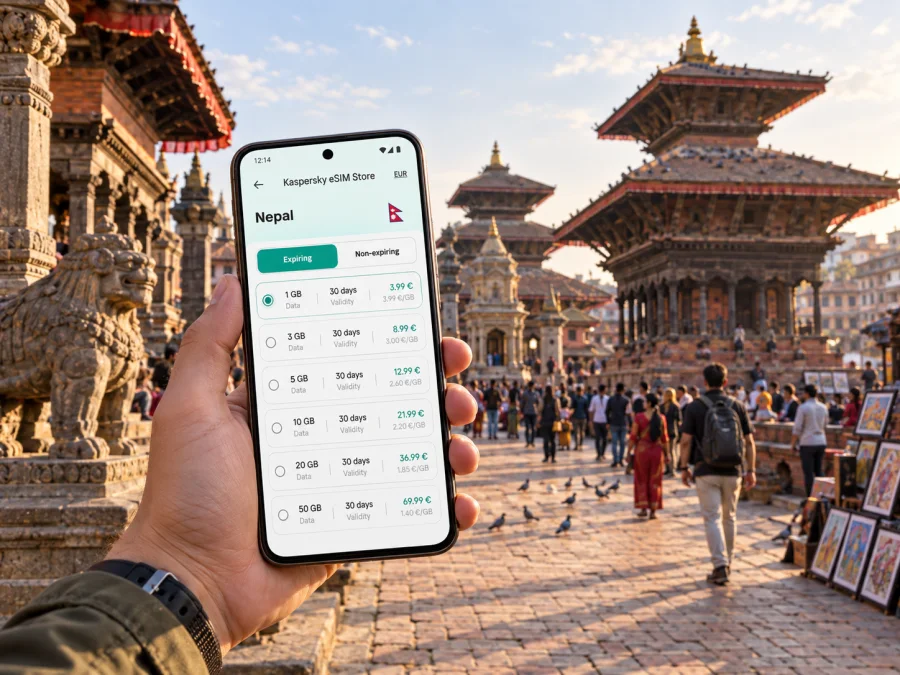
Kathmandu eSIM: mobile connection and internet for your trip
Kathmandu is often the first place visitors experience Nepal: the city’s busy streets, temple courtyards, neighborhood markets, and distant valley hills arrive all at once. A dependable way to get online helps with the practical transitions—finding your hotel after landing, checking a route across town, confirming a meeting point, or letting someone know your plans have changed.
An eSIM can make mobile data easier to prepare for a visit to Kathmandu. It is a digital SIM profile installed on a compatible, unlocked device. You can keep your usual SIM available for calls and messages while using the travel eSIM for data, depending on your phone settings and the plan you choose. Before buying, check what the plan includes, where it is valid, how long it lasts, and when its validity begins.
Start with the shape of the city
Kathmandu is not a place where every outing follows a straight line. Narrow lanes, one-way streets, local traffic, and busy junctions can make two nearby destinations feel farther apart than they look on a map. A map app is useful for orientation, but its suggested travel time is only an estimate. Leave room for traffic, a wrong turn, or an unplanned stop at a shrine or shop.
For a first visit, it helps to think in small geographic clusters rather than trying to cross the city repeatedly in a single day:
| Area or landmark | What it is useful for | How mobile data helps |
|---|---|---|
| Thamel | Tourist services, guesthouses, restaurants, and shops | Locate an accommodation entrance, message a host, and save a walking route |
| Kathmandu Durbar Square and Basantapur | Historic center, courtyards, temples, and nearby old-city lanes | Keep a map open while exploring a dense network of streets |
| Boudhanath | A major stupa and the neighborhood around its circumambulatory path | Check the route from another part of town and arrange a pickup point |
| Pashupatinath | A significant temple complex near the Bagmati River | Coordinate the visit and your return journey without relying on memory alone |
| Swayambhunath | A hilltop stupa with broad views over the valley | Check directions to the entrance and reconnect with your group afterward |
These places sit in different parts of the Kathmandu urban area, and some well-known valley destinations are in neighboring cities. Treat each as a separate outing. Download or save the hotel address and key map areas before leaving Wi-Fi, then use live directions when you have a data connection.
From Tribhuvan International Airport to your first stop
Tribhuvan International Airport is Kathmandu’s main international arrival point. After landing, the immediate priorities are usually straightforward: find your onward transport, confirm the hotel address, and tell a host or colleague that you have arrived. Having mobile data ready can make those first exchanges easier, especially if your accommodation is in a small lane that is difficult to describe by landmark alone.
Before travel, save the full hotel name and address in both your booking app and a note that is available offline. If the property has shared a location pin, keep it accessible. For a pickup, compare the map pin with the written address and agree on a recognizable meeting point; a pin can lead to the correct block without identifying the exact entrance.
At the airport, follow current signs and local instructions for transport. Available options and pickup arrangements can change, so avoid relying on an old screenshot or a fixed estimate of journey time. Traffic conditions also vary by hour and route. If someone is meeting you, send a short message when you have cleared the arrival process and again when you are at the agreed point.
A useful arrival checklist:
- Keep your passport, accommodation details, and transport payment method easy to reach.
- Confirm that your phone has enough battery for maps and messages; carry a power bank if you have one.
- Open your hotel pin while connected to Wi-Fi and check that the pin matches the written address.
- Decide which SIM or eSIM profile should handle mobile data before you leave the terminal.
- If your plans change, send the new meeting point rather than only saying that you are delayed.
An eSIM does not remove the need to confirm a ride or check local transport arrangements. It gives you another way to access maps and communication apps during the handoff from airport to city.
Moving around Kathmandu without losing your bearings
Walking is often the most useful way to explore compact historic areas, but it does not solve every journey. Routes may pass through alleys, courtyards, and busy roads where landmarks are easier to recognize than street names. Keep your destination saved, look up from the screen at crossings, and use the map to reorient yourself when the street pattern becomes confusing.
For longer hops, visitors commonly use a mix of taxis and local public transport. Routes, stopping points, fares, and availability depend on the trip and current conditions. If you take a taxi, confirm the destination before departure and agree how the fare will be handled. If you use a bus or shared vehicle, check the destination and stop with the driver or another reliable local contact; a map pin alone may not tell you which side of a large road is right for boarding.
Use navigation as a companion rather than an autopilot. In dense parts of Kathmandu, GPS positioning can shift between nearby lanes, while traffic can make a short distance slow. A practical routine is to check the route before setting out, identify one or two recognizable landmarks, then check again at a safe pause. This reduces the temptation to walk while staring at your phone.
Choose a data setup that fits the visit
Kaspersky eSIM Store is an app and website where you can choose, arrange, and activate an eSIM with a suitable plan for mobile internet while traveling abroad. It is not a mobile network operator. The plan details, including coverage and restrictions, are the terms to review before your trip. To compare available options for Nepal, choose an eSIM plan for your visit.
| Your travel pattern | What to consider before choosing |
|---|---|
| Short city break | Estimate how often you will need maps, ride coordination, and messaging; check that the validity covers the full visit |
| Work trip | Consider video meetings, email attachments, hotspot use, and whether your accommodation also provides reliable Wi-Fi |
| Multi-stop itinerary | Confirm that the selected plan applies to all destinations on your route, not just Kathmandu |
| Longer stay | Read the plan’s validity and recharge terms so you know what happens when data runs low or the period ends |
Think through the places where you will most need data: arriving, finding a hotel, navigating between neighborhoods, and coordinating a departure. At the same time, do not assume that a city plan covers every mountain or rural stop outside Kathmandu. Check the listed destination and conditions for the exact plan you choose.
Prepare your phone before you leave
A little setup at home can prevent avoidable friction on arrival. First, check that your phone model supports eSIM and is not restricted by a carrier lock. Support may vary by model and market, so verify the exact device rather than relying on a product family name. Check whether your device supports eSIM before you choose a plan.
Next, confirm that you can access the account or email address used for your purchase. Keep your phone’s operating system up to date if practical, and make sure you know the passcode needed to change mobile settings. If you plan to use your regular SIM alongside the eSIM, understand which line is selected for mobile data and which one handles calls or SMS. Your own carrier may charge roaming fees for the regular SIM.
Installation steps differ by device. Follow the instructions shown with your eSIM and avoid deleting a profile unless you understand whether it can be installed again. The guides for installing eSIM on Android and installing eSIM on iOS explain the general device steps. You will usually need an internet connection during installation, so complete setup before departure or while connected to trusted Wi-Fi.
A practical setup sequence
- Check device compatibility and carrier-unlock status.
- Read the plan’s destination, data amount, validity, and activation conditions.
- Install the eSIM profile using the device instructions and the details provided after purchase.
- Label the profile clearly, for example “Nepal travel,” so you can identify it in settings.
- Decide which line will be used for mobile data and review data-roaming settings for that profile.
- Keep the setup information available until the profile is working as expected.
The exact menu labels vary across devices. Some plans begin their validity at installation, while others begin at a different activation point; check the terms for your selected plan. If you are uncertain, do not guess based on another provider’s instructions.
Neighborhood days: Thamel, the old city, and the valley sights
Thamel is a convenient base for many visitors because it brings accommodation, food, travel services, and shops together in a walkable area. Its small streets can be lively and easy to mix up on a first evening. Save the entrance to your lodging rather than only the neighborhood center, and take a screenshot or write down the name in case you need to ask for directions. A message to the host can clarify which lane or nearby landmark to use.
The old city around Kathmandu Durbar Square rewards a slower pace. The map helps you find the broad area, but the experience is often in the turns between courtyards, temples, and markets. Keep the phone secure in crowded places and avoid assuming that a route through a narrow lane will be faster than following a familiar main street. If you are meeting someone, choose a clear point such as a named entrance or open square and share it in advance.
Boudhanath and Pashupatinath are separate visits with different surroundings and rhythms. At Boudhanath, visitors circulate around the stupa and the surrounding neighborhood; at Pashupatinath, be attentive to site rules and the fact that parts of a religious complex may have access restrictions. Check current visitor guidance locally. Mobile data is useful for finding your next stop and coordinating transport, but it cannot replace respectful observation of local customs.
Swayambhunath stands on a hill west of central Kathmandu and offers a broad view across the valley. Plan for the approach and steps, and agree where your group will meet if people move at different speeds. A map is helpful for the route to the site; once there, give attention to signs, site staff, and the people around you rather than keeping your phone out continuously.
Patan, also known as Lalitpur, and Bhaktapur are distinct cities within the Kathmandu Valley, not simply neighborhoods of Kathmandu. They can make rewarding outings, but each needs its own time and transport planning. Save the return route before setting out and confirm the location where a driver or bus will meet you. If you are heading onward to another region of Nepal, treat that leg as a separate journey and check its transport details rather than assuming Kathmandu city travel advice applies.
Kathmandu for work, a stopover, or a short stay
A business trip adds different priorities to sightseeing. Before the first meeting, save the venue’s exact location, the name of the building or organization, and a contact method that works if the entrance is not obvious. Send your estimated arrival time early if traffic changes the route. Keep calendar details and essential documents available offline, and use hotel Wi-Fi or another trusted connection for large downloads when possible.
If you have only a brief stop in the city, choose one area and avoid building a schedule around several cross-town trips. Time in Kathmandu is affected by road conditions, and an itinerary that looks compact on a map may not be realistic. A simple plan could be a walk in Thamel, a meal nearby, or one landmark visit, with a generous return buffer. Confirm your next departure’s check-in requirements and transport arrangements directly with the relevant provider.
Use data thoughtfully and keep a backup
A few simple habits help:
- Download offline maps for the areas you expect to visit, where your map app allows it.
- Save important addresses in text, not only as pins inside one app.
- Carry a power bank or charge the phone before a long outing.
- Keep a paper note of your accommodation name and contact details as a fallback.
- Review which SIM line is selected for mobile data after changing profiles.
- Turn off automatic app updates over mobile data if you want to limit background use.
If a map stops updating, pause somewhere safe and check whether mobile data is enabled for the intended profile. If a connection is unavailable, use the saved address, offline map, or a local information desk to continue. Do not rely on a single app for every part of a trip.
Common questions about eSIM in Kathmandu
Will an eSIM help me get around the city?
It can provide mobile data for maps, messaging, and other online travel tools when the selected plan is active and the device can connect to a supported network. It does not guarantee uninterrupted service in every place. Save key details offline and check the plan’s destination and coverage terms.
Can I keep my regular SIM in the phone?
Many phones allow a physical SIM and an eSIM profile to be available together, but the exact options depend on the device. You can often choose which line handles mobile data. Check your phone settings and your regular carrier’s roaming charges before travel.
Does a travel eSIM include a local phone number?
A data-focused eSIM plan is generally intended for mobile internet and may not include a regular phone number, voice calls, or SMS. Review the conditions for the specific plan. Internet messaging and calling apps may work over data when the other person can use them too.
Should I install the eSIM before arriving?
You can prepare the profile before travel if the plan’s instructions and activation conditions allow it. Read when validity begins before installation. If you wait until arrival, you may need airport or hotel Wi-Fi to complete the steps, so keep the instructions accessible.
What if I travel beyond Kathmandu?
Check the plan’s destination list and coverage terms for every place on your itinerary. Kathmandu Valley visits to Patan or Bhaktapur and a longer trip to another region are different travel legs; do not infer coverage from the city name alone.
A simple plan for a smoother visit
Before departure, confirm the eSIM conditions, install it at a convenient time, and save your first address. On arrival, use your map and messaging apps to coordinate the airport-to-hotel handoff. During the stay, group nearby places together, leave time for road conditions, and keep offline details as a backup. For work or a short stopover, make fewer commitments across the city and protect a buffer before the next transfer.
Kathmandu is easier to explore when you combine digital directions with attention to the street itself. A mobile connection can help you find the next turn or confirm a meeting point, while a bit of preparation keeps the essentials available if the screen goes dark or the route changes.
Prepare your eSIM for Kathmandu
Choose a plan whose destination, data allowance, and validity fit your visit, then follow the installation steps for your device. Kaspersky eSIM Store helps you choose, arrange, and activate an eSIM for mobile internet during an overseas trip. Explore eSIM plan options for Nepal and get your phone ready before setting out in Kathmandu.


