Travel connectivity guide
Katowice eSIM: Mobile Internet for Your Trip
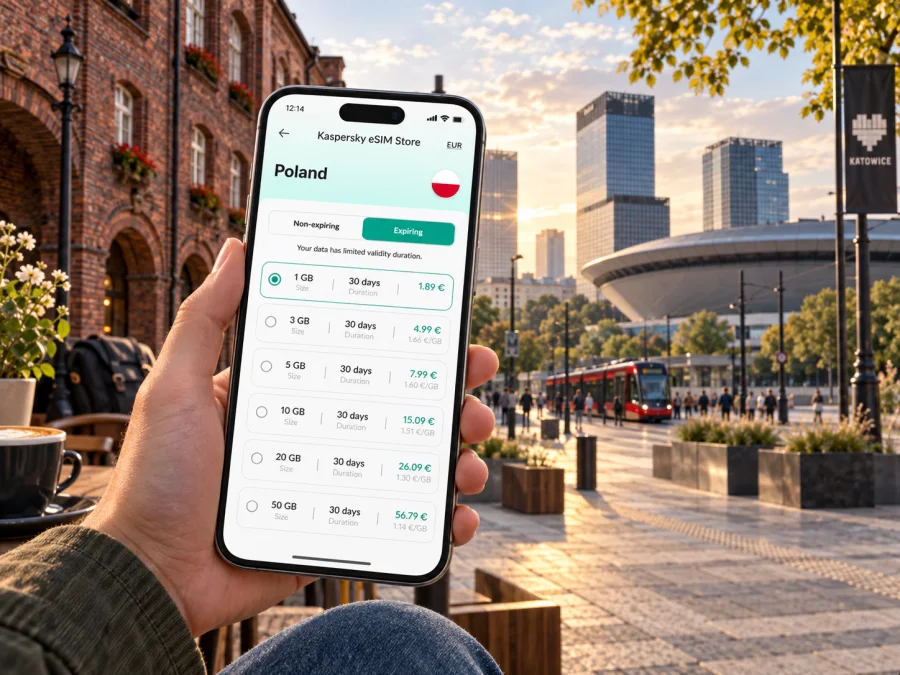
Katowice eSIM: mobile connection and internet for your city trip
Katowice is often a first stop in Upper Silesia: you may arrive for a conference, a concert, a weekend in the city centre, or a longer trip that continues to nearby towns. A reliable mobile connection helps with the practical parts of the visit: checking a transfer, finding the right tram stop, opening a hotel message, or meeting colleagues at a venue. An eSIM can make mobile internet easier to arrange before you travel, while your plans for the city stay flexible.
This guide focuses on using mobile data around Katowice. It covers arrival at Katowice Airport, the railway station, local transport, the central districts, business travel and day trips. It also explains how to prepare an eSIM without assuming that one setup suits every device or itinerary.
Why mobile internet matters in Katowice
Katowice is a city destination and a transport hub for the wider Upper Silesian and Dąbrowa Basin Metropolis. A visit may connect Katowice Airport at Pyrzowice, a city-centre hotel, a venue in the Culture Zone, a meeting in another district and a train onward. Mobile data helps with the transitions: checking directions, finding a stop, opening a hotel message or coordinating a changed arrival.
Use your phone to compare walking and transit routes, locate an entrance or stop, check current transport information, message a host and keep reservations close at hand. You do not need to stay online every minute. Save essential details offline, especially before a long transfer or when your battery is low.
Arriving at Katowice Airport
Katowice Airport is in Pyrzowice, outside the central city area. Plan the whole journey to your accommodation: options may include a metropolitan bus, pre-booked transfer, taxi or rental car, depending on your arrival and destination. Do not treat the airport as if it were the central railway station.
Before departure, save your hotel address and district in a map app. Keep pickup details and a contact method accessible offline. After landing, check the current departure information and confirm the stop or pickup point. Timetables and road conditions can change, so use saved directions as a backup rather than as a live update.
Arrival checklist
- Confirm whether you are heading to central Katowice or another district.
- Check a transfer option for your arrival time and luggage.
- Save your address and booking details before boarding.
- Verify the next departure after landing.
- Keep enough battery for navigation and messages.
For a late arrival or tight connection, leave time for baggage, locating the stop and traffic. Mobile data helps you adjust, but check the service actually running on your travel date.
Getting around: a map, then a route
Katowice’s bus and tram services are organised by the metropolitan transport authority, and regional rail supports journeys beyond the city. An itinerary may cross municipal boundaries, so search by exact address or stop name and confirm whether a route uses a tram, bus, train or a combination. Use current operator timetables and ticket conditions for the final decision.
The central railway station is a helpful reference point. Some central addresses may be walkable from it; a tram, bus or taxi can suit a farther district or luggage-heavy journey. Katowice includes neighbourhoods well beyond the centre, so check the full route rather than assuming a destination is close to the station.
| Trip situation | What to check | Why it helps |
|---|---|---|
| Airport to accommodation | Current transfer and final address | Pyrzowice is outside the centre |
| Station to hotel | Entrance, walking route and luggage options | Nearby addresses can still be awkward with bags |
| Centre to an event | Venue entrance and return options | Large venues can have several access points |
| Visit to Nikiszowiec | Route to the district and last walk | It is not beside the central station |
| Regional trip | Departure station, train and return | Several services may be involved |
Check the stop direction, transfer point and ticket validity. Allow time to cross streets or station concourses, and use mobile data to verify changes. A downloaded map and written address are useful backups.
Where to stay and how neighbourhoods affect your plans
For a first visit, Śródmieście (the city centre) can be convenient for the railway station, central streets, restaurants and the Culture Zone. Compare accommodation by exact address rather than a broad “Katowice centre” label; the location affects your walk, transit connection and pickup point.
Nikiszowiec offers a distinct setting, with red-brick workers’ housing and courtyards. It is worth allowing time to explore rather than treating it as a quick walk from the centre. Check your return route before heading out, and respect residential courtyards and private areas. The Culture Zone, on a site associated with Katowice’s industrial past, is a useful anchor for event and museum visits. Save the venue entrance as well as its name.
| Base | Useful when | Plan ahead for |
|---|---|---|
| Śródmieście | Your plans centre on downtown or the station | Exact hotel address and late arrival |
| Near the Culture Zone | You have an event, museum or conference | Entrance and return route |
| Nikiszowiec or another outer district | You have a local appointment or want a neighbourhood stay | Journey to the centre and return service |
| Near a business venue | Meetings start early or span the metro area | Travel time between appointments |
Choose your base around the places you will actually visit. If meetings are spread across nearby cities, check rail and road connections as well as the city map. Keeping addresses in your calendar makes changes easier to manage.
Preparing an eSIM for a trip to Katowice
An eSIM is a digital SIM profile installed on a compatible device. It can provide mobile data under the selected plan’s conditions without requiring a physical SIM purchase after arrival. Kaspersky eSIM Store is an app and website that helps you choose, arrange and activate an eSIM with a suitable plan for mobile internet on an international trip. The service depends on the chosen plan and its network arrangements.
Consider your stay length and use of maps, messaging, video calls, hotspot and uploads. Check the destination, data allowance, validity period and activation conditions. If you expect to use hotel or venue Wi-Fi, include that in your estimate while keeping a mobile-data buffer for journeys between places.
You can review eSIM plan options for Poland and compare the details with your itinerary. Coverage and service can vary by location and network. Choose by the full plan conditions, not only its headline data allowance.
Estimate by use: light use covers messages and occasional route searches; regular city use adds frequent maps and email; high use includes video calls, hotspot or uploads. These are planning categories, not a fixed data calculation. Apps vary, and automatic photo backup or updates can use data unexpectedly. Review data settings and disable mobile downloads if you want to control usage.
Device and installation checklist
Before purchase, check whether your device supports eSIM and confirm it is not carrier-locked. Support can differ by model variant and sales region. Keep an internet connection available for setup and follow your device’s instructions.
- Check the device: confirm eSIM support and that the phone is not locked.
- Choose a plan: match destination, validity and allowance to the trip.
- Install: follow the steps for Android or iOS. Keep the QR code or details available if setup requires them.
- Label the profile: use a clear name such as “Poland travel”.
- Select the data line: choose the travel eSIM for mobile data when appropriate, and configure your regular line for calls or messages according to your needs.
- Check activation timing: installation and validity start may be separate events.
- Test the connection when the plan should be active, before relying on it for a transfer.
A data eSIM should not be assumed to include a regular number, voice calls or SMS unless the plan says so. Messaging apps use data, while verification texts may depend on your usual SIM and its roaming settings. Check those conditions before departure.
Staying connected during meetings and events
A business itinerary may include a hotel, a Culture Zone venue, a downtown meeting and an appointment elsewhere in the metropolitan area. Save each exact address in your calendar and allow the map app to open it directly; a venue name alone may not identify the correct entrance or office.
Before leaving Wi-Fi, keep your ticket, registration details, meeting contacts and hotel address available offline. If you use your phone as a laptop hotspot, monitor data and battery use: video calls and cloud syncing consume more than messaging or navigation. When travelling with colleagues, agree on a recognisable meeting point and share it before separating.
Short stopovers and day trips from Katowice
For a stopover, choose one or two places and leave time to return to your next departure. The Culture Zone and central streets can suit a short visit if timing allows. Nikiszowiec is farther from the central station area, so count both outward and return journeys instead of treating it as a quick central walk.
Katowice can also be a starting point for regional trips. Check the origin station, operator, departure and return options before leaving; services depend on your destination and time. Save tickets and directions where possible, and keep your accommodation address ready for the return journey. If you cross into another country, confirm that the eSIM plan covers it; Polish coverage does not automatically include every border crossing.
Before setting out, check: time available after baggage and transfers; the realistic route to your chosen place; a comfortable return time; and whether tickets, directions and essential contacts are saved offline. A compact itinerary is easier to adapt if a service changes.
When mobile data is slow or unavailable
A travel eSIM does not guarantee identical service in every building, vehicle or neighbourhood. If data stops, check that the correct profile is enabled for mobile data, the plan is active and still valid, and the destination is included. Follow the plan’s setup guidance before changing network settings. Wi-Fi and saved maps, tickets, addresses and meeting details can help as backups.
Quick check: Is the travel eSIM selected? Is the profile enabled? Is the plan still valid and does it cover your location? Does the setup require data roaming? Have you followed the recommended troubleshooting steps?
If an issue persists, use the support information associated with your purchase. Avoid deleting the eSIM profile unless instructed; some profiles cannot be reinstalled after removal. For a critical journey, leave enough time to ask staff or use a ticket machine instead of relying on one app.
Frequently asked questions
Is an eSIM useful for a short visit?
It can help with airport transfers, maps, transport checks and messages without arranging a physical SIM after arrival. Suitability depends on your device, the plan’s validity and how much you use Wi-Fi.
Is Katowice Airport in the city centre?
No. It is in Pyrzowice, outside the centre. Check the transfer to your actual accommodation or meeting address.
Can one plan work in nearby cities?
Check the selected plan’s destination and coverage details. Metropolitan transport boundaries do not determine eSIM coverage.
Does a data eSIM replace my regular number?
Not necessarily. A data plan may exclude voice calls, SMS and a phone number. Keep your regular SIM configured as needed, subject to its provider’s conditions.
Should I install before travelling?
Arranging the profile before departure gives you time to follow setup steps. Check activation terms because installation and the start of validity may differ.
What should I save offline?
Keep your hotel address, transfer or train details, tickets and essential contacts available if data is temporarily unavailable.
Make your Katowice connection plan before departure
A little preparation can make arrival and movement around Katowice easier: know whether you are heading to the centre or an outer district, save your addresses, and check the transport leg you will use. Choose an eSIM plan only after reviewing its destination, allowance, validity and activation conditions, and confirm that your phone supports eSIM.
Use the Kaspersky eSIM Store app or website to choose and activate an eSIM for your trip, then keep the setup and route details accessible. Choose an eSIM plan for Poland that fits your time in Katowice and the way you expect to use mobile data. With the transfer, first destination and backup information ready, you can spend less time sorting out logistics and more time getting to know the city.


