
Travel connectivity guide
Kazakhstan eSIM: mobile internet for travel
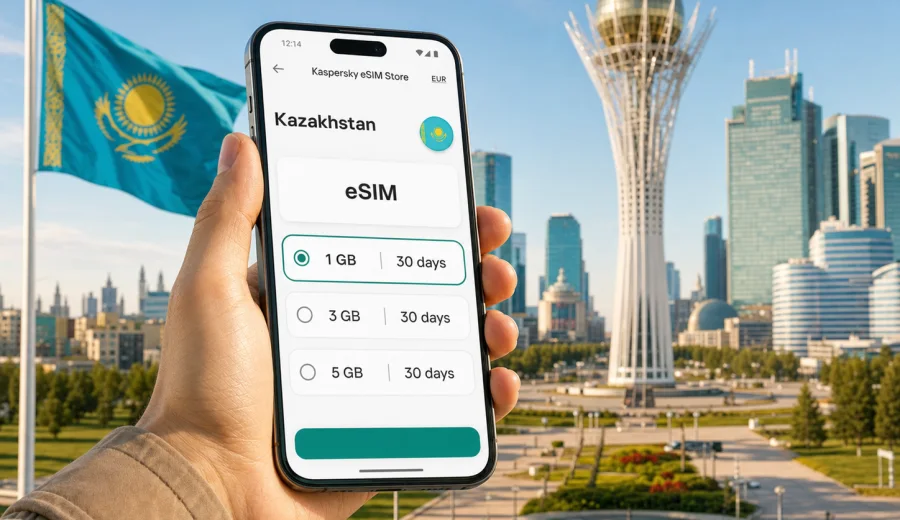
eSIM in Kazakhstan: mobile connection and internet for your trip
Kazakhstan is a country where mobile internet can matter from the first hour of the trip. Distances are long, cities are spread out, and many useful travel actions happen online: calling a ride from Astana airport, checking a train ticket to Almaty, finding a hotel address in Shymkent, translating a menu, or sharing your route with colleagues. An eSIM helps you prepare a mobile connection before you start looking for a local SIM card counter.
For most visitors, the main task is simple: keep internet access on a compatible phone without replacing the physical SIM card from home. With an eSIM, you install a digital SIM profile, choose a data package for the trip, and use mobile data when you arrive. This is useful if your itinerary includes several stops across Kazakhstan and you want the connection prepared in advance.
This guide explains how to plan mobile internet in Kazakhstan, what to check before you buy an eSIM plan, how much data different travel scenarios may need, and how Kaspersky eSIM Store can help you choose, set up, and activate an eSIM with a suitable data plan for your trip.
Why eSIM is practical for Kazakhstan
Kazakhstan is the world's largest landlocked country, and travel inside the country often means long routes between cities, airports, train stations, business districts, and natural sights. You may spend one day in Astana, another in Almaty, and then continue to Turkistan, Aktau, or a mountain area near the Tian Shan. Public Wi-Fi is not always the right tool for that kind of movement.
An eSIM is useful because it gives you a separate mobile data profile on your phone. You can keep your main SIM active for banking messages or calls from home, while using the eSIM for internet traffic during the trip. This setup is convenient for navigation, maps, messengers, translation, email, mobile boarding passes, and hotel apps.
Key reasons travelers choose eSIM for Kazakhstan:
- no need to swap a physical SIM card or carry a SIM eject tool;
- you can prepare the plan before departure or shortly after arrival;
- the plan conditions are visible before purchase: data volume, validity period, destination, and price;
- the setup works directly on a compatible smartphone or tablet;
- you can manage the eSIM and balance through the site or app.
An eSIM is not a full replacement for a local mobile subscription. In the Kaspersky eSIM Store context, it is designed for mobile internet in international travel. Regular voice calls and SMS are not included unless a specific plan says otherwise. For calls and messages, you can usually use internet-based apps.
Where mobile internet helps most
Kazakhstan is not only Astana and Almaty. A visitor may need online access in very different situations: after landing, during intercity transfers, while working from a hotel, or when arranging a day trip outside the city. A prepared eSIM plan reduces the number of moments when you have to depend on a hotel lobby, cafe Wi-Fi, or a local shop.
Common travel scenarios include:
| Situation | Why mobile data helps | Practical note |
|---|---|---|
| Arrival at Nursultan Nazarbayev International Airport or Almaty International Airport | Open maps, message the host, check ride-hailing apps | Install the eSIM before departure if possible, then turn on data when needed |
| Business meetings in Astana or Almaty | Use email, calendar, documents, and messengers | A plan with enough data for tethering may be useful if your device and plan allow it |
| Train or domestic flight connections | Check tickets, gate changes, taxi routes, and hotel details | Download key documents offline as a backup |
| Tourism in Turkistan, Aktau, Burabay, or mountain areas near Almaty | Navigate, translate, check weather, and coordinate with guides | Coverage and speed depend on local network conditions |
| Family travel | Keep messaging, maps, and booking apps available | One eSIM profile is usually tied to one compatible device |
The practical value is control. You know the plan's data allowance and validity period before using it. You can also separate travel internet from your home SIM, which makes it easier to understand which connection is handling data.
eSIM, roaming, local SIM, and Wi-Fi: what to compare
Travelers usually choose between four options: standard roaming, a local physical SIM card, public Wi-Fi, or eSIM. Each can work, but the best choice depends on timing, device compatibility, budget, and how much you rely on mobile data.
| Option | Strengths | Limits to consider |
|---|---|---|
| Standard roaming | Uses your existing number and SIM | Conditions and cost depend on your home operator; data may be expensive for active use |
| Local physical SIM | Can be suitable for longer stays | Requires an offline purchase process, a physical SIM slot, and time after arrival |
| Public Wi-Fi | Useful in hotels, airports, and cafes | Not available during transfers, walking routes, or many outdoor plans |
| eSIM | Prepared digitally, no physical SIM swap, useful for mobile data | Requires a compatible unlocked device and correct setup |
For a short visit, eSIM is often the most convenient way to get mobile internet ready quickly. For a very long stay, you may still compare it with local options. For a multi-country route across Central Asia, check whether a country or regional plan better matches your itinerary.
Check your device before choosing a plan
Before you pay for any eSIM plan, confirm that your phone or tablet supports eSIM and is not locked to a mobile operator. This is a technical requirement, not a formality. Some models support eSIM only in certain markets, and some devices sold through operators can have restrictions.
Use this short checklist:
- your device model supports eSIM;
- the device is unlocked for mobile network use;
- the operating system is updated enough to add a digital SIM;
- you have a stable internet connection for installation;
- you understand which SIM will be used for mobile data after activation;
- you do not delete the eSIM profile unless you are sure it can be reinstalled under the plan conditions.
If you are unsure, check your device before buying a plan. It is better to solve compatibility questions at home than after landing in Kazakhstan with luggage, a taxi queue, and low battery.
How much data do you need in Kazakhstan?
The right data volume depends on your habits, not only on the length of the trip. A traveler who uses maps and messages may need much less data than someone who joins video calls, uploads large files, or uses the phone as a hotspot for a laptop.
Approximate planning guide:
| Trip style | Typical use | Data planning idea |
|---|---|---|
| Light city trip | Maps, messengers, email, booking apps | A smaller package may be enough if you avoid video streaming |
| Business visit | Email, documents, taxi apps, calls in messengers | Choose more data if you expect frequent online meetings |
| Active tourism | Maps, photo sharing, translation, weather, guide coordination | Keep extra data for navigation and messaging outside hotel Wi-Fi |
| Remote work | Cloud tools, video meetings, tethering | Pick a larger data package and check hotspot conditions |
| Family route | Several phones, constant coordination | Each compatible device may need its own plan or another data strategy |
Video streaming, cloud backups, app updates, and automatic photo uploads are the fastest ways to use up a travel data package. Before departure, disable unnecessary background syncing and download offline maps, playlists, tickets, and documents. This does not replace mobile internet, but it helps keep the eSIM data package for the moments when you really need it.
A simple setup workflow
The setup process is usually straightforward, but it is worth doing it calmly. You need internet access to install the eSIM profile, and you should keep the QR code or activation details available until the setup is complete.
Basic workflow:
1. Check whether your device supports eSIM and is unlocked.
2. Choose Kazakhstan as the destination.
3. Select a plan by data volume and validity period.
4. Complete the order.
5. Install the eSIM profile on your device.
6. Set the eSIM as the mobile data line when you want to use it.
7. Turn on data roaming for the eSIM if the device or plan instructions require it.
8. Monitor usage and top up if the plan supports it.
For detailed setup steps, use the Android installation guide or the iOS installation guide. Keep your main SIM settings separate from the eSIM settings so you can control which line uses mobile data.
When to install and when to activate
Many travelers prefer to install the eSIM before the trip while they still have stable home Wi-Fi. This reduces pressure after arrival. Activation rules can vary by plan, so read the conditions carefully: some plans start when the eSIM connects to a supported network, while others may have different validity logic.
A practical approach:
- install the eSIM before leaving home if the instructions allow it;
- keep your home SIM as the default line for calls and messages if you need it;
- set mobile data to the eSIM when you are ready to use travel internet;
- avoid deleting the eSIM profile after installation;
- check the remaining data before long transfers.
If you land late at night or have a tight connection, doing the installation in advance is especially helpful. You can then focus on transport and accommodation instead of finding a SIM counter.
Choosing a Kazakhstan eSIM plan
At this point in trip planning, compare the plan conditions with your route and expected internet use. If you need mobile data mainly for maps and messengers, choose a package that fits light daily use. If you plan to work from the road, use video calls, or rely on tethering, choose more data and check whether hotspot use is allowed by the selected plan and device settings.
Kaspersky eSIM Store is an app and website where you can quickly choose, order, and activate an eSIM with a suitable mobile data plan for international travel. For Kazakhstan, you can choose an eSIM plan for your trip to Kazakhstan and review the available data volumes, validity periods, and prices before you travel.
Do not choose only by the largest number of gigabytes. Choose by the shape of your trip:
- number of travel days;
- expected use of maps and ride-hailing apps;
- need for work tools and video meetings;
- whether you will use hotel Wi-Fi for heavy tasks;
- whether your route includes more than one country;
- whether you may need to top up during the trip.
This planning step is where eSIM is most useful. You are not trying to guess everything at the airport. You are matching a digital data plan to your actual itinerary.
Data-saving checklist for Kazakhstan
Use these settings before departure or on the first day:
- download offline maps for Astana, Almaty, and other planned stops;
- save hotel addresses in English and local formats if available;
- turn off automatic cloud photo backup on mobile data;
- disable large app updates over mobile data;
- download ride-hailing, airline, railway, and booking apps in advance;
- keep passport scans and tickets available offline;
- set your eSIM as the data line only when you are ready to use it;
- check usage after video calls or long navigation sessions.
These actions make the data package more predictable. They also help if you move through places where signal quality changes or where you prefer to conserve battery.
Quick answers about eSIM in Kazakhstan
Does an eSIM for Kazakhstan give me a phone number?
Usually no. In this context, the eSIM is for mobile internet in travel. Ordinary phone calls and SMS are not included unless the selected plan clearly says otherwise. You can use messengers, email, and calling apps over mobile data.
Can I keep my home SIM active?
In many dual-SIM phones, yes. You can keep your home SIM for calls or messages and use the eSIM for mobile data. Exact settings depend on the phone model and operating system.
Should I install the eSIM before arrival?
It is often convenient to install it before departure using a stable Wi-Fi connection. Read the activation conditions of the selected plan so you understand when the validity period starts.
What if I travel from Kazakhstan to another country?
Check the destination coverage of your selected plan. A Kazakhstan plan is meant for Kazakhstan. If your route continues to Kyrgyzstan, Uzbekistan, or another country, compare whether a separate country plan or a regional plan suits the full itinerary.
Can I use the eSIM for hotspot?
It depends on the selected plan and your device settings. If you expect to share data with a laptop or another device, check the plan details before purchase and choose enough data for that use.
What should I do if mobile data does not start?
Check that the eSIM is installed, selected for mobile data, and allowed to use data roaming if the instructions require it. Restarting the device can also help after setup. If the issue continues, use the support options available through the site or app.
Prepare your eSIM for Kazakhstan
If Kazakhstan is on your route, prepare the mobile internet part of the trip before the first taxi ride, train connection, or hotel check-in. Check your device, estimate your data needs, and choose a plan that matches the length and style of your journey.
You can prepare an eSIM plan for Kazakhstan in Kaspersky eSIM Store and set up mobile data for the trip in advance, so your phone is ready for maps, messengers, bookings, and everyday travel tasks when you need them.