Travel connectivity guide
Kazan eSIM: Mobile Internet for Your City Trip
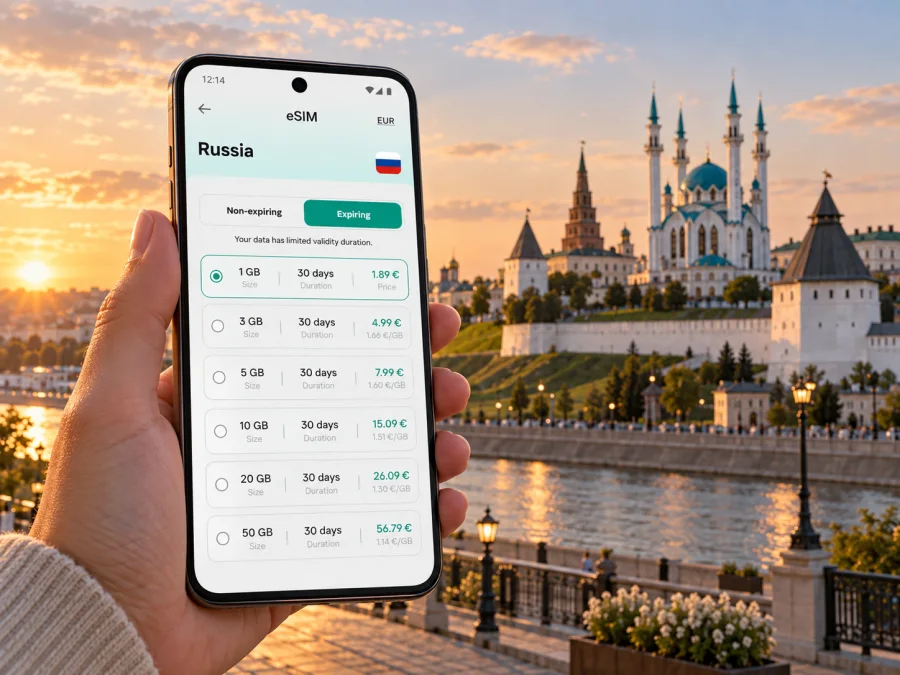
Kazan eSIM: mobile connection and internet for city travel
A first visit to Kazan often combines several kinds of movement: arriving at the airport, finding a hotel, crossing the city for a meeting, and then walking between the Kremlin, Bauman Street and the riverfront. Mobile internet helps keep those steps in one plan. With an eSIM, you can prepare a digital SIM profile for your trip without replacing the physical SIM already in your phone.
Kazan is the capital of the Republic of Tatarstan on the Volga. This guide covers arrival, city routes, workdays and short trips beyond the centre, with practical checks for preparing mobile data.
Where mobile internet helps most in Kazan
Mobile internet is useful before you reach your accommodation: confirm a transfer, message your host, compare routes or share a changed arrival time. Save the address as well, so you can orient yourself even if you need to close the map.
Kazan International Airport is outside the central districts. The best onward option depends on your arrival time, luggage, destination and current transport arrangements. Check the route for the day you travel rather than relying on an old screenshot. A working data connection is useful for checking directions and coordinating a pickup, but keep the hotel address and booking details available offline as well.
In the historic centre, online maps can help you move between the Kazan Kremlin, Bauman Street, the pedestrian areas nearby and the streets around Kaban Lake. Distances that look short on a map can feel different when you stop for photos, enter a museum, or take a longer route along the water. Save a few places in advance and use walking directions as a guide, not as a substitute for checking signs and opening information on site.
Across the Kazanka River, the city opens into different districts and larger venues. A visitor staying near the centre may still need to reach a conference, a sports event, a university or a business address elsewhere in Kazan. Live navigation is especially helpful when you need to compare a walk with a public-transport or taxi route, or when a meeting time changes.
Plan by neighbourhood, not just by landmark
Kazan is easier to navigate when you think in areas and crossings rather than treating every stop as a separate destination. The Kremlin and the streets around it form a natural starting point for a central walk. Bauman Street is a familiar pedestrian spine, while the area around Kaban Lake offers a different pace and a useful orientation point. The river and its bridges matter when your plans include the opposite bank.
Before setting out, open the map and check where your next stop sits in relation to the river, the nearest metro station and the district where you are staying. The city’s metro is useful along its served corridor, but it does not bring every visitor directly to every hotel or attraction. Buses, trams, trolleybuses, taxis and walking may each suit a different part of the route. Verify the current route and service details on the day; construction, schedules and local arrangements can change.
| Trip segment | What to check on your phone | Useful backup |
|---|---|---|
| Airport to accommodation | Address, route options, pickup details and arrival messages | Save the address and booking confirmation offline |
| Hotel to the Kremlin area | Walking route, nearest transit stop and estimated time | Keep the hotel name and street address in a note |
| Centre to the opposite bank | Bridge crossing, transit connection and meeting location | Agree on a clear landmark for meeting someone |
| Evening return | Route availability and the exact hotel entrance | Keep enough battery for directions and messages |
Arriving and getting oriented
Once you land, pause before leaving the terminal and check three things: the destination address, the way you will travel into the city, and the contact details for anyone meeting you. If you are using a taxi or prearranged transfer, confirm the pickup point and vehicle details through the channel agreed with the driver. Do not assume that the first location pin you see identifies the correct terminal exit.
A simple arrival sequence helps when you are tired or travelling with others:
- Connect to the mobile data line you intend to use for the trip, if its plan is active and the setup is complete.
- Open your saved accommodation address and check the route from the airport.
- Confirm the pickup arrangement and send an update if your flight or baggage collection took longer than expected.
- Keep the route open until you recognize the destination, then save the location for your return journey.
Choosing an eSIM plan for a Kazan trip
Kazan is in the Russian Federation, so check that the plan you consider includes the country and is available for your itinerary. A city name is useful for planning, but the plan’s country or regional coverage, validity period and data allowance determine whether it matches your trip. If you will continue to another destination, check every country on the route before choosing a plan.
Think about how you will actually use data. A traveller who mainly checks maps and messages may need a different allowance from someone who joins video calls, uploads large files or streams media. Hotel Wi‑Fi can reduce mobile-data use, but you may still want data between meetings, while travelling, or when a connection is not available. Estimate from your habits instead of choosing by the largest number shown.
Before selecting an option, compare these details in the plan information:
- Destination: confirm that the Russian Federation is covered, and check any regional terms if your trip continues elsewhere.
- Validity: match the plan period to your arrival and departure dates. Check when validity begins under the plan’s terms.
- Data allowance: consider maps, messages, browsing, video calls and media uploads separately.
- Tethering: if you expect to connect a laptop or another device, check whether hotspot use is supported and how it affects the allowance.
- Calls and texts: travel eSIM plans for data may not include a regular phone number, voice calls or SMS unless the plan says so. Messaging and internet calls in apps use data.
- Activation conditions: read whether installation, activation or first network use starts the validity period, and follow the instructions shown for that plan.
Kaspersky eSIM Store is an app and website where you can select, arrange and activate an eSIM with a suitable plan for mobile internet while travelling abroad. The available plan details are what you should use to make the final choice. You can review eSIM plan options for the Russian Federation when you are ready to compare the destination, allowance and validity against your Kazan itinerary.
Navigation checklist
Before leaving your hotel or meeting point, confirm:
- the destination pin is the correct building or entrance;
- the route is for the mode you intend to use, not just the fastest mode under different conditions;
- any public-transport connection is operating at the time you plan to travel;
- you have enough battery for the next leg and return;
- the address and a recognizable nearby landmark are saved in case the map view closes.
Treat live directions as a planning aid. Follow local signs and instructions, and check current transport information where timing matters. If two apps show different routes, compare the street names and stops rather than switching repeatedly while walking. Step aside before looking at your phone near busy crossings or station entrances.
Where a connection fits into a Kazan itinerary
Historic centre and first walks
Visitors often begin near the Kremlin or central pedestrian streets because these areas make it easy to combine landmarks, cafés and short walks. Mobile maps can help identify side streets and return routes, especially if you take an unplanned detour. Save the meeting point for a group, and use a clear landmark rather than “somewhere on the main street.”
Kaban Lake and the river
A walk around the lake or along the Kazanka can be a pleasant change from the denser centre. Use the map to see which bank or promenade section you mean and how you will get back to your accommodation. If your route crosses a bridge, check whether the planned destination is on the same side of the water; this small detail can materially change the walk.
Work, study and events
Conference venues, university buildings and event spaces may sit outside the central sightseeing area. Save the venue name and full address, then check the route shortly before departure. If an organizer sends a last-minute room or entrance change, mobile data can help you confirm it. For a remote-work day, use the hotel or a confirmed workspace for long calls and keep a backup plan for a call that cannot be interrupted.
Trips beyond the centre
Some itineraries include a day trip from Kazan or a second stop elsewhere in Tatarstan. Check whether your chosen plan covers the full route, not only the city, and save transport tickets and directions in advance. Network availability and data performance can vary by location and provider; do not assume that the experience in the city centre will be identical on every leg of a regional journey.
Install and prepare your eSIM
Set up your eSIM when you have enough time to read the on-screen directions, a reliable internet connection for the installation steps, and access to your account details. Whether you install it before departure or after arriving depends on the plan’s instructions and your schedule. Do not delete an installed eSIM profile as a troubleshooting shortcut unless the plan instructions or support team tells you to do so.
A general preparation sequence is:
- Confirm that your phone supports eSIM and is not restricted by a carrier lock.
- Review the chosen plan’s destination, validity, data allowance and activation terms.
- Follow the relevant Android eSIM installation instructions or iOS eSIM installation instructions.
- Keep your usual line configured for calls and messages if you still need it, and choose the travel eSIM for mobile data according to the device settings and plan guidance.
- When the plan’s activation conditions are met, check that the correct line is selected for data and that data roaming is enabled if the instructions require it.
Menu names differ between phone models and software versions, so use the device’s current settings and the linked instructions rather than relying on screenshots from another model. If the installation screen or activation status does not match the instructions, pause and check the plan details or contact support before making changes that could remove the profile.
Check device compatibility before purchase
An eSIM plan requires a compatible device, and some phones sold for particular markets or through particular carriers may have restrictions. Use the device compatibility checker, then confirm that your exact model is unlocked before you choose a plan. If you carry a second phone or tablet, check each device separately; support on one device does not mean another device can use the same profile.
Common questions
Is a Kazan city eSIM different from a country plan?
Usually, the key question is whether the plan covers the Russian Federation and matches your travel dates and data needs. A city-specific search can help you plan, but the plan details determine the geographic coverage. If your itinerary continues beyond Kazan, review those destinations as well.
Can I keep my regular SIM in the phone?
Many dual-SIM phones let you keep a physical SIM and add an eSIM, but the available settings depend on the device. You can select which line handles mobile data and which line handles calls or messages. Confirm your phone’s behavior before travel and check roaming settings for both lines to avoid unexpected charges.
Does a travel eSIM include a phone number?
A data-focused eSIM plan may not include a regular local number, voice calls or SMS. Read the chosen plan’s terms. Internet messaging and voice or video calls through apps use data, so include that use in your allowance estimate.
Should I install the eSIM before I arrive?
Follow the activation instructions for your selected plan. Some travellers prefer to prepare the profile before departure; others wait until arrival. The important point is to understand when validity begins and to have the account or QR details available when you are ready to install it.
What if my map stops updating?
Check that the correct line is selected for mobile data, confirm the plan’s status and data allowance, and follow the device or plan troubleshooting guidance. If you are in a metro station or large building, wait until you are in a suitable area to reconnect and orient yourself. Use your saved address or landmark while you troubleshoot.
Prepare your connection for Kazan
Kazan is simplest to explore when your arrival details, routes and important addresses are easy to reach. Choose a data allowance and validity period that fit your own plans, read the activation terms and set up the profile according to the instructions for your device. Kaspersky eSIM Store lets you select, arrange and activate an eSIM plan for mobile internet abroad through its app and website.
When you are ready, choose an eSIM plan for your trip to the Russian Federation, then save your Kazan hotel and first destination before you leave. That gives you a practical starting point for airport arrival, city journeys and the next stop on your itinerary.


