
Travel connectivity guide
Kazbegi eSIM: mobile internet for travel
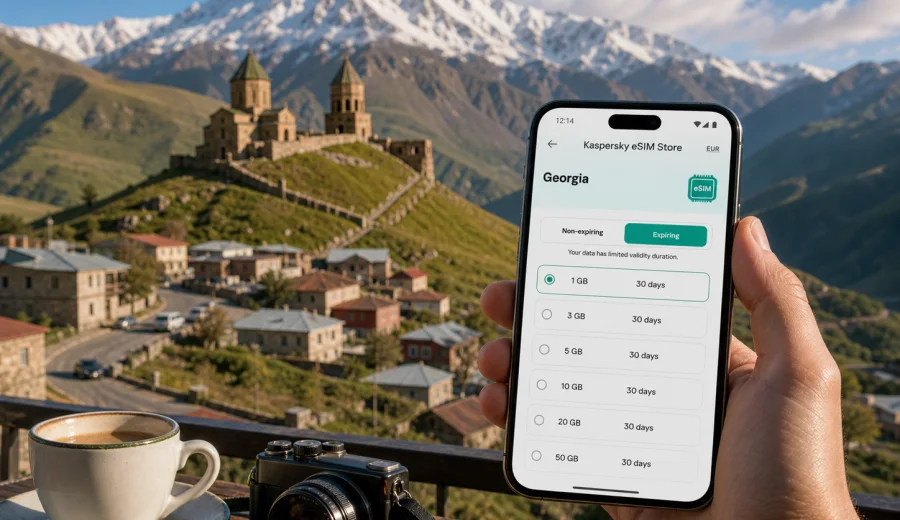
eSIM in Kazbegi: mobile connection and internet for your mountain trip
Kazbegi is one of the places in Georgia where mobile internet matters from the first hour of the trip. The town is compact, but the usual travel tasks are spread across mountain roads, guesthouses, trailheads, viewpoints, cafes, taxi rides, and day trips toward the Russian border area. You may arrive from Tbilisi by car, minibus, private transfer, or tour van, and you may need maps, messenger calls, booking details, weather updates, and translation before you have time to look for a local SIM card.
An eSIM can make this part of the trip simpler. Instead of buying a physical SIM card after arrival, you install a digital SIM profile on a compatible smartphone and use a prepaid data plan for the country you are visiting. For a trip to Kazbegi, that usually means choosing an eSIM plan for Georgia and preparing it before you leave or while you still have stable Wi-Fi.
This guide explains how to think about eSIM, mobile connection, and internet in Kazbegi: where data is most useful, how to plan traffic for mountain travel, what to check before buying, and how to install an eSIM without turning your first day into a technical task.
Why mobile internet is especially useful in Kazbegi
Kazbegi, also known as Stepantsminda, is not a city of long metro lines or large shopping districts. Its travel rhythm is different: short distances in town, steep roads above town, guesthouses on side streets, mountain viewpoints, and weather that can change quickly. Because of that, mobile internet is less about entertainment and more about staying oriented.
You are likely to use data in Kazbegi for:
- checking the route from Tbilisi to Kazbegi on the Georgian Military Highway;
- contacting a driver or guesthouse host before arrival;
- opening hotel or apartment booking details;
- navigating to Gergeti Trinity Church, trailheads, cafes, or viewpoints;
- checking weather before a hike or a jeep ride;
- using messenger calls with family, colleagues, or guides;
- translating menus, signs, and short messages;
- paying attention to road timing if you continue toward other parts of Georgia.
Offline maps help, but they do not replace live information. A saved map can show the road; mobile internet helps you confirm whether a driver is waiting, whether the weather looks acceptable, whether your accommodation sent updated instructions, or whether a booking code is in your email.
How much data you may need in Kazbegi
Your data use depends on how you travel. Kazbegi is photogenic, and it is easy to spend traffic on video, cloud backup, and social apps. For basic navigation and messaging, the amount is usually modest. For remote work or streaming, it can rise quickly.
| Trip style | Typical mobile data tasks | Data planning approach |
|---|---|---|
| One-day tour from Tbilisi | Messaging, maps, quick photo sharing | A small short-term plan may be enough |
| Weekend in Kazbegi | Maps, restaurants, messenger calls, weather | Choose enough data for two travel days plus the road |
| Hiking-focused trip | Offline maps, live weather, emergency communication | Download maps on Wi-Fi and keep mobile data for updates |
| Remote work stay | Email, cloud documents, video calls, hotspot use | Select a larger plan and confirm whether tethering is allowed |
| Multi-city Georgia route | Tbilisi, Kazbegi, Gudauri, Mtskheta, maybe Kakheti | A Georgia plan can cover the route better than a city-only mindset |
As a practical rule, messaging, navigation, and light browsing use much less data than video calls, high-resolution photo backup, streaming, and app updates. If your accommodation Wi-Fi is good, you can reserve mobile data for movement around town, road transfers, and moments when Wi-Fi is not available.
Before you buy: device and plan checks
Before choosing an eSIM plan, check your phone rather than assuming every recent device supports eSIM. You need a compatible smartphone or tablet, and it should not be locked to one mobile operator. Some devices also differ by region, even when the model name looks familiar.
Use this short checklist before your trip:
- Check whether your device supports eSIM.
- Confirm that the device is not carrier-locked.
- Make sure you can access the email or account where installation details will be sent.
- Install the eSIM while you still have stable Wi-Fi, unless you intentionally plan to do it after arrival.
- Read the plan conditions: country, data amount, validity period, and when the validity starts.
- Check whether the plan includes only mobile data or also other services. Many travel eSIM plans are data-only.
- Decide which SIM will handle mobile data and which SIM will remain available for calls or SMS.
An eSIM for a travel data plan usually does not give you a regular local phone number. If voice calls and SMS are not included in the selected plan, you can still use internet-based calling and messaging apps over mobile data. This is often enough for hotel communication, ride coordination, family updates, and work chats.
Choosing an eSIM plan for a Kazbegi trip
For Kazbegi, choose the plan by country first, then by travel pattern. The city is in Georgia, so the relevant destination is Georgia. If your itinerary includes Armenia, Azerbaijan, Türkiye, or a broader regional route, check whether a country plan or a regional plan better matches the full trip. Do not choose only by the city name; choose by where your phone will actually need data.
The key plan variables are simple:
| Plan detail | What to check | Why it matters in Kazbegi |
|---|---|---|
| Destination | Georgia or a broader region | Kazbegi itself does not need a separate city plan |
| Data volume | GB included in the plan | Photos, maps, and video calls can change the amount you need |
| Validity | Number of days the plan remains active | Mountain trips often include transfer days before and after Kazbegi |
| Activation timing | When the validity period starts | Some plans start when installed, others when connected to a supported local network |
| Top-up options | Whether more data can be added | Useful if you extend the stay or use hotspot more than planned |
If your route is Tbilisi to Kazbegi and back, a Georgia plan is usually the cleanest option. If you are crossing borders or combining several countries in one trip, compare the plan conditions carefully before purchase.
When to install and activate eSIM
You can usually prepare an eSIM before departure while you are on stable Wi-Fi. This is convenient if you are leaving Tbilisi early or arriving in Georgia late and do not want to solve phone settings on the road. The exact timing depends on the selected plan conditions, so check whether the validity starts at installation or after the eSIM first connects to a local network.
A simple installation flow looks like this:
1. Check eSIM compatibility and carrier-lock status.
2. Choose the destination and plan that fit your trip.
3. Complete the order and open the installation details.
4. Install the eSIM profile using the QR code or in-app instructions.
5. Label the eSIM clearly, for example "Georgia data".
6. When you are ready to use it, select the eSIM for mobile data.
7. Turn on data roaming for the eSIM if the plan instructions require it.
8. Keep your primary SIM settings unchanged unless you intentionally want to change call or SMS behavior.
For detailed setup steps, use the Android installation guide or the iOS installation guide. Installation details can vary by device model and operating system version, so follow the instructions shown for your phone.
At this stage of planning, you can also prepare an eSIM plan for Georgia through Kaspersky eSIM Store and choose the data amount and validity period that fit your Kazbegi route. Kaspersky eSIM Store is an app and website where you can choose, arrange, and activate an eSIM with a suitable mobile internet plan for international travel.
Practical Kazbegi travel scenarios
For a weekend from Tbilisi, mobile internet is useful before you reach the mountains: pickup details, traffic checks, driver messages, and the guesthouse address may all be needed on the road. In town, maps help with restaurants, short walks, and the road toward Gergeti Trinity Church. Use accommodation Wi-Fi for video uploads and app updates if your mobile data allowance is limited.
For a hiking-focused stay, do not treat mobile internet as your only navigation tool. Download maps in advance, keep the route available offline, and use eSIM data for weather updates, messenger communication, and last-minute checks before leaving town. Kazbegi weather can shift quickly, so live information is useful, but it should support local advice and your own judgment.
For business travel, a retreat, or a workation, choose a larger data allowance if you expect video calls, file sharing, or hotspot use. Ask your accommodation about Wi-Fi quality in the room, not only in public areas, and keep mobile data as a practical backup during transfers or short work sessions away from the hotel.
If Kazbegi is one stop in a larger Georgia route, plan data for the whole route rather than only the nights in town. Tbilisi, Mtskheta, Gudauri, Kazbegi, Kakheti, and airport transfers can all use the same Georgia-focused travel plan if the validity period and data amount match your itinerary.
How to keep data use under control
Data control is mostly about settings. A few minutes of preparation can make a small or medium plan last much longer.
Use this checklist before the Kazbegi drive:
- download offline maps for Tbilisi, the Georgian Military Highway, and Kazbegi;
- save your hotel or guesthouse address in your map app;
- turn off automatic app updates on mobile data;
- pause automatic cloud photo and video backup;
- reduce video quality in streaming and social apps;
- use Wi-Fi for large uploads from your accommodation;
- check which SIM is selected for mobile data before leaving Wi-Fi;
- keep your eSIM label clear so you do not confuse it with your primary SIM.
If you use two SIMs at the same time, be deliberate. Your phone may allow one SIM for mobile data and another for calls or SMS. Check the settings after installation so the travel eSIM handles data and your primary SIM does not unexpectedly use roaming data.
Common mistakes to avoid
The most common eSIM problems are small setup oversights that happen when travelers install a plan in a hurry.
Avoid these mistakes before going to Kazbegi:
- buying a plan before checking device compatibility;
- installing an eSIM on unstable Wi-Fi and interrupting the setup;
- forgetting to switch mobile data to the travel eSIM;
- leaving data roaming off when the plan instructions require it;
- assuming the plan includes voice calls or SMS without checking conditions;
- using mobile data for automatic video backup on the first day;
- deleting the eSIM profile after activation without checking whether it can be reinstalled;
- waiting until the mountain road to solve installation issues.
If something does not work, check the basics first: device compatibility, selected data SIM, data roaming setting for the eSIM, plan status, and remaining data. If the issue continues, use the support channel provided in the service interface.
Quick Kazbegi eSIM checklist
Before departure:
- confirm your device supports eSIM;
- choose a Georgia plan that matches your trip length;
- install the eSIM on stable Wi-Fi;
- read when the plan validity starts;
- save installation details and booking information;
- download offline maps.
On arrival in Georgia:
- select the eSIM for mobile data;
- enable data roaming for the eSIM if required;
- check that mobile data works before leaving the airport or city;
- keep your primary SIM available if you need banking messages or calls.
In Kazbegi:
- use mobile data for maps, weather, messaging, and live travel tasks;
- use Wi-Fi for heavy uploads and updates;
- monitor remaining data if your plan is limited;
- keep offline maps available for mountain routes.
FAQ about eSIM and internet in Kazbegi
Is there a separate eSIM for Kazbegi?
Usually, you choose an eSIM plan for Georgia rather than a separate city plan. Kazbegi is the city or destination in your route, while the plan destination is the country where mobile data will be used.
Can I use eSIM for calls in Kazbegi?
Many travel eSIM plans are focused on mobile data and may not include a standard phone number, voice calls, or SMS. You can use messenger calls and internet-based communication if your selected plan provides mobile data and your apps are configured.
Will eSIM replace hotel Wi-Fi?
It can complement hotel Wi-Fi, but it does not need to replace it. Use Wi-Fi for large files and long calls when available. Use eSIM mobile data for movement, maps, weather, and communication away from the hotel.
Prepare mobile internet for Kazbegi before the mountains
Kazbegi is easy to enjoy when your phone is ready for the practical parts of the trip: route changes, driver messages, guesthouse directions, weather checks, and navigation outside the main streets. An eSIM helps you prepare mobile internet for Georgia without adding a physical SIM card stop to your itinerary.
Before you leave for the mountains, check device compatibility, compare the data amount and validity period, and install the eSIM while you have stable Wi-Fi. When the plan is ready, you can focus on the road, the views, and the time you came to spend in Kazbegi.
You can choose an eSIM plan for your trip to Kazbegi in Georgia through Kaspersky eSIM Store and set up mobile internet for the travel days when you need it most.