
Travel connectivity guide
eSIM Kenya: mobile internet for your trip
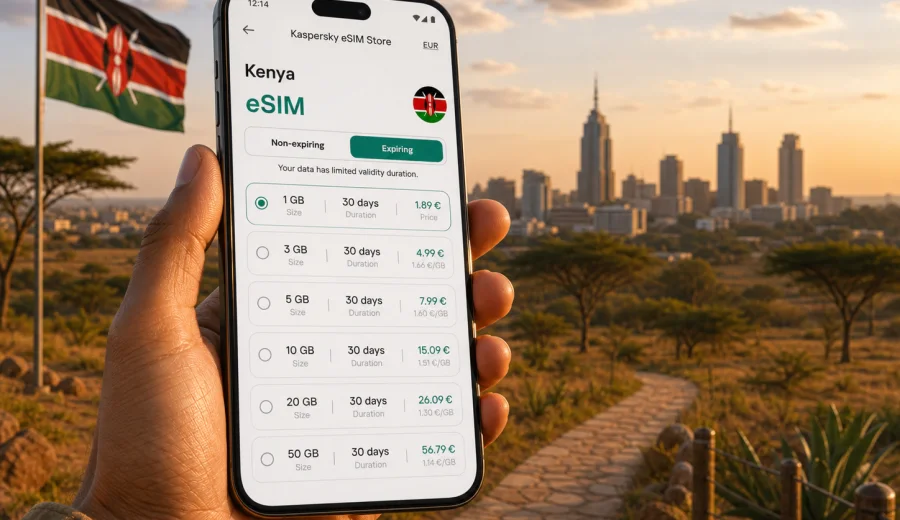
eSIM in Kenya: mobile connection and internet for your trip
Kenya is a country where mobile internet quickly becomes part of the journey. You may need maps after landing in Nairobi, a ride-hailing app on the way from Jomo Kenyatta International Airport, hotel messages in Mombasa, train tickets for the route to the coast, or navigation during a longer itinerary that includes national parks and several cities. An eSIM can make that first online moment easier because you do not need to find a physical SIM card shop before using mobile data.
This guide explains how to prepare mobile connection and internet for Kenya with an eSIM, how to choose a suitable data plan, what to check before purchase, and how to avoid common setup mistakes.
An eSIM is a digital SIM profile installed on a compatible smartphone or tablet. In travel use, it is mainly a way to use mobile data abroad without replacing your primary SIM card. Kaspersky eSIM Store is an app and website where you can choose a destination, review data volume and validity, arrange a plan for the trip, and activate it on a compatible device.
Why mobile internet matters in Kenya
Kenya is not a one-stop destination for many travelers. A typical route can include Nairobi, Naivasha, the Maasai Mara region, Amboseli, Diani, Mombasa, Lamu, Kisumu, or Mount Kenya. Even if your hotel has Wi-Fi, you may need internet in between: at the airport, in a taxi, at a rail station, during a day trip, or when confirming a booking.
Mobile data helps with:
- maps and route planning in Nairobi, Mombasa, Kisumu, Eldoret, and coastal towns;
- ride-hailing, delivery, and local transport apps;
- messaging with hosts, guides, colleagues, and family;
- checking bookings, boarding passes, and travel documents;
- translating short messages or menus;
- sharing location during group travel;
- using mobile banking or payment apps where they are part of your travel routine;
- checking weather before road transfers or park visits.
Public Wi-Fi can still be helpful in hotels, lounges, and cafes, but it is not always available exactly when you need it. A prepared eSIM reduces dependence on Wi-Fi during arrival and transfers. It also gives you more control over data use because you can choose a prepaid plan with a visible allowance and validity period before you start using it.
eSIM for Kenya in plain terms
For a trip to Kenya, an eSIM usually means a data plan installed on your phone as a second mobile profile. Your usual SIM can remain in the device for calls, banking messages, or your home number, while the eSIM is selected for mobile data during the trip.
The exact behavior depends on your phone and the chosen plan, but the usual travel pattern is simple:
| Travel need | How an eSIM helps |
|---|---|
| Internet after landing | You can install the eSIM before departure and enable it when you arrive. |
| Keeping your regular number | Your primary SIM can stay in the phone while the eSIM handles data. |
| Managing trip costs | You choose a prepaid data allowance and validity period. |
| Moving around Kenya | You use one data profile for the destination instead of buying a physical SIM card at each stage of the trip. |
| Short visits | You can choose a plan based on days and expected data use instead of setting up a long local contract. |
An eSIM plan for travel normally focuses on data. It usually does not include a local phone number, traditional voice calls, or SMS unless the specific plan conditions say otherwise. For calls and messages, travelers often use internet-based apps over mobile data.
When an eSIM is especially useful in Kenya
An eSIM is most useful when your first online tasks happen before you have time to solve local connectivity. That is common in Kenya because many trips start with a transfer, a domestic connection, or a long drive.
Consider an eSIM if:
- you land in Nairobi and need a car, driver, hotel route, or local contact immediately;
- you travel from Nairobi to the coast by train or road and want maps and messages on the way;
- you work remotely for part of the trip and need a backup to hotel Wi-Fi;
- you visit several regions and do not want to spend arrival time looking for a SIM card;
- you are traveling with family and need quick contact between phones;
- you arrive late at night or early in the morning when store opening hours may be inconvenient.
For a very long stay, a local SIM card may still be worth comparing. For a short business trip, a holiday, a safari route, or a mixed city-and-coast itinerary, eSIM is often the simpler option because most of the preparation can be done before arrival.
How much data to choose for Kenya
There is no universal data allowance for every traveler. The right amount depends on trip length, app habits, whether your hotel Wi-Fi is reliable, and how often you upload photos or use video.
Use this planning table as a starting point:
| Scenario in Kenya | Typical use | Suggested way to think about data |
|---|---|---|
| Weekend in Nairobi | maps, taxis, messaging, booking checks | A smaller plan may be enough if you use hotel Wi-Fi for heavy tasks. |
| One week city and safari | maps, chat, photo uploads, occasional calls in messengers | Choose enough data for transfers and daily navigation, not just hotel use. |
| Coast holiday | messaging, maps, restaurant searches, social apps | Estimate extra data if you upload photos and videos from the beach. |
| Business trip | email, calendar, messaging, calls over data | Add a buffer for tethering and backup connectivity. |
| Remote work segment | video meetings, cloud documents, hotspot use | Choose a larger plan and avoid using mobile data for constant video if Wi-Fi is available. |
Video is usually the biggest variable. A few short map searches and messages use little data, while streaming, video calls, and automatic cloud backups can consume a plan quickly. Before departure, download offline maps, music, documents, and entertainment over home Wi-Fi. Also check whether your photos and videos sync automatically on mobile data.
What to check before buying an eSIM plan
Before you choose a plan for Kenya, check the practical details. This saves time and helps avoid buying a plan that does not fit your device or travel pattern.
Checklist:
- Your phone or tablet supports eSIM.
- The device is not locked to one mobile operator.
- You understand whether the plan is valid only in Kenya or also in other countries or regions.
- The data allowance is realistic for your trip length.
- The validity period covers your full stay, including arrival and departure days.
- You know when the validity period starts: after purchase, after installation, or after first connection, depending on the plan conditions.
- You know whether hotspot or tethering is allowed if you plan to share data with a laptop or another phone.
- You have a stable internet connection available for installation before the trip.
If you are unsure whether your device can use eSIM, check your device before purchase. Compatibility depends on the exact model, country version, and carrier lock status, so it is better to confirm this early rather than at the airport.
Choosing an eSIM plan for Kenya
Choosing a plan is mostly about matching data volume, validity, and route. A traveler staying in Nairobi for three days has different needs from someone spending two weeks between Nairobi, the Rift Valley, the Maasai Mara area, and the coast.
Start with four questions:
1. How many days will you be in Kenya?
2. Will you rely on mobile data every day, or mainly during transfers?
3. Will you upload photos and videos on mobile data?
4. Do you need internet only in Kenya, or are you also visiting nearby countries?
If Kenya is the only destination, a country plan is usually the most direct choice. If your route also includes Tanzania, Uganda, Rwanda, or another regional stop, compare the country plan with a regional option if available for your itinerary. The best choice is not simply the largest package. It is the plan whose data allowance, validity, and coverage area match how you will actually travel.
For a focused Kenya trip, you can use Kaspersky eSIM Store to choose an eSIM plan for your trip to Kenya and review the available data volumes and validity periods before you leave. This link is most useful after you have estimated your data needs, checked device compatibility, and decided whether you need a Kenya-only option or a broader regional plan.
Practical Kenya travel scenarios
Arrival in Nairobi
Many international travelers arrive through Jomo Kenyatta International Airport. The first hour often includes passport control, baggage, transport, hotel communication, and map checks. If your eSIM is already installed, you can select it for mobile data after arrival and follow the activation steps without searching for airport Wi-Fi for every task.
Keep your main SIM available if you need bank verification messages, but set the eSIM as the mobile data line. On dual-SIM phones, check that data roaming is enabled for the eSIM if the installation instructions or plan conditions require it.
Nairobi plus national parks
For safaris and road trips, mobile data can help with messaging, maps, weather checks, and coordination with guides. Coverage and speed can vary outside cities and along remote routes, so do not treat mobile internet as the only safety tool. Download key documents and maps offline, keep your guide or operator contact details saved, and carry a power bank.
Coast itinerary: Mombasa, Diani, Watamu, Lamu
On the coast, mobile internet is often used for navigation, restaurant searches, ferry or transfer coordination, and photo sharing. If you expect to upload many photos and videos, choose a plan with a buffer. Hotel Wi-Fi can handle heavier uploads when available; mobile data is better kept for movement and essential tasks.
Business travel
For business travelers, the important point is continuity. Email, calendars, messaging, ride apps, and document access can become urgent between meetings. If you might use your phone as a hotspot, choose a plan that fits that workload and confirm tethering conditions before relying on it.
How to install and activate an eSIM
Install the eSIM while you still have reliable Wi-Fi, ideally before departure. Then activate or enable it according to the plan instructions when you are ready to use mobile data in Kenya. The exact steps differ between operating systems, but the general sequence is similar.
Basic steps:
1. Check that your device supports eSIM and is not carrier locked.
2. Choose Kenya as the destination and select a suitable data plan.
3. Complete the purchase flow.
4. Install the eSIM profile using the QR code or in-app instructions.
5. Name the line clearly, for example “Kenya data”.
6. On arrival, select the eSIM for mobile data.
7. Enable data roaming for the eSIM if the instructions require it.
8. Test mobile data before leaving the airport or hotel.
For platform-specific setup, use the Android installation guide or the iOS installation guide. Follow the instructions for your exact device and do not delete the eSIM profile after installation unless support or the plan instructions clearly tell you to do so.
Settings that prevent common problems
Most eSIM issues during travel are not caused by the idea of eSIM itself. They are usually settings, timing, or device compatibility details. Check these points before assuming the plan is not working:
- Mobile data line: make sure the Kenya eSIM is selected for mobile data.
- Data roaming: some travel eSIM profiles require data roaming to be enabled for that eSIM.
- Airplane mode: turn it on and off once after arrival if the device does not connect.
- Network selection: automatic network selection is usually the simplest option.
- APN settings: if the plan instructions mention APN details, enter them exactly.
- Low data mode: useful for saving traffic, but it can affect background sync.
- Primary SIM roaming: disable data roaming on your home SIM if you want to avoid accidental roaming charges.
Do not delete the eSIM as a troubleshooting step unless you are instructed to. On many devices, deleting a profile can prevent simple reinstallation without support.
eSIM, roaming, local SIM: what is different?
Travelers usually compare three options: home operator roaming, a local physical SIM card, and a travel eSIM.
| Option | Strengths | Trade-offs |
|---|---|---|
| Home roaming | Uses your existing SIM and number; familiar billing | Costs and included data depend on your home operator; you may need to check daily fees carefully. |
| Local physical SIM | Can be practical for long stays; may include local services | Requires time to buy and set up; conditions and registration process may vary. |
| Travel eSIM | Can be prepared before arrival; no physical SIM swap; prepaid data plan | Requires eSIM-compatible unlocked device; usually data-focused without a local voice number. |
An eSIM is not automatically the cheapest option in every case, and it is not a guarantee of identical speed in every location. Its main advantage is preparation and convenience: you can review plan conditions before the trip and avoid making connectivity decisions while tired after a flight.
Data-saving tips for Kenya
Use your data plan intentionally, especially if you will be away from hotel Wi-Fi for long periods.
Quick wins:
- Download offline maps for Nairobi, Mombasa, the coast, and your planned road routes.
- Save hotel addresses, guide contacts, boarding passes, and booking PDFs offline.
- Turn off automatic app updates over mobile data.
- Pause cloud photo backup until you are on trusted Wi-Fi.
- Reduce video streaming quality or avoid streaming on mobile data.
- Use messaging calls instead of video calls when signal is limited.
- Check data use in your phone settings every day or two.
For group trips, avoid making one phone the permanent hotspot for everyone unless the plan was chosen for that purpose. Hotspot use can drain the battery and consume data faster than expected.
Before you leave: a simple preparation checklist
Use this checklist a day or two before travel:
- Confirm that your passport, tickets, insurance, and accommodation details are saved offline.
- Install the eSIM while connected to stable Wi-Fi.
- Take a screenshot or save the setup instructions where you can access them offline.
- Label your primary SIM and Kenya eSIM clearly in phone settings.
- Turn off mobile data roaming on your home SIM if you do not plan to use it.
- Pack a charger and power bank for long transfers.
- Download offline maps and key travel apps.
- Tell family or colleagues which apps you will use for messages and calls.
The goal is not to solve every possible travel issue in advance. It is to make the first online step in Kenya predictable, so you can focus on transport, check-in, meetings, or the start of your holiday.
Frequently asked questions
Does an eSIM for Kenya include a local phone number?
Travel eSIM plans are usually focused on mobile data. They normally do not include a local phone number, voice calls, or SMS unless this is clearly stated in the selected plan conditions. You can use internet-based calling and messaging apps over mobile data.
Can I keep my normal SIM active?
In many compatible dual-SIM phones, yes. You can keep your primary SIM for your usual number and select the eSIM for mobile data. Check your device settings carefully so your home SIM does not use roaming data unintentionally.
Should I install the eSIM before departure or after arrival?
Installation is usually easier before departure because you can use stable Wi-Fi and solve any setup questions calmly. Activation timing depends on the plan conditions, so read when the validity period starts before you install or enable the eSIM.
Will mobile internet be available everywhere in Kenya?
Mobile coverage and speed depend on local network conditions, device compatibility, terrain, and the area you are visiting. Cities and main routes are different from remote parks or rural roads. Keep important documents available offline and do not rely on mobile data as your only travel safety resource.
Can I use hotspot with a Kenya eSIM?
Hotspot availability depends on the selected plan and device settings. If you need to connect a laptop or share data with another traveler, check the plan conditions before purchase and choose a data allowance that fits the extra use.
What should I do if the eSIM does not connect?
Check that the eSIM is selected for mobile data, data roaming is enabled for that eSIM if required, airplane mode has been toggled once, and the APN settings match the instructions if any are provided. If the issue continues, contact support with your device model, destination, screenshots of relevant settings, and a short description of what you have already tried.
Choose an eSIM plan for Kenya before your trip
The simplest time to prepare mobile internet is before travel, not while standing in an arrivals hall or trying to message a driver from a crowded lobby. With Kaspersky eSIM Store, you can choose Kenya as your destination, compare available data allowances and validity periods, install the eSIM on a compatible device, and keep the plan ready for the moment you need mobile data.
If Kenya is your next destination, prepare an eSIM plan for your trip to Kenya and check the setup steps before departure. A few minutes of preparation can make arrival, transfers, maps, bookings, and everyday messaging much easier to manage.