
Travel connectivity guide
Khor Fakkan eSIM for Mobile Internet
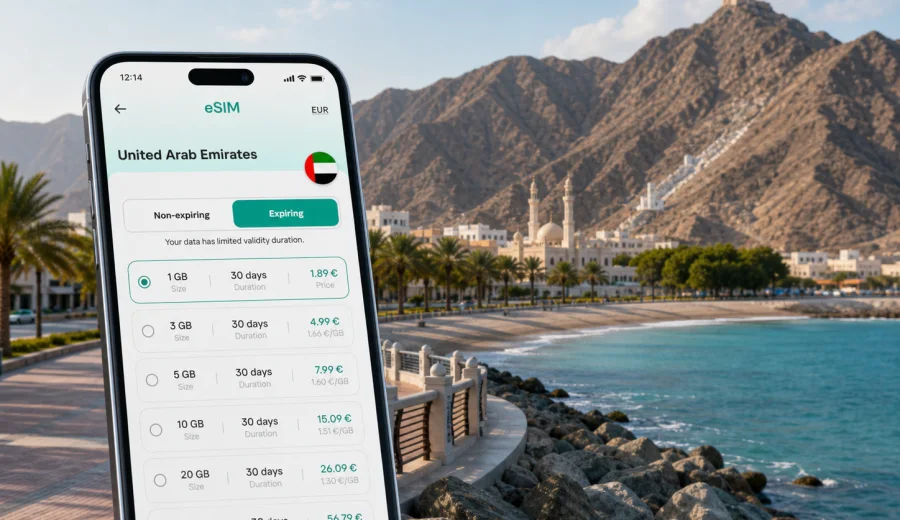
Khor Fakkan eSIM: mobile connection and internet for a coastal UAE trip
Khor Fakkan is one of the most practical places in the United Arab Emirates to plan your mobile internet before you arrive. The city sits on the Gulf of Oman coast, with mountains behind the beach, hotels spread along the waterfront, mountain roads leading toward Sharjah and Fujairah, and day trips that often start early and move quickly. If your route includes navigation, ride-hailing, hotel check-in messages, restaurant searches, maps for hiking viewpoints, or work calls from the coast, an eSIM can make the trip easier than waiting for hotel Wi-Fi or looking for a physical SIM card after arrival.
This guide focuses on Khor Fakkan itself: arrival, local movement, beach areas, business travel, stopovers, mountain drives, and short trips from the city. It also explains how to prepare an eSIM for mobile internet in the United Arab Emirates through Kaspersky eSIM Store, which is an app and website where you can choose, arrange, and activate an eSIM with a suitable data plan for an international trip.
Why mobile internet matters in Khor Fakkan
Khor Fakkan is compact, but many useful places are not concentrated on one metro line or in a single walkable downtown. A typical day may include the Corniche, the beach, a mountain viewpoint, a hotel lobby, a cafe, a port-related meeting, and a drive toward Fujairah or Sharjah. In that kind of itinerary, mobile data is not only about browsing. It supports the small decisions that keep the day moving.
Useful mobile internet scenarios in Khor Fakkan include:
- checking the route from your hotel to Khor Fakkan Beach or the Amphitheatre;
- messaging a driver while standing near a hotel entrance or waterfront pickup point;
- opening maps before a mountain road or viewpoint walk;
- translating menus, signs, and short service messages;
- confirming hotel check-in times or late checkout details;
- sharing your live location with travel companions;
- checking weather before a beach walk, boat activity, or mountain trail;
- joining a work call from a quiet hotel corner;
- managing onward travel to Fujairah, Dubai, Sharjah, or Ras Al Khaimah.
Public Wi-Fi can help in a hotel, cafe, or lobby, but it does not follow you along the Corniche, into a taxi, up a viewpoint, or between emirates. A prepared eSIM gives you a separate mobile data option for the moments when you are away from a trusted network.
Arrival routes: when to activate data
Many visitors reach Khor Fakkan by road after landing elsewhere in the UAE. Dubai International, Sharjah International, and regional routes via Fujairah can all be relevant depending on the trip. The important point for mobile connection is that your first practical need for data may appear before you reach Khor Fakkan: confirming a transfer, opening a map, checking a hotel address, or telling someone your estimated arrival time.
If you install an eSIM before departure, you can wait to activate the data plan according to the plan conditions and your device flow. Some plans start when they connect to a supported local network, while others may have different activation logic. Read the plan details before purchase, especially the data volume, validity period, destination, and whether data roaming must be enabled for the eSIM line.
For a smooth arrival, prepare this before you leave:
- save your hotel name and address offline;
- keep a screenshot of your booking and transfer details;
- install the eSIM while you still have a stable connection;
- check whether your phone supports eSIM and is not carrier locked;
- label the eSIM line clearly, for example "UAE data";
- keep your primary SIM available for calls or banking messages if you need it;
- decide whether you will activate data at the airport, on the road, or after hotel check-in.
The goal is not to use data constantly from the first minute. The goal is to avoid being stuck without maps, messages, or account access when you actually need them.
Khor Fakkan travel situations where eSIM helps
Khor Fakkan has a different rhythm from the larger UAE cities on the western coast. It is more coastal, more scenic, and often built around a few focused trip purposes: a resort stay, a beach weekend, a mountain drive, a family stop, a cruise or port visit, or a business trip connected to the east coast. Each purpose uses mobile internet differently.
| Trip situation | Why mobile data helps | Practical tip |
|---|---|---|
| Beach stay | Maps, messages, dining searches, weather checks | Keep enough data for photo sharing and navigation after sunset |
| Mountain viewpoint | Route checks and location sharing | Load the route before leaving the main road |
| Business visit | Email, calendars, ride coordination, calls through apps | Choose a data allowance that covers work apps, not only maps |
| Family trip | Messaging, hotel coordination, children entertainment | Download large videos on Wi-Fi before going out |
| Stopover | Quick navigation and transfer updates | Install eSIM before arrival to save time |
| Day trip from Dubai or Sharjah | Navigation across emirates | Check that the selected plan is valid for the United Arab Emirates |
Khor Fakkan is also a place where plans can change quickly. You may decide to continue to Fujairah, stop at Shees Park, spend more time at the beach, or return later than expected through mountain roads. Mobile internet keeps these changes manageable because you can check routes, opening hours shown in map apps, and messages without depending on the nearest Wi-Fi password.
Choosing a data allowance for Khor Fakkan
The right amount of data depends on how you travel. A short beach stop and a work-heavy week need very different plans. Before choosing an eSIM data plan, think about the apps you use most and the moments when you will be away from Wi-Fi.
Light use may be enough if you mainly need maps, messaging, ride coordination, and occasional restaurant searches. Medium use is better if you upload photos, use social media regularly, or make short internet calls. Heavier use may be appropriate if you work remotely, take video calls, use cloud documents, or travel with family members who rely on your hotspot. Tethering availability depends on the selected plan and device settings, so check the plan details if you expect to share data.
Use this quick estimate:
- Maps and messaging: usually light data use, but frequent route recalculation can add up.
- Photo uploads: moderate use, especially on high-resolution settings.
- Video calls: heavy use compared with messaging and maps.
- Streaming: high use; download entertainment on hotel Wi-Fi when possible.
- Cloud documents and email attachments: variable; business trips need extra margin.
- Hotspot for a laptop or another phone: plan carefully and check whether it is supported.
For Khor Fakkan, it is usually better to leave a data buffer for the road. A trip that begins as a resort stay can turn into a full east coast drive, and navigation is one of the last things you want to ration.
Before you buy: device and plan checks
Not every phone supports eSIM, and some devices may be locked to a carrier. Before arranging a plan, check your device and make sure it can use eSIM for mobile data abroad. This is especially important if your phone was bought through a carrier contract, if it is an older model, or if you plan to use a dual-SIM setup with your home SIM active at the same time.
Also check the plan conditions:
- destination: the plan should cover the United Arab Emirates;
- validity: the period should match your stay, including arrival and departure days;
- data volume: the allowance should fit your maps, messaging, work, and media use;
- activation rules: understand when the validity period starts;
- hotspot use: confirm it if you plan to share data;
- voice and SMS: eSIM data plans usually do not include a regular phone number unless stated in the specific plan conditions;
- support path: know where to find help if installation or activation does not work as expected.
Kaspersky eSIM Store helps you choose and activate an eSIM with a suitable data plan for an international trip. It does not replace a local mobile operator, does not provide a regular phone number by default, and should not be treated as a VPN. Think of it as a practical way to prepare mobile internet for travel, with the plan conditions visible before you commit.
Mid-trip setup: choose a UAE eSIM plan
If Khor Fakkan is part of a wider UAE trip, choose the plan for the country rather than searching for a separate city product. You can use Kaspersky eSIM Store to view eSIM data plan options for the United Arab Emirates and compare data volume, validity period, and destination before you travel or while you still have a stable connection.
This is the best point to make the decision if you are already planning a route that includes more than Khor Fakkan. The same trip may include Dubai airport arrival, a Sharjah stop, a Khor Fakkan weekend, a Fujairah drive, and a return across the mountains. A UAE destination plan is easier to think about than separate decisions for each city.
When comparing plans, do not choose only by the smallest data amount. Match the plan to how you will actually move:
- One-day stop: maps, messaging, and ride coordination may be the main needs.
- Weekend stay: add photo sharing, restaurant searches, and more navigation.
- Business trip: include email, cloud files, calendar apps, and calls through internet apps.
- Family route: allow for multiple devices, entertainment downloads, and backup data.
- Road trip: keep extra data for navigation and unexpected detours.
If you are unsure, choose a plan that gives you a practical buffer. Running out of data during a beach afternoon is inconvenient; running out while coordinating a transfer or finding a mountain route can be more disruptive.
How to install and activate an eSIM
The exact setup flow depends on your phone, operating system, and selected plan, but the general process is simple: choose the destination and plan, complete the purchase flow, install the eSIM profile on a compatible device, then activate mobile data for that eSIM line when appropriate. If you need device-specific help, use the Android installation guide or the iOS installation guide.
A practical setup sequence for Khor Fakkan:
1. Install the eSIM while you have reliable Wi-Fi, preferably before departure or in your hotel.
2. Keep your home SIM active if you need calls, banking messages, or your usual number.
3. Give the eSIM a clear label such as "UAE travel data".
4. Set mobile data to the eSIM line when you are ready to use the plan.
5. Enable data roaming for the eSIM line if the plan instructions require it.
6. Open a map or browser to confirm the data connection.
7. Keep the QR code or installation email until the setup is complete.
Do not delete the eSIM profile after activation unless you are sure you no longer need it. In many cases, an activated eSIM cannot simply be moved to another device. If you change phones during the trip, check support guidance before removing anything.
Local movement, business visits, and short stays
Khor Fakkan is easy to enjoy, but not every useful move is on foot. You may walk along the Corniche, then use a car or taxi for a hotel, viewpoint, restaurant, port-adjacent meeting, or onward transfer. Keep pickup points precise: hotel names can be similar, beach entrances are spread out, and sending a live location is often clearer than describing a landmark.
For mountain roads, use mobile data as support, not as your only preparation. Save the route, keep the phone charged, and download offline map areas before leaving the main city. For hotels, check that your booking app, email, and messaging app work before you leave the lobby; a confirmation, door code, or transfer message may be needed after Wi-Fi coverage ends.
Business travelers should plan for calendar changes, email attachments, internet calls through approved work apps, and ride coordination between Khor Fakkan, Fujairah, Sharjah, or Dubai. If your employer requires secure access tools, configure them before departure. Kaspersky eSIM Store is for choosing and activating eSIM data plans for travel; it is not a VPN.
For stopovers, install the eSIM before arrival, save the return pickup point, keep booking confirmations offline, and leave enough data for the final transfer. A short Khor Fakkan visit is better spent on the beach, the Amphitheatre area, a waterfront meal, or a mountain view than on searching for a SIM counter.
Day trips and data-saving tips
Khor Fakkan is a useful base for east coast movement. You may continue to Fujairah, explore mountain scenery, visit parks, or drive back toward Sharjah and Dubai. Keep enough data for navigation, route changes, restaurant searches, and transfer updates, especially if the return drive happens after dark.
To make the plan last longer:
- turn off automatic cloud photo backup on mobile data;
- download offline maps for Khor Fakkan and nearby routes;
- update apps on Wi-Fi, not on mobile data;
- disable automatic video playback in social apps;
- use hotel Wi-Fi for large uploads when it is stable and trusted;
- monitor data use if your phone becomes a hotspot for a laptop or another device.
Quick answers about eSIM in Khor Fakkan
Is an eSIM useful if my hotel has Wi-Fi?
Yes. Taxis, beach walks, mountain roads, restaurants, and transfers happen away from the hotel. Wi-Fi is helpful, but it is not a citywide connection.
Do I need a Khor Fakkan-specific plan?
Usually no. Choose a plan that covers the United Arab Emirates and matches your route and stay length.
Can an eSIM replace my regular phone number?
Usually, travel eSIM data plans are for mobile internet. They do not include a regular phone number, voice calls, or SMS unless this is stated in the plan conditions.
Should I activate before arrival or after arrival?
Install before travel if possible. Activation timing depends on the selected plan and device flow, so read the plan details before you use the data line.
Final preparation before your trip
Before you travel to Khor Fakkan, decide how much you will rely on mobile internet outside the hotel. If you only need maps and messages, a smaller data allowance may be enough. If you plan to work, share photos, use maps throughout the day, or continue to Fujairah, Sharjah, or Dubai, choose more data and a validity period that covers the full route.
Use this final checklist:
- confirm your device supports eSIM;
- choose a UAE plan with enough data and validity;
- install the eSIM on stable Wi-Fi;
- save offline maps and booking details;
- keep your primary SIM available if you need your usual number;
- test mobile data before leaving a reliable connection;
- keep enough data for your return transfer.
Khor Fakkan rewards flexible movement: a beach morning, a mountain view, a quiet cafe, and an evening drive can all fit into one trip. Preparing mobile internet in advance makes that flexibility easier. When your route is set, you can choose an eSIM data plan for your United Arab Emirates trip through Kaspersky eSIM Store, install it on a compatible device, and arrive in Khor Fakkan ready to navigate, message, and manage your travel day with less dependence on public Wi-Fi.