Travel connectivity guide
Khujand eSIM: Mobile Internet in Tajikistan
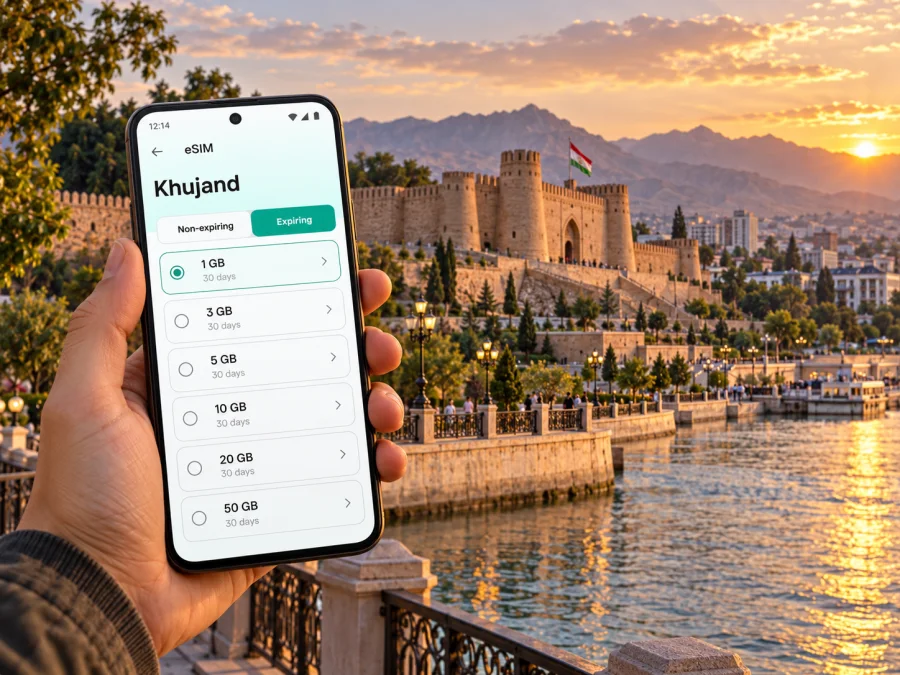
Khujand eSIM: Mobile Connection and Internet for Your Visit
Khujand is a useful base for exploring northern Tajikistan, but a day here can involve more than one kind of navigation: finding your hotel after landing, walking between the old city and the Syr Darya, arranging a ride, and checking plans for a trip beyond the city. An eSIM can help you prepare mobile internet without taking out your home SIM. It is a digital SIM profile installed on a compatible, unlocked device; the travel plan you choose determines where it can be used and what data it includes.
This guide focuses on practical connectivity in Khujand: the airport arrival, city movement, familiar landmarks, work and short stays, plus the checks that matter before selecting a plan for Tajikistan. Mobile service depends on the plan, its partner network, local conditions and your handset. A city name on a guide is not a promise of coverage at every address.
Khujand at a glance
Khujand is in Sughd Region in the north of Tajikistan, on the Syr Darya. The historic Khujand Fortress complex and the Kamoli Khujandi cultural and recreation park sit in the city centre beside the river. The international airport is about seven kilometres southeast of the city, so travellers should allow for a ground transfer rather than assume they can walk from the terminal into the centre.
| Trip moment | Where mobile internet helps | Practical preparation |
|---|---|---|
| Arrival | Confirming a pickup, sharing your location, checking a hotel address | Save the address and booking details offline before boarding |
| First city walk | Opening a map, translating a sign or message, contacting your host | Download an offline map area and keep the hotel pin accessible |
| Day around the centre | Looking up opening details, meeting companions, arranging the next ride | Keep the phone charged and use a map pin as well as a written address |
| Work or a longer stay | Email, calls through internet apps, document access | Check plan duration and data needs; keep a backup connection option |
| Leaving Khujand | Checking onward transport and route changes | Confirm the plan’s country coverage for every leg, especially across a border |
Your first hours after landing
Khujand International Airport is outside the central historic area. Before you leave the arrivals hall, make sure you can retrieve your accommodation address, your driver’s name or meeting point, and a way to contact the person expecting you. A working data connection makes it easier to check a message or share a pin, but these details should also be saved offline in case setup takes longer than expected.
A low-stress arrival routine is simple:
- Keep your home number available for any one-time codes you may need before departure.
- Save the hotel or host’s address in both map form and plain text.
- If you have installed a travel eSIM, wait until your phone shows that the profile is ready before making it the mobile-data line.
- Confirm the transfer arrangement and vehicle details directly with your driver or accommodation.
- Once on the road, follow the route on your map and check the destination against the address you saved.
Do not rely on an airport Wi-Fi connection as your only plan for reaching town. Wi-Fi availability, sign-in steps and signal quality can vary. If you are travelling as a group, agree in advance on a meeting point inside the terminal and share the booking information with each person. That small backup helps when a flight is delayed, a phone battery is low or one traveller has trouble connecting.
Moving around the city
Khujand’s visitor routes often cluster around the historic centre, Panjshanbe Market and the riverfront. The fortress complex is on the Syr Darya in the centre; from there, you can orient yourself by the river and use a map to plan the next stop. Streets around markets and public places can be busy, so check the walking route before setting off and keep a saved destination pin for the return journey.
For a taxi or a pre-arranged car, a precise map pin can reduce confusion when names are transliterated differently or a driver is unfamiliar with an English spelling. Send both a pin and a short written location when possible. If you use a local taxi service or a booking app, confirm that the method works with your phone number and payment setup before depending on it. A mobile data plan does not automatically provide a local phone number, local payment method or ordinary voice service.
Public transport information and payment arrangements can change. Check the current route and fare details locally rather than relying on an old screenshot. Keep enough battery for maps and messaging, and download the map section around your hotel and the centre before you head out. Offline maps can show roads and saved places without data, although live traffic, fresh search results and new messages still need a connection.
City locations where a connection is handy
- Khujand Fortress and the riverside park: save the entrance or meeting point, then use the map to reconnect with your route along the river.
- Panjshanbe Market: set a pin before entering the busy market area. If you split up, agree on a clear meeting point and time rather than relying on a live message alone.
- Hotel or guesthouse: store the address in the local script if the property provides it, plus a phone number or booking reference where available.
- Cafés and work meetings: send the exact venue pin to colleagues, and download any documents you may need before leaving stable Wi-Fi.
- A day trip outside central Khujand: check the destination and return arrangements in advance. Do not assume that an urban plan or signal level will remain the same outside the city.
A useful habit is to keep the destination pin, booking confirmation and one emergency contact in offline notes. Mobile internet is a helpful layer for a trip, while offline information gives you a fallback if the battery, signal or data allowance becomes an issue.
Choosing a travel eSIM plan for Khujand
Khujand is the city you are visiting; the relevant country destination is Tajikistan. When comparing plans, check the plan’s stated geographic scope rather than searching for a separate Khujand package. A country plan, a multi-country regional plan and a global plan can have different inclusions. For a route that starts in Khujand and continues into Uzbekistan or another country, confirm that each country is explicitly included; proximity across a border does not extend a plan automatically.
Review the eSIM plan options for your trip to Tajikistan and compare the terms shown for the destination you need. Kaspersky eSIM Store is an app and website where you can choose, purchase and activate an eSIM with a suitable plan for mobile internet on an overseas trip. The available plan, data allowance, validity, price and activation rules are defined by the selected offer, so check those details before completing an order.
A practical comparison starts with your itinerary, not a guess about how much data “a city” requires:
| Question | Why it matters | What to check |
|---|---|---|
| How long will you be in Tajikistan? | A short stop and a multi-week visit need different validity windows | Start and end rules, validity length, and when the plan becomes active |
| Where else will you travel? | A city visit may turn into a regional or cross-border route | Countries and regions expressly included in the plan |
| What will you do online? | Maps and messaging are lighter than frequent video or large uploads | Allowance, fair-use conditions if listed, and top-up availability |
| Which line will use mobile data? | Dual-SIM phones can keep a home line and travel profile active together | Data-line settings and roaming settings specified for the eSIM |
| Do you need calls or SMS? | Many travel data profiles do not include a regular number | The exact service inclusions shown in the plan terms |
For a map-first city break, estimate how often you will search for places, message your host and use ride services. For remote work, include video meetings, cloud files and hotspot use only if the chosen plan permits them. If you are unsure, avoid selecting solely by the largest data amount: a longer validity or regional scope may matter more for your route. Check the current terms in the plan view because offers and conditions can change.
Local operator eSIM and travel eSIM are not the same thing
Tajikistan has its own mobile operators and local eSIM services. For example, operator-specific eSIM information is published by ZET-Mobile and Megafon Tajikistan. That confirms that eSIM exists in the local operator market; it does not tell you which local network a separate international travel plan will use, nor whether that travel plan is sold as a local operator profile. The network and usage conditions for a travel eSIM must be checked in that particular plan’s details.
The same distinction applies to geography. A plan marked for Tajikistan is a country-level offer whose network access is governed by its terms and partner arrangements. It is not a Khujand municipal network, and it should not be treated as a coverage guarantee for every building, road or nearby destination. Mountainous terrain, indoor locations, congestion and maintenance can affect service. If you need dependable access for a meeting or transfer, keep an offline address and a second way to contact the other party.
Device compatibility also has two layers. First, the exact device must support eSIM and be unlocked for another profile. Second, regional variants of what looks like the same model can differ: a handset bought in one market may not have the same eSIM capability as a similarly named model sold elsewhere. Confirm the model number and check the phone’s own mobile-network settings before travel. Check whether your device supports eSIM.
Install and activate before you travel
If you have chosen a plan, it is usually easier to prepare the profile while you have a reliable internet connection. Follow the instructions for your operating system: eSIM installation for Android or eSIM installation for iOS. The labels in device settings differ by manufacturer and OS version, so use the on-screen steps for your phone rather than assuming every menu is identical.
A careful setup sequence:
- Check the phone. Confirm eSIM support, carrier unlock status and enough battery. Regional model variations matter.
- Read the plan terms. Verify Tajikistan is included, and note the allowance, validity and activation trigger.
- Install with stable internet. Use the app or QR-code process provided with your order. Do not delete a profile to troubleshoot unless the instructions or support team tells you to; some profiles cannot simply be reinstalled.
- Label the profile. Use a clear name such as “Travel data” so it is easy to identify beside your home SIM.
- Choose your data line at the right time. Keep your home line selected for calls and codes if needed, and select the travel profile for mobile data when you are ready to use it.
- Check roaming instructions. Some eSIM plans require data roaming to be enabled on that profile. Follow the plan’s instructions, and avoid changing roaming settings on your home SIM unless you intend to use it.
- Test calmly. After the profile is active and the plan should work, allow time for the phone to register. If it does not connect, check the selected data line, plan status and settings before reinstalling anything.
Installing a profile and starting its validity period are not always the same event. Depending on the offer, the period may begin at installation, first network connection or another stated trigger. Check this in the plan description so you do not start a limited validity window earlier than intended. Kaspersky eSIM Store helps you select, complete and activate the chosen eSIM plan; local network access remains subject to the plan and the receiving network.
What to prepare for a short stop, a longer stay or work
Short city stop: install and test only if the plan’s activation conditions suit your layover. Save the next transport details offline, avoid large updates on mobile data and use a location pin when coordinating a pickup. If the connection is not ready immediately, your saved information still gets you to the next step.
Two or three days in Khujand: map the places you expect to visit, download an offline area, and check whether the plan’s validity is based on calendar days or another activation rule. Messaging, basic browsing and directions usually need less planning than video, backups or frequent hotspot use, but actual consumption varies by app and settings.
Business visit: check whether the plan allows tethering before using a laptop or tablet. Download presentation files and meeting details in advance. For important calls, confirm whether the meeting app can connect over data and keep the organiser’s contact details outside the app.
Trip onward from Khujand: treat every border crossing as a new plan check. Confirm the next country is listed, then note any change to the validity or network terms. A Tajikistan-only plan should not be assumed to continue working after you leave Tajikistan.
Before you leave: a practical checklist
- [ ] Confirm that the exact phone variant supports eSIM and is not carrier-locked.
- [ ] Match the selected plan’s country list to the full itinerary.
- [ ] Check data allowance, validity, activation trigger, top-up terms and any usage conditions.
- [ ] Save accommodation details, airport transfer information and key pins offline.
- [ ] Install the eSIM over a dependable connection and keep the order or profile details accessible.
- [ ] Know which SIM is selected for mobile data and which line handles ordinary calls or SMS.
- [ ] Keep a charger or power bank available for maps and messaging.
- [ ] Have an offline fallback for the first ride and the return to your accommodation.
Common questions
Is Khujand a separate eSIM destination from Tajikistan?
Usually, the plan’s coverage is described by country or region, not by city. Khujand is in Tajikistan, so check for Tajikistan in the selected plan’s destination list. Do not infer that a plan covers another country on your onward route.
Can I use eSIM as soon as I land?
It may be possible if the profile has been installed correctly, the plan is active under its terms and the phone registers on an available partner network. Setup and registration can take time and depend on the device and network. Save your transfer details offline as a backup.
Does a travel eSIM give me a local Tajik phone number?
Not necessarily. Many travel eSIM plans are designed for mobile data and do not include a conventional local number, voice calls or SMS. Check the selected plan’s inclusions. Internet messaging and calling apps can work over data, subject to the app and recipient’s access.
Does a local operator’s eSIM prove that my travel eSIM will work?
No. Local operators’ eSIM services are separate offers with their own eligibility and device conditions. An international travel eSIM follows the country and network arrangements described in that plan. Check the plan itself rather than assuming it uses a particular local operator.
Will every version of my phone support eSIM?
No. Support can vary by model and sales region, and a carrier lock can prevent adding another profile. Verify the exact model number and device settings before you choose a plan.
What if maps stop updating?
Use your downloaded map and saved pins, reconnect to a trusted Wi-Fi network when practical, and check that the eSIM is selected for mobile data. If the plan has a data cap, review remaining usage in the app or phone settings. Contact support if the profile remains unable to connect after these checks.
Stay ready for Khujand
A little preparation makes Khujand easier to navigate: keep the airport transfer and accommodation details offline, save the riverfront and market as map pins, and choose a plan whose destination and validity match the whole trip. Before departure, check the exact device variant and read the selected offer’s network and activation terms.
Use Kaspersky eSIM Store on the website or in the app to choose, purchase and activate an eSIM plan for your trip. Choose an eSIM plan for Tajikistan and check the displayed destination, data allowance and validity before you travel.


