
Travel connectivity guide
Kinshasa eSIM for mobile internet travel
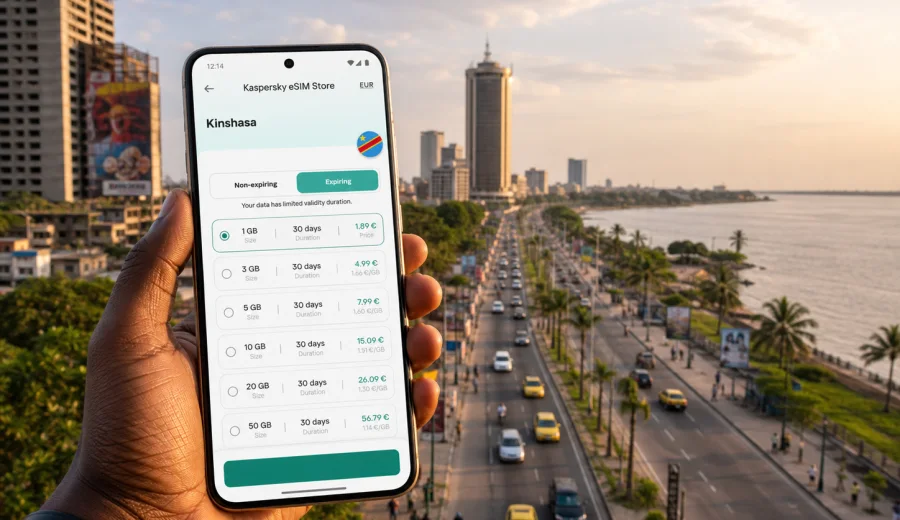
Kinshasa eSIM: mobile connection and internet for a trip to the city
Kinshasa is a city where mobile internet quickly becomes part of the travel plan. You may need it before you leave N'djili International Airport, while arranging a transfer into Gombe, checking the address of a hotel near Boulevard du 30 Juin, or coordinating a meeting across town. An eSIM can make these first steps easier because you do not have to start the trip by looking for a physical SIM card.
This guide is for travelers who are going to Kinshasa and want a practical way to prepare mobile internet for the city. It focuses on arrival, local transport, navigation, hotels, business trips, short stopovers, and routes from Kinshasa to other places in the Democratic Republic of the Congo.
An eSIM is useful when you want mobile data on a compatible phone or tablet without changing a plastic SIM card. In Kaspersky eSIM Store, you can choose a destination, review the data allowance and validity period, order a suitable eSIM plan for your trip, and activate it on a compatible device. The eSIM plan is mainly for mobile internet. It usually does not include a local phone number, voice calls, or SMS unless this is stated in the terms of a specific plan.
Why mobile internet matters in Kinshasa
Kinshasa is large, busy, and spread along the Congo River. Distances can feel short on a map but take longer in traffic, especially when you move between the airport, Gombe, Limete, Ngaliema, Kintambo, Lingwala, and hotel or office areas. A prepared mobile data plan helps you handle the trip with fewer pauses.
Typical moments when internet access helps in Kinshasa:
- checking hotel or apartment addresses after landing;
- messaging a driver, host, colleague, or local contact;
- using maps during the transfer from N'djili International Airport;
- confirming meeting times when traffic changes your route;
- translating short messages, addresses, or transport details;
- checking booking confirmations at a hotel reception;
- using banking apps or travel documents when needed;
- sharing your location with family or colleagues.
Public Wi-Fi may be useful in some hotels, offices, restaurants, and airport areas, but it is not a complete plan for moving around the city. You may need internet when you are between two Wi-Fi points, in a car, at a meeting location, or checking a route on the street. An eSIM gives you a way to prepare mobile data before those moments.
Arrival at N'djili International Airport
For many visitors, Kinshasa begins with the airport and the drive into the city. This is exactly the point where mobile internet is most useful. You may need to contact a driver, check a pickup point, message your hotel, or confirm whether a meeting contact is waiting for you.
Before departure, save key details offline: hotel address, reservation number, emergency contact, and the name of the district where you are staying. Then prepare mobile data so you can go online as soon as your phone connects to a local network and the eSIM profile is ready.
Arrival checklist:
- install the eSIM profile before the flight if the plan terms allow it;
- keep your main SIM active for calls or banking SMS if you need it;
- set the eSIM as the mobile data line after arrival;
- turn on data roaming for the eSIM if the setup instructions require it;
- avoid large downloads until you know your plan allowance;
- keep the QR code or installation details accessible in your email or account.
If your phone supports dual SIM, you can usually keep your home number for calls and messages while using the eSIM for mobile data. Exact behavior depends on the device, the mobile plan, and your home operator settings.
Where an eSIM helps most inside the city
Kinshasa travel is often about coordination. Plans can change during the day, and the route that looks convenient in the morning may not be the best route later. Mobile internet helps you adapt without waiting for the next Wi-Fi connection.
| City situation | Why mobile data helps |
|---|---|
| Airport transfer | You can message a driver, confirm the destination, and check route progress. |
| Hotel check-in | Booking emails, ID documents, and payment confirmations are easier to access. |
| Business day in Gombe | Calendar updates, maps, and messenger calls can stay available between meetings. |
| Restaurant or cafe stop | You can coordinate with local contacts without relying on the venue's Wi-Fi. |
| Moving across districts | Navigation and live communication are useful when travel time changes. |
| Short stopover | You can use data only for essential tasks instead of arranging a physical SIM. |
The point is not to use mobile data for everything. It is to have a reliable option for the practical tasks that make a city trip smoother: finding a place, contacting someone, checking a document, or adjusting a route.
Choosing the right data allowance for Kinshasa
The best eSIM plan depends on your trip length and how you use your phone. A traveler who only needs maps and messages for two days will not use data the same way as someone who spends a week in Kinshasa on business calls.
Use these scenarios as a practical starting point:
- Stopover or one-night stay: focus on messaging, maps, transfer coordination, and hotel check-in. A small data allowance may be enough if you avoid video and large app updates.
- Weekend visit: allow for navigation, ride coordination, restaurant searches, translation, and moderate social messaging.
- Business trip: consider more data for email, cloud documents, video calls, hotspot use, and longer days away from hotel Wi-Fi.
- Family trip: data use can grow quickly if several people share one device through hotspot mode.
- Field or project travel from Kinshasa: choose a plan with enough validity for the full route, not only for the first day in the city.
Before you order a plan, check the data volume, validity period, destination, price, activation rules, and whether hotspot use is allowed. These terms can differ by plan, so review them before payment.
Device compatibility comes first
Not every phone or tablet supports eSIM, and some devices may be locked by an operator. Check this before buying any travel data plan. If the device is not compatible, you may not be able to install the eSIM profile even if the destination plan is suitable.
Before the trip, check your device and confirm three points:
- your model supports eSIM;
- the device is not locked to one mobile operator;
- you have a stable internet connection for the installation step.
It is also worth updating your operating system before departure, saving your account login details, and making sure you can receive important messages from your bank or travel services. If you use your physical SIM for those messages, do not remove it unless you are sure you no longer need it.
Preparing eSIM before you fly
The most comfortable setup is usually done before departure. You can review plans calmly, install the eSIM profile over a stable connection, and leave only final activation or mobile data switching for arrival in Kinshasa. Always follow the conditions of the plan you choose, because some plans start their validity after installation, while others start after connection to a supported local network.
General preparation steps:
1. Check that your phone supports eSIM and is unlocked.
2. Choose Democratic Republic of the Congo as the destination if your trip is centered on Kinshasa.
3. Compare data allowance and validity period.
4. Order the plan that matches your trip length and route.
5. Install the eSIM profile using the instructions provided after purchase.
6. Keep your home SIM available if you need calls, SMS, or banking verification.
7. After arrival, select the eSIM for mobile data and check that data roaming is set according to the instructions.
If you need setup guidance, use the instructions for Android or the instructions for iOS. The exact menu names can vary by phone model and operating system version, so follow the screen shown on your device.
When to choose a country plan for a city trip
For a city article, the useful destination is still the country where the city is located. Kinshasa is in the Democratic Republic of the Congo, so the relevant travel data option is a plan for that country, if it matches your route and device. This is especially important if you will arrive in Kinshasa, stay in the city, and then make day trips or continue to another location inside the country.
If you are ready to prepare mobile data for your stay, you can review eSIM plan options for a trip to Kinshasa and the Democratic Republic of the Congo in Kaspersky eSIM Store. Check the data allowance, validity, and activation details before choosing.
This first planning step is enough for many city trips: choose the destination, install the eSIM on a compatible device, and use it for mobile data when you arrive. If your route includes several countries, compare whether a regional or global option is more suitable, but avoid buying more coverage than you need.
Kinshasa scenarios and data planning
Different trips to Kinshasa create different internet needs. The useful plan is the one that matches the way you will move through the city, not simply the largest data package available.
Business trip
Business travelers often stay in or around Gombe, move between offices, and rely on messaging throughout the day. A prepared eSIM helps you keep access to email, calendars, maps, and document links while traveling between meetings. If you expect video calls, hotspot use, or large file sharing, choose a larger data allowance and check whether tethering is allowed in the plan conditions.
Practical tip: download heavy files on hotel or office Wi-Fi, then use mobile data for communication, navigation, and urgent document access while moving around the city.
Hotel-based city stay
If your hotel Wi-Fi covers most evening work, you may need mobile data mainly for daytime movement. In that case, maps, messengers, and booking apps are the priority. Keep automatic app updates, cloud backups, and photo uploads limited to Wi-Fi so your travel data lasts longer.
Useful settings:
- disable automatic media downloads in messengers;
- set cloud photo backup to Wi-Fi only;
- download offline map areas before leaving the hotel;
- close apps that refresh in the background;
- check your data use once or twice a day.
Short stopover
A short stopover in Kinshasa does not always justify buying a physical SIM card. If you mainly need to contact a driver, check a hotel booking, or use maps for a few hours, an eSIM can be a simpler option. Install the profile before the trip when possible so you do not spend the stopover handling setup.
Local exploration
For city walks, restaurant plans, museum visits, river views, and evening transfers, mobile data is helpful for route checks and communication. It is also useful when a driver asks for a live location or when a meeting point changes. Keep the phone charged and carry a power bank if you expect a long day away from your hotel.
Trips from Kinshasa
If Kinshasa is the start of a wider route, plan for the full period. Check whether the chosen eSIM plan covers the destination and validity you need. Mobile data conditions can vary by location and local network availability, so avoid assuming that the experience will be identical everywhere outside the city.
How to keep data use under control
Travel data is easier to manage when you decide what the eSIM is for. In Kinshasa, most travelers need it for navigation, messaging, bookings, and work communication. The biggest data drains are usually video, cloud sync, automatic updates, and hotspot sharing.
Data-saving checklist:
- download maps, playlists, and documents before leaving Wi-Fi;
- turn off app auto-updates on mobile data;
- reduce video quality in streaming and meeting apps;
- send compressed photos in messengers when possible;
- use hotspot mode only when necessary;
- monitor data use in your phone settings;
- keep hotel and office Wi-Fi for large uploads.
For a short visit, these small settings can make a modest data plan last longer. For a business trip, they reduce the chance that video calls or file sync will consume your allowance earlier than expected.
eSIM, roaming, local SIM, and Wi-Fi in Kinshasa
There is no single best option for every traveler. The right choice depends on trip length, device support, budget, and how much time you want to spend arranging connectivity after arrival.
| Option | Good for | What to check |
|---|---|---|
| eSIM | Preparing mobile data before arrival and avoiding a physical SIM swap. | Device support, plan terms, validity, data allowance, hotspot rules. |
| Home roaming | Keeping your usual number and operator services active. | Roaming price, daily caps, speed limits, and billing rules. |
| Local physical SIM | Longer stays or users who need local voice/SMS options. | Registration process, shop availability, language support, device SIM slots. |
| Public Wi-Fi | Large downloads in hotels, offices, and some venues. | Security, availability, speed, and whether you need internet while moving. |
An eSIM is often attractive when you want a prepared mobile data option without spending the first hours of the trip comparing physical SIM cards. It can also work alongside your home SIM if your device supports dual SIM settings.
What to check in the plan details
Do not choose only by the number of gigabytes. Read the plan details and match them with your trip.
Key questions:
- Is Democratic Republic of the Congo included as the destination?
- How much data is included?
- How long is the plan valid?
- When does the validity period begin?
- Is data roaming for the eSIM required in phone settings?
- Is hotspot or tethering allowed?
- What happens when the data allowance is used?
- Can the plan be topped up, or do you need a new plan?
These checks take a few minutes and help avoid surprises after arrival. They are especially important if you have a tight schedule, an early meeting, or a transfer immediately after landing.
Practical setup for dual SIM phones
Many travelers use a physical SIM and an eSIM together. This can be useful in Kinshasa because your home number remains available while the eSIM handles mobile data.
A common setup looks like this:
- keep your home SIM as the default line for calls and SMS if you need it;
- set the eSIM as the mobile data line;
- turn off data roaming on your home SIM to avoid unwanted roaming charges;
- turn on data roaming for the eSIM only if the installation instructions require it;
- label the eSIM clearly, for example "Kinshasa data" or "DRC trip";
- check that messenger apps continue using mobile data normally.
If you are unsure, change one setting at a time and test data access before you leave the airport or hotel Wi-Fi.
FAQ: eSIM and mobile internet in Kinshasa
Can I use eSIM for a trip to Kinshasa?
Yes, if your device supports eSIM, is not operator-locked, and you choose a plan that includes the Democratic Republic of the Congo. Review the plan terms before ordering.
Does an eSIM give me a local phone number?
Usually no. Travel eSIM plans are mainly for mobile internet. Voice calls and SMS are not included unless the specific plan clearly says otherwise. You can use internet-based calling and messaging apps over mobile data.
Should I install the eSIM before departure?
Often it is more convenient to install it before the flight using a stable internet connection. Check the activation rules of the plan first, because validity may start at different moments depending on the plan.
Can I keep my usual SIM active?
On many dual SIM phones, yes. You can keep your usual SIM for calls or SMS and use the eSIM for data. Check your device settings and roaming rules carefully.
Is hotel Wi-Fi enough for Kinshasa?
Hotel Wi-Fi can help with large downloads and evening work, but it does not cover airport transfers, city movement, route changes, or messages while you are away from the hotel.
What if the eSIM does not connect immediately?
Check that the eSIM is installed, selected for mobile data, and configured according to the instructions. Make sure data roaming is set as required for the eSIM plan, restart the phone if needed, and contact support if the issue continues.
Final preparation before your Kinshasa trip
Before you leave, make mobile internet part of the same checklist as your passport, hotel address, and flight details. Confirm that your device supports eSIM, choose a plan with enough data and validity, install the profile in advance when possible, and save the setup instructions where you can reach them offline.
For Kinshasa, this preparation is especially useful during the first hours: airport arrival, transfer, hotel check-in, route changes, and business coordination. It also helps during the rest of the stay, when you need maps, messages, bookings, and work tools between Wi-Fi connections.
When you are ready, choose an eSIM plan for your trip to Kinshasa and the Democratic Republic of the Congo in Kaspersky eSIM Store. Review the terms, install the eSIM on a compatible device, and use it as your mobile data line during the trip.