
Travel connectivity guide
Kisangani eSIM for mobile internet
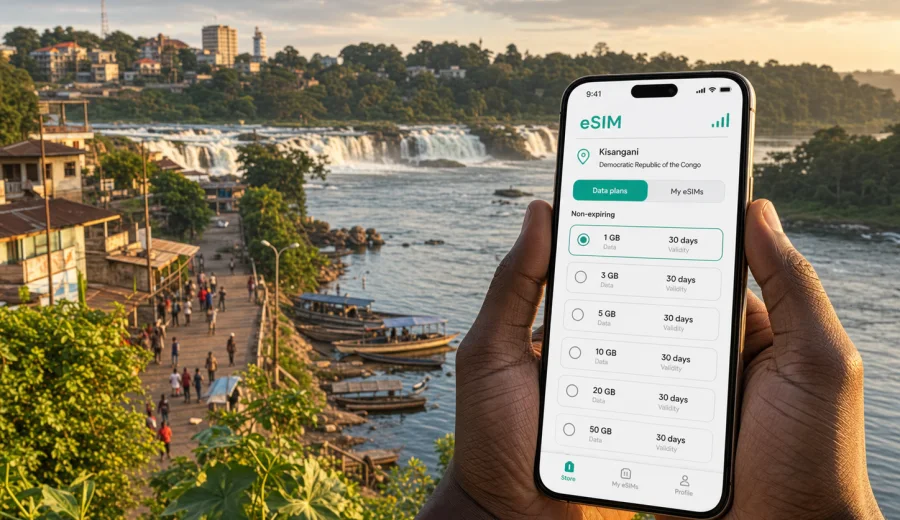
Kisangani eSIM: mobile connection and internet for your trip
Kisangani is a city where mobile internet matters from the first practical moment of the trip. You may arrive through Bangoka International Airport, continue toward a hotel near the city center, meet partners around the riverfront, visit the Tshopo area, or plan a short trip toward the Boyoma and Wagenia Falls. In each case, you need maps, messages, ride coordination, booking confirmations, mobile banking alerts, and the ability to check details without waiting for hotel Wi-Fi.
An eSIM can make that preparation simpler. Instead of looking for a physical SIM card after arrival, you can set up a digital SIM profile on a compatible phone and use a prepaid data tariff for the Democratic Republic of the Congo. For a Kisangani trip, that is useful because local movement can involve airport transfers, river routes, informal meeting points, and changing daily plans. Having mobile internet ready helps you keep the trip organized without turning your first stop into a search for connectivity.
This guide focuses on Kisangani itself: arrival, local movement, districts, hotels, business visits, stopovers, and day trips from the city. The country context matters because the eSIM tariff is selected for the Democratic Republic of the Congo, but the practical need is city-based: staying online while moving through Kisangani.
Why eSIM is useful in Kisangani
Kisangani sits by the Congo River and is one of the key urban centers in the northeast of the Democratic Republic of the Congo. It is a working city, not only a sightseeing stop. Travelers may come for trade, humanitarian work, research, university visits, logistics, government meetings, church or NGO projects, and onward travel deeper into Tshopo Province. The rhythm of the city makes mobile data useful in several ordinary situations:
- confirming a pickup from Bangoka International Airport;
- sharing a live location with a driver, colleague, or hotel;
- checking whether a route is passable after heavy rain;
- translating short messages when French, Swahili, Lingala, or another local language is used;
- keeping documents and booking confirmations available in cloud storage;
- coordinating a visit to the riverfront or the Boyoma Falls area;
- using messengers for calls when ordinary voice calls are not included in a data tariff;
- checking banking, expense, and work messages during a business day.
The main advantage of an eSIM is not that it changes how the city works. It gives you a more prepared starting point. If your phone supports eSIM and is not locked to one operator, you can install the profile before you travel or while you have reliable Wi-Fi, then activate it according to the tariff instructions. That helps you avoid using public Wi-Fi as your only backup for essential trip tasks.
Arrival: before and after Bangoka International Airport
Kisangani Bangoka International Airport is outside the central urban area, so the first leg of the trip usually involves a transfer into the city. This is when mobile internet can be especially useful. You may need to message your driver, find the correct pickup point, send your estimated arrival time, or confirm the hotel address before leaving the airport area.
Prepare the following before departure:
- save your hotel address offline and in the original language used by the property;
- take screenshots of your flight, booking, and contact details;
- add your driver, host, or local coordinator to a messenger app;
- download an offline map area for Kisangani as a backup;
- keep your main SIM available for banking SMS if your bank still uses text verification;
- check that your phone supports eSIM before you buy a digital tariff.
An eSIM tariff is usually focused on mobile data. It may not include a local phone number, standard voice calls, or SMS unless those options are specifically stated in the selected tariff conditions. For Kisangani, that means messengers are often the practical communication layer. If you expect ordinary calls, confirm your options before travel and keep your primary SIM available if you need it.
Where mobile internet helps inside the city
Kisangani is spread around river routes, commercial streets, administrative areas, university and hospital zones, and residential neighborhoods. A visitor may move between the airport road, the center, hotel areas, the Tshopo River, local offices, markets, and the riverbank. Distances can look simple on a map, but travel time may change with weather, road conditions, traffic, and the availability of reliable transport.
Mobile data helps most when you are between fixed Wi-Fi points. Hotel Wi-Fi can be useful, but it may not help when you are already in a vehicle, at a meeting, waiting near a river landing, or walking to a local appointment. With an eSIM profile set up, you can use your phone for route checks, translation, confirmation messages, and document access during those gaps.
| Trip moment in Kisangani | Why mobile data helps | Useful preparation |
|---|---|---|
| Airport transfer | Driver contact, address sharing, arrival updates | Save contacts and hotel location |
| Hotel check-in | Booking confirmation, payment alerts, ID document access | Keep files available offline too |
| Business meeting | Calendar updates, maps, shared documents | Sync key documents before travel |
| Riverfront visit | Navigation, photo backup, group coordination | Set a meeting point in advance |
| Day trip from the city | Route changes, weather checks, contact with guide | Download maps and keep power bank charged |
| Stopover | Fast messaging during limited time | Install eSIM before the flight if possible |
Choosing data for a Kisangani itinerary
The right data amount depends less on the city name and more on how you use your phone. A short business visit with hotel Wi-Fi needs less data than a trip with video calls, cloud backups, and frequent map use. Before choosing a tariff, think about how many days you will be in Kisangani, whether you will leave the city, and whether your work requires constant online access.
For many travelers, these scenarios are a useful starting point:
- Light use: messaging, maps, email headers, hotel and flight confirmations.
- Moderate use: navigation, translation, regular email, image sharing, messenger calls.
- Heavy use: video calls, cloud document sync, high-resolution photo backup, hotspot use for a laptop.
Avoid choosing only by price. Check the data volume, validity period, destination, activation rules, and whether tethering is allowed if you plan to connect a laptop. A prepaid eSIM tariff gives you clearer control because you can see the conditions before you use it. Still, the exact experience depends on the selected tariff, device settings, local network availability, and where you are in or around the city.
A practical setup checklist
Before you leave for Kisangani, use this checklist:
- Check whether your phone supports eSIM and confirm it is not locked to one mobile operator.
- Update your phone system before the trip, while you have stable Wi-Fi.
- Keep your primary SIM active if you need banking messages or calls from home.
- Save your hotel address, airport pickup details, and local emergency contacts offline.
- Download an offline map for Kisangani and nearby areas you plan to visit.
- Choose a data tariff for the Democratic Republic of the Congo with enough validity for your full stay.
- Install the eSIM profile before travel if the tariff instructions allow it, but follow the activation timing carefully.
- Bring a power bank, especially if you will use navigation, hotspot, or photography for a full day.
This is also the right point to decide how you will use your phone on arrival. Some travelers keep their primary SIM for calls and use eSIM for mobile data. Others switch mobile data fully to the eSIM and keep messenger apps as the main communication channel. Check the tariff details before deciding.
When to prepare the eSIM for Kisangani
For a city like Kisangani, the most comfortable setup is usually before departure or during a stable Wi-Fi session before you leave your departure airport. That way, you are not trying to install a digital profile while standing outside the terminal or relying on a weak hotel connection. If your eSIM tariff has specific activation rules, follow them carefully so that the validity period starts when you expect it to start.
If you want to prepare mobile internet before the trip, you can use Kaspersky eSIM Store to choose an eSIM tariff for the Democratic Republic of the Congo and review available data options for your travel dates. Kaspersky eSIM Store is an app and website that helps you choose, set up, and activate an eSIM with a suitable data tariff for international travel. It is not a mobile network operator, and the conditions of use depend on the tariff you select.
Once the eSIM is installed, do not delete it unless you are sure you no longer need it. In many cases, an installed eSIM profile cannot simply be moved to another device. If you are replacing your phone shortly before travel, finish the device change first and then set up the eSIM on the phone you will actually carry.
How to install and activate the eSIM
The exact steps depend on your device and the selected tariff, but the general flow is simple:
1. Choose the destination and data tariff for the Democratic Republic of the Congo.
2. Complete the purchase process and open the eSIM details in your account or app.
3. Install the eSIM profile using the provided QR code or in-app instructions.
4. Set the eSIM as the mobile data line when you are ready to use it.
5. Enable data roaming for the eSIM if the instructions for that tariff require it.
6. Check that mobile data is assigned to the eSIM and that your primary SIM is not using roaming data unexpectedly.
For device-specific setup, use the Android installation guide or the iOS installation guide. Follow the instructions on a stable Wi-Fi connection and keep the QR code or activation details available until setup is complete.
Before you activate, review the tariff validity period. Some data tariffs start when installed, while others start when the eSIM connects to a supported local network. Do not assume the timing; read the conditions shown for the selected tariff.
Local movement: maps, transport, and meeting points
Kisangani travel often depends on clear coordination. A visitor may not know local landmarks by name, while a driver may prefer a known hotel, church, office, market, bridge, or river point rather than a formal street address. Mobile internet lets you combine both approaches: you can share a pin, send a screenshot, and still keep the written address visible.
Use these habits for smoother movement:
- agree on the pickup point before you start moving;
- send a map pin and a short written description;
- keep the driver or host contact available in a messenger;
- avoid relying only on live maps; save offline maps as a backup;
- check the route again if heavy rain changes road conditions;
- keep enough battery for the return trip.
Hotels, guesthouses, and work trips
Hotel Wi-Fi in any city can vary by property, room location, power conditions, and number of users. In Kisangani, you should treat hotel Wi-Fi as helpful but not as your only connection method. If you travel for work, research, logistics, or meetings, an eSIM can provide a separate data option when you need to check a document, send a message, or join a short call away from the hotel network.
For business travelers, mobile internet is especially useful in these situations:
- moving between a hotel and a partner office;
- receiving a last-minute meeting room change;
- joining a messenger call from a vehicle or waiting area;
- scanning and sending receipts;
- checking shared documents before a meeting;
- using translation tools for short operational messages;
- reporting arrival and departure times to a team.
Short stays and stopovers
Some travelers pass through Kisangani for a short assignment or stopover rather than a long stay. In that case, the main value of prepared mobile internet is speed. You do not want to spend a limited visit comparing local options, finding a shop, or troubleshooting setup after arrival.
For a stopover, prepare a smaller but reliable setup:
- install the eSIM profile before departure if possible;
- save the exact time window for your transfer or meeting;
- keep the hotel, airport, and local contact in one offline note;
- use mobile data mainly for messaging, maps, and confirmations;
- avoid automatic cloud backups until you are on Wi-Fi;
- keep a second payment method available in case a card confirmation message is needed.
Trips from Kisangani
Kisangani can also be a base for nearby movement, including river-related visits, trips toward Boyoma and Wagenia Falls, and work outside the central area. Once you leave the most familiar urban routes, mobile data becomes useful for planning but should not be your only safety or navigation tool.
Before a day trip, do the following:
- confirm the route with a local guide, host, or trusted driver;
- save the meeting point and return time offline;
- download maps before leaving strong Wi-Fi;
- carry a charged power bank;
- avoid using mobile data for large uploads during the route;
- tell someone at your hotel or office when you expect to return.
Coverage and connection quality can vary by location, local network conditions, buildings, weather, and device settings. Keep your plans realistic: use mobile internet for coordination and updates, but do not depend on a live signal for every step of a route outside the city center.
How to save data during the trip
A well-chosen tariff is easier to manage if you control background usage. Before landing in Kisangani, check the apps that consume data without asking. Cloud photos, app updates, video autoplay, and large messenger downloads can use more data than maps and email.
Use these settings:
- disable automatic app updates on mobile data;
- pause cloud photo and video backup until Wi-Fi;
- turn off autoplay in social apps;
- download entertainment before the trip;
- set maps to use offline areas where possible;
- restrict laptop hotspot use unless your tariff allows it and you have enough data;
- monitor usage in your phone settings and in the app where your eSIM details are shown.
Common mistakes to avoid
The most common eSIM problems are usually preparation problems. You can avoid many of them before you travel:
- buying a tariff before checking device compatibility;
- assuming every eSIM includes a phone number;
- deleting the eSIM profile after installation;
- installing the eSIM on a phone you will not take to Kisangani;
- leaving your primary SIM selected for mobile data and triggering roaming charges;
- activating too early without checking the validity rules;
- relying only on live maps without offline backup;
- using hotspot heavily without checking whether it is allowed.
If the eSIM does not connect immediately after arrival, check the basics first: mobile data line, data roaming setting for the eSIM, airplane mode, network selection, and the installation status of the profile. Connection can take a few minutes and depends on the device and local network conditions.
Quick answers about eSIM in Kisangani
Can I use an eSIM for mobile internet in Kisangani?
You can use an eSIM if your device supports eSIM, is not operator-locked, and you choose a tariff that covers the Democratic Republic of the Congo. Check the tariff conditions before purchase.
Does an eSIM replace my regular SIM card?
Not necessarily. Many travelers keep their regular SIM for calls or banking messages and use the eSIM for mobile data abroad.
Will the eSIM include calls and SMS?
Usually, travel eSIM tariffs focus on mobile data. Calls and SMS are included only if the selected tariff states that clearly.
Should I install the eSIM before arriving in Kisangani?
It is often easier to install it before travel on stable Wi-Fi. Activation timing depends on the selected tariff, so check when the validity period starts.
Is hotel Wi-Fi enough for a Kisangani trip?
It may be enough for light use inside the hotel, but mobile data is useful during airport transfers, city movement, meetings, and trips outside fixed Wi-Fi locations.
Choose your eSIM setup before Kisangani
A Kisangani trip is easier when mobile internet is planned before the first transfer, not solved after arrival. Check your device, choose a data volume that matches your route, install the eSIM while you have stable Wi-Fi, and keep offline backups for maps and key documents.
Kaspersky eSIM Store helps you prepare an eSIM tariff for travel to the Democratic Republic of the Congo through its app or website, so you can arrive in Kisangani with a clearer mobile internet plan. Review the tariff details, install the profile on the device you will carry, and use mobile data for the city tasks that matter most: arrival, navigation, messages, meetings, and movement around the Congo River city.