
Travel connectivity guide
Klaksvik eSIM for mobile internet
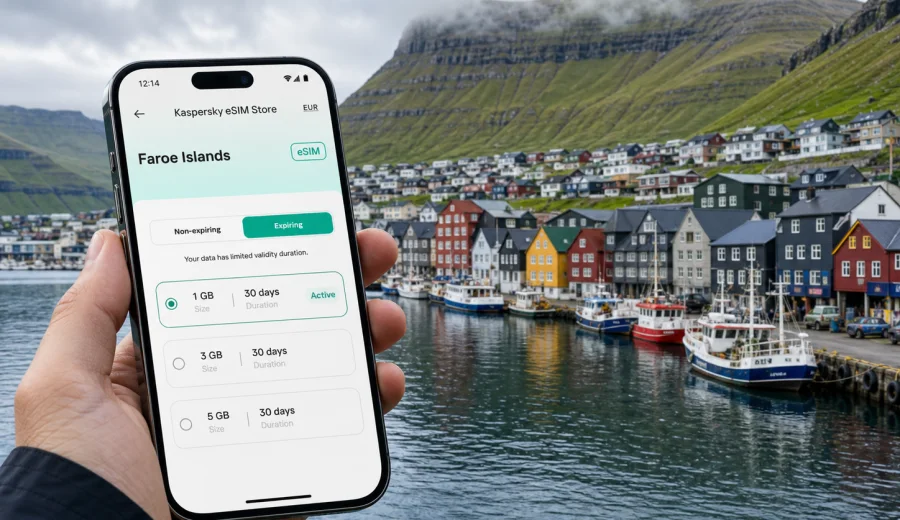
Klaksvik eSIM: mobile connection and internet for a trip to the Faroe Islands
Klaksvik is a compact harbor town, but a trip here can be surprisingly demanding on mobile internet. You may arrive after a long route from Vagar Airport, cross tunnels between islands, check ferry times for Kalsoy, follow weather updates before a hike, and keep hotel, car rental, and restaurant details close at hand. An eSIM can make that first day simpler because you do not have to search for a physical SIM card after arrival.
This guide is focused on Klaksvik, not only on the Faroe Islands in general. It explains where mobile data is useful in and around the city, how to estimate your data needs, what to check before buying an eSIM plan, and how to prepare your phone before you start moving between the Northern Islands.
Kaspersky eSIM Store is an app and website where you can choose, arrange, and activate an eSIM with a suitable data plan for mobile internet in an international trip. It is not a mobile operator and does not replace local network conditions, but it can help you prepare a practical internet setup before you travel.
Why mobile internet matters in Klaksvik
Klaksvik is the main town in the Northern Islands and a natural base for travelers going to Kalsoy, Kunoy, Vidareidi, and smaller villages nearby. The town has hotels, guesthouses, cafes, a harbor area, shops, and road links through tunnels, yet many of the best travel moments happen outside dense urban streets. That is exactly where a working data plan becomes useful.
You may need mobile internet in Klaksvik for:
- navigation from your accommodation to the harbor, trailheads, supermarkets, and viewpoints;
- ferry and bus schedule checks, especially when weather affects plans;
- messaging your hotel, host, driver, guide, or travel companions;
- online check-in, boarding passes, booking confirmations, and payment notifications;
- weather, wind, and visibility updates before drives, boat trips, or hikes;
- translation, maps, restaurant searches, and route planning;
- work calls or document access during a business visit or remote-work stay.
Klaksvik is easy to walk in the center, but the wider travel pattern is not only walking. Visitors often combine the town with road trips, tunnels, ferries, and stops in villages where you may not want to depend on public Wi-Fi. An eSIM helps you keep mobile data ready for those transitions.
Arrival scenarios: from Vagar Airport to Klaksvik
Most international visitors enter the Faroe Islands through Vagar Airport, then continue toward Streymoy, Eysturoy, and Bordoy. Klaksvik is reached by road through tunnels and causeways, and many travelers arrive by rental car, bus, or arranged transfer. Mobile internet is useful before you even see the town.
In the arrival phase, a working eSIM can help with:
| Moment | Why data helps |
|---|---|
| Leaving the airport | Check rental details, messages, maps, and route changes. |
| Crossing between islands | Keep navigation active through a route with tunnels and changing weather. |
| Finding your stay | Open map pins, door codes, host messages, and parking instructions. |
| Late arrival | Confirm restaurant hours, fuel stops, or supermarket options. |
| First evening in Klaksvik | Share arrival updates and plan the next day's ferry or drive. |
If you plan to activate mobile data only after reaching the town, make sure you can access your eSIM installation details offline or through secure Wi-Fi. A more reliable approach is to install the eSIM before departure, then enable it when the plan conditions and your travel timing make sense.
Local movement in Klaksvik
Klaksvik is not a large city, but it is layered around the harbor, residential slopes, industrial waterfront areas, and road connections to nearby islands. A map app is useful because the most direct route on foot may differ from the best driving route. Weather can also change how comfortable a walk feels, so checking conditions before leaving your accommodation is sensible.
Mobile data can support everyday city movement in several practical ways:
- walking from the harbor to cafes, shops, and viewpoints;
- checking whether a restaurant or service is open before you go;
- finding parking near your accommodation or the waterfront;
- coordinating pickup points with a guide or local host;
- checking route options before driving through tunnels;
- saving map pins for viewpoints and trail starts around the Northern Islands.
Offline maps are still worth downloading before the trip. They reduce data use and help if signal is weaker in a tunnel, on a remote road, or during a temporary local network issue. Treat the eSIM as your main travel data layer and offline tools as a backup.
Klaksvik travel use cases for eSIM
Different travelers use mobile data differently. A short stay in Klaksvik may need only light navigation and messaging. A longer trip with hikes, ferries, photo uploads, and remote work can use much more data.
| Traveler type | Typical data needs in Klaksvik | Practical eSIM approach |
|---|---|---|
| Stopover visitor | Maps, messages, ferry checks, hotel details | Choose a smaller data plan if you will not stream or work online. |
| Road-trip traveler | Navigation, weather, route changes, bookings | Prioritize enough data for several days of map and planning use. |
| Hiker or photographer | Weather, maps, uploads, cloud backup | Download maps offline and save large uploads for Wi-Fi. |
| Business traveler | Email, calls, documents, calendar updates | Choose a plan with enough data for tethering if the plan allows it. |
| Family trip | Messaging, transport, kid-friendly searches, shared logistics | Plan for multiple devices or choose who will keep mobile data active. |
The right plan depends on your actual usage, not only the city name. If you mainly use maps and messaging, you can keep data consumption moderate. If you stream video, back up photos, or use a laptop through hotspot mode, you will need a larger allowance and should check whether tethering is permitted in the selected plan.
How much data do you need for Klaksvik?
There is no universal number because travel behavior varies. The most practical method is to list what you expect to do on mobile data and remove anything you can safely move to Wi-Fi.
Use this quick estimate:
- Light use: messaging, email checks, maps, tickets, weather, and occasional browsing.
- Medium use: daily navigation, regular searches, social media, photo sharing, and messaging calls.
- Heavy use: video streaming, large photo or video uploads, laptop tethering, work meetings, or cloud backups.
For Klaksvik, many visitors fall between light and medium use if they download offline maps, avoid video streaming on mobile data, and use hotel Wi-Fi for large uploads. Business travelers and remote workers should assume a higher data buffer because weather, transport, and schedule changes can push more work onto mobile data than expected.
Choosing an eSIM plan for Klaksvik
For a city article, the correct destination is the country where the city belongs. Klaksvik is in the Faroe Islands, so you should choose a plan that covers the Faroe Islands rather than looking for a separate city plan. Review the destination, data allowance, validity period, activation rules, and any hotspot conditions before you pay.
A useful selection checklist:
1. Confirm that the destination is the Faroe Islands.
2. Match the validity period to your full stay, including arrival and departure days.
3. Choose a data allowance based on your real usage.
4. Check when the plan becomes active and when data use starts.
5. Review whether tethering is allowed if you need laptop access.
6. Keep installation details available before you leave home.
When you are ready to compare options, you can choose an eSIM plan for your trip to Klaksvik and the Faroe Islands in Kaspersky eSIM Store.
Compatibility checks before you buy
Before arranging an eSIM, check whether your phone or tablet supports eSIM and is not locked to a single carrier. This matters more than the destination, because an incompatible or locked device cannot use an eSIM profile in the expected way.
Check your device before purchase if you are unsure. Also verify that your operating system is up to date enough to manage eSIM profiles reliably, and that you know where your phone stores mobile data, roaming, and SIM settings.
For a Klaksvik trip, it is also worth deciding what happens to your regular SIM. Many travelers keep their home SIM active for calls or SMS and use the eSIM for mobile data. If you do this, check your phone settings carefully so mobile data uses the eSIM profile and your home line does not create unwanted roaming charges.
Installing eSIM before departure or after arrival
The easiest travel routine is to install the eSIM while you still have stable internet at home or in your hotel before the travel day. Activation timing can depend on the selected plan, so read the plan conditions before switching it on. After purchase, follow the instructions shown in your profile, app, or email.
For step-by-step setup, use the official installation guides: Android instructions and iOS instructions. Keep the QR code or manual installation details accessible until the eSIM is installed.
A simple setup sequence:
1. Check that the device supports eSIM and is unlocked.
2. Choose the Faroe Islands as the destination.
3. Select the data allowance and validity period.
4. Install the eSIM using the displayed instructions or QR code.
5. Label the eSIM profile clearly, for example "Faroe data".
6. Set mobile data to the eSIM profile when you are ready to use it.
7. Enable data roaming for the eSIM profile if the plan instructions require it.
8. Test basic browsing or messaging after arrival.
Do not delete the eSIM profile unless you are sure you no longer need it. Some eSIM profiles cannot be moved or reinstalled after activation, depending on the plan conditions and device behavior.
Practical data habits in Klaksvik
Good data habits make a smaller plan go further and reduce stress during a trip. Klaksvik is a place where you may take many photos, check weather repeatedly, and navigate between small communities. These are normal travel uses, but background apps can consume data quietly.
Before you travel, adjust these settings:
- download offline maps for the Faroe Islands and your Klaksvik area pins;
- turn off mobile data for apps that do not matter during the trip;
- pause automatic cloud photo and video uploads on mobile data;
- disable automatic app updates over mobile data;
- save hotel, ferry, rental, and insurance documents offline;
- decide which messenger and map app you will rely on if plans change quickly.
During the trip, check data consumption after the first day. If you use more than expected, shift heavy tasks to hotel Wi-Fi and keep mobile data for maps, transport, messages, and essential browsing.
Transport, ferries, and day trips from Klaksvik
Klaksvik is a strong base for Northern Islands routes. Travelers often use it for trips to Kalsoy, Kunoy, Vidareidi, and scenic drives around Bordoy. Some of these plans depend on ferry times, road conditions, weather, and daylight. Mobile internet gives you more flexibility when the plan changes.
For ferry days, use mobile data to:
- check the latest schedule before leaving your accommodation;
- coordinate where to queue or meet other travelers;
- keep confirmation messages accessible;
- update your route if a sailing, bus, or pickup time changes;
- message your hotel if you return later than expected.
For drives outside Klaksvik, mobile data helps with navigation and weather, but do not rely on it as your only safety layer. Download maps and allow extra time, because fog, wind, tunnels, ferries, and narrow roads can change the rhythm of a day.
Hotels, guesthouses, and remote work
Accommodation Wi-Fi is useful, but it should not be your only internet plan. You may need data before check-in, after check-out, or while moving between meetings, cafes, and viewpoints. If you work during the trip, mobile data can also be a backup when Wi-Fi quality varies.
For a work-focused stay in Klaksvik, check:
- whether your selected eSIM plan allows hotspot use;
- how much data video calls usually consume for your meeting schedule;
- whether you can move large file transfers to Wi-Fi;
- whether your workplace authentication requires SMS on your home number;
- whether your phone can keep both your regular SIM and eSIM active.
For business travelers, the main value of eSIM is not only convenience. It is predictability. You can arrange the plan before the trip, see the data allowance and validity period, and avoid making connectivity decisions at the airport or after a late arrival in the Northern Islands.
Short stays and stopovers
Klaksvik can be part of a compact Faroe Islands itinerary. You might spend one night in town before a Kalsoy day trip, arrive for a meeting, or use Klaksvik as a route stop while driving north. In these cases, you need mobile internet for a concentrated set of tasks rather than constant heavy use.
For a one- or two-day stay, prioritize:
1. navigation from Vagar Airport or Torshavn to Klaksvik;
2. accommodation access details;
3. ferry or bus timing;
4. weather and visibility checks;
5. messaging with hosts, guides, or travel partners;
6. digital tickets and booking confirmations.
If your trip continues around the Faroe Islands, choose the plan for the whole destination period, not just the nights in Klaksvik. A plan that ends before your final travel day can create problems when you need maps, boarding passes, or messages on the way back to the airport.
What to do if mobile data does not work at first
If the eSIM is installed but mobile data is not working, check the basics calmly before assuming something is wrong with the plan. Device settings are a common cause of first-use issues.
Try this sequence:
1. Confirm that the eSIM profile is installed and turned on.
2. Make sure mobile data is assigned to the eSIM profile.
3. Enable data roaming for the eSIM profile if the plan instructions say it is required.
4. Turn airplane mode on and off.
5. Restart the phone if the profile still does not register.
6. Check that you have not exhausted the data allowance or reached the end of the validity period.
7. Contact support if the issue continues.
Avoid deleting the eSIM profile while troubleshooting unless support or the plan instructions tell you to do so. Removing the profile can make recovery harder on some devices.
Quick preparation checklist for Klaksvik
Use this checklist before leaving for the Faroe Islands:
- eSIM-compatible, unlocked phone confirmed;
- Faroe Islands destination plan selected;
- validity period covers arrival, Klaksvik stay, day trips, and departure;
- installation instructions saved;
- mobile data and roaming settings understood;
- offline maps downloaded;
- ferry, hotel, rental, and booking details saved offline;
- home SIM roaming settings checked;
- power bank packed for long photo and navigation days;
- data-heavy app updates and cloud backups paused on mobile data.
This preparation is especially useful in Klaksvik because plans can change with weather, ferries, and daylight. Having mobile internet ready keeps the practical parts of the trip easier to manage.
FAQ about eSIM in Klaksvik
Is there a separate eSIM plan for Klaksvik?
Usually you choose coverage by country or region. For Klaksvik, select the Faroe Islands as the destination and check the plan conditions before purchase.
Can I use eSIM for calls and SMS?
Many travel eSIM plans are focused on mobile data. Calls and SMS are not included unless the selected plan states otherwise. You can use internet-based messaging and calling apps over mobile data.
Should I install eSIM before I fly?
Installing before departure is often easier because you have stable internet and time to follow the steps. Activation timing depends on the chosen plan, so review the instructions before switching it on.
Will eSIM replace hotel Wi-Fi?
It can be a useful mobile data layer, but hotel Wi-Fi is still practical for large uploads, streaming, and app updates. Use eSIM for movement, maps, messages, and essential online tasks.
Can I keep my regular SIM active?
On many compatible phones, yes. You can often keep your regular SIM for calls or SMS and use the eSIM for data. Check device settings to avoid unwanted roaming charges.
What if I visit other Faroe Islands towns after Klaksvik?
Choose the destination and validity period for your whole itinerary. If your route includes Torshavn, Vagar, Eysturoy, or other islands, the plan should cover the full travel period in the Faroe Islands.
Choose mobile internet for your Klaksvik trip
A trip to Klaksvik is easier when your phone is ready for maps, ferry checks, weather updates, messages, bookings, and route changes. eSIM is a practical way to prepare mobile internet for the Faroe Islands without looking for a physical SIM card after arrival.
Before you travel, check device compatibility, choose a data allowance that matches your plans, install the eSIM while you have stable internet, and keep offline backups for maps and documents. Then use mobile data for the moments that matter most: arrival, local movement, ferries, day trips, and staying reachable in the Northern Islands.
You can prepare an eSIM plan for Klaksvik and the Faroe Islands in Kaspersky eSIM Store and review the available data options before your trip.