
Travel connectivity guide
Koh Rong eSIM: Mobile Internet in Cambodia
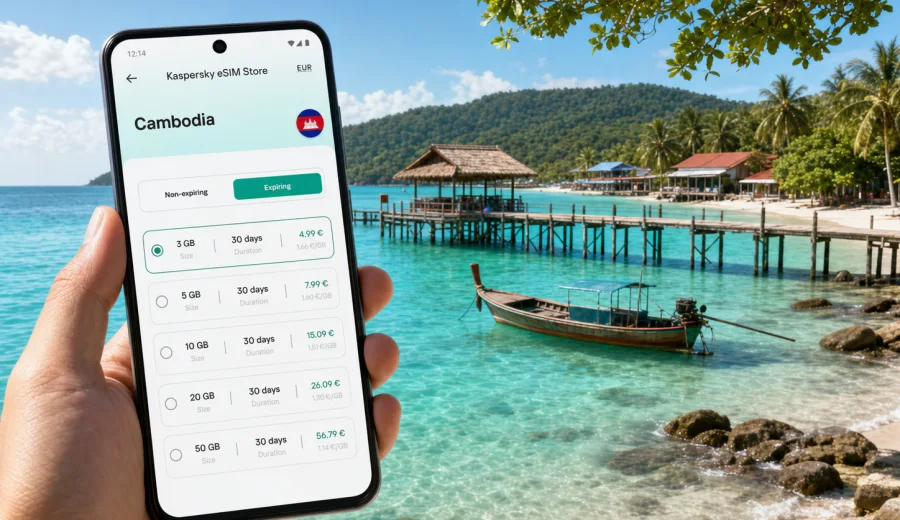
Koh Rong eSIM: mobile connection and internet for your island trip
Koh Rong is an island destination where mobile internet quickly becomes part of the travel plan. You may arrive through Sihanoukville, find the correct ferry pier, message your accommodation, check a boat time, follow a map to the right beach, or confirm a transfer before the next stage of the trip. An eSIM helps you prepare mobile data for Cambodia before these small but important decisions begin.
For Koh Rong, the question is not only whether you can get online. It is whether you can get online at the right moments: on the mainland before boarding, at the pier after arrival, between beach areas, when hotel Wi-Fi is weak, or when a return boat time changes. A travel eSIM can reduce your dependence on public Wi-Fi and make arrival, navigation, bookings, messages, and everyday movement easier.
Kaspersky eSIM Store is an app and website where you can quickly choose, arrange, and activate an eSIM with a suitable data plan for mobile internet during an international trip.
Why mobile internet matters in Koh Rong
Koh Rong is not a dense city with predictable transport stops. It is a beach and island destination where your phone supports practical travel: finding a pier, opening hotel instructions, checking boat details, using maps between beaches, keeping booking confirmations close, and messaging friends if your group splits up.
Mobile data is especially useful for:
- arrival in Sihanoukville and transfer to the ferry or speedboat pier;
- contact with hotels, guesthouses, and boat pickup points;
- maps around Koh Touch, Long Set Beach, Sok San, and quieter bays;
- restaurant, tour, and activity planning during the day;
- translation, banking, payments, and travel documents;
- messaging family, friends, or colleagues from the island;
- return travel from Koh Rong to the mainland.
Arrival: mainland, pier, and first hours on the island
Many travelers reach Koh Rong by first traveling to Sihanoukville and then taking a boat to the island. Your mobile connection can matter before you even see the beach, because the most time-sensitive tasks often happen on the mainland: finding the pier, checking a message from the hotel, confirming a boarding point, or saving the return schedule.
Before the travel day, save the ferry company name, the pier or meeting point, your hotel area, booking confirmations, return boat time, accommodation contact, and offline maps for Sihanoukville and Koh Rong. Arrival can be fragmented: you may land, take a car, walk to a pier, board a boat, and reach a beach area where Wi-Fi is not immediately available. With mobile data prepared in advance, essential apps can keep working through these transitions.
Travel tasks that use data in Koh Rong
| Task | Why internet helps | Data note |
|---|---|---|
| Ferry and transfer coordination | Check boarding points, messages, and timing | Light data use, but important |
| Maps between beaches | Find piers, paths, restaurants, and hotel areas | Download offline maps first |
| Hotel contact | Confirm arrival time or pickup details | Messaging usually uses little data |
| Restaurant and activity planning | Check tours, menus, and opening times | Moderate use if you browse photos |
| Remote work or email | Send files, join calls, review documents | Choose more data if work is planned |
| Photo backup and sharing | Upload images or short video | Can use a lot of data |
This is why a Koh Rong eSIM plan should match your real route. A light traveler may mainly need maps and messages. A remote worker or group may need more data for calls, documents, coordination, and shared bookings.
Where eSIM can help around the island
Different parts of Koh Rong create different connectivity needs. Near Koh Touch, data is useful for arrivals, restaurants, boat trips, and moving between guesthouses. Around Long Set Beach, it helps with hotel directions, pickup instructions, and activity planning. Near Sok San and quieter bays, mobile data is useful as a backup, but you should still save essential information offline because signal and Wi-Fi quality can vary by exact location, weather, building, and local network conditions.
If your hotel is in a quiet bay, ask in advance how arrival works. Some stays involve boat transfers or beach pickup points. Do not depend on one app or one connection method for critical travel details.
How to choose an eSIM plan for Koh Rong
Start with the full Cambodia route, not only the island. You may use mobile data in Phnom Penh, Sihanoukville, on the way to the pier, on Koh Rong, and again when returning to the mainland. Check whether the plan is for Cambodia, a wider region, or a global route, and compare data volume, validity period, price, and activation rules before you arrange it.
Practical planning:
- 1 to 3 days: maps, ferry details, hotel messages, light browsing;
- 4 to 7 days: beach movement, restaurant searches, activity planning, social apps;
- 8 days or more: longer validity, more data, and attention to top-up options;
- remote work: more data for email, calls, and documents;
- group travel: enough data for coordination, maps, and shared bookings.
At this stage, you can use Kaspersky eSIM Store to choose an eSIM plan for your trip to Cambodia and prepare mobile internet before the island part of your route. Koh Rong belongs to Cambodia, so the Cambodia destination page is the right place to start for this city article.
When to prepare your eSIM
For Koh Rong, preparing before arrival is usually easier than trying to solve connectivity while moving between airport, road transfer, pier, and boat. Install the eSIM while you have stable internet at home or in a hotel, then activate mobile data according to the plan instructions when you are ready to use it.
Before departure, confirm that your phone supports eSIM, make sure it is not locked to one carrier, choose Cambodia as the destination if Koh Rong is part of your Cambodia trip, compare data volume and validity, and save ferry, hotel, and travel documents offline. Keep your primary SIM active if you need your usual number for calls or banking messages.
How to install and activate eSIM for the trip
The exact flow depends on your device, operating system, and selected plan, but the general process is simple. Choose a destination and plan, complete the setup flow, install the eSIM profile, and select it for mobile data when you want to use it.
Step-by-step:
1. Check that your device supports eSIM and is not carrier-locked.
2. Choose a suitable data plan for Cambodia or your wider route.
3. Connect your phone to stable Wi-Fi before installation.
4. Follow the instructions shown after the plan is arranged.
5. Add the eSIM profile to your device.
6. Select the eSIM for mobile data when you are ready.
7. If needed, enable data roaming for the eSIM profile according to the plan instructions and device settings.
8. Wait a few minutes for the device to register on an available local mobile network.
If you need device-specific guidance, use the Android installation instructions or the iOS installation instructions. Install the eSIM while you have a stable connection and avoid deleting the eSIM profile unless the instructions or support team tell you to do so.
Device compatibility before you go
Not every phone or tablet supports eSIM, and some models differ by region of sale. Before arranging a plan, check your device compatibility. Also confirm that the device is not locked to a specific carrier, because a locked device may not allow another mobile profile to work correctly.
For Koh Rong, this check is worth doing early. If you find a compatibility issue after reaching the island, your alternatives may be less convenient: public Wi-Fi, a physical SIM search on the mainland, or relying on someone else's hotspot. A few minutes of preparation can prevent a practical problem during arrival.
How much data do you need?
There is no single correct number because data use depends on habits, app settings, and whether you work during the trip. Essential use includes maps, ferry and hotel messages, transport apps on the mainland, banking, payment confirmation, email, travel documents, translation, and emergency contact. High-data use includes cloud photo backup, video calls, streaming, large app updates, hotspot sessions, and uploading high-resolution videos.
To conserve data, download maps before departure, update apps on Wi-Fi, pause automatic cloud backups, reduce video quality, use reliable Wi-Fi for large uploads, monitor data use in phone settings, and close navigation apps when you no longer need them.
Hotels, beaches, and remote work
Koh Rong can be a place to disconnect, but many travelers still need access at specific times: a work call, payment confirmation, family message, or route check for the next morning. An eSIM does not guarantee perfect signal in every corner of the island, but it gives you another way to get online when Wi-Fi is weak, crowded, or unavailable.
For remote work, ask your accommodation about Wi-Fi before booking, keep important documents offline, test mobile data before a scheduled call, avoid relying on one connection for urgent work, keep a power bank charged, and choose enough data for email, calls, and file access. If you need to use a laptop, check the plan terms and device settings before using hotspot mode.
Local movement and offline backup
Koh Rong movement can involve walking paths, beach routes, small boats, hotel pickups, and mainland transfers. Mobile data helps when plans change, but it should work together with offline preparation. Save your accommodation, pier, return meeting point, hotel instructions, ferry tickets, QR codes, emergency contacts, and travel insurance details. eSIM helps you stay more flexible, while offline preparation keeps essential information available even if the connection drops.
Short stays and multi-stop Cambodia trips
Some travelers visit Koh Rong for only two or three nights as part of a wider Cambodia route. In that case, your eSIM should cover the full sequence: arrival in Phnom Penh or Sihanoukville, transfer to the pier, boat to Koh Rong, return to the mainland, and onward travel to Siem Reap, Kampot, or another country. For a regional route, compare whether a Cambodia plan is enough or whether a wider option is more suitable.
What eSIM does not replace
A travel eSIM is mainly for mobile internet. Unless a selected plan states otherwise, it usually does not include a regular phone number, traditional voice calls, or SMS. You can still use internet-based calling and messaging apps over mobile data.
Keep your primary SIM active if you need bank verification messages, calls to your usual number, SMS from services at home, or two-factor authentication tied to your existing number. On many phones, you can keep your primary SIM for calls and messages while using the eSIM for mobile data.
eSIM, roaming, Wi-Fi, and physical SIM
| Option | Good for | Watch out for |
|---|---|---|
| Travel eSIM | Preparing mobile data before or soon after arrival | Requires a compatible, unlocked device |
| Standard roaming | Keeping your usual mobile number active | Costs and data limits depend on your home plan |
| Public or hotel Wi-Fi | Large downloads and relaxed browsing | Quality, availability, and security can vary |
| Physical local SIM | Longer stays or users who need a local number | Requires finding a sales point and changing SIM setup |
FAQ: eSIM for Koh Rong
Is eSIM useful for Koh Rong?
Yes. eSIM can be useful for mobile internet during arrival, ferry transfers, hotel coordination, navigation, messaging, and island movement.
Should I choose a Koh Rong plan or a Cambodia plan?
Choose the destination plan for Cambodia if that matches your route and the available options. Koh Rong is in Cambodia, so the country destination is the relevant plan page.
Can I install eSIM after I arrive on the island?
You may be able to install it after arrival if you have reliable Wi-Fi or mobile data, but it is usually easier to install the eSIM before the trip or before boarding the boat.
Will eSIM include calls and SMS?
Usually no, unless the selected plan states otherwise. eSIM plans in Kaspersky eSIM Store are intended for mobile internet in international travel. For calls and messages, use internet-based apps or keep your primary SIM active.
Can I rely only on hotel Wi-Fi?
Hotel Wi-Fi may be enough at the property, but mobile data is helpful when you are moving between piers, beaches, restaurants, and transfers.
What should I check before arranging an eSIM?
Check device compatibility, carrier lock status, destination, data volume, validity period, activation rules, and whether your route stays within Cambodia or crosses into another country.
Final checklist before your Koh Rong trip
Before leaving for Koh Rong, make sure your phone supports eSIM, your Cambodia data plan matches the trip length, the eSIM is installed on reliable Wi-Fi, ferry tickets and maps are saved offline, primary SIM settings are checked, and a power bank is charged.
Koh Rong is easier to enjoy when practical travel details are handled before you reach the island. Prepare mobile data, save the essentials offline, and keep your phone ready for arrival, maps, transfers, hotel contact, and messages home. To set up mobile internet for the trip, choose an eSIM plan for Cambodia in Kaspersky eSIM Store before you travel or while you still have a reliable connection.