
Travel connectivity guide
eSIM Kosovo: mobile internet for travel
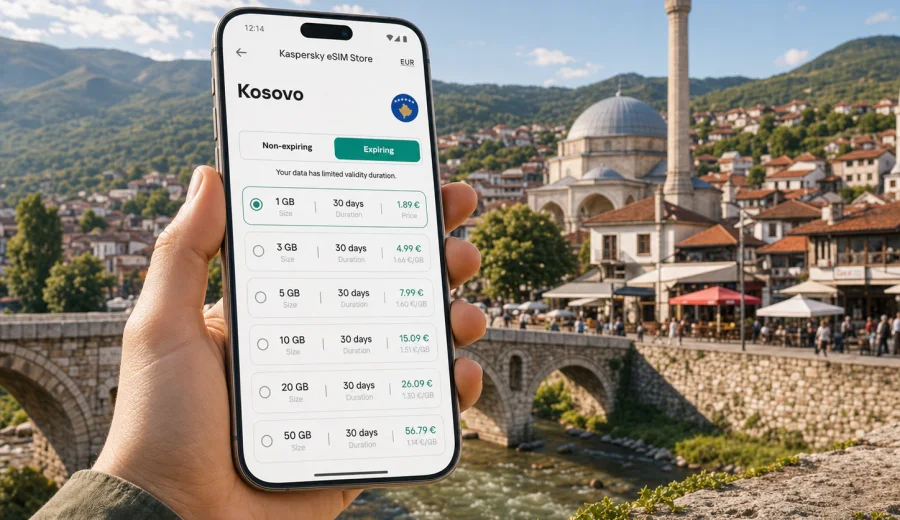
eSIM for Kosovo: mobile connection and internet for your trip
If you are planning a trip to Kosovo, mobile internet can become useful before the trip has really started: at Pristina airport, during the transfer to your hotel, when opening maps, checking a booking, messaging a driver, or sending your arrival time to family. An eSIM can make these first moments easier because you do not need to buy, insert, or keep a physical SIM card. You choose a suitable data plan for the trip, install the eSIM profile on a compatible device, and use mobile data when you need it.
Kosovo is a compact destination, but travel scenarios vary. Some visitors stay mostly in Pristina for meetings and city breaks. Others continue to Prizren, Peja, Gjakova, the Rugova area, or nearby Balkan countries. In each case, the question is practical: how much data do you need, how long should the plan stay active, and when is the best time to install the eSIM?
This guide explains how to prepare mobile connection and internet for Kosovo with eSIM, what to check before choosing a plan, how installation usually works, and how to avoid common mistakes. The focus is mobile data for travel, not a replacement for a local phone contract.
Why eSIM is useful for travel in Kosovo
An eSIM is a digital SIM profile built into a compatible smartphone or tablet. For travel, it is mainly used for mobile data. That means you can keep your regular SIM for calls or SMS if your device supports dual SIM use, while the eSIM handles internet access during the trip.
For Kosovo, this can be useful in several everyday situations:
- You arrive at Pristina International Airport and need maps, transport details, or a hotel address.
- You travel between Pristina, Prizren, Peja, Gjakova, Mitrovica, or smaller towns and want navigation available on the road.
- You use messaging apps to coordinate with hosts, colleagues, friends, or drivers.
- You need translation, restaurant information, museum hours, or booking confirmations during the day.
- You want to depend less on public Wi-Fi in airports, cafes, hotels, and bus stations.
- You are combining Kosovo with Albania, North Macedonia, Montenegro, Serbia, or a wider European route and need to plan data coverage carefully.
The main advantage is preparation. You can review the plan conditions before departure instead of solving internet access under time pressure after arrival. You see data volume, validity period, destination, and price before choosing the plan.
What an eSIM for Kosovo does and does not include
Travel eSIMs are usually designed for data. This point matters because many problems come from expecting an eSIM to behave like a full local mobile subscription.
| Feature | What to expect |
|---|---|
| Mobile data | The main use case for maps, messaging, browsing, bookings, email, and apps. |
| Phone number | Usually not included unless the selected plan clearly says otherwise. |
| Voice calls and SMS | Not usually included in data-only travel plans. Use internet-based messengers if suitable. |
| Physical SIM replacement | No plastic SIM card is needed, but the device must support eSIM. |
| Local network access | Depends on the selected plan, local mobile networks, device settings, and conditions in the area. |
| Unlimited certainty | Do not assume the same speed, signal, or availability in every building, road, or mountain area. |
In practice, mobile data is enough for many travel tasks: navigation, ride apps, messaging, email, cloud documents, QR tickets, and travel research. If you need a traditional phone number for local calls, check the plan conditions before choosing it.
Who should consider eSIM mobile internet in Kosovo
An eSIM can fit different travel styles. The right plan depends less on the country itself and more on how you use data.
| Travel profile | Typical data use | Practical priority |
|---|---|---|
| Short city break | Maps, messenger, restaurant search, booking details | Clear validity period and moderate data volume |
| Business trip | Email, calendars, messengers, documents, occasional calls | Reliable backup for hotel or office Wi-Fi |
| Family visit | Messaging, navigation, social apps, photo sharing | Enough data for daily communication |
| Balkan road trip | Maps, border route planning, hotel changes, translation | Check whether country or regional options fit the full route |
| Remote work add-on | Laptop hotspot, file sharing, video meetings | Larger data allowance and careful hotspot control |
If you mostly use maps and messaging, a modest data volume may be enough. If you stream video, upload photos automatically, or use your phone as a hotspot for a laptop, data can disappear much faster. Before choosing a plan, check your phone settings to see which apps used the most mobile data on recent trips.
How to choose an eSIM plan for Kosovo
Start with the route, not the gigabytes. A plan that looks generous can still be a poor fit if its validity period is too short or the destination does not match your trip. A smaller plan can be enough if you prepare offline maps and avoid video-heavy apps.
Use this sequence:
1. Define the route: only Kosovo, Kosovo plus nearby countries, or a wider European itinerary.
2. Estimate the number of days when you will need mobile data.
3. Check your usual data habits in iOS or Android settings.
4. Decide whether hotspot use is necessary.
5. Review plan conditions: data volume, validity, destination, price, and activation rules.
6. Confirm that your device supports eSIM and is not locked to one mobile operator.
For a short stay, maps, messengers, and browsing usually need much less data than streaming or cloud backups. For a week with daily navigation and social apps, choose more space. For work, hotspot use, or frequent media upload, plan more carefully and disable background data where possible.
When your travel dates and route are clear, you can choose an eSIM plan for Kosovo in Kaspersky eSIM Store and compare the available data volume, validity period, and destination conditions before installation.
What to check before choosing a plan
The most important check is device compatibility. Not every phone supports eSIM, and some eSIM-capable phones may be locked by a mobile operator. Some models also differ by sales region, so the name of the device alone is not always enough.
Before you continue, check your device and confirm these points:
- Your smartphone or tablet supports eSIM.
- The device is not carrier-locked in a way that blocks another mobile data profile.
- The operating system is up to date enough for eSIM setup.
- You have a stable internet connection for installation.
- You understand when the plan validity starts.
- The data volume matches your expected use.
- The destination or region matches your actual itinerary.
- You know which SIM line will handle mobile data after activation.
This short check can prevent the most common travel problem: choosing a data plan and then discovering at the airport that the device cannot install or use an eSIM profile.
When to install and activate your eSIM
Many travelers prefer to install the eSIM before departure while they still have a stable home Wi-Fi connection. That is often convenient, but you should read the plan conditions first. Depending on the plan, validity may begin after installation, after activation, or after the first connection in the destination area.
A practical setup flow looks like this:
1. Check device compatibility.
2. Choose the destination or region that matches the trip.
3. Review data volume, validity, and activation details.
4. Install the eSIM profile using the on-screen steps or QR code.
5. Name the line clearly, for example "Kosovo travel".
6. Keep your primary SIM active if you need it for calls or SMS.
7. Select the eSIM as the line for mobile data when you are ready to use it.
8. Enable data roaming for the eSIM if your device or instructions require it.
For step-by-step setup, use the Android installation guide or the iOS installation guide. Menu names can vary by phone model and operating system version, so follow both the guide and the prompts shown on your device.
Planning data volume for Kosovo
The right amount of data depends on behavior. The table below is a planning aid, not a fixed recommendation.
| Activity | Data impact | How to control it |
|---|---|---|
| Maps and navigation | Low to moderate | Download offline maps before travel. |
| Text messaging | Low | Keep media auto-download limited. |
| Voice messages | Moderate | Use when needed, but avoid large group media downloads. |
| Email and calendar | Low to moderate | Download large attachments on Wi-Fi. |
| Social media | Medium to high | Turn off video autoplay. |
| Video calls | High | Use stable Wi-Fi when possible. |
| Streaming video | Very high | Avoid on mobile data if the plan is limited. |
| Laptop hotspot | Variable, often high | Disable system updates and cloud sync before tethering. |
If you are staying mostly in Pristina or Prizren and use data for maps, messages, and booking details, you may not need a very large plan. If you plan to work from cafes, share a hotspot, or upload many photos and videos, choose more data and monitor consumption daily.
Where Kaspersky eSIM Store fits into the trip
Kaspersky eSIM Store is an app and website where you can quickly choose, arrange, and activate an eSIM with a suitable mobile data plan for an international trip. The useful part is the clear workflow: select a destination, review plan conditions, install the eSIM on a compatible device, and manage the profile for travel.
For Kosovo, the best moment to do this is after you know your route and travel dates, but before the departure day. That gives you time to compare data volume and validity without rushing.
When your trip plan is clear, review the available conditions before installation. If Kosovo is part of a wider route, compare the country option with any suitable regional option shown for your itinerary.
Practical checklist before departure
Use this checklist a few days before the trip:
- Save your accommodation address, booking numbers, and travel insurance details offline.
- Download offline map areas for Pristina, Prizren, Peja, Gjakova, and your route.
- Check that your phone supports eSIM and is not carrier-locked.
- Choose a data volume and validity period that match your travel dates.
- Install the eSIM profile in advance if the plan conditions allow it.
- Rename your SIM lines so you do not confuse the primary SIM and travel eSIM.
- Check data roaming settings for the eSIM.
- Turn off mobile data for apps that update automatically.
- Disable automatic video playback in social apps.
- Pack a power bank if you expect long navigation days.
This preparation takes little time, but it reduces the chance of solving connectivity problems during the first hour of the trip.
FAQ about eSIM for Kosovo
Is an eSIM for Kosovo a phone number?
Usually no. Travel eSIM plans are mainly for mobile data. Voice calls and SMS are included only if the selected plan explicitly says so. For many travelers, messaging apps over mobile data are enough for day-to-day communication.
Can I keep my regular SIM active?
On many eSIM-compatible phones, yes. You can keep your regular SIM for calls or SMS and use the eSIM for mobile data. Check your device settings carefully so your main SIM does not use expensive roaming data by accident.
Should I install the eSIM before I travel?
Often it is convenient to install it before departure using stable Wi-Fi. First, check when the plan validity starts. If validity begins only when the eSIM connects in the destination, early installation can be especially practical. If validity starts at installation, time it closer to the trip.
Does eSIM work outside Pristina?
Mobile data use depends on the selected plan, local networks, device, settings, and conditions in the area. Major towns and routes may be easier than remote valleys or mountain areas, but no travel mobile option should be treated as guaranteed in every exact spot.
Is eSIM always cheaper than roaming?
Not always. Costs depend on your home operator, roaming package, chosen eSIM plan, data volume, and trip length. The advantage of an eSIM is that you can review the data allowance, validity, and price before choosing the plan.
Do I need Wi-Fi to install an eSIM?
You need an internet connection during installation. Stable Wi-Fi is usually the easiest option. Avoid waiting until you are standing outside an airport or bus station with no reliable connection.
Key takeaway for Kosovo travel
An eSIM for Kosovo is a practical way to prepare mobile internet for maps, messaging, bookings, translation, and travel coordination without depending only on public Wi-Fi or looking for a physical SIM card after arrival. The best result comes from four checks: device compatibility, route, data volume, and validity period.
Before you leave, decide how you will use data, install the eSIM when the plan conditions allow it, and keep essential travel details offline. In Kaspersky eSIM Store, you can choose an eSIM plan for your Kosovo trip, review the available conditions, and prepare mobile internet on a compatible device before or during your journey.