
Travel connectivity guide
Koumra eSIM for mobile internet in Chad
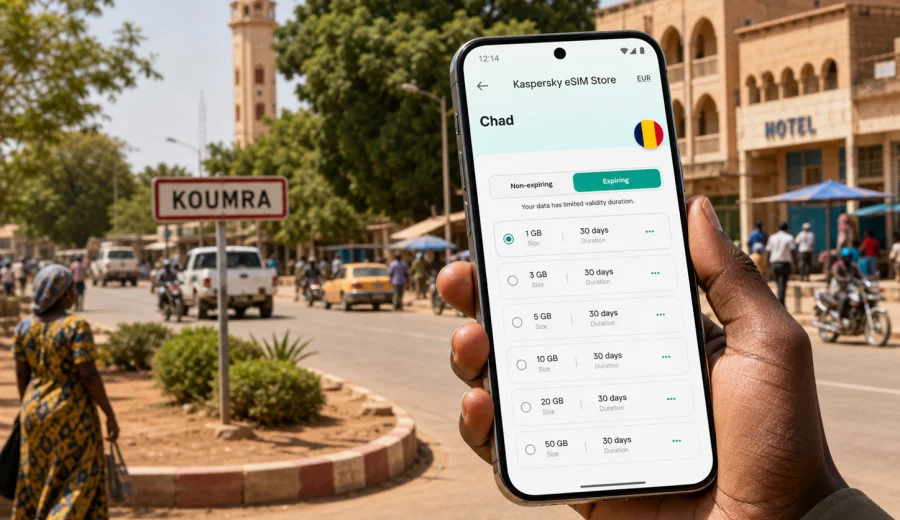
Koumra eSIM: mobile connection and internet in Chad
Koumra is not a city where a traveler wants to solve mobile internet at the last minute. It is a southern Chadian hub: useful for work in the Mandoul region, road travel between larger towns, local administration, field projects, hotel stays, market visits, and short regional stops. When your plans depend on maps, messaging, payment confirmations, driver coordination, translation, and documents in the cloud, an eSIM can make the first hours in Koumra more predictable.
This guide focuses on using an eSIM for Koumra, not on turning the trip into a general Chad itinerary. The main question is simple: how do you stay online when you arrive, move around the city, check in at a hotel, arrange local transport, and continue to nearby destinations without relying only on public Wi-Fi or a physical SIM card search.
An eSIM is a digital SIM profile that can be installed on a compatible smartphone or tablet. For international travel, it is usually used for mobile data. It normally does not replace your regular phone number, and voice calls or SMS are not included unless a specific tariff says so. For most travelers in Koumra, the most useful setup is to keep the home SIM for essential messages and use the eSIM for mobile internet.
Why mobile internet matters in Koumra
Koumra trips often involve several small but time-sensitive tasks. You may need to message a driver before leaving a hotel, confirm a meeting address, send a location pin, download a document, or check whether the next stage of a road journey is still on schedule. A working data connection helps you handle these tasks without waiting for a stable Wi-Fi network.
Mobile internet is especially useful in these Koumra situations:
- arrival by road after a long transfer, when you need to tell a host or colleague that you are close;
- hotel check-in, when booking details, ID scans, or payment confirmations are stored online;
- local movement between offices, markets, guesthouses, and meeting points;
- coordination with drivers for trips toward Moundou, Sarh, or other southern routes;
- business visits where messaging apps, email, shared folders, and maps are part of the day;
- short stopovers when you do not want to spend time looking for a local SIM option.
Public Wi-Fi can be helpful when available, but it should not be the only plan. Access may vary by hotel, cafe, office, or guesthouse, and the connection may not be convenient when you are already on the move. An eSIM gives you a separate mobile data option that you can prepare before the trip or set up when you still have reliable internet.
What an eSIM changes before arrival
The biggest advantage of an eSIM for Koumra is preparation. You can choose a suitable data package before travel, install the eSIM on a compatible device, and keep the profile ready for activation according to the tariff conditions. That removes one common arrival problem: needing mobile data in order to find mobile data.
Before you leave for Chad, check three things:
1. Your device supports eSIM.
2. Your device is not locked to one mobile operator.
3. The selected data package covers Chad and matches the expected length of your stay.
If you are not sure whether your phone supports eSIM, use the compatibility check before arranging the trip setup: check your device. This is worth doing early, especially if you travel with an older phone, a work-issued device, or a model bought through a carrier.
For Koumra, think about data in practical blocks. A light user may only need maps, messaging, and occasional email. A business traveler may need larger attachments, video calls from a hotel, and cloud access. A field team may need shared photos, route updates, and communication across several towns. The right tariff depends on your actual use, not just the number of days on the calendar.
Koumra travel scenarios where eSIM helps
The table below shows common city situations and what mobile data is usually needed for.
| Situation in Koumra | Why internet helps | Practical tip |
|---|---|---|
| Arriving after a road transfer | You can update your host, hotel, or driver without waiting for Wi-Fi | Save the hotel name and contact in advance |
| Moving between districts | Maps and location sharing reduce confusion | Download key areas offline, then use mobile data for live checks |
| Business meetings | Email, messaging, and document access keep the schedule moving | Keep files available offline as a backup |
| Hotel stay | Wi-Fi quality can vary by room or time of day | Use eSIM data for urgent tasks and app-based calls |
| Market or service visits | Translation, messaging, and mobile payments may be useful | Keep battery power and data balance visible |
| Trips out of Koumra | Route changes and pickup points are easier to coordinate | Confirm coverage and tariff conditions before departure |
This is also where eSIM is different from a travel checklist item that you set once and forget. You should monitor usage during the trip. Photos, video calls, automatic cloud backup, app updates, and navigation can use more data than expected. If the tariff allows top-ups or if you can choose a larger package in advance, plan around the most demanding day of the route.
Arrival and first-hour checklist
The first hour in Koumra often decides how smooth the rest of the stay feels. You may be tired from travel, carrying luggage, and trying to coordinate several small decisions at once. A prepared mobile connection helps you move through that first hour calmly.
Use this checklist before you start moving around the city:
- Turn on the eSIM line according to the instructions for your device and tariff.
- Make sure mobile data is assigned to the eSIM, while your primary SIM remains available if needed.
- Check whether data roaming needs to be enabled for the eSIM profile.
- Open your map app and confirm that your hotel, office, or meeting point is saved.
- Send one short message to your local contact or driver.
- Turn off automatic app updates and large cloud backups over mobile data.
- Keep a screenshot of your eSIM details and support information in case you need help.
Do not wait until you are in a moving vehicle to check all settings. It is easier to confirm the data line, maps, and messaging while you are still in a hotel lobby, office, or another place where you can pause and focus.
Choosing data for a Koumra trip
For a city stay, the best eSIM tariff is not always the largest one. It is the one that fits your trip length, route, and data habits. A traveler staying two nights for meetings may need less data than someone using Koumra as a base for several days of regional travel. A person who sends text updates and checks maps will use less than someone joining video calls or uploading reports from the field.
For a focused Koumra trip, compare the tariff conditions in four areas:
- data allowance: enough for maps, messaging, email, and expected work tasks;
- validity period: long enough for the full trip, including arrival and departure days;
- destination coverage: Chad or a regional option that includes Chad, depending on the route;
- activation rules: when the validity period starts and what you need to do on the phone.
Kaspersky eSIM Store is an app and website where you can quickly choose, arrange, and activate an eSIM with a suitable mobile data tariff for an international trip. If Koumra is your main stop, use the Chad destination when comparing options. After you know your dates and expected data use, you can prepare an eSIM for your trip to Koumra and keep the setup ready before travel.
How much data might you need?
Exact usage depends on your apps and settings, but you can estimate from behavior. Messaging uses little data. Maps use more when you search and navigate live. Video calls, social video, cloud backup, and large attachments can use data quickly. The safest approach is to separate essential travel data from optional entertainment.
| Traveler profile | Typical mobile data use in Koumra | What to watch |
|---|---|---|
| Light traveler | Messaging, maps, hotel details, ride coordination | Keep offline maps and disable media auto-downloads |
| Business visitor | Email, documents, calls, shared calendars | Avoid large sync tasks over mobile data |
| Field or NGO traveler | Photos, forms, team chats, route updates | Compress uploads and send large files on trusted Wi-Fi |
| Stopover visitor | Messaging, booking checks, navigation | Choose validity that covers both arrival and departure |
Local movement and navigation
Koumra movement is often practical rather than tourist-oriented. You may be moving between a guesthouse, an administrative office, a field-project base, a market area, a transport point, or a local business. Mobile internet helps with live navigation, but you should not depend on the map app alone.
Before leaving your accommodation, save:
- the name and address of your destination;
- a screenshot of the route or nearby landmarks;
- the phone number of your contact or driver;
- the address of your accommodation for the return trip;
- an offline map area for Koumra and the roads you expect to use.
Live maps are useful for orientation, but local directions may rely on landmarks rather than formal addresses. Use mobile data to share location pins and confirm pickup points, then keep a written or screenshot backup in case the connection changes during the ride.
Transport and trips from Koumra
Many Koumra trips are connected to wider movement in southern Chad. You may arrive from another city, travel onward to Moundou or Sarh, or use Koumra as a working stop in the Mandoul region. For these trips, mobile internet is useful before departure, during stops, and after arrival.
Use eSIM data before longer road travel to:
- confirm the departure time with your driver or coordinator;
- send your planned route to a colleague or host;
- check whether your next accommodation has replied;
- download maps and documents;
- make sure your device battery and power bank are charged.
During the trip, coverage and speed can change. Treat mobile data as a planning and coordination tool, not as a guarantee that every app will work at every moment on the road. Download anything essential before leaving Koumra and keep emergency contacts available offline.
Installing and activating an eSIM
The exact steps depend on your device and the selected tariff, but the general flow is straightforward. You choose a destination and data package, arrange the eSIM, install the eSIM profile on a compatible phone, and activate it according to the instructions. For setup details, follow the Android installation guide or the iOS installation guide.
Before activation, read the tariff conditions carefully. Some tariffs begin validity when the eSIM connects to a supported network at the destination, while others may have different rules. If the trip includes several stages, do not activate too early unless the selected conditions fit that plan.
A practical setup sequence for Koumra looks like this:
1. Check that your smartphone supports eSIM and is not carrier-locked.
2. Choose Chad as the destination or select a regional option that covers your full route.
3. Install the eSIM while you still have stable internet.
4. Keep your regular SIM active for your usual number if you need it.
5. On arrival, assign mobile data to the eSIM and check roaming-data settings if required.
6. Test messaging, maps, and email before leaving for the next appointment.
If something does not work, do not repeatedly delete and reinstall the profile without checking the instructions. Some eSIM profiles have limits on reinstallation or transfer. Review the setup steps first and contact support through the available product channel if needed.
Short FAQ
Is an eSIM useful for Koumra if I already have roaming?
It can be useful as a separate mobile data option for the trip. Roaming conditions vary by home operator, so compare your roaming price and limits with the available eSIM data package before travel.
Can I use eSIM for calls in Koumra?
Travel eSIM tariffs are commonly focused on mobile data. Voice calls and SMS are not included unless the selected tariff clearly says so. Use internet-based calling apps when you have data.
What if my phone is not compatible?
Use another compatible device or choose a different connectivity plan. Before arranging the eSIM, use the device compatibility check and confirm that the phone is not locked to one operator.
Final checklist before you travel to Koumra
Before departure, make the setup boring and predictable. That is the goal. You should not be learning your phone's eSIM menu while looking for a hotel, trying to call a driver, or preparing for a meeting.
Check the essentials:
- your phone supports eSIM and is unlocked;
- the selected tariff covers Chad and the dates of your trip;
- the eSIM profile is installed or ready to install with stable internet;
- maps, hotel details, and contact numbers are saved offline;
- mobile data settings are clear;
- app updates and cloud backup are limited over mobile data;
- you know where to find installation instructions and support.
Koumra travel is easier when mobile internet is planned before the day becomes busy. With Kaspersky eSIM Store, you can choose, arrange, and activate an eSIM with a suitable data tariff for your visit, then use it for maps, messaging, hotel coordination, business tasks, and onward travel in Chad. If your dates are set, choose a mobile data option for Chad before your Koumra trip and keep the connection ready for the first practical moments of the journey.