Travel connectivity guide
Kowloon eSIM: Mobile Internet for Hong Kong
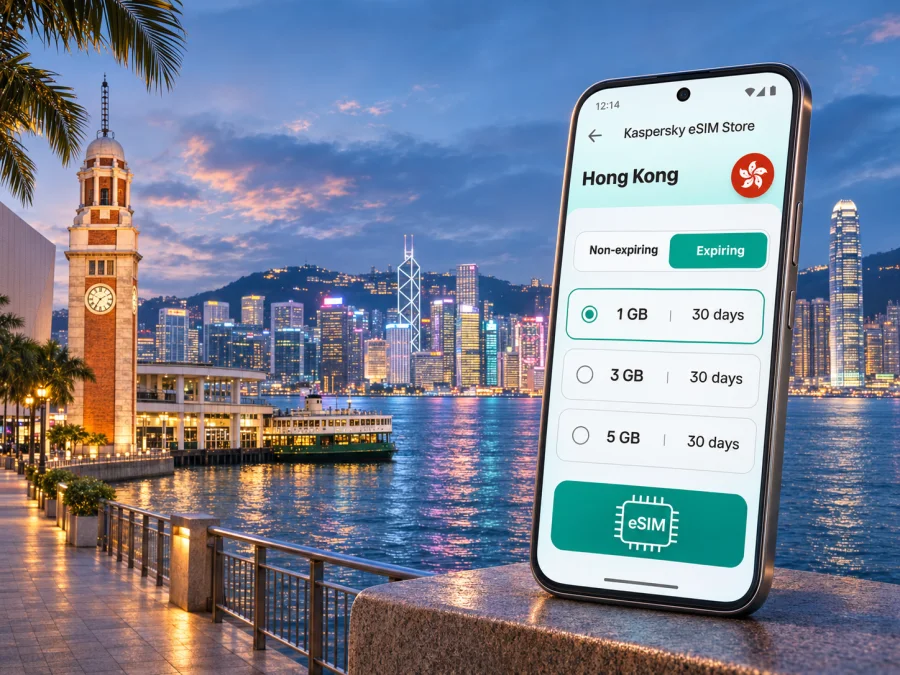
Kowloon eSIM: mobile connection and internet for your Hong Kong trip
Kowloon is a practical base for a Hong Kong visit: you may arrive through the airport, cross the harbour for meetings, follow a walking route through Tsim Sha Tsui, or spend an afternoon in Mong Kok and Sham Shui Po. Mobile internet helps with maps, transport updates, hotel messages, bookings and calls through messaging apps. A travel eSIM can provide a data option without replacing the physical SIM already in your phone.
Kowloon is part of Hong Kong, which is a Special Administrative Region of the People’s Republic of China. For connectivity planning, treat Hong Kong as its own destination market: a plan labelled Hong Kong should not be assumed to include mainland China, Macau or every stop on a wider itinerary. Check the plan’s listed destinations and terms before you buy, especially if your trip crosses a border.
Where mobile internet helps around Kowloon
The need for data often begins before you reach your hotel. At Hong Kong International Airport, you may want to check a transfer, send your arrival time, confirm a booking or open a map. If you take the Airport Express to Kowloon Station, the railway brings you to the West Kowloon side of the peninsula; from there, your onward trip may involve a taxi, bus, MTR connection or a walk. Save the hotel address and check current transport information before setting off.
Once you are in Kowloon, mobile data is useful for small decisions that add up over a day: finding the right station exit, checking a walking route through busy streets, translating a short message, confirming a restaurant reservation, or telling someone that you are running late. Many station areas have several exits and connected passageways. Check the station exit against the building entrance; the street address may not lead to the nearest way in.
| Kowloon situation | What a connection can help you do |
|---|---|
| Arrival at the airport | Open your transfer details, message your host and check the route to Kowloon |
| Tsim Sha Tsui waterfront | Find the promenade, Star Ferry Pier, museums or a meeting point |
| Mong Kok and Yau Ma Tei | Check a street address, station exit or walking route between busy blocks |
| Sham Shui Po | Save a map and locate a shop, café or cultural stop while exploring side streets |
| West Kowloon | Check a venue, ticket or onward route around the cultural district and station area |
| Business day | Join a call, confirm a calendar change or share a location, subject to your plan and signal |
Mobile coverage and data speed are not identical on every street, inside every building or on every route. They can vary with the local network, construction, congestion, device settings and the specific plan. Keep essential booking details available offline and use station signs or staff assistance if your connection is unavailable.
Choose a plan for the trip you are actually taking
The useful plan is the one that fits your destination list, length of stay and data habits. A short city break built around maps and messages may use data differently from a work trip with video calls, frequent uploads or a laptop hotspot. Avoid choosing only by the headline data amount: validity, activation timing, supported destinations, top-up options and any usage limits also matter.
Before choosing, answer these questions:
- Is Hong Kong listed as a covered destination? Confirm it in the plan details. A regional package can include several places, but the name of a region alone is not enough; read the complete destination list.
- How long will you be away? Match the validity period to your dates, and check when the validity begins. The purchase, installation and first network connection can be separate events under a plan’s terms.
- How will you use data? Navigation, messaging and email have different needs from video streaming, large file transfers or tethering. Estimate from your own routine and allow a margin if you rely on work apps.
- Will you leave Hong Kong? If you plan to continue to mainland China or another destination, confirm that each stop is included in the same plan or arrange a suitable separate option. Do not infer cross-border coverage from proximity.
- What happens when the allowance runs low? Check whether the plan can be topped up, whether another package is needed, and how usage is shown in your account.
Match your data use to the day
Think about your itinerary in practical blocks. A traveller who mainly checks maps, sends messages and looks up transport may use less data than someone who streams video while travelling or uploads photos throughout the day. Video meetings, cloud backups, automatic app updates and hotspot use can consume data more quickly. If your phone offers per-app data controls, review them before departure and disable background tasks you do not need.
No general estimate can predict your exact usage. If work depends on a stable connection, download key files in advance and check whether your hotel or workplace has Wi‑Fi. Performance also depends on the local network and conditions where you use it.
Getting around: plan by district, then by station exit
Kowloon is not a single compact attraction zone. It includes neighbourhoods with different rhythms and transport patterns, and journey time depends on the exact start and end points. A destination pin is helpful, but the final walk may involve an underground passage, a footbridge, a busy junction or a station exit on the opposite side of a large block.
Tsim Sha Tsui and the harbourfront
Tsim Sha Tsui is a natural starting point for many visitors because the waterfront, promenade, museums, hotels, shopping streets and Star Ferry Pier are close to one another. The area is still large enough that a meeting at the pier and a hotel farther inland can require a meaningful walk. Use a map to compare the route with the nearest station exit, and download or note the address before leaving if you expect to be moving through crowded streets.
Mong Kok and Yau Ma Tei
Mong Kok is dense, energetic and full of overlapping streets, shops and food stops. If you are meeting someone, share a precise pin or the name of a nearby landmark instead of saying only “Mong Kok”; the district covers many possible meeting points. Navigation is especially useful when a route changes from a main road to a smaller street or when you need to locate a particular entrance.
Yau Ma Tei sits south of Mong Kok and can be combined with a walk if you have time, but check the distance and conditions first. In a busy area, a route that looks short on a small map may involve crossings and crowds. Keep your destination saved and avoid holding your phone out while stepping into traffic or moving through a station concourse.
Sham Shui Po
Sham Shui Po has a distinct street-level character, with markets, small businesses, fabric and electronics shops, food stops and older buildings. It rewards a slower visit: you may want to save several places in a map and move between them without deciding every turn in advance. A working data connection can help you check opening information, but verify time-sensitive details directly with the venue when they matter.
Side streets and shop names can be easy to confuse. Save the name in both English and, if available, Chinese, and keep a screenshot of the location. This is useful not only when data is slow but also when you need to show a driver or ask for directions.
West Kowloon and Kowloon Station
Kowloon Station is an Airport Express and MTR interchange area associated with West Kowloon and major hotels, retail and cultural destinations. The station complex is large, and nearby venues may be reached by different exits or routes. Check the specific venue’s directions rather than assuming that the nearest station entrance is the final destination.
If you are visiting the West Kowloon Cultural District, plan the route around your chosen venue, event time and weather. You may combine a museum or performance with a harbourfront walk, but leave room for walking between locations. Download tickets or save reservation details before you leave accommodation so you can still access them if the connection drops.
Kowloon City, Kai Tak and eastern Kowloon
Kowloon City and Kai Tak sit beyond the classic Tsim Sha Tsui visitor route. Check the full journey and return options for a restaurant, heritage stop or event there; the route may combine MTR with a bus, taxi or walk. Save the return route before an event, when crowds may make it harder to stop and check a phone.
Kowloon is part of Hong Kong, which is a Special Administrative Region of the People’s Republic of China. For connectivity planning, treat Hong Kong as its own destination market: a plan labelled Hong Kong should not be assumed to include mainland China, Macau or every stop on a wider itinerary. Check the plan’s listed destinations and terms before you buy, especially if your trip crosses a border. The current Hong Kong destination page identifies HKT among local telecommunications providers for its local plan options; provider arrangements may differ for regional plans, so check the offer you select. Kaspersky eSIM Store is an app and website where you can choose, order and activate an eSIM with a suitable data plan for an international trip. Review current data-plan options for your Kowloon trip and read the terms shown for the individual option before confirming it.
Arrival checklist for Kowloon
Use this short sequence when you land:
- Connect to airport Wi‑Fi or another internet connection long enough to finish any required eSIM setup, if you have not done so already.
- Check your hotel’s full address and arrival instructions.
- Confirm the Airport Express, bus, taxi or other route for your arrival time and luggage; check current service information on the day.
- If using the Airport Express, confirm Kowloon is the right stop for your onward journey and check the current timetable.
- Before relying on the travel eSIM, select it for mobile data and make sure the home SIM is not unintentionally using roaming data.
- Keep your passport, payment method and hotel details accessible separately from the phone.
Do not assume that installing an eSIM means data has already started or that a plan’s validity begins at a particular moment. Follow the purchase and installation instructions and check the terms for when activation and usage begin. If the plan requires a setting such as data roaming for that eSIM, enable it only as described in the plan or device instructions.
Check the phone before you travel
An eSIM works only when the phone supports eSIM and is not restricted from using another profile. Support can vary by model, region of sale and carrier configuration. Check the exact model and device settings; ask the seller or operator if unclear. Check whether your device is compatible with eSIM.
Before ordering, confirm:
- your exact phone model supports eSIM in the version sold for your market;
- the phone is unlocked or otherwise permitted to use another mobile profile;
- you can access Wi‑Fi during setup;
- the selected plan covers Hong Kong and any additional destinations on your route.
If the phone does not support eSIM, consider a compatible unlocked device or a physical SIM option. A data-only eSIM may not include a local number, regular calls or SMS; check the plan, home operator roaming charges and dual-SIM settings.
Install and activate with a little preparation
If possible, install the profile using reliable Wi‑Fi and allow time to follow each screen. Activation and data-use timing vary by plan. Follow its instructions, and do not delete an installed profile unless support advises you to.
- Confirm destination, allowance, validity and activation rules in the plan details.
- Open the installation instructions in your account or confirmation message.
- Add the eSIM through your phone settings or the directed QR-code flow.
- Give the profile a clear label, such as “Hong Kong data”.
- After arrival, select it for mobile data; enable roaming for that profile only if instructed.
- Test a simple page or map. If it fails, check the selected line, destination, activation terms and settings.
For device-specific steps, follow the Android eSIM installation guide or the iPhone eSIM installation guide. Menu names can vary with software version and device manufacturer, so follow the wording shown on your phone.
Keep your connection useful and your data predictable
Download offline maps, turn off photo backup over mobile data if unnecessary, and set large updates to Wi‑Fi. If you use a laptop hotspot, check the plan’s tethering terms and monitor usage because background sync can use data.
A few habits help when moving around Kowloon:
- Save key addresses as text as well as map pins, and keep screenshots of essential routes or tickets.
- Use station maps and exit signs as a backup to turn-by-turn navigation.
- Stop somewhere safe to check a route; ask staff if a map stops updating.
The eSIM is for data unless its terms say otherwise. Internet calls and messages can use existing apps; regular calls and SMS generally remain tied to your usual service. Check which line handles each function.
Common travel scenarios
A short stopover: Save flight details and the route before leaving the airport. Allow enough time for immigration, both journeys and airport procedures; keep boarding details offline.
A hotel change: Save both addresses and compare routes with luggage in mind. Hotel staff can confirm an entrance or taxi drop-off point.
A day of meetings: Keep invitations and addresses available offline. For video calls, check the plan allowance and venue Wi‑Fi in advance.
A market walk: Pin places but leave room for detours. Agree on a specific exit or landmark when meeting friends.
An onward border crossing: Confirm each place in the plan’s destination list and check activation and validity for the whole route. Arrange separate connectivity if the next stop is not clearly included.
Troubleshooting if data does not connect
Confirm the eSIM is installed, enabled and selected for mobile data, and that the plan covers your location and remains valid. If its instructions require data roaming, check that setting for the eSIM; avoid changing your regular line unintentionally.
Try airplane mode briefly or restart the phone. Change network or APN settings only if instructed. Do not delete the profile or rescan a one-time QR code without guidance; keep your confirmation and error message for support.
If indoors or underground, move to an open area and try again. For urgent navigation, use saved directions, signs or ask staff while you troubleshoot.
Frequently asked questions
Is Kowloon a separate country or mobile destination from Hong Kong?
No. Kowloon is an area of Hong Kong. Hong Kong is a Special Administrative Region of the People’s Republic of China and has its own destination listing on the eSIM Store page. For a plan, follow the destinations explicitly named in its terms; do not assume that Hong Kong coverage includes mainland China or Macau.
Will one Hong Kong eSIM work throughout Kowloon?
The destination listing is for Hong Kong, but signal and speed can vary with location, indoor conditions, network availability, device and plan. Keep an offline backup for essential routes.
Can I use my regular number at the same time?
Many dual-SIM phones can keep both profiles available, but combinations depend on the device. A data-focused eSIM may not include a number, regular calls or SMS. Check your home operator’s roaming charges.
Should I install the eSIM before flying?
When supported, installing before departure gives you time to follow the setup screens. Check when activation, validity and data use begin; installation and first use may differ.
Do I need data roaming switched on?
Some eSIM plans or devices require data roaming for the eSIM profile. Follow the instructions for the selected plan and verify that your home SIM is not using roaming data unintentionally. The setting applies to the selected profile and phone configuration, so check before changing it.
What should I do if I travel onward from Kowloon?
Check every destination in the plan list. If the next stop is not included, arrange another connection; nearby locations are not necessarily covered together.
Prepare your Kowloon connection before you go
For a smoother first day, verify your phone’s eSIM support, choose a plan whose destination and validity match your itinerary, and install it when you have dependable internet access. Keep the Airport Express or other transfer details, hotel address and key bookings available offline; use mobile data for maps, messages and changes as you move around Tsim Sha Tsui, Mong Kok, Sham Shui Po and West Kowloon.
When you are ready, choose a Hong Kong eSIM data plan for your trip to Kowloon through Kaspersky eSIM Store, the app and website for selecting, ordering and activating a travel eSIM. Review the current terms, destination list and activation instructions before confirming your choice.


