Travel connectivity guide
Krakow eSIM: Mobile Internet for Your City Trip
Krakow eSIM: Mobile Connection and Internet for Exploring the City
Krakow rewards a little planning. The historic centre is compact enough for long walks, yet an arrival from the airport, a hotel outside the Old Town, an evening in Kazimierz, or a day trip can quickly make a working mobile connection useful. Maps, tickets, and messages are easier to manage when you can get online.
An eSIM can help you prepare mobile internet for a visit to Krakow without changing the physical SIM in your phone. Before travelling, you can choose a plan for Poland in Kaspersky eSIM Store, review its data allowance and validity, and install it on a compatible, unlocked device. The guide below focuses on how that connection fits into a real city itinerary, from the airport and Kraków Główny to the riverside and neighbourhoods beyond the centre.
What mobile internet helps you do in Krakow
The central sights are close together, but an itinerary may run from the Main Market Square to Wawel, along the Vistula, and then by tram to another district. A map helps when a route changes from walking to public transport or when you need a hotel entrance rather than a broad neighbourhood pin.
Mobile data is useful for checking a stop or route, finding a restaurant, opening hotel messages, translating a short sign, and coordinating with travel companions. Your needs depend on your habits: navigation and messaging use a different amount of data from video calls, hotspot use, or frequent uploads. Save addresses and tickets offline when the relevant apps allow it, then choose a plan that fits your expected use.
Start with the arrival route
John Paul II International Airport Kraków–Balice is west of the city. The airport station sits next to the terminal and has a covered connection, and the SKA1 train route links the airport with Kraków Główny and continues toward Wieliczka. Depending on your arrival time, luggage, and final address, a train, bus, taxi, or pre-arranged transfer may suit you better. Check current service information shortly before travelling, because schedules and disruptions can change.
Before leaving the terminal, check your hotel’s exact address and nearest stop. “Old Town” is a broad label, so a saved map pin is more useful than a neighbourhood name alone.
A simple airport-to-hotel checklist
- Keep the hotel address and booking details available offline.
- Check the current airport route and choose a stop near your accommodation.
- Confirm where to buy or validate a train or bus ticket; a data plan is not a transport ticket.
- Follow the map for the final walk, paying attention to pedestrian streets and the entrance on the correct side of a block.
- Send a quick arrival message once you are settled, rather than depending on an open Wi-Fi network along the way.
Kraków Główny is next to Galeria Krakowska and within walking distance of the Old Town. With luggage, compare the walk with a tram connection and use directions to find the right hotel entrance.
Walking, trams, buses, and route changes
Walking is often easiest in the historic centre. The Planty park encircles much of the Old Town, and the Main Market Square, St. Mary’s Basilica, the Cloth Hall, and Wawel can be joined on foot. A map helps with small lanes and entrances, but leave room to enjoy the streets without following the screen at every step.
Trams and buses connect the centre with districts farther away. Check the stop name and direction before boarding: nearby stops can serve different routes, and a landmark name may not match the name on the sign. Ticket types, fares, zones, and validation rules can change, so confirm current instructions with the transport operator or ticket machine. A data plan is not a transport ticket, and a city ticket should not be assumed to cover a regional train.
| Journey | Useful connection task | Prepare ahead |
|---|---|---|
| Airport to hotel | Compare rail, bus, and road options | Save the exact address |
| Old Town walk | Find a lane or entrance | Save a map area if available |
| Tram or bus transfer | Check stop and direction | Confirm ticket and validation |
| Evening in Kazimierz | Find a place or route home | Save the hotel pin |
| Business day | Open meeting details | Keep key files available offline |
| Day trip | Find the departure point | Recheck the timetable |
Choose where to stay with the map in mind
The best base depends on the kind of visit you want. Staying near the Old Town can reduce the number of transport decisions on a short sightseeing break. Accommodation around Kraków Główny can be convenient for arrivals by rail and for an early departure. Kazimierz offers a different evening atmosphere and is close to the river, while Podgórze puts you on the opposite bank and can make sense if your plans focus on that side of the city. None of these areas is automatically right for every traveller; compare the address with your daily itinerary.
A hotel’s map pin can clarify questions that a listing description cannot. How far is it from the nearest tram stop? Is the approach walkable with luggage? Will you return late from a restaurant or event? Does the route cross the river, or require a change? Looking at these details before booking can make a short stay calmer and helps you estimate how often you will use public transport.
Mobile internet is particularly helpful when check-in instructions are digital or the reception desk is not staffed at all hours. Keep confirmation details accessible even if you expect to be connected. For apartments, note the exact building number and any entry instructions before setting off; a pin may identify a block but not the correct doorway.
Prepare a Poland eSIM for your Krakow itinerary
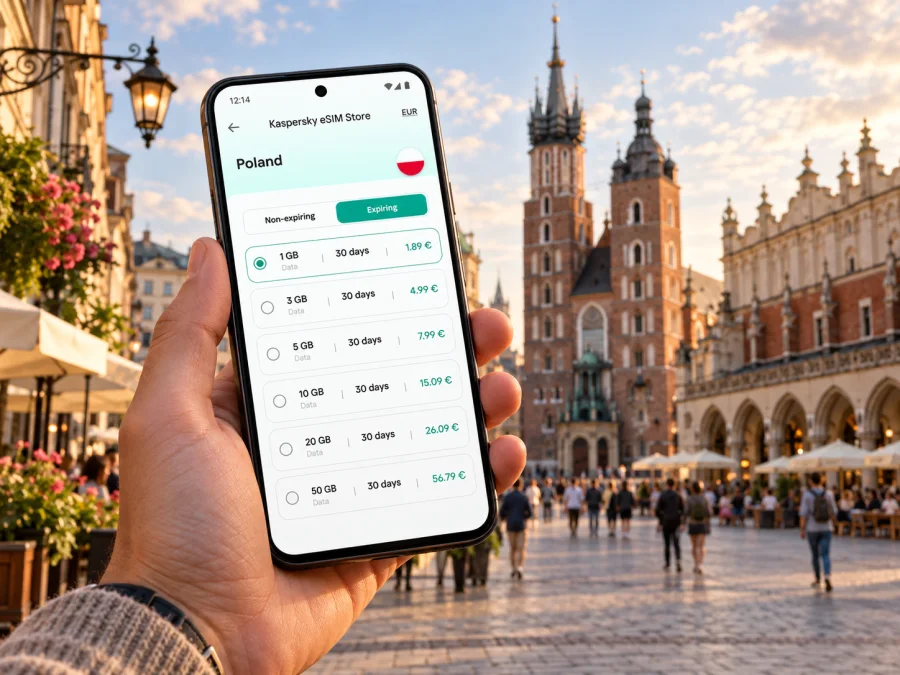
A city article uses the country destination for the eSIM plan: Krakow is in Poland, and the plan should match the country or route shown in the offer. In Kaspersky eSIM Store, the app and website help you choose, arrange, and activate an eSIM with a suitable data plan for an international trip. Review the plan details before choosing: data allowance, validity period, price, and where it applies. Consider whether your itinerary stays in Krakow or also includes nearby destinations and other parts of Poland.
Explore eSIM plans for a trip to Poland
The right allowance depends on how you use your phone. Navigation, messaging, and occasional browsing usually place different demands on data than video streaming, hotspot use, or daily remote-work calls. If you are unsure, list the tasks you expect to do and check the plan terms against them. You can reduce avoidable usage by downloading maps, tickets, and entertainment over Wi-Fi before departure, then turning off automatic photo backups or app updates if you do not want them using travel data.
An eSIM for mobile data is not necessarily a replacement for your usual phone number. Voice calls and SMS may not be included unless the plan explicitly says so. Keep your primary SIM available if you need calls or verification messages, and check your home carrier’s roaming settings and charges. Your device may let you choose which line handles mobile data, calls, and messages separately; review those settings before the trip so you know which line is active.
How to prepare and activate an eSIM
Before you select a plan, check whether your device supports eSIM and confirm that it is not locked to a carrier. Compatibility can vary by device model, market, and software configuration, so check the exact phone rather than relying only on a brand name. Make sure you can access the email address or account used for your order and that the device has a stable internet connection during installation.
A straightforward preparation sequence is:
- Choose Poland as the destination and review the plan’s data, validity, price, and coverage details.
- Complete the order and read the activation instructions provided for that plan.
- Install the eSIM while connected to reliable Wi-Fi, following the steps for your phone’s operating system.
- Keep the eSIM turned off or leave data roaming disabled until the plan’s instructions say it is time to activate it. Plan conditions differ, so follow the instructions supplied with your purchase.
- On arrival, select the travel eSIM for mobile data and check that the phone is using the intended line. Turn on data roaming for that eSIM only if the plan instructions require it.
- Open a map or another simple service to confirm the connection before relying on it for a longer journey.
For device-specific steps, use the Android eSIM installation guide or the iOS eSIM installation guide. Menu names may vary by operating-system version. Installing a profile and beginning to use its data can be separate steps, so check the plan’s activation rules to avoid starting validity earlier than intended.
If you have a layover or a late arrival, prepare in advance instead of making installation part of the airport rush. Save a copy of the instructions and hotel details, charge your phone, and make sure you can sign in to the app or website. If the eSIM does not connect, first check which line is selected for data, the plan’s activation instructions, and whether mobile data is enabled. Avoid deleting an installed eSIM profile unless support or the plan instructions tell you to do so.
Districts and the shape of a city day
A day in Krakow often combines several different settings. The Old Town is a natural starting point for the Main Market Square and Wawel; Kazimierz brings a different evening atmosphere and places to eat; Podgórze is across the Vistula and may suit a separate afternoon. If you add Nowa Huta, check the route and return options before leaving the centre. Maps help with transfers and entrances, while saved bookings and addresses keep the day workable if your connection pauses.
For a short visit, avoid treating every district as a separate checklist. Pair nearby sights, leave time for meals, and use a route planner to see whether a tram ride makes more sense than walking. The map pin for a hotel or venue can also answer practical questions: how far it is from a stop, whether the walk crosses the river, and how late you may need transport.
Business trips and short stopovers
For a business visit, mobile data can support practical tasks between the airport, hotel, meeting venue, and station: opening an agenda, confirming a room, navigating to a client address, or sending an update if a meeting runs late. Download large files in advance, check whether your accommodation has suitable Wi-Fi for calls, and confirm company rules for hotspot use. A schedule with addresses and time buffers is more useful than improvising each transfer on arrival.
For a short stop between destinations, plan around the time you actually have. A few hours in the centre may mainly call for navigation and messaging; an overnight stay with onward rail travel may also involve booking access and coordination. Verify the departure station and return route. If you continue elsewhere in Poland, check that the selected plan applies to the full itinerary rather than assuming that the city name determines coverage.
Day trips from Krakow
Wieliczka is a well-known nearby destination, and the airport’s SKA1 rail route also runs through Kraków Główny toward Wieliczka. Other outings may use different stations, operators, or ticket conditions. Check the current route and departure point for your destination, and confirm return options before leaving; services can vary by day and season.
Download the key map area and booking details in advance, but keep data available for changes and messages. Save the destination name from your booking as well as the map pin, since similar place names can point to different locations. If travelling with others, share the meeting point and agree what to do if someone arrives separately.
Quick troubleshooting in the city
If data is not working, check whether the travel eSIM is installed, switched on, and selected for mobile data. Confirm whether its instructions require data roaming, whether the plan is active, and whether data remains under its terms. Airplane mode should be off; a phone may need a moment to reconnect after a setting changes. Basements and thick-walled buildings can affect reception.
If the connection still fails, consult the plan instructions or contact customer support through an available Kaspersky eSIM Store channel. Keep your order details handy, but do not share account credentials or verification codes in an open chat. Avoid deleting an installed eSIM profile as a first response.
Krakow eSIM questions, answered
Will an eSIM help me navigate Krakow?
It can provide data for maps, route changes, and messages, depending on your plan and local network conditions. Save essentials as a backup.
Do I need mobile data if I am staying in the Old Town?
Not constantly, but it can help with restaurant details, tickets, hotel messages, and routes beyond the centre.
Can I use the same eSIM beyond Krakow?
That depends on the plan. Check its listed country or regional coverage for Wieliczka or other stops.
When should I install it?
Prepare before departure on stable Wi-Fi. Check when validity begins and when to enable data, as activation rules vary.
Get ready for your trip to Krakow
Review the plan’s destination, data allowance, validity, and activation terms, then prepare the eSIM on a compatible device before departure. Kaspersky eSIM Store helps you choose, arrange, and activate an eSIM plan for mobile internet while travelling abroad.


