
Travel connectivity guide
Kuala Belait eSIM for mobile internet
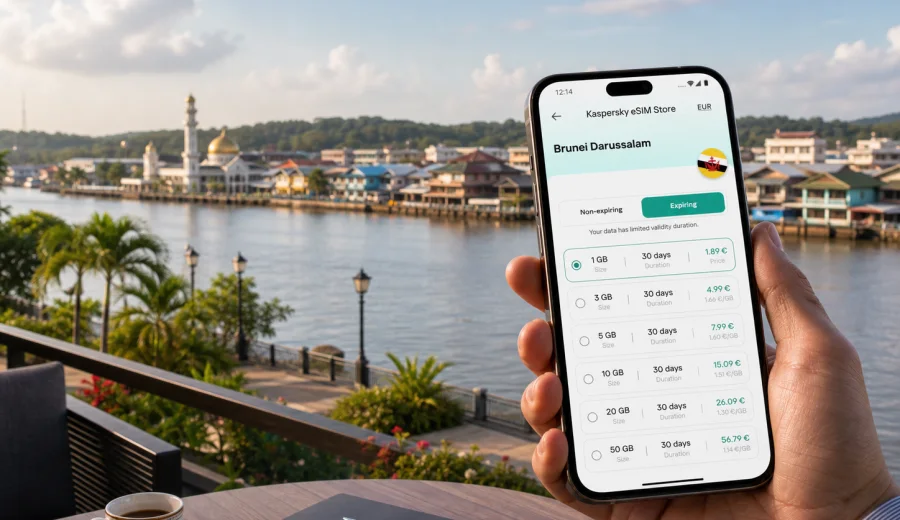
Kuala Belait eSIM: mobile connection and internet for a smooth trip
Kuala Belait is a practical travel base in western Brunei Darussalam: a river town near the coast, close to Seria, Panaga, oil and gas offices, beach roads, and the overland route toward Miri in Malaysia. It is not a city where every travel task is solved by walking into a busy airport arrivals hall or a large downtown transit hub. Many visitors arrive after a long transfer, depend on hotel pickups or company transport, and need maps, messages, booking details and email working as soon as they reach the town.
That is why an eSIM can be useful for Kuala Belait. It helps you prepare mobile internet before the trip or shortly after arrival, without looking for a physical SIM card shop when you may be tired, in transit, or heading straight to a meeting. This guide focuses on the city scenario: arrival, local movement, business travel, hotels, short stays, riverside walks, trips to nearby Seria and routes across Brunei Darussalam.
Why mobile internet matters in Kuala Belait
Kuala Belait is compact, but travel around it often relies on planning. If you are staying near Jalan Pretty, the Belait River, a beach area, a company guesthouse or a hotel on the road toward Seria, you may still need mobile data for several everyday tasks:
- finding your accommodation after a transfer from Brunei International Airport or Miri;
- messaging a driver, host, colleague or hotel reception;
- checking maps before moving between Kuala Belait, Seria and Panaga;
- keeping boarding passes, ferry or flight details available in email;
- joining video calls from a hotel room or office site;
- using translation, banking, travel insurance and ride coordination apps;
- checking restaurant opening hours before walking or taking a car.
Public Wi-Fi can help in hotels and offices, but it is not a complete travel plan. You may need internet before check-in, between stops, during a border route, or while coordinating with someone who is waiting for you. A travel eSIM gives you another option for mobile data on a compatible phone, so you are less dependent on asking for passwords or waiting until you reach a fixed location.
Arrival scenarios: airport, road transfer and first hours
Many visitors do not start their Kuala Belait trip inside Kuala Belait. The most common practical scenarios are different from a large capital-city arrival.
| Arrival route | Why mobile data helps |
|---|---|
| Brunei International Airport to Kuala Belait | You may have a long road transfer and need maps, driver contact, hotel details and messages during the journey. |
| Miri to Kuala Belait by road | You may need online documents, route checks and coordination around the border area. |
| Business pickup or company transport | You can confirm pickup points, share delays and keep email available before reaching the hotel or office. |
| Local movement from Seria or Panaga | Short rides still need maps, messaging and meeting confirmations if plans change. |
If you install an eSIM before travel, you can usually leave the profile ready on your phone and switch mobile data to it when you need it, following the conditions of the chosen tariff. If you prefer to activate after arrival, keep in mind that you will need an internet connection to complete the setup steps, such as hotel Wi-Fi, airport Wi-Fi or another working connection.
Choosing an eSIM tariff for Kuala Belait
For a city trip, the tariff choice should start with the country and route, not only the city name. Kuala Belait is in Brunei Darussalam, so a city article should lead you to the Brunei Darussalam destination page rather than a separate city-only plan. Check that the selected tariff covers Brunei Darussalam and that its validity period matches your dates.
Think about your trip in three layers:
1. Length of stay. A one-night stopover needs less validity than a two-week work assignment.
2. Data habits. Messaging and maps use less data than video calls, hotspot use and cloud backups.
3. Route. If you will also spend time in Bandar Seri Begawan, Seria, Panaga or cross toward Miri, check whether you need a country, regional or separate destination tariff.
A calm rule of thumb is to choose more data if you expect to use video meetings, navigation every day, photo uploads or laptop tethering. Choose a smaller package if you mainly need maps, chat, email and occasional browsing. Avoid starting heavy system updates, cloud photo sync or streaming on mobile data unless you have checked your remaining allowance.
City use cases: where eSIM is most useful
Kuala Belait is not only a point on a map. The way you use mobile internet depends on why you are there.
Business trip
Kuala Belait and nearby Seria are important for business visitors, especially those connected with energy, engineering, logistics, marine services and support operations. In this scenario, mobile data helps with calendar changes, secure account prompts, email attachments, online maps, hotel-to-office transfers and messaging with local contacts.
If you travel with a laptop, check whether your chosen tariff and device settings allow personal hotspot use. Do not assume it is available in every tariff. If you plan to use hotspot for work, choose a data volume that can handle calls and file transfers without running out too early.
Hotel stay
Hotel Wi-Fi is useful, but it may not cover the moments when you need internet most: before check-in, at the entrance, in a car, at a cafe, by the river, or while moving between hotel and meeting point. An eSIM can keep maps and messages working when you step outside.
Before relying on hotel Wi-Fi for eSIM setup, save your QR code or account access details in a place you can reach offline. If your phone needs a confirmation email or account login during setup, make sure you know how you will receive it.
Short stopover
For a short stay in Kuala Belait, the goal is simple: reduce friction. You may not want to spend time comparing local SIM options, finding an offline shop or removing your primary SIM card. With a compatible phone, an eSIM can be prepared in advance, then used for maps, messaging and quick checks during the stopover.
Local walks and riverside plans
The Belait River area, waterfront roads, local cafes and beach routes can be easy to enjoy when you are not worrying about getting lost or missing a message. Mobile internet helps with navigation, weather checks, restaurant searches and sharing your location with someone you are meeting.
Prepare before you travel
The best time to solve mobile internet is before the day becomes busy. A few checks can prevent most travel-day problems.
- Confirm that your phone supports eSIM.
- Check that the device is not locked to one mobile operator.
- Update your operating system before leaving, if you normally delay updates.
- Save hotel names, addresses and booking references offline.
- Keep your main SIM active if you need bank confirmations or SMS on your usual number.
- Decide whether you want to install the eSIM before departure or after arrival.
- Review the tariff validity period, data allowance and destination coverage.
Before choosing a tariff, check your device for eSIM support. Some models differ by region of sale, and an operator-locked phone may not allow a new eSIM profile even if the model normally supports eSIM.
When to add the eSIM landing page to your planning
Once you know your dates, route and data needs, you can compare available options for the country. For Kuala Belait, use the Brunei Darussalam destination rather than searching for a separate city plan. This keeps the choice aligned with where the tariff needs to work.
If your itinerary is centered on Kuala Belait, Seria, Panaga or road travel across western Brunei, you can choose an eSIM plan for your trip to Brunei Darussalam and then match the data volume and validity to your stay. Kaspersky eSIM Store helps you select, set up and activate an eSIM with a suitable tariff for mobile internet in a foreign trip; it is not a mobile network operator and the exact terms depend on the tariff you choose.
How to install and activate eSIM for a Kuala Belait trip
Installation is usually straightforward, but it is worth treating it as a checklist rather than a last-minute guess. You can follow the Android installation guide or the iOS installation guide if you want step-by-step instructions for your device.
1. Open Kaspersky eSIM Store on the site or in the app.
2. Choose Brunei Darussalam as the destination for your Kuala Belait trip.
3. Select a tariff by data volume and validity period.
4. Complete the order and open the eSIM details in your profile or email.
5. Add the eSIM profile to your phone using the QR code or on-screen flow.
6. Set the eSIM as the mobile data line when you are ready to use it.
7. Check whether data roaming needs to be enabled for the eSIM profile.
8. Wait a few minutes if the phone needs time to register on the local network.
If you install before departure, keep your primary SIM as the default line for calls and SMS unless you intentionally change that setting. Travel eSIM tariffs are usually focused on mobile data and may not include a phone number, regular voice calls or SMS unless the selected tariff states otherwise. You can still use internet-based messaging and calling apps over mobile data.
Data planning for common Kuala Belait trips
Your actual usage depends on apps, device settings and habits, but the table below can help you choose more realistically.
| Trip type | Likely data needs | Practical note |
|---|---|---|
| One or two days for meetings | Low to medium | Email, maps and messaging may be enough, but video calls change the calculation. |
| Week-long business stay | Medium to high | Plan for daily maps, document downloads, calls and hotspot if allowed. |
| Family visit or leisure stay | Medium | Messaging, photos, searches and navigation can add up over several days. |
| Stopover on a wider route | Low to medium | Check whether the route needs only Brunei Darussalam coverage or another destination too. |
| Remote work from hotel | High | Use hotel Wi-Fi for heavy uploads when possible and keep mobile data for movement. |
To control data use, disable automatic cloud backup on mobile data, download offline maps before the trip, switch video calls to lower quality when possible and review app background data settings. These small changes matter on a short tariff.
Moving around Kuala Belait with mobile internet
Kuala Belait is easier with a working map, especially if you are moving between hotels, offices, riverside areas and nearby towns. Public transport options can be limited compared with large regional cities, so many visitors rely on private vehicles, company transport, hotel arrangements or pre-planned rides.
Mobile data helps you:
- confirm pickup locations without relying on lobby Wi-Fi;
- share a live location with a colleague or family member;
- compare routes between Kuala Belait and Seria;
- check whether a restaurant or shop is open before leaving;
- keep access to maps if a driver needs a precise address;
- manage travel changes if a meeting moves from one site to another.
If you are walking, remember that the city is tropical and weather can change quickly. Mobile internet helps with rain checks and route decisions, but you should still save your hotel address offline and carry enough battery for navigation.
Trips from Kuala Belait
Kuala Belait is often part of a wider western Brunei itinerary. Nearby Seria and Panaga are common local movements, while Bandar Seri Begawan is the capital route for many arrivals and departures. Some travelers also connect the trip with Miri across the border in Malaysia.
For travel inside Brunei Darussalam, a Brunei Darussalam eSIM tariff may be the right starting point. For cross-border travel, check the destination rules carefully. A tariff selected for one country may not cover another country unless the conditions explicitly say so. If your trip includes Malaysia, review whether you need a separate tariff or a regional option before you leave Wi-Fi.
This is especially important on a road route. You do not want to discover a coverage mismatch only after leaving a hotel or office network. Save maps and booking details offline as a backup, even when you plan to use eSIM for mobile internet.
Quick checklist for the day before arrival
- Keep your passport, booking references and meeting address available offline.
- Install the eSIM profile while you still have stable internet, if you prefer early setup.
- Confirm which SIM line will handle mobile data after arrival.
- Turn off data roaming on your primary SIM if you want to avoid unintended roaming costs.
- Check whether the eSIM profile requires data roaming to be enabled.
- Save your hotel and first meeting point in maps.
- Charge a power bank if you will have a long transfer.
- Keep support and account access details available.
This checklist is simple, but it reduces the most common friction: arriving tired, looking for transport, trying to read a message and discovering that your phone has no usable data connection yet.
Common mistakes to avoid
Do not wait until you are in a car with weak Wi-Fi to start installation. Adding an eSIM profile requires an internet connection at the setup stage. If the process is interrupted, you may need to return to a stable connection and follow the steps carefully.
Do not assume that a travel eSIM includes voice calls or SMS. Check the tariff conditions. If it is data-only, use messaging apps and internet calls for communication.
Do not choose a tariff only by the lowest price. A smaller data package can be enough for a stopover, but it may be inconvenient for a work week with video calls and hotspot use.
Do not forget device compatibility. eSIM support depends on the exact model, region and lock status. A quick check before payment is easier than solving it after arrival.
Do not rely only on public Wi-Fi. It may be unavailable, slow, password-protected or limited to guests in specific areas. Mobile data gives you more flexibility between fixed locations.
FAQ
Is eSIM useful for Kuala Belait if I already have hotel Wi-Fi?
Yes, it can still be useful. Hotel Wi-Fi helps when you are inside the property, but eSIM mobile data can cover transfers, maps, messages, riverside walks, meeting changes and the first minutes before check-in.
Should I choose a city plan or a country plan?
For Kuala Belait, choose a tariff that covers Brunei Darussalam. City articles point to the country destination because mobile data coverage and tariff conditions are set by destination, not by a separate city page.
Can I install eSIM before flying to Brunei Darussalam?
In many cases, yes. You can add the eSIM profile before departure if you have a compatible phone and a stable internet connection. Check the tariff details so you understand when validity and data use begin.
Will eSIM replace my usual phone number?
No. A travel eSIM for mobile internet usually does not replace your primary number. Keep your main SIM active if you need bank codes, calls or SMS on your usual number, and set the eSIM as the line for mobile data when appropriate.
What if my trip includes Miri as well as Kuala Belait?
Check the tariff conditions before crossing the border. A Brunei Darussalam tariff may not include Malaysia unless the selected option explicitly covers both destinations or a wider region.
Choose mobile internet for your Kuala Belait trip
Kuala Belait is easiest when your phone is ready before the first transfer, meeting or hotel check-in. With a compatible device, an eSIM can help you keep maps, messages, email and travel details available while you move around the city and nearby areas.
Before departure, check compatibility, choose the right destination and review the data allowance and validity period. Then choose an eSIM plan for Brunei Darussalam in Kaspersky eSIM Store and prepare mobile internet for your Kuala Belait trip without relying only on public Wi-Fi or a physical SIM card after arrival.