Travel connectivity guide
Kulob eSIM: Mobile Internet for Your Trip
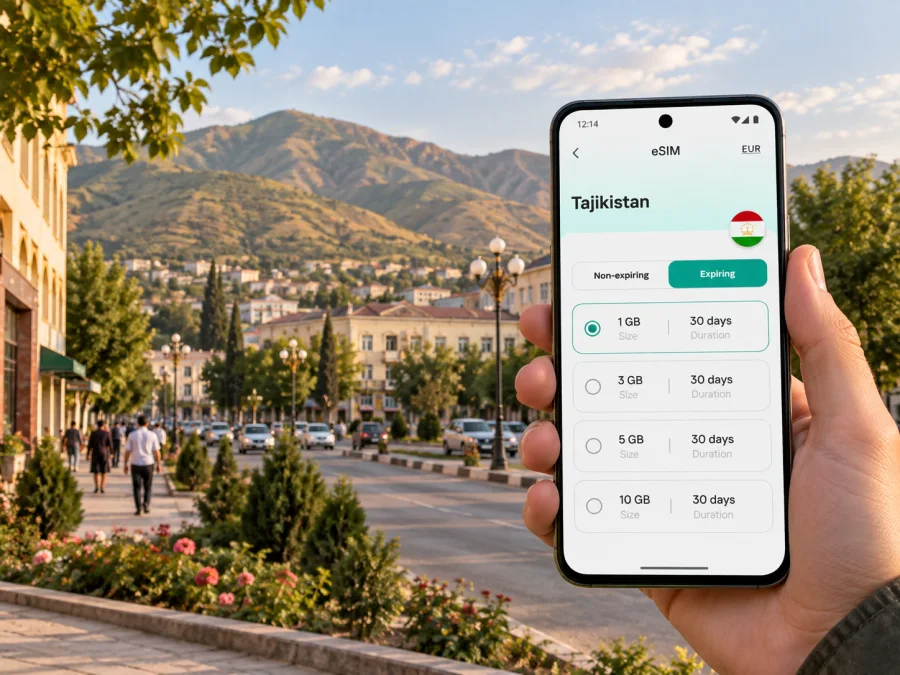
Kulob eSIM: mobile connection and internet for your trip
Kulob is a useful base for exploring southern Tajikistan, visiting family, or making a business trip in Khatlon Region. Before leaving the airport, finding your hotel, or arranging a ride across town, a working mobile data connection can make the practical parts of the visit easier: checking a map, messaging a host, translating a sign, or confirming a meeting place.
An eSIM is a digital SIM profile that you install on a compatible, unlocked device. For travel, it can provide mobile internet without replacing a physical SIM card. Kaspersky eSIM Store is an app and website where you can choose, purchase, and activate an eSIM with a suitable data plan for an international trip. The eSIM is intended for mobile data; it does not usually include a regular phone number, voice calls, or SMS unless the specific plan says otherwise.
Start with the shape of your visit
Kulob is in the south of Tajikistan, in Khatlon Region. It is not a large capital with a dense web of metro lines and named visitor districts. Many visitors come for a particular address, a family visit, work, or an onward journey, so the useful question is often not “Which tourist area should I stay in?” but “How will I get from my arrival point to the places I need to visit?”
Write down the places that matter before you travel:
- airport or road arrival point;
- hotel, guesthouse, or host’s address;
- office, market, clinic, or meeting location;
- any station or intercity pickup point you will use;
- the address of a person who can help if plans change.
Save each location in a map app and keep the written address as well. A map pin is convenient, but a street name, nearby landmark, or local-language version of an address can be easier to confirm with a driver or host. If the map labels use a different spelling of Kulob, try the common alternative “Kulyab” when searching. Keep the exact destination name from your booking or invitation so that similarly named places are not confused.
What mobile data helps with in Kulob
A data connection is most useful when it supports a specific task. You may use it to:
- follow the route from Kulob International Airport to your accommodation;
- message the person meeting you and share your current location;
- check a map while walking between central streets, shops, and public places;
- translate a short message or read a menu when offline language support is not enough;
- confirm a work appointment or send a document while away from the hotel;
- check road conditions and coordinate a departure for another town.
These are practical uses, not guarantees of signal or speed at every address. Actual service depends on the selected plan, its local network arrangements, your device, and conditions where you are. Keep a backup plan for essential calls and save important information before setting out.
Arriving in Kulob
Kulob International Airport serves the city. Before departure, check your itinerary and the airport’s current flight information with your airline; routes and schedules can change. If you are arriving by road, agree on the pickup point and estimated arrival time with your host or driver in advance. In either case, download the hotel address and a map area for offline use while you have a reliable connection.
At the airport, decide how you will reach your first stop before you begin moving. If someone is meeting you, message them after landing and agree on one clear meeting point. If you plan to take a taxi, confirm the destination and fare arrangement before starting the ride. Do not rely on being able to summon a car through an app: availability and app use may vary. A mobile connection can help you communicate, but it does not replace confirming the ride directly.
A calm arrival checklist:
- Keep your accommodation address available in written form and on your phone.
- Check whether your host or driver has confirmed the pickup.
- Open the saved map pin and verify that it matches the address you were given.
- Share your arrival status with a companion if that is part of your travel plan.
- Keep your passport and payment method secure while arranging transport.
If the airport Wi-Fi or mobile signal is unavailable, the offline map and saved address still help you complete the first leg. When you do have data, use it to confirm details rather than making assumptions from an old screenshot or an automatically suggested route.
Moving around the city
For a short stay, organize journeys around the places you actually need to reach. Ask your hotel or host which local transport options are practical for the exact time and route. Taxis can be convenient for door-to-door trips, while shared or public transport may suit familiar routes; availability, fares, and stopping points should be confirmed locally. Do not assume that a service follows a fixed timetable or that a driver will recognize an English-language map pin.
When you arrange a car, send the destination in a message if possible, then check the route together before departure. If you are walking, note the nearest large road or recognizable public place as well as the final building. A map may place an entrance on the wrong side of a block, especially where a destination has a courtyard or several access points. If a driver asks for clarification, a nearby shop, intersection, or public building can help you describe the last part of the trip.
Keep navigation simple while moving:
- Look at the route before starting rather than staring at the screen throughout the walk.
- Follow major streets and confirm turns at safe stopping points.
- Keep the phone charged; use a power bank for a long day out.
- Save your hotel location as a favorite and take a screenshot of the route if helpful.
- Recheck the destination after a detour or a change of vehicle.
Mobile maps are a useful reference, but local directions can be more current when a road is closed, construction changes access, or a destination is known by a local name. If the digital route and a trusted local instruction differ, pause somewhere safe and clarify before continuing.
Choosing where to stay and how to plan routes
Kulob accommodation may be listed under different spellings or transliterations. Before booking, confirm the property’s exact address, check-in arrangements, and a working contact method. Ask whether the staff can arrange a pickup, whether the entrance is easy to find after dark, and what reference point a driver should use. These questions are especially useful if you arrive late, travel with luggage, or do not speak Tajik or Russian.
Rather than choosing a hotel only by a map’s estimated distance, consider the day’s route. A property close to one appointment can still be inconvenient if you also need to visit another side of town. Group visits by area where possible, leave room for traffic and unplanned stops, and ask your host to confirm local journey times. Directions shown by a map are estimates, not a promise about how long a trip will take.
| Trip need | What to prepare | How mobile data can help |
|---|---|---|
| Airport to accommodation | Address, pickup contact, arrival time | Send a message and compare the pin with the written address |
| Hotel to a meeting | Meeting point and a backup contact | Recheck the route if the time or venue changes |
| Walking between nearby stops | Saved map pins and a charged phone | Follow turns and message someone if plans change |
| Road trip from Kulob | Pickup point, destination spelling, departure plan | Coordinate the driver and check route updates |
Keep the address in more than one format: a booking confirmation, a note in your phone, and a message you can forward to a driver. If you have a local contact, ask them to write the destination as they would share it locally. Do not assume that transliteration is consistent across map services, hotel listings, and transport conversations.
Prepare an eSIM for Tajikistan
An eSIM can be useful when you want to arrange mobile data before arrival and avoid handling a physical travel SIM on the move. Kaspersky eSIM Store lets you select a destination and review available plan details through its app or website. Compare the listed data allowance, validity period, destination coverage, and price with your expected use. A short visit mostly spent at one address may need a different allowance from a work trip with frequent map use, video calls, and file transfers.
For a city stay, estimate your use by activity rather than by the number of days alone. Messaging and map checks typically use less data than long video sessions or uploading large files. If you expect to rely on video meetings, use hotel Wi-Fi when suitable and keep mobile data for travel between locations. Check whether the selected plan covers only Tajikistan or a wider region if your itinerary continues across borders; do not infer regional coverage from the name of a nearby destination.
Before selecting a plan, review:
- Destination: Tajikistan must be included for your trip to Kulob.
- Data allowance: estimate maps, messaging, email, browsing, and any work calls over data.
- Validity: check when the plan starts and how long it remains active.
- Device support: confirm eSIM support and that the phone is not carrier-locked.
- Activation details: read whether installation and data use begin at different times.
You can review eSIM plan options for Tajikistan and compare the conditions shown for your travel dates. Plan details can differ, so make your choice from the current information displayed for the destination.
Before installation: device and account checks
Check that your phone supports eSIM and can use a profile from another provider. Device support can vary by model and market, and a carrier lock may prevent activation even on a model that otherwise supports eSIM. Check whether your device supports eSIM before you purchase. If you have two SIMs installed, decide which line should handle calls and texts and which should handle mobile data.
Install the profile while you have stable internet access, such as at home or on trusted Wi-Fi. Keep the QR code or installation details available on a second screen if you need to scan them. Follow the prompts on your device, give the eSIM a clear label such as “Travel data,” and leave your primary line configured for the services you still need. The exact menus vary by device model and operating system version.
A careful installation sequence
- Check the plan details. Confirm destination, data allowance, validity, and the instructions supplied with the plan.
- Connect to reliable Wi-Fi. Keep the phone powered and avoid interrupting installation.
- Add the eSIM profile. Use your device’s mobile-network settings and follow the on-screen steps.
- Label the line. Choose a name that makes it easy to identify while travelling.
- Choose the data line. Set the travel eSIM for mobile data when you are ready to use it, while keeping your primary line’s call settings as intended.
- Follow activation guidance. Some plans may require data roaming to be enabled for the travel eSIM; use the plan’s own instructions.
- Check the connection. Once the plan is active and you are in the supported destination, test a simple page or message.
For device-specific steps, use the Android eSIM installation instructions or iOS eSIM installation instructions. Do not delete an installed profile as a first troubleshooting step; reinstalling may not be possible under every plan’s conditions. If something does not match the instructions, check the plan information and seek support before changing settings repeatedly.
Short stopovers and onward trips
If Kulob is one stop on a longer journey, decide whether your data needs end in the city or continue elsewhere. A plan for Tajikistan may not cover another country; confirm each destination in the plan information before relying on it. Save ticket details, lodging confirmations, and onward contact numbers offline. Keep enough time between transport legs to handle a late departure or a change of pickup point without needing to search through a full inbox.
Travel from Kulob to other places in Tajikistan is a separate journey from moving around the city. Road conditions, journey duration, and transport options can vary by destination and date. Confirm the route with a local host or transport provider shortly before departure, especially if you are heading into a remote area. Download maps for the route where available, and tell someone your intended departure and arrival plan.
If your onward trip includes the Hulbuk archaeological site near Vose, check the current opening arrangements and transport with a local source before setting out. A map pin can help with orientation, but it does not confirm opening hours, access, or the availability of a return ride. For any excursion outside Kulob, keep water, cash appropriate for your plans, a charged phone, and offline directions; adapt these preparations to the weather and route.
When mobile data is unavailable
A temporary loss of data does not always mean that the eSIM has failed. You may be indoors, outside the plan’s covered area, or in a place where local network conditions are weak. First check that airplane mode is off, the intended eSIM line is enabled, and the phone is set to use it for mobile data. If the plan instructions call for data roaming, confirm that setting for the travel eSIM only. Then move to a location where it is safe to stop and try again.
If service still does not return, avoid deleting the profile or resetting the phone immediately. Check the plan’s validity and activation conditions, restart the device if appropriate, and use Wi-Fi to consult the supplied support guidance. For time-critical directions, contact your hotel, host, or driver through another available channel. Keep essential addresses and confirmations accessible offline so that one connection problem does not derail the whole visit.
Questions travelers ask
Is eSIM useful for a short visit to Kulob?
It can be, if you want mobile data for maps, messages, and coordination without buying a physical SIM locally. Compare the plan’s validity and allowance with the length and activities of your visit, and check that your device is compatible.
Can I use an eSIM for ordinary phone calls?
Usually a travel data eSIM does not include a regular phone number, voice calls, or SMS unless the plan explicitly lists them. You can use internet-based calling or messaging apps over data when the app and connection allow it. Keep your usual line available if you need its number for calls or verification messages, and review roaming charges with your existing provider.
Should I install the eSIM before arriving?
Installing over a stable connection before travel can make setup easier, but follow the activation timing shown for your selected plan. Installation and the start of the plan’s validity are not necessarily the same event. Keep the instructions accessible and avoid switching data settings until you are ready to use the travel line.
Will mobile maps work everywhere around Kulob?
No map or mobile connection can be guaranteed at every location. Download an offline map, save the places you need, and ask a local contact for current directions when roads, entrances, or transport arrangements change.
What should I do if a driver cannot find my hotel?
Send the written address and map pin, then identify a nearby recognizable place or main road. Ask the hotel to provide directions in a form you can forward. Confirm the entrance before you leave the vehicle, particularly if the property has more than one gate or building.
What if I travel beyond Kulob?
Check that your selected plan covers the next destination and that its validity extends through the onward leg. Confirm road and transport details locally, download maps where possible, and do not assume that a city connection will be available throughout a rural route.
Prepare your trip to Kulob
Before you travel, check your device, review the plan’s destination and validity, and install the eSIM according to its instructions. Save your hotel and meeting addresses offline, then decide how you will reach each place on arrival. Kaspersky eSIM Store’s app and website make it possible to choose and activate an eSIM plan for a trip abroad. Compare eSIM options for Tajikistan and select a plan that fits your visit to Kulob.


