
Travel connectivity guide
Kutaisi eSIM for mobile internet in Georgia
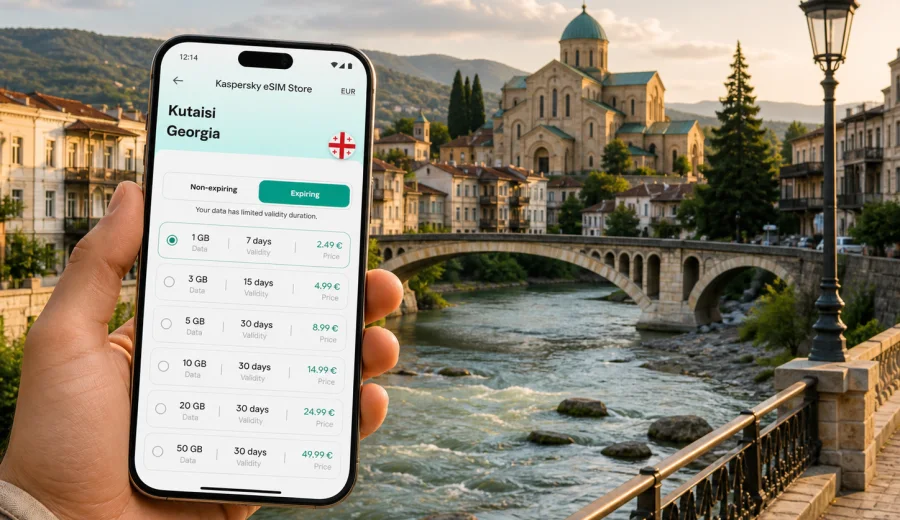
Kutaisi eSIM: mobile connection and internet for a practical trip to western Georgia
Kutaisi is often the first Georgian city travelers meet when they fly into western Georgia. It is smaller and calmer than Tbilisi, but it still asks a lot from your phone: airport transfers, maps, hotel check-in messages, taxi apps, restaurant searches, train and bus information, and day trips to caves, monasteries, canyons, or the Black Sea coast. A working mobile connection is useful from the first minutes after arrival, especially if you do not want to depend on airport Wi-Fi or search for a local SIM card before knowing the city.
An eSIM can make the first part of a Kutaisi trip more predictable. You choose a suitable data plan for Georgia, install it on a compatible phone, and use mobile internet for maps, messengers, bookings, and travel tasks. Kaspersky eSIM Store is an app and website where you can quickly choose, purchase, install, and activate an eSIM with a suitable data plan for mobile internet during an international trip. The exact conditions depend on the selected plan, so check data volume, validity period, destination, and activation rules before you travel.
This guide focuses on Kutaisi itself: arrival at Kutaisi International Airport, moving between districts, staying connected in hotels and guesthouses, working during a short business visit, and planning routes from the city to other parts of western Georgia.
Why mobile internet matters in Kutaisi
Kutaisi is easy to enjoy at a slow pace, but many trip details are handled online. You may need a map to find your guesthouse in the old town, a messenger to coordinate with a driver, or mobile data to check whether a marshrutka, train, or intercity transfer suits your route. Public Wi-Fi can help in cafes and hotels, but it is not a dependable travel plan for arrival, evening walks, or trips outside the center.
In Kutaisi, mobile internet is useful for:
- finding the right exit or pickup point after landing at Kutaisi International Airport;
- sharing your live location with a driver or hotel host;
- checking walking routes between the Colchis Fountain, the old town, the Rioni River, and Bagrati Cathedral;
- translating menus, signs, and short messages;
- confirming tours to Prometheus Cave, Martvili Canyon, Tskaltubo, Gelati Monastery, or Batumi;
- using messaging apps for calls and updates when your eSIM plan includes data but not a regular phone number;
- managing remote work tasks if Kutaisi is part of a longer trip through Georgia.
The city is compact, but your route may not be. Many travelers land near Kutaisi, spend one or two nights in the city, then continue to Tbilisi, Batumi, Mestia, or a nature destination in Imereti. That makes a country-level eSIM plan for Georgia more practical than thinking only about one neighborhood.
Arrival at Kutaisi International Airport
Kutaisi International Airport is outside the city, so the first online tasks usually happen before you reach your hotel. You may need to check a transfer confirmation, message a host about arrival time, compare taxi pickup instructions, or look up the exact address in Georgian and English.
A simple arrival setup looks like this:
1. Install the eSIM before departure while you have stable Wi-Fi.
2. Keep your primary SIM active for calls or banking messages if you need it.
3. After landing, enable mobile data for the eSIM profile according to the plan instructions.
4. Open maps, messaging, and booking apps before leaving the terminal.
5. Save your hotel address offline as a backup in case you need it.
Do not wait until you are in a moving car to configure everything. eSIM installation is usually straightforward, but it is still a phone setting that deserves a calm moment. If your plan requires activation after arrival, follow the instructions and allow a few minutes for the device and local network to register.
Where connection helps inside the city
Kutaisi is walkable in the central area, but it is not a grid city where every turn is obvious. Streets curve around the river, hills, bridges, markets, and residential blocks. Mobile data helps if your accommodation is in a quiet street near the old town or on the way to Bagrati Cathedral.
| Kutaisi situation | Why internet helps | Practical tip |
|---|---|---|
| First walk from the hotel | Streets and bridges can be confusing on day one | Save your hotel location and check the route before leaving |
| Taxi or transfer | Pickup points and street names may need confirmation | Keep your messenger open until the ride starts |
| Local restaurants | Opening hours and menus can change | Check recent information in maps or booking apps |
| Guesthouse check-in | Hosts often coordinate arrival by message | Keep data active until you have the door code or instructions |
| Day trip departure | Meeting points may be outside the old center | Screenshot the address and keep the driver contact |
| Evening return | Walking routes may feel different after dark | Use maps and a charged phone battery |
The main point is not constant scrolling. It is having enough mobile internet for travel decisions when they appear: a changed pickup location, a delayed train, a different entrance, or a quick translation.
Choosing an eSIM data plan for Kutaisi
For a city trip to Kutaisi, choose the plan around your real route rather than the city name alone. The relevant destination is Georgia, and the same plan may support your movement between Kutaisi, Tbilisi, Batumi, and other Georgian stops if the plan conditions allow it. Before purchase, check the destination, validity period, data allowance, and top-up rules.
Use this simple planning rule:
- 1-2 days in Kutaisi: light maps, messengers, booking checks, and occasional searches usually need a modest data allowance.
- 3-5 days in western Georgia: add more data if you use navigation during day trips, upload photos, or work from cafes.
- One week or more in Georgia: choose a longer validity period and a larger allowance so you do not have to manage data too often.
- Remote work: estimate video calls and hotspot use separately. They consume data much faster than maps and messages.
- Family or group travel: every traveler who needs independent data should have a compatible device and a suitable plan.
If Kutaisi is part of a broader itinerary, you can choose a mobile internet plan for your trip to Georgia before departure and keep the setup focused on the whole route, not only the first city. Kaspersky eSIM Store lets you compare available plan details for the destination and prepare the eSIM on a compatible device, while the actual performance and availability depend on the selected plan, device settings, and local network conditions.
Local movement: walking, taxis, buses, and transfers
Kutaisi rewards walking, and mobile internet makes the walks easier. The old town, riverfront, central market, White Bridge area, and Bagrati Cathedral can fit into a relaxed day. Maps help with walking time, elevation, and the most convenient bridge or street.
For taxis and transfers, mobile data is even more useful. Drivers and hosts may use messaging apps for arrival details. If your accommodation is in a guesthouse rather than a large hotel, the address may be easier to confirm through a pin or live location than through a street name alone. Keep your phone charged and keep the eSIM profile selected for mobile data when you are coordinating pickup.
For buses, marshrutkas, and intercity travel, treat the internet as a planning aid and confirm important departures locally when needed. Mobile data helps you compare options, find stations, message tour providers, and keep relatives updated.
Districts, hotels, and guesthouses
Many visitors stay near the center because it keeps restaurants, bridges, the market, and main sights within a short walk. Others choose quieter guesthouses or hotels with parking if Kutaisi is a base for day trips. Your connectivity needs change slightly depending on where you sleep.
Central stays are convenient for walking, but you may still need data for maps, taxi calls in bad weather, restaurant bookings, and late check-in messages. Hillier or quieter areas make navigation more important, especially at night. Hotels often provide Wi-Fi, but mobile data is useful when you step outside or need a backup connection.
Before booking, consider these connection-related questions:
- Will you arrive after reception hours?
- Does the hotel or guesthouse send check-in instructions by message?
- Are you planning early day trips before breakfast?
- Will you need to work from the room or a cafe?
- Do you rely on map apps for walking routes?
- Does your phone support eSIM and is it unlocked for eSIM use?
If the answer to several questions is yes, prepare the eSIM before you travel.
How to install and activate eSIM for a Kutaisi trip
The cleanest approach is to install the eSIM before your flight and activate mobile data according to the plan instructions when you need it. Installation requires internet access, so do it on home Wi-Fi or another stable network. Activation timing and data validity depend on the plan conditions.
General setup steps:
1. Check that your phone supports eSIM and is not locked to a single carrier.
2. Choose Georgia as the destination and select a plan with suitable data volume and validity.
3. Complete the purchase in Kaspersky eSIM Store.
4. Install the eSIM profile using the on-screen instructions or QR code if provided.
5. Name the profile clearly, for example "Georgia data".
6. After arrival, select the eSIM for mobile data and follow the activation instructions.
7. Keep your primary SIM for calls or SMS if you need regular phone service.
For device-specific setup, use the Android installation guide or the iOS installation guide. The exact menu names can differ by phone model and software version, so follow both the phone prompts and the instructions linked to your purchase.
Compatibility checks before you buy
Not every phone supports eSIM, and some compatible devices can still be restricted by carrier lock or regional settings. Check this before purchase, not at the airport. Also confirm that your phone can keep your usual SIM active if you need banking SMS, calls, or a familiar number for messengers.
Check your device before choosing a plan. Then review these items:
- your device model supports eSIM;
- the device is not locked to one mobile carrier;
- your operating system is updated enough for eSIM settings to work smoothly;
- you know which SIM profile will be used for mobile data;
- you understand whether voice calls and SMS are included in the selected plan;
- you have Wi-Fi available for installation before departure;
- you have saved the installation email or profile details.
Most travel eSIM use cases are data-first. If you need calls, SMS, or a local number, check the selected plan conditions before you rely on it.
Business trips and remote work in Kutaisi
Kutaisi can be a practical stop for business travelers in western Georgia. For work, mobile internet is less about sightseeing and more about continuity: calendar updates, ride coordination, document access, and a backup connection when Wi-Fi is crowded or unstable.
If you plan to work from Kutaisi, estimate your data needs honestly. Email and documents are light; video calls, file sync, cloud backups, and hotspot use are heavy. Download large files on trusted Wi-Fi when possible and keep mobile data for tasks that need mobility.
Practical work checklist:
- download meeting documents before travel;
- save hotel and office addresses offline;
- keep a power bank in your day bag;
- turn off automatic app updates on mobile data;
- check whether hotspot use is allowed by your selected plan;
- keep support and installation instructions accessible;
- track data balance during the trip.
Kaspersky eSIM Store can help you prepare a suitable eSIM plan for the destination, while you choose enough data for your workload and read the plan rules.
Stopovers and short stays
Some travelers use Kutaisi as a short stop: land, sleep, see the center, and continue onward. You may not need a large plan, but you do need connectivity at the right time.
For a one-night stay, prioritize:
- airport-to-city navigation;
- transfer or taxi communication;
- hotel check-in messages;
- one map app and one messenger;
- next-day route to the bus station, train station, airport, or tour meeting point.
Avoid spending the first hour in Kutaisi solving phone settings if your stay is short. Install the eSIM in advance, screenshot key details, and know how to switch mobile data to the travel profile.
Day trips from Kutaisi
Kutaisi is a base for western Georgia. Travelers often visit monasteries, caves, canyons, spa towns, mountain routes, or the coast. These trips can use more data than the city center because you may need maps, driver communication, weather checks, and route changes.
Common day-trip tasks include:
- confirming pickup time with a guide or driver;
- checking travel time to Gelati Monastery, Motsameta, Prometheus Cave, Tskaltubo, or Martvili Canyon;
- translating short messages or signs;
- sending your location to other travelers;
- checking whether a restaurant or attraction is open;
- keeping entertainment or maps available during longer transfers.
Download offline maps before leaving the city if you expect rural roads or mountain areas. A prepared eSIM, offline maps, saved phone numbers, and a charged battery work better together.
Data-saving tips for Kutaisi
Smart settings help a data plan last longer, especially if your Kutaisi stay is part of a longer Georgia route.
Use these settings before or right after arrival:
- disable automatic app updates on mobile data;
- pause cloud photo uploads until Wi-Fi;
- download offline maps for Kutaisi and your day-trip areas;
- save hotel, airport, and station addresses;
- use lower video quality for calls if the connection is mainly for work;
- close navigation after you arrive instead of leaving it active in the background;
- check data balance in your profile or app when available.
For couples or groups, do not assume one phone can cover everyone through hotspot all day. Hotspot use drains battery and data quickly, and plan rules may vary.
Quick comparison: eSIM, roaming, local SIM, and Wi-Fi
Each connection option can work in Kutaisi, but they solve different problems.
| Option | Best for | Main limitation |
|---|---|---|
| Travel eSIM | Preparing mobile data before or soon after arrival | Requires compatible, unlocked eSIM device |
| Standard roaming | Keeping your usual SIM active with minimal setup | Costs and conditions depend on your home carrier |
| Local physical SIM | Longer stays or users who want a local package | Requires finding a sales point and handling setup locally |
| Public or hotel Wi-Fi | Large downloads at accommodation or cafes | Not available during transfers, walks, or day trips |
For many Kutaisi visitors, eSIM works well as the travel data layer, while the primary SIM remains available for calls, banking messages, or account verification.
Common mistakes to avoid
Small setup mistakes can create stress on arrival. Avoid these before flying to Kutaisi:
- buying a plan before checking device compatibility;
- installing the eSIM only after leaving reliable Wi-Fi;
- forgetting which SIM profile is selected for mobile data;
- assuming the eSIM includes a regular phone number;
- using a small data plan for video calls and hotspot sharing;
- deleting the eSIM profile before the trip is finished;
- ignoring the validity period and activation rules;
- relying only on public Wi-Fi for airport transfer and check-in.
If something does not work immediately, check the basics first: mobile data profile, roaming data setting for the eSIM if required by instructions, device restart, plan status, and whether you are in an area with local network service.
FAQ: eSIM and mobile internet in Kutaisi
Is Kutaisi enough of a city trip to need eSIM?
Yes, if you rely on maps, messengers, taxi coordination, bookings, or day trips. Arrival and transfers are easier when your phone is online.
Should I choose a city plan or a Georgia plan?
The relevant destination is Georgia. Choose a plan that matches the country and your route, then check whether the data volume and validity period fit your stay.
Can I install eSIM after I land?
You can usually install an eSIM when you have internet access, but it is better to install before departure on stable Wi-Fi.
Does eSIM include calls and SMS?
Many travel eSIM plans are focused on mobile data. Calls and SMS are not included unless the selected plan says so. You can use messaging apps over data.
Is eSIM useful for trips from Kutaisi to Batumi or Tbilisi?
It can be useful if your selected plan covers Georgia and has enough data for the whole route.
What if my phone is not compatible?
Use another connection option, such as standard roaming, a local physical SIM, or Wi-Fi where available.
Final preparation before your flight
Before you leave for Kutaisi, make your phone part of the travel checklist. Confirm that your device supports eSIM, choose a data allowance that fits the trip, install the profile on stable Wi-Fi, save your hotel address, and keep the Android or iOS instructions accessible.
When you are ready to prepare mobile internet for the trip, choose an eSIM plan for Georgia in Kaspersky eSIM Store. Select the option that matches your route, check the plan conditions, and activate the eSIM according to the instructions for your device.