Travel connectivity guide
Kuwait City eSIM for Mobile Internet
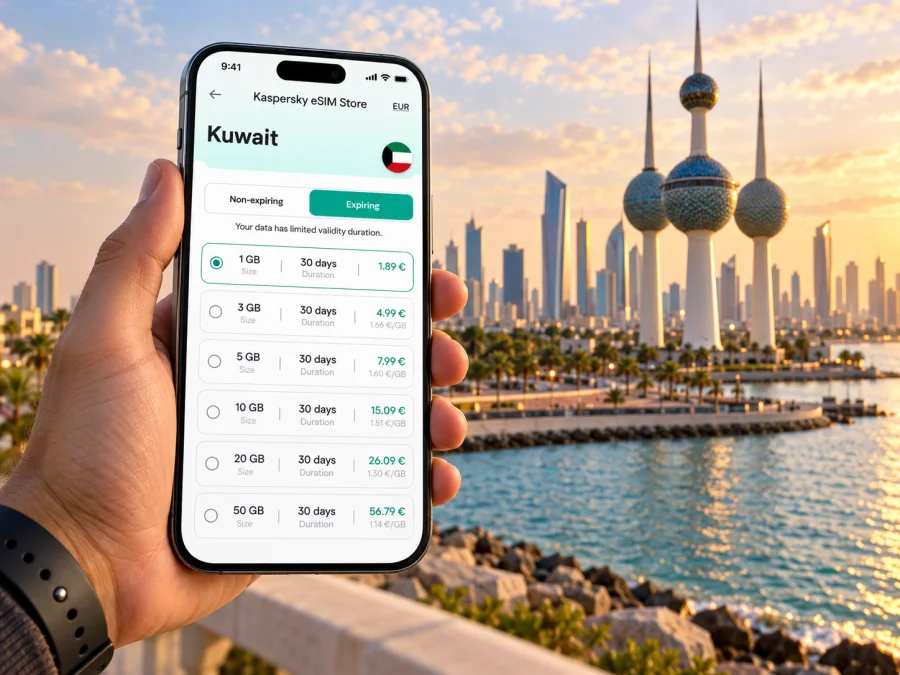
Kuwait City eSIM: Mobile Connection and Internet for Your Trip
Kuwait City is a place where a short drive can connect very different parts of a day: an arrival at Kuwait International Airport, a meeting in the business district, lunch near the old market, and an evening along the Gulf. A reliable way to use maps, messages, booking details, and work tools can make those transitions easier. An eSIM is a digital SIM profile for a compatible, unlocked device; a travel data plan can help you get mobile internet without swapping a physical SIM card.
This guide focuses on using mobile internet around Kuwait City: planning the first trip from the airport, orienting yourself between districts, choosing data for your itinerary, and preparing for a stopover or business visit. Coverage and performance depend on the selected plan, its local network partner, your device, and where you are in the city, so check the plan details before you travel.
Why mobile internet helps in Kuwait City
Kuwait City spreads along the coast and inland roads, and many visitors move between separate destinations rather than spending the whole day on one pedestrian street. Even when a hotel, office, or café has Wi-Fi, mobile data is useful between those places and for the small decisions that come up on the way:
- Check a map before leaving the hotel and confirm the entrance or drop-off point for a large building.
- Message a driver, colleague, or host if an arrival time changes.
- Keep digital boarding passes, reservations, and meeting details available while moving around.
- Look up opening hours and directions before heading to a museum, market, or waterfront stop.
- Translate a place name or read a menu when you need a quick clarification.
Plan your first connection before landing
Kuwait International Airport is the usual arrival point for visitors heading to the capital. The airport lists buses, airport taxis, car rental, and limousine services among its transport options. Choose based on destination, luggage, timing, and schedule; check current airport transport details, since routes and availability can change.
Before boarding, save your hotel address, complex name, and entrance details so you can show a driver the exact destination. A map pin is useful when a district name covers a broad area.
A simple arrival sequence:
- At home or before departure, confirm that your phone supports eSIM and is not carrier-locked.
- Choose a travel plan whose destination and validity fit your Kuwait City dates. Read the data allowance, activation conditions, and any limits shown for that plan.
- Install the eSIM while you have a stable connection, following the on-screen instructions. Keep the confirmation and setup information accessible.
- When you arrive, select the travel eSIM for mobile data if that is how your device manages multiple SIMs. Follow the plan instructions for activation and data roaming settings.
- Open a map, load your hotel details, and send a short message before leaving the airport.
If data is not available immediately, check that the correct line is selected, the plan is active, mobile data is enabled, and settings match the plan instructions. Avoid removing the profile unless support guidance tells you to.
Getting around: think in routes, not just distances
For many visitors, Kuwait City is easiest to navigate as a set of planned journeys. A destination that looks close on a small-scale map may still involve a road journey, and the best route can depend on traffic, the time of day, and where a car can stop. Before setting off, check the route from your actual starting point, not only from the city centre.
Airport transport information includes buses and taxis, while car hire and limousine services are also listed. Public buses can suit travelers whose destination is served by a convenient route and who have time to check current stops and schedules. A taxi or prearranged car may be more practical with luggage, an early or late arrival, or several stops. For any ride, confirm the destination and pickup point in the map before the journey begins.
| Trip situation | What to prepare on your phone | Why it helps |
|---|---|---|
| Airport to hotel | Saved hotel name, address, and map pin | Makes the destination easier to confirm at pickup |
| Hotel to a meeting | Building name, entrance, and contact details | Business sites may have several access points |
| Market or museum visit | Destination pin and opening information | Helps you confirm the stop before setting out |
| Several stops in one day | A short route list in travel order | Reduces backtracking and last-minute searching |
| Short stopover | One essential destination and return route | Keeps the outing realistic around flight timing |
Allow extra time, follow posted directions, and choose a clear pickup point. A brief message with a saved location can make driver coordination easier.
Districts and landmarks: use them as navigation anchors
Kuwait City combines government, commercial, cultural, shopping, and waterfront destinations. Names such as Sharq, Mirqab, Dasman, and the historic market area can help orient a visitor, but the exact location of a hotel or appointment matters more than a district label. Add the specific building or entrance to your saved places before you travel.
The Kuwait Towers are a recognizable waterfront landmark and a useful reference for a visit along the Gulf. Check each stop individually rather than assuming nearby attractions are an easy walk apart. For a visit to the towers or a view over the city, confirm current access and opening arrangements before setting out.
Souq Al-Mubarakiya offers a more compact market setting with lanes, shops, and places to eat. Save it as a destination and agree on a recognizable entrance or meeting point in advance.
The Grand Mosque, museums, cultural venues, and shopping centres make distinct stops. Check current opening hours and access rules, and leave time for the drive and finding the entrance.
Choose a data plan around your itinerary
Estimate data from your expected tasks. Navigation, email, and messaging differ from video calls, frequent photo uploads, or streaming. Hotel Wi-Fi may handle heavier use when available; mobile data covers time between places.
| Your travel pattern | Likely phone use | Planning approach |
|---|---|---|
| One-day stopover | Maps, messages, ride coordination, essential searches | Prioritize enough data for directions and changes; keep an offline map |
| Weekend city break | Navigation, reservations, social updates, browsing | Estimate daily use and how often you will rely on hotel Wi-Fi |
| Business visit | Email, maps, calendars, messaging, occasional calls over apps | Include work use and confirm whether video meetings are expected |
| Longer stay | Regular navigation, communication, browsing, uploads | Compare plan validity with the full trip and review how top-ups work |
Before choosing, compare the stated data allowance, validity period, supported destination, price, and activation rules. A plan that expires before your return or begins its validity earlier than expected may not fit your dates. Avoid relying on a single estimate if you know you will use video or upload large files; those activities can consume data quickly.
For a trip limited to Kuwait City, choose a plan that lists Kuwait as its destination and read any regional or usage notes. If your itinerary also includes other countries, confirm that the selected plan covers each destination rather than assuming a Kuwait plan automatically works across borders. You can review eSIM plan options for Kuwait and compare the details with your route before deciding.
What an eSIM does—and what it does not
An eSIM is a digital profile installed on a compatible device. A travel plan is intended for mobile data and does not automatically include a local number, voice calls, or SMS; check its terms. Internet-based messaging and calling apps can work when you and the person you contact have an internet connection.
Depending on your phone, you may keep your usual SIM available for calls or messages while the eSIM handles data. Check line settings and possible home-carrier roaming charges before departure, including automatic data switching if available.
Before purchase, confirm that your phone supports eSIM and is not locked to a carrier. The same phone model can have different capabilities by region or variant, so use the exact device details when checking. Check whether your device supports eSIM before you choose a plan.
Install and activate with a little preparation
The easiest time to prepare is before travel, when you have access to stable Wi-Fi and can read each setup step without rushing. Kaspersky eSIM Store is an app and website where you can select, arrange, and activate an eSIM with a suitable plan for mobile internet during an international trip. Availability and setup steps depend on the device and selected plan.
A careful setup looks like this:
- Open the app or website and select the destination and plan that match your travel dates and expected use.
- Review the price, data amount, validity, activation trigger, and other conditions before completing the order.
- Follow the device-specific installation instructions: Android eSIM installation guide or iOS eSIM installation guide.
- Label the new line clearly, for example “Kuwait travel data,” so it is easy to identify beside your home SIM.
- Keep the eSIM enabled and select it for mobile data when the plan instructions say to do so. Some plans may require data roaming to be enabled for that eSIM; follow the plan guidance.
- Test the connection with a simple page or map after activation. If it does not work, check the selected data line, activation status, and device settings before making changes to the profile.
Installation and activation may be separate. Check when validity begins before turning the line on, and do not delete an installed profile unless support instructions say to; reinstalling may not be possible.
Business visits, hotels, and short stopovers
For a work trip, save the venue’s full address, your meeting contact, and calendar details. If a building has multiple entrances, ask your host which one to use and pin it on the map. Data helps with directions and messages between the airport, office, and next appointment.
Check hotel Wi-Fi availability and its sign-in process. Use mobile data for directions and messages outside, and download essential documents in advance instead of depending on a large transfer while moving.
For a stopover, allow time for arrival formalities, transport both ways, and an airport return buffer. Choose one realistic destination and save the return route and flight details offline as well.
Common questions
How reliable is eSIM coverage across Kuwait City?
No travel plan guarantees service at every spot. Coverage and performance depend on the plan’s local network arrangements, device, indoor conditions, and current network conditions. Review the destination and terms, and keep offline directions for critical parts of your trip.
Can I use my usual number and a travel eSIM together?
Many phones support multiple SIM lines, but combinations vary. You may be able to keep your usual number active and use the eSIM for data. Check device instructions and home-carrier roaming terms, then choose the correct line for each task.
Does the data plan include phone calls and text messages?
A travel data plan is intended for internet access unless its terms explicitly say otherwise. It does not necessarily include a local number, standard voice calls, or SMS. If you need those, verify the exact plan conditions and keep another way to reach essential contacts.
Should I install the eSIM at the airport?
You can prepare before the trip over a stable connection. Whether to install or activate before departure depends on the plan’s validity rules. Read them first and keep setup information available after landing.
What if maps stop updating?
Use an offline map or written address. Check that data is assigned to the travel eSIM, the plan is active, and the app can use data. If needed, follow the plan’s troubleshooting guidance instead of deleting the profile.
A practical checklist for Kuwait City
Before you leave:
- Save the hotel, first meeting, and any must-see destinations as map pins.
- Confirm transport from Kuwait International Airport and check current service details.
- Verify eSIM support and that the phone is carrier-unlocked.
- Match plan destination, data allowance, validity, and activation conditions to your dates.
- Install the profile with a stable internet connection and save the setup instructions.
- Download an offline map and keep essential addresses available without data.
- Review how your phone selects SIM lines and check possible home-carrier roaming charges.
When you arrive:
- Select the travel eSIM for data according to the plan instructions.
- Confirm the pickup point and destination before starting the airport journey.
- Test maps and messaging, then keep the hotel pin and return route handy.
- Recheck directions before moving between districts or changing plans.
Prepare your Kuwait City connection
Plan your first destination, transport, and setup details before you arrive. Kaspersky eSIM Store helps you choose, arrange, and activate an eSIM with a suitable plan for mobile internet during an international trip. Review the plan terms and activation instructions, then choose a Kuwait eSIM plan for your trip that fits the time you will spend in Kuwait City.


