Travel connectivity guide
La Ceiba eSIM: Mobile Internet in Honduras
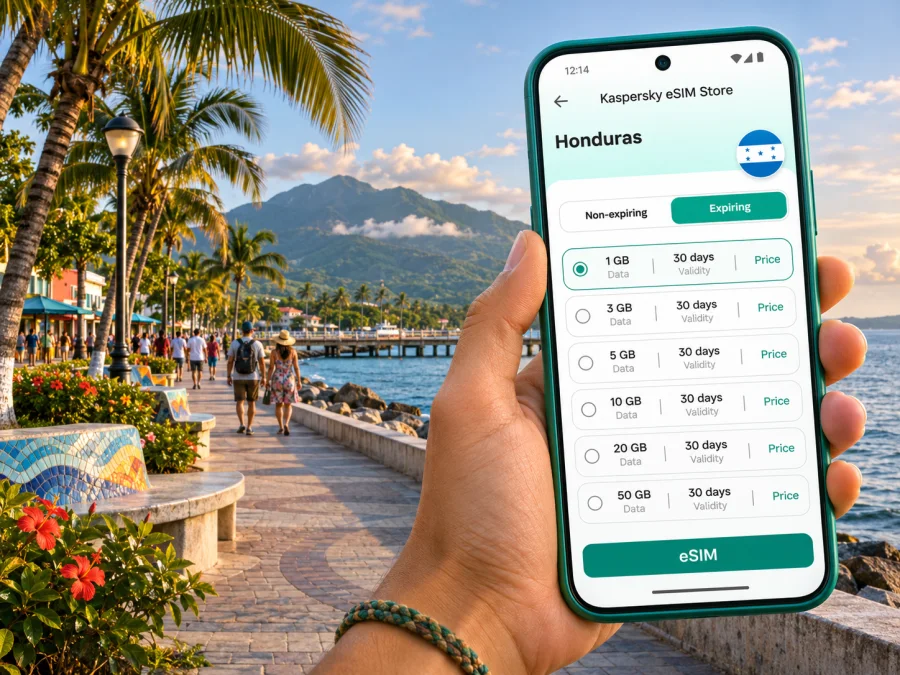
La Ceiba eSIM: Mobile Connection and Internet for Your Trip
La Ceiba is a Caribbean port city on Honduras’s northern coast, where an airport arrival, a waterfront stay and a ferry connection can all be part of the same itinerary. An eSIM can make the practical transitions easier: check a transfer, open a map, message your host or confirm a departure without first finding a shop for a physical SIM. Before travelling, check that your phone supports eSIM, review the selected plan’s country coverage and validity, and keep a second way to access important bookings.
This guide focuses on using mobile internet in La Ceiba and on common routes through the city. It does not promise a particular signal or speed at every address. Service depends on the plan, its partner network, the phone and local conditions.
When mobile internet helps in La Ceiba
Arriving at Golosón
La Ceiba’s airport is listed by Honduras’s civil aviation authority as Golosón International Airport (LCE), in the department of Atlántida. If your flight lands there, having data ready can help you check the latest pickup details, contact your accommodation, see a route into town or tell someone that you have arrived. Airport transport arrangements and flight schedules can change, so confirm the details with your carrier or accommodation before leaving.
If you install an eSIM before departure, make sure you understand when its data allowance or validity begins. Some plans start when installed, while others begin under different conditions; use the terms shown for the plan you select. You can install the profile in advance while connected to reliable Wi-Fi, then choose when to use it for mobile data according to those instructions. Keep your booking confirmation available offline as well.
Moving between the waterfront, the centre and your stay
La Ceiba is not a single resort strip. You may move between accommodation, the centre, shops, restaurants, the waterfront and transport terminals during one day. Mobile data can help you check a pinned address, compare a route, arrange a ride directly with a provider, translate a message or share your location with a travelling companion. Save the hotel name and address in a note; a map pin can be difficult to identify if several places have similar names.
For walking or short transfers, download an offline map of the area before you go out. Use live data when you need a refreshed route or to contact someone, and switch back to offline navigation where practical. This reduces unnecessary background use and gives you a fallback if mobile service is weak indoors or along the way.
A day around town
The restored old dock and Paseo de los Ceibeños waterfront are among the city’s recognizable places. Swinford Park, in the Mazapán area near the centre, is another useful point to place on a map. If you plan a walk between these stops, check distances and opening information on the day rather than assuming every attraction is open or accessible. A mobile connection is useful for finding a meeting point, checking local updates and sending a message if plans change.
Use the same preparation for dining and errands: save the address, note any reservation details and keep a screenshot of directions. If a site or booking requires a confirmation code, check that you can receive it through your usual number. A data-only travel eSIM generally does not replace your regular phone number or include ordinary calls and SMS unless its terms say otherwise. Messaging and internet calls can work through compatible apps when you have data and the other person is reachable there.
Choosing an eSIM plan for a La Ceiba trip
Start with the itinerary rather than the city name alone. A short city stay may need less data than a trip that includes frequent video calls, cloud backups or several mainland destinations. A Honduras plan is the relevant country-level option to review for La Ceiba. If your route continues to another country, verify that the selected plan explicitly includes each destination; a regional plan may be worth considering only when its country list and conditions match the route.
To compare plans, check the information shown at purchase:
| What to check | Why it matters in La Ceiba |
|---|---|
| Country or region | Confirm that Honduras is included. A city name alone does not determine a plan’s coverage. |
| Data allowance | Maps, messaging and email use less than extended video, uploads or a laptop hotspot. Estimate from your own habits. |
| Validity period | Match the plan duration to your dates and check what event starts the validity clock. |
| Tethering and device limits | If you intend to connect a laptop or another phone, read whether sharing is supported and any applicable conditions. |
| Top-up or renewal terms | Check whether additional data can be added and whether the same eSIM profile remains usable. |
| Price and currency | Review the final displayed amount and applicable terms before confirming the order. |
Avoid choosing only by the largest data allowance. A plan with more data may not be useful if it expires too early or does not cover the rest of your route. Conversely, a small allowance can run out quickly if your phone uploads photos automatically or streams video over mobile data. Turn off automatic cloud backup on mobile data, use Wi-Fi for large downloads, and check your data use during the trip.
Kaspersky eSIM Store is an app and website where travellers can choose, arrange and activate an eSIM with a suitable plan for mobile internet abroad. It is not a mobile network operator, and a listing should not be read as a promise about signal at a particular hotel, road or terminal. For the Honduras destination, review the available options for a trip to Honduras and check each plan’s current terms before choosing. The page is for the country; it does not represent a separate La Ceiba-only package.
Match the plan to how you will use your phone
A practical estimate begins with your likely activities. Navigation and text messages are usually lighter uses than video calls, high-resolution uploads and streaming. If you work remotely, consider how often you will join calls, whether your accommodation has dependable Wi-Fi and whether your employer permits a mobile hotspot. Do not assume that a plan allows tethering: check its terms and test your workflow before relying on it for a deadline.
Airport, ferry and onward travel
La Ceiba is an important mainland departure point for the Bay Islands. Galaxy Wave’s published schedule lists sailings between La Ceiba and Roatán, including departures from La Ceiba at 9:30 a.m. and 4:30 p.m.; operators can revise schedules, so recheck your travel date and arrive according to the ferry company’s current check-in guidance. The ferry company says passengers should check in at its terminal one hour before departure. Do not plan a tight airport-to-ferry connection without confirming arrival times, terminal transfer time and ticket rules.
A phone with usable data can help you coordinate the final transfer to the port, share delays and check for travel updates. Keep a screenshot of your ticket and the terminal location in case your connection drops. If your route continues by bus, check the departure station and boarding time separately; city transport hubs are not necessarily beside the waterfront or your hotel.
For excursions beyond town, such as a visit toward Pico Bonito National Park, expect the journey to leave the dense urban area. La Ceiba sits close to a varied landscape of coast, river valleys and steep forested terrain. Do not assume that a mobile plan will provide continuous data on trails or outside town. Download maps and reservation details, agree on a meeting point and follow the guidance of your local tour provider. The forested environment and changes in terrain can make navigation and reception different from a central street.
A simple transfer checklist
Before leaving the airport or your accommodation:
- Confirm the exact name and address of your destination.
- Save your ticket, booking reference and important contacts offline.
- Check the latest departure information with the airline, ferry or bus operator.
- Allow time for baggage, road conditions and moving between terminals.
- Tell your accommodation or travel companion if your arrival time changes.
- Keep enough battery for maps, messages and payment or ticket screens.
Mobile data is a planning aid, not a substitute for transport confirmation or local instructions. For a ferry departure, the operator’s latest timetable and check-in rules take priority over a map estimate. For a flight, check your airline’s current information rather than relying on a saved schedule.
Prepare and activate your eSIM
Complete setup while you have stable internet access and enough time to read the prompts. Check that your device is eSIM-compatible and is not restricted by a carrier lock; model names alone can be misleading because support may differ by sales region. Check whether your device supports eSIM before selecting a plan.
Before you install
- Check the device. Confirm eSIM support for your exact phone variant and verify that the phone is unlocked for use with another plan.
- Review the plan. Confirm Honduras is included, the validity dates fit your stay and the conditions match your expected data use.
- Keep internet available. Use reliable Wi-Fi for downloading or adding the eSIM profile, and keep access to the setup instructions.
- Save the QR code or activation details. Follow the plan’s installation method; do not delete a profile or scan a one-time code casually.
- Choose the data line. In your phone’s mobile settings, select the travel eSIM for mobile data when you are ready to use it. Keep your home SIM settings appropriate for calls and messages, and check roaming charges with your home carrier.
The exact menu names depend on your phone. For step-by-step help, follow the Android eSIM installation instructions or the iOS eSIM installation instructions. The plan’s own activation instructions determine whether data roaming must be enabled for that profile. Do not turn on roaming indiscriminately for your home SIM; check which line is selected for data.
After installation, label the new line something recognizable, such as “Travel” or “Honduras,” if your phone allows it. When you arrive, select that line for mobile data and confirm that data switching behaves as you intend. If the connection does not start, wait briefly, check the selected data line and plan instructions, then restart the phone if appropriate. Avoid removing the eSIM profile as a first troubleshooting step, because reinstalling may require a new activation process.
What to know about coverage and local networks
Mobile service in La Ceiba depends on the network used by the selected plan and on local conditions. Reception can vary between a central street, a building interior, the airport, a vehicle, a ferry terminal and a rural excursion. A country page or plan label does not guarantee identical performance at every point. If you need reliable connectivity for work or an onward departure, keep essential details offline and ask your accommodation or transport provider about a practical backup.
Honduras has local operators that support eSIM in some circumstances, but local operator eSIM availability and a travel eSIM plan are not the same product. A local number, identity or account requirements, payment method and eligibility rules can differ. The Apple carrier information for Honduras lists Claro and Tigo for certain eSIM activation methods on iPhone; that does not mean every phone model, prepaid option or plan is eligible. For a local line, check directly with the operator for current requirements. For a travel plan, rely on the terms shown for the specific eSIM you select.
Remember that a data-only travel eSIM normally supplies mobile data rather than a new local phone number. Keep your regular number active if you need calls or SMS, and confirm roaming costs with your home carrier. Calls over internet apps use data and depend on both parties having access to the relevant service. ## Common La Ceiba scenarios
Common La Ceiba scenarios
You are catching a morning ferry
Check the ferry operator’s schedule on the travel date, locate the correct terminal and account for the stated check-in time. Download your ticket and terminal details in advance. If you are travelling from a hotel or the airport, confirm the transfer plan and leave room for traffic or a delayed arrival. Keep mobile data available for operator updates, but do not wait until the last minute to look for them.
You are heading toward Pico Bonito
Arrange transport with a provider familiar with the area, save the meeting location and ask what to expect for reception on the specific route. Download maps and reservation details before leaving town. In a natural area, follow guide instructions and do not depend on a phone signal for navigation or emergency communication.
You are working from your accommodation
Ask about Wi-Fi quality and backup options before your first meeting. Test the connection, keep meeting links and contacts accessible, and check whether the eSIM plan allows hotspot use before connecting a laptop. Use mobile data selectively for calls and reserve some allowance for maps and messages outside the hotel.
Troubleshooting mobile data
If the eSIM appears installed but you cannot get online, work through these checks in order:
- Confirm that the travel eSIM is enabled and selected for mobile data.
- Check that the plan is active and has not reached its allowance or validity limit.
- Review whether the instructions require data roaming for the travel profile.
- Turn airplane mode on briefly and off, then give the phone a little time to register.
- Move to a different spot, especially if you are indoors or inside a vehicle.
- Restart the device if the previous steps do not help.
- Contact the service’s support team with the plan and device details if the problem continues.
Frequently asked questions
Will an eSIM work everywhere in La Ceiba?
No plan can promise service at every address or on every route. Availability depends on the eSIM plan’s network partners, the device and local conditions. Check the plan details and keep essential information available offline.
Can I use the same eSIM in La Ceiba and Roatán?
That depends on the specific plan and its country coverage. Both destinations are in Honduras, but connectivity can still vary by network and location. Check the plan terms, then verify the ferry schedule separately with its operator.
Does a travel eSIM give me a Honduran phone number?
Usually not. A data-only travel eSIM is intended for mobile internet and may not include a local number, voice calls or SMS. Review the plan details and keep your regular number if you need it.
Should I install the eSIM before flying?
Often it is convenient to install before departure while connected to Wi-Fi, but follow the plan’s instructions about when to install and activate it. Check when its validity begins so you do not start the plan earlier than intended.
Do I need to turn on data roaming?
Some travel eSIMs require data roaming for that eSIM profile to connect. Follow the instructions for your selected plan and verify that the travel line, rather than your home SIM, is selected for data.
What should I do if my phone does not recognize the eSIM?
Confirm that the exact device variant supports eSIM and is not carrier-locked. Check the installation steps and internet connection, then contact the service’s support team before deleting the profile or attempting to install it again.
Is an eSIM enough for a trip outside the city?
It can help with maps and messages where mobile service is available, but it should not be your only source of directions or emergency planning. Save information offline and follow local guides for excursions outside La Ceiba.
Get ready for your trip
Before you leave, check device compatibility, compare the Honduras plan terms with your itinerary and install the eSIM using the supplied instructions. Save your hotel address, airport transfer details and ferry ticket offline, then choose the travel eSIM for mobile data when you are ready to use it. Review the available eSIM options for Honduras in Kaspersky eSIM Store and select a plan whose coverage, data allowance and validity match your trip to La Ceiba.


