
Travel connectivity guide
La Palma eSIM: mobile internet guide
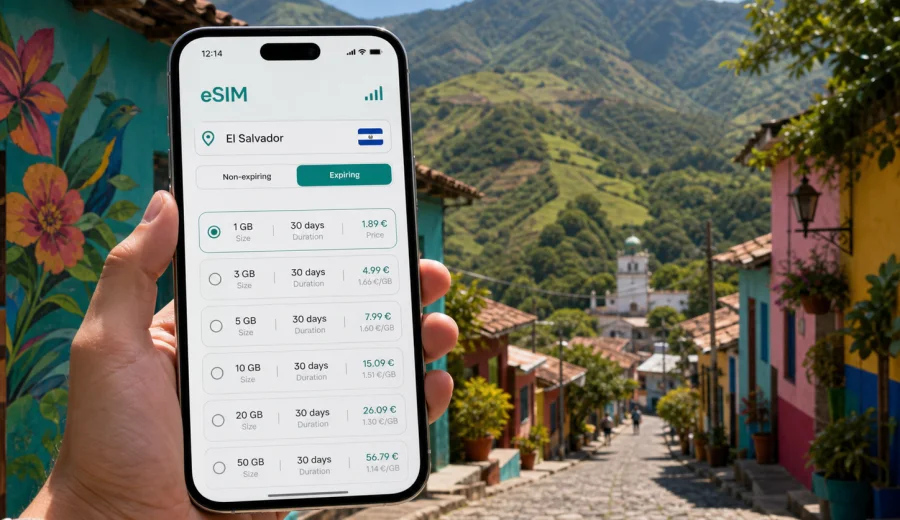
La Palma eSIM: mobile connection and internet for a trip to El Salvador
La Palma is a small mountain town in northern El Salvador, close to the Honduran border and known for painted facades, artisan workshops, cool highland air, and relaxed streets that are easy to explore on foot. It is not the kind of destination where you want to spend your first hour looking for mobile data. You may arrive by road from San Salvador, continue toward Chalatenango, use La Palma as a stop before mountain villages, or stay overnight for craft shopping and cooler weather. In each case, a working eSIM can make the practical parts of the trip easier: maps, hotel messages, transport coordination, translation, payments, and keeping in touch.
This guide focuses on mobile connection and internet in La Palma, not on El Salvador in general. The city is compact, but the surrounding routes are rural and hilly. That means your data habits can change quickly: one moment you are walking between murals and cafes, and the next you are following a road toward Miramundo, San Ignacio, or a viewpoint where offline directions may not be enough. Preparing mobile internet before the trip helps you move with more confidence, especially if your Spanish is limited or your itinerary depends on drivers, buses, or same-day decisions.
Why mobile internet matters in La Palma
La Palma rewards slow travel. You may spend time comparing painted wooden souvenirs, visiting small galleries, taking photos of facade art, and walking between central streets rather than rushing through big-ticket sights. Reliable mobile data still matters because the town sits away from the main international arrival points. Travelers often need connectivity before they even reach La Palma.
Common moments when mobile internet is useful include:
- checking the route from San Salvador, El Salvador International Airport, or Chalatenango;
- messaging a hotel or guesthouse about arrival time;
- confirming whether a driver understands the exact pickup point;
- using maps when roads split outside town;
- translating menu items, workshop signs, or short conversations;
- sharing live location with travel companions;
- checking weather before higher-altitude day trips;
- saving photos and documents to cloud storage when Wi-Fi is slow;
- handling work messages during a quiet stopover.
La Palma is not a large urban environment with transport apps everywhere. A simple data connection is often most valuable when plans change: a bus is delayed, rain affects a mountain route, or a hotel asks you to confirm by message. An eSIM does not replace all local planning, but it can reduce dependence on public Wi-Fi and help you avoid small problems becoming time-consuming.
La Palma arrival scenarios
Most international travelers do not fly into La Palma directly. The typical route begins at El Salvador International Airport near San Salvador, then continues by road through the capital area and north toward Chalatenango. Some visitors come from another Central American country by land and use La Palma as a border-region stop. Others visit as part of a wider itinerary through northern El Salvador.
| Arrival situation | What you may need data for | Practical eSIM habit |
|---|---|---|
| Airport to La Palma | Maps, driver messages, hotel check-in details | Install the eSIM before departure and activate it when you are ready to use mobile data |
| San Salvador to La Palma | Bus timing, road navigation, contact with accommodation | Download offline maps, then keep mobile data for updates |
| Short stop in town | Directions to craft shops, cafes, viewpoints | Choose a modest data package if you only need maps and messaging |
| Multi-day highland stay | Weather, route planning, photo backup, work messages | Choose more data and a validity period that covers the full route |
| Border-region travel | Messaging, translation, document access | Check that the selected tariff covers the country you will use it in |
Because La Palma is reached by road, connectivity before arrival matters as much as connectivity in town. If you plan to meet a driver, join a small tour, or coordinate with a guesthouse, prepare your phone while you still have stable Wi-Fi at home, in your hotel, or at the airport.
What to expect from local movement
Inside La Palma, many visitor tasks are walkable. The center has a small-town rhythm: painted storefronts, artisan shops, simple restaurants, and lodging spread across short streets. For these movements, mobile data helps with orientation rather than turn-by-turn complexity.
Outside the center, the picture changes. Roads toward nearby mountain areas, viewpoints, and neighboring towns may require more careful navigation. Mobile coverage and speed can vary depending on terrain, local network conditions, building materials, and weather. You should not assume that every bend in the road will have the same signal quality. The safer approach is to combine an eSIM with offline preparation:
1. Save your hotel address and check-in instructions.
2. Download offline maps for northern El Salvador.
3. Keep key messages available in your chat app.
4. Store passport scans, booking confirmations, and travel insurance offline.
5. Use mobile data for live updates, messaging, and location sharing.
This combination works well for La Palma because the town is easy to enjoy without being glued to your screen, but the route context still benefits from a dependable data plan.
Choosing data for a La Palma itinerary
The right eSIM data package depends less on the size of La Palma and more on how you travel around it. A traveler who spends one night in town and mostly uses maps and messages may need far less data than a remote worker who joins video calls from a guesthouse or uploads photos every evening.
Think about the trip in practical data categories:
- Light use: maps, chat, translation, email, basic browsing.
- Medium use: social media, photo sharing, ride coordination, travel research.
- Heavy use: frequent photo/video uploads, hotspot use, cloud backups, work calls.
For La Palma itself, light or medium use often covers the essentials. For a broader El Salvador route, especially if you move between San Salvador, Suchitoto, the Pacific coast, and northern highlands, choose a tariff with a validity period that matches the whole trip rather than just the day you reach La Palma. Check the traffic volume, validity period, destination coverage, and any usage conditions before you complete the purchase.
How eSIM helps in hotels and guesthouses
Small hotels and guesthouses in mountain towns can be comfortable and welcoming, but Wi-Fi performance may vary by room, building position, time of day, or the number of guests using the connection. Mobile data gives you a backup for the moments when Wi-Fi is not enough.
Useful hotel scenarios include:
- sending your estimated arrival time from the road;
- opening a map when a property is on a side street;
- translating check-in questions;
- using messaging apps if reception is not staffed continuously;
- checking next-day weather before a mountain trip;
- accessing booking confirmations if Wi-Fi is unstable;
- joining a short work call without relying only on the hotel network.
An eSIM is especially practical if you are traveling with only carry-on luggage and do not want to spend time finding a local SIM after arrival. With Kaspersky eSIM Store, the user can choose, complete setup, and activate an eSIM with a suitable tariff for mobile internet during an international trip. It is not a mobile operator and does not own the local network, so the actual connection depends on the selected tariff, device settings, and local network availability.
Business trips and quiet work days
La Palma is not a typical corporate hub, but some travelers use smaller towns for remote work, field visits, NGO projects, photography assignments, or quiet work days between meetings in San Salvador and northern departments. For these trips, mobile internet needs are different from casual sightseeing.
Before you rely on mobile data for work, decide what is essential:
- messaging and email only;
- document access and cloud storage;
- maps and live location sharing for field movement;
- light video calls;
- hotspot use for a laptop;
- backup internet in case accommodation Wi-Fi drops.
If hotspot use is important, check whether tethering is allowed by the selected tariff and monitor data use carefully. Video calls, automatic backups, and app updates can consume data quickly. It is safer to pause automatic cloud sync on mobile data and keep the eSIM package for tasks that are difficult to postpone.
Preparing your phone before the trip
Your phone preparation should happen before you are tired from travel. The goal is simple: arrive in El Salvador with the eSIM profile ready, know which line is used for mobile data, and keep your primary number available if you need it for calls or messages.
Before leaving, check the basics:
- Your phone supports eSIM.
- The device is not locked to another carrier.
- Your operating system is up to date enough for eSIM setup.
- You have stable Wi-Fi for installation.
- You understand whether your primary SIM should remain active for calls or SMS.
- You have saved the QR code or account access details where you can reach them.
If you are unsure whether your phone can use eSIM, check your device before choosing a tariff. Compatibility can depend on the exact model and sales region, so it is worth confirming rather than assuming.
Once your device is ready, choose a tariff that fits your El Salvador itinerary, including La Palma and any side trips. You can choose an eSIM tariff for your trip to La Palma through Kaspersky eSIM Store and review the package size, validity period, destination, and price before completing the order.
Step-by-step setup for La Palma travel
The exact installation flow depends on your device, but the trip-planning logic is straightforward. Install the eSIM when you have a stable internet connection, then use it for mobile data when you are ready to connect in El Salvador.
1. Choose El Salvador as the destination for your trip.
2. Compare tariffs by data volume, validity period, and trip length.
3. Complete the order and open the eSIM details in your profile or app.
4. Install the eSIM using the on-screen instructions or QR code.
5. Name the eSIM line clearly, for example "El Salvador data".
6. Set the eSIM as the mobile data line when you want to use it.
7. Turn on data roaming for the eSIM if your device or tariff instructions require it.
8. Keep your primary SIM settings separate if you need calls or SMS on your regular number.
For device-specific setup, follow the Android installation instructions or the iOS installation instructions. Connection may take a few minutes and can depend on your device and local network conditions.
Data planning by trip style
La Palma can be part of very different itineraries. A useful eSIM choice reflects your real behavior, not only the city name.
| Trip style | Typical data use | Planning tip |
|---|---|---|
| One-day craft stop | Maps, photos sent by chat, translation | Keep offline maps and choose enough data for navigation |
| Weekend in the highlands | Weather, restaurant search, messages, photos | Match validity to the full weekend, not only arrival day |
| Family trip | Location sharing, group chats, child entertainment | Disable automatic video downloads on mobile data |
| Photography visit | Cloud backup, social posting, map scouting | Upload large batches on Wi-Fi when possible |
| Remote work stay | Email, documents, calls, hotspot | Choose more data and keep a backup plan for critical calls |
| Regional route | San Salvador, Chalatenango, La Palma, nearby towns | Use a country tariff that covers the El Salvador part of the route |
Do not choose only by the largest number on the screen. A shorter high-data package may not fit a slow route, while a longer low-data package may be too limited if you work from your phone. Check both volume and duration.
Navigation and transport around La Palma
Public transport and private transfers require more local judgment in small towns than in major cities. Timetables may not always be visible in one app, pickup points can be described informally, and drivers may rely on messaging rather than formal booking systems. Mobile internet helps you handle these details while staying flexible.
Use mobile data for:
- confirming the exact stop or pickup location;
- sharing a landmark photo with a driver;
- translating a destination name or address;
- checking whether a route goes through Chalatenango or another town;
- watching weather before mountain roads;
- messaging your accommodation if arrival time changes.
For longer roads, start navigation before leaving a reliable signal area. Keep the phone charged and carry a power bank if you expect a full day outside town. If your route crosses into areas near Honduras, check your tariff destination and avoid unplanned data use outside the covered country.
Internet habits that save data
Even a generous package can disappear faster than expected if your phone treats mobile data like home Wi-Fi. Before you reach La Palma, adjust a few settings.
Checklist:
- Turn off automatic app updates on mobile data.
- Pause cloud photo backup unless you need it immediately.
- Download maps, playlists, and translation packs in advance.
- Use lower video quality when streaming.
- Ask messaging apps not to auto-download large videos.
- Track data use in your phone settings.
- Keep hotel Wi-Fi for large uploads when it is stable.
For most La Palma travel, maps and messaging are the priority. Save heavy tasks for Wi-Fi and keep mobile data for the moments when movement, safety, or coordination depend on being online.
Day trips from La Palma
La Palma is often paired with nearby highland areas. Travelers may continue to San Ignacio, explore cooler mountain roads, visit viewpoints, or use the town as a quiet base before returning toward Chalatenango or San Salvador. These trips are exactly where mobile data becomes more than convenience.
Before leaving town:
1. Check the weather and road expectations.
2. Save the route offline.
3. Message your accommodation or driver with timing.
4. Make sure your eSIM is selected for mobile data.
5. Keep a backup battery for your phone.
6. Avoid starting large downloads before the route.
Mountain weather can change plans. If rain, fog, or delays affect your route, mobile data helps you send updates, search alternatives, and keep your group coordinated.
Quick answers about La Palma eSIM use
Do I need an eSIM for La Palma?
You do not strictly need one, but it can be useful if you want mobile internet for maps, messages, translation, hotel coordination, and road travel before and after your stay in town.
Is La Palma too small for a travel eSIM to matter?
No. The town is small, but the arrival route, mountain roads, guesthouse communication, and day trips make mobile data practical. The value is often in the journey around La Palma, not only in the central streets.
Can I install the eSIM after arriving?
Yes, if you have stable Wi-Fi and access to your eSIM details. For a smoother arrival, install it before departure and activate mobile data when you are ready to use it in El Salvador.
Does an eSIM include calls and SMS?
Usually, eSIM tariffs for travel mobile internet do not include a regular phone number, calls, or SMS unless this is stated in the tariff conditions. Use internet-based messaging apps for calls and messages when appropriate.
What should I check before choosing a tariff?
Check destination coverage, data volume, validity period, device compatibility, whether your phone is unlocked, and whether your itinerary stays within El Salvador or continues into another country.
Final checklist before you go to La Palma
Use this list before leaving your last reliable Wi-Fi connection:
- eSIM installed on a compatible, unlocked device;
- El Salvador tariff chosen for the correct destination;
- mobile data line selected correctly;
- data roaming setting checked for the eSIM;
- offline maps downloaded for La Palma and northern routes;
- hotel address and arrival instructions saved;
- driver or accommodation contact available offline;
- automatic app updates and large backups paused;
- power bank charged for road travel;
- primary SIM settings reviewed if you need calls or SMS.
This preparation keeps the travel day simpler. You can focus on the painted streets, craft workshops, mountain air, and onward plans instead of solving phone setup under time pressure.
Choose mobile internet for your La Palma trip
La Palma is a practical destination for travelers who like smaller towns, artisan culture, and highland routes. A prepared eSIM can support the parts of the trip that depend on being online: arrival, navigation, hotel messages, translation, weather checks, and day trips from town.
Kaspersky eSIM Store helps you choose, complete setup, and activate an eSIM with a suitable tariff for mobile internet in an international trip. Before you travel, review the available options and prepare an eSIM tariff for El Salvador that fits your time in La Palma and the rest of your route.