
Travel connectivity guide
La Paz eSIM: Mobile Internet in Bolivia
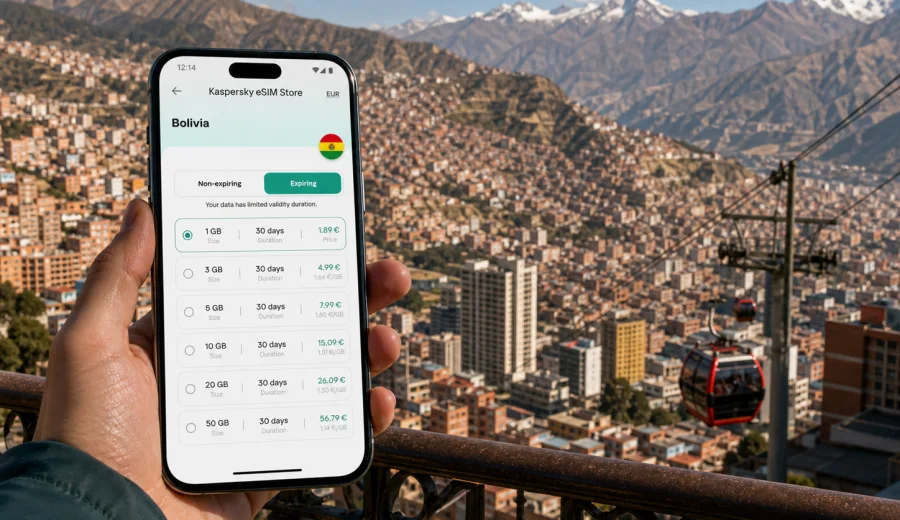
La Paz eSIM: mobile connection and internet for your trip to Bolivia's high-altitude capital
La Paz is a city where mobile internet starts helping before the first full day of the trip. You may arrive tired after a long flight, adjust to the altitude, look for your transfer from El Alto, check a hotel address in Sopocachi or Calacoto, and message people who are waiting for you. In that first hour, a working data connection can be more useful than any travel tip.
An eSIM is a practical way to prepare mobile internet for La Paz without searching for a physical SIM card after landing. With a compatible phone, you can choose a prepaid eSIM plan before the trip or shortly after arrival, install it digitally, and use mobile data for maps, ride apps, hotel messages, work chats, translation and travel updates.
This guide focuses on La Paz as a city: arrivals, movement between districts, cable car routes, hotels, business trips, stopovers and short trips from the city. Bolivia matters because the eSIM plan must match the country where La Paz is located, but the travel scenarios are local.
Why mobile internet matters in La Paz
La Paz sits in a steep valley below El Alto, with streets, viewpoints and neighborhoods spread across different elevations. A simple journey on the map can involve a taxi, a cable car station, a short walk uphill and a change in plans because traffic or weather looks different from what you expected. Offline preparation helps, but live mobile data gives you flexibility.
In La Paz, a traveler may need mobile internet for:
- checking the route from El Alto International Airport to the hotel;
- comparing taxi, ride app and hotel transfer options;
- finding the nearest Mi Teleferico station;
- opening booking details when reception asks for confirmation;
- messaging a guide, driver, colleague or host;
- translating short Spanish phrases in shops, hotels and transport;
- checking opening hours before crossing the city;
- using maps in neighborhoods with steep streets and irregular blocks;
- keeping work email, calendars and messengers available during a business trip.
The main value is not just "being online". It is reducing the number of small frictions that appear when you are in a new city, at altitude, with luggage, limited time and unfamiliar streets.
Arrival at El Alto and the first hour online
Most international visitors reach La Paz through El Alto International Airport. The airport is above the city, and the drive down into central La Paz can feel unusual if this is your first time in Bolivia: bright highland light, wide views, dense traffic, steep roads and a quick change from open plateau to urban valley.
Mobile data is useful as soon as you leave the arrivals area. You may want to confirm a pickup point, send your hotel an updated arrival time, check whether your driver is at the right door or compare the route to your accommodation. If you are staying in the city for work, you may also need to tell colleagues that you have landed and are on the way.
Airport Wi-Fi can be enough for a quick message, but it is not a travel plan. It may require registration, may be slow when the terminal is busy and will not help once you are in the car. An eSIM plan prepared in advance can make the airport-to-hotel transition more controlled because you do not have to solve connectivity at the same time as transport, currency and luggage.
La Paz districts where data is especially useful
La Paz is not a flat city with one obvious center. Travelers move between business areas, hotels, markets, cable car stations, viewpoints and residential districts. Mobile internet helps because the right route often depends on where you are starting and how much time you have.
| Area or route | Why you may need mobile data |
|---|---|
| El Alto airport to La Paz | Transfer confirmation, ride app messages, route checks and arrival updates |
| Sopocachi | Hotel navigation, restaurants, meeting points and evening transport |
| San Miguel and Calacoto | Business visits, cafes, coworking, longer taxi rides and hotel coordination |
| Historic center | Walking routes, museums, markets, translations and map checks |
| Miraflores | Hospital, stadium, offices and cross-city transport |
| Mi Teleferico routes | Station planning, line changes, maps and timing between districts |
| Valle de la Luna trips | Driver coordination, tickets, weather checks and return route planning |
For a short visit, you may only need a modest amount of traffic for maps and messages. For a week with video calls, cloud files and frequent rides, you may need a larger package. The best choice depends on how you use your phone, not only on the number of days in La Paz.
What an eSIM does for a La Paz trip
An eSIM is a digital SIM profile that lets a compatible device use mobile data without inserting a physical SIM card. For travel, the practical benefit is simple: you can prepare a data plan for the destination and keep your usual SIM in the phone for your primary number, depending on your device settings and home operator conditions.
For La Paz, an eSIM can help in several common situations:
1. You arrive late and want internet before leaving the airport.
2. You are moving between hotel, meetings and restaurants across different districts.
3. You prefer not to rely on public Wi-Fi in airports, cafes and hotel lobbies.
4. You need maps while walking in hilly streets or finding a cable car station.
5. You want to keep travel apps, messengers and booking confirmations available.
An eSIM plan for mobile internet is not the same as a local phone contract. It usually does not include a regular local phone number, voice calls or SMS unless the chosen plan says so. For calls and messages, travelers often use internet-based apps. Always read the plan conditions before purchase, including destination, traffic volume, validity period and activation rules.
How much data to plan for La Paz
Data use in La Paz depends on the style of the trip. Altitude and geography do not change how much data your phone consumes, but they can change how often you reach for maps, ride apps and messages.
| Trip type | Typical mobile data use | Practical approach |
|---|---|---|
| 1-2 day stopover | Maps, hotel messages, airport transfer, light browsing | Choose a smaller plan if you will mostly use hotel Wi-Fi for heavy tasks |
| City break | Maps, restaurant searches, translation, photo backups on Wi-Fi | Pick enough data for daily movement and keep large uploads for Wi-Fi |
| Business trip | Email, calendars, messaging, document access, occasional hotspot | Consider a larger plan and check whether tethering is allowed by the tariff |
| Remote work stay | Calls, cloud tools, navigation, team chats, backup connection | Use hotel or office Wi-Fi for video-heavy work and keep eSIM data as a mobile layer |
| Bolivia route from La Paz | Intercity buses, airport changes, tours, maps, bookings | Choose a Bolivia plan that matches the whole route, not only the first night |
Avoid choosing only by the lowest price or the largest number. A 30-day plan is not automatically better for a two-day stopover, and a tiny plan may feel limiting if you expect many rides, map checks and work messages. Match the plan to the real behavior of your trip.
Choosing an eSIM plan for La Paz
For a La Paz city article, the correct destination is Bolivia. The city is the travel context, but the plan should be valid for the country where you will use mobile data. If your route includes only La Paz and nearby places such as El Alto, Valle de la Luna or Lake Titicaca trips from the city, a Bolivia plan may be the straightforward option. If your itinerary continues across borders, compare whether a regional or multi-country option fits better.
Before selecting a plan, check four details:
- Destination: the plan should cover Bolivia for a La Paz trip.
- Traffic volume: choose enough data for maps, messaging, apps and work.
- Validity period: make sure the plan duration covers your full stay.
- Activation rules: understand when the validity period starts and what steps are needed.
If you want to prepare before landing, Kaspersky eSIM Store helps you choose and activate an eSIM with a suitable prepaid data plan for a foreign trip. For La Paz, you can choose an eSIM plan for your trip to Bolivia and review the available traffic volumes, validity periods and plan conditions before you travel.
That link should be treated as the country landing page for this city page: La Paz belongs to Bolivia, so the Bolivia plan page is the relevant internal destination. The article remains about the city, but the plan selection follows the country where the eSIM data will be used.
Installing eSIM before departure or after arrival
Many travelers prefer to install the eSIM before flying and activate mobile data when they reach the destination. Others wait until they are at the airport or hotel. The better option depends on the plan rules, your device and whether you will have a reliable internet connection during setup.
Use this basic installation flow:
1. Check that your device supports eSIM and is not locked to one carrier.
2. Choose a plan for Bolivia that matches your La Paz stay.
3. Install the eSIM profile using the on-screen steps or QR code.
4. Keep your primary SIM active or inactive according to your roaming preferences.
5. In Bolivia, select the eSIM profile for mobile data.
6. If required by the device or tariff, enable data roaming for the eSIM profile.
7. Wait a few minutes for the phone to register on an available local network.
If you need device-specific setup steps, use the Android installation guide or the iOS installation guide. Follow the instructions for your operating system and check the plan details before activating data.
Check device compatibility before buying
Not every phone supports eSIM, and some devices can differ by region of sale. A phone may also be locked to a carrier, which can prevent normal use with another mobile profile. This is why compatibility should be checked before you pay for a plan.
Before your La Paz trip, confirm that:
- your smartphone or tablet supports eSIM;
- the device is not carrier-locked;
- the operating system is up to date enough for eSIM setup;
- you can access the internet during installation;
- you know which SIM profile will be used for mobile data;
- you understand whether data roaming must be enabled for the travel eSIM.
You can check your device before choosing a plan. This step is especially important if you bought the phone in a different region, use a company device or have never installed an eSIM before.
Using eSIM around La Paz
Once the eSIM profile is active, treat mobile data as a practical travel tool. You do not need to keep every app online all the time. Small settings can help your data last longer without making the phone inconvenient.
Useful settings for La Paz:
- download offline map areas before a long day of walking;
- turn off automatic video playback in social apps;
- pause cloud photo backup until hotel Wi-Fi;
- keep ride apps, maps, banking and messengers allowed to use mobile data;
- disable background updates for apps you do not need during the trip;
- monitor data use in your phone settings or eSIM profile tools.
This matters in La Paz because you may spend a day moving between viewpoints, cable car routes, cafes, museums and hotel districts. Mobile internet should support those moments, not disappear because a background app used too much traffic overnight.
Transport and navigation scenarios
La Paz rewards travelers who can adjust quickly. Traffic can slow down in central areas, cable car routes may be faster than a road transfer, and a short route on paper can include a steep walk. Mobile data helps you compare options in real time.
Airport transfer
Use mobile data to confirm your pickup, check the route down from El Alto and message the hotel if you are delayed. If you booked accommodation in Sopocachi, San Miguel, Calacoto or the historic center, save the address in Spanish and keep it accessible offline too.
Cable car movement
Mi Teleferico is one of the most distinctive ways to move around the La Paz metropolitan area. Data helps you find the nearest station, understand line changes and check walking directions at both ends of the journey. It is also useful for coordinating with another traveler if you exit at different points.
Taxis and ride apps
Mobile internet lets you compare routes, share your journey and message the driver. If the pickup point is crowded or the street layout is confusing, a data connection can save time and reduce misunderstandings.
Walking in steep districts
In hilly neighborhoods, the shortest route may not be the easiest route. Maps, saved pins and live location sharing can help you choose a more practical path, especially in the evening or when you are still adjusting to the altitude.
Business trips, stopovers and routes from La Paz
For business travelers, mobile internet is less about sightseeing and more about continuity. You may need to join a meeting after landing, find an office in Calacoto, send documents from a hotel lobby or keep a messenger available while moving between appointments. If you plan to connect a laptop, check whether hotspot use is allowed by the selected tariff and whether your company phone can install an eSIM profile.
For a one-night stopover, prioritize airport pickup, hotel communication, boarding passes, maps near the hotel and messages from drivers or tour operators. A smaller plan may be enough if you will not stream video or upload many photos, but the data should be available during the time-sensitive parts of the trip: arrival, check-in and onward travel.
La Paz is also a base for trips to Valle de la Luna, Tiwanaku, Lake Titicaca, the Yungas road region and onward flights or buses. Coverage and speed can vary outside dense urban areas, so save essential details offline: hotel address, meeting point, ticket confirmation, tour contact and return route. Use mobile data for live updates where service is available, but combine it with offline preparation.
Practical checklist before you fly to La Paz
Use this checklist a day or two before departure:
- Confirm that your phone supports eSIM and is not carrier-locked.
- Choose a Bolivia plan that fits your La Paz dates and data use.
- Save your hotel address and airport transfer details offline.
- Install essential travel apps before the flight.
- Download offline maps for central La Paz and your hotel district.
- Keep the eSIM installation instructions accessible.
- Check whether your home SIM roaming is on or off according to your preference.
- Make sure you know which SIM profile handles mobile data.
- Keep a backup payment method for transport and emergencies.
This preparation is small, but it makes arrival easier. In La Paz, you may be dealing with altitude, traffic and a new street layout at the same time. Mobile data should already be planned, not left as another problem to solve after landing.
FAQ: eSIM and mobile internet in La Paz
Is an eSIM useful for La Paz?
Yes. An eSIM can be useful for airport transfer, maps, ride apps, hotel messages, cable car navigation, business communication and day trips from the city. It is especially helpful if you want mobile data before searching for local connectivity options.
Which country plan should I choose for La Paz?
Choose a plan valid in Bolivia. La Paz is the city context, but the eSIM destination should match the country where the mobile data will be used.
Can I install an eSIM before traveling?
Often yes, but follow the plan instructions. Some travelers install the eSIM before departure and activate mobile data after arrival. Make sure you understand when the validity period starts.
Does an eSIM include a Bolivian phone number?
Usually no, unless the chosen plan clearly says otherwise. Travel eSIM plans are typically for mobile internet. For calls and messages, you can use internet-based apps.
Will an eSIM work everywhere around La Paz?
Coverage depends on local networks, location, device support and the selected plan. It is better to treat eSIM as a practical mobile data option where service is available, not as a guarantee for every road, valley or remote route.
Can I keep my usual SIM active?
On many compatible devices, you can keep your primary SIM and use the eSIM for mobile data. Check your phone settings and home operator terms, especially if you want to avoid unexpected roaming charges.
Choose an eSIM plan for your La Paz trip
La Paz is easier to handle when your phone is ready for the first practical tasks: finding the transfer, opening the hotel address, checking a cable car station, messaging a guide and keeping work or family contacts available. A travel eSIM helps you prepare mobile internet before the trip without looking for a physical SIM card after arrival.
Before you travel, check device compatibility, choose the right destination, review traffic volume and validity, then install the eSIM according to your phone's instructions. For this city, the relevant country destination is Bolivia, so you can choose a suitable eSIM plan for mobile internet in Bolivia before your La Paz itinerary begins.