
Travel connectivity guide
La Romana eSIM: mobile internet for travel
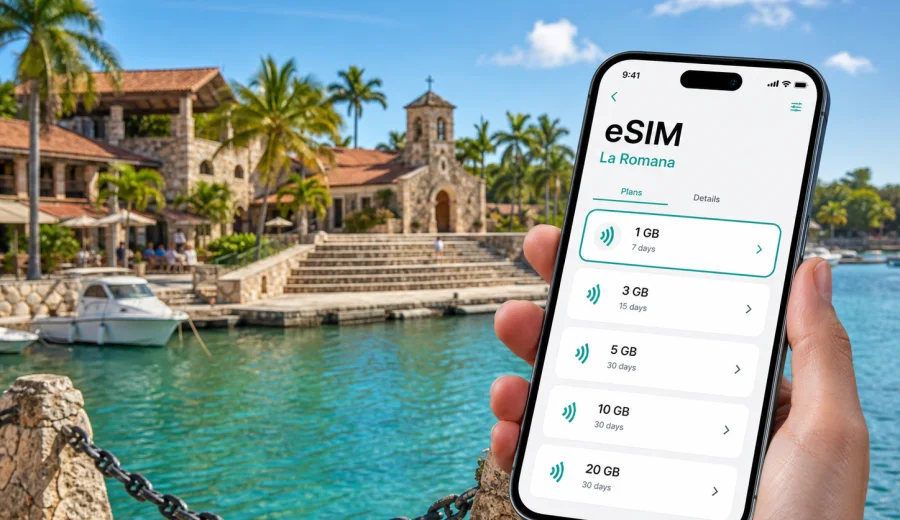
La Romana eSIM: mobile connection and internet for a smooth city trip
La Romana is a practical Dominican Republic base for travelers who move between an airport, a cruise port, Casa de Campo, Altos de Chavon, downtown addresses, resort hotels, golf courses, marinas, and day trips toward Bayahibe, Dominicus, Saona Island, and Catalina Island. In this kind of trip, mobile internet is not just a convenience. It helps you confirm a transfer, open a map, find a meeting point, message a guide, translate a menu, check a flight update, and keep work tools available when hotel Wi-Fi is out of reach.
An eSIM can make the data part of a La Romana trip easier because you do not need to look for a physical SIM card after arrival. With a compatible phone, you can install a digital SIM profile and use a mobile data plan for the Dominican Republic while keeping your main SIM in the device. Kaspersky eSIM Store is an app and website where you can choose, arrange, and activate an eSIM with a suitable mobile internet plan for travel abroad.
This guide is city-focused. It explains where mobile data matters in La Romana, how to estimate traffic, when to install an eSIM, what to check before purchase, and how to prepare your phone for resort, port, business, and short-stay routes.
Why mobile internet matters in La Romana
La Romana is not always a walkable one-center trip. You may land at La Romana International Airport, go directly to Casa de Campo, spend an evening in Altos de Chavon, meet a driver near the cruise port, continue to Bayahibe for a boat departure, or use the city as a working base between appointments. Public Wi-Fi can help inside a hotel, cafe, or lounge, but it does not cover the moments when you are between places.
Mobile internet is especially useful in La Romana for:
- airport pickup coordination after landing;
- ride and private transfer messages;
- map navigation between La Romana, Casa de Campo, Bayahibe, and Dominicus;
- tour meeting points for Saona Island or Catalina Island trips;
- translation for short conversations with drivers, guides, restaurants, or hotel staff;
- cruise port timing and excursion details;
- messenger calls when the selected eSIM plan is data-only;
- banking alerts, airline apps, work tools, and travel documents;
- hotspot use for a laptop if the plan and device settings allow it.
The city is manageable, but the travel pattern is spread out. A reliable mobile data plan can matter more here than in a destination where you stay near one metro line or one compact historic center.
Arrival scenarios: airport, port, resort, and city hotel
Your first hour in La Romana shapes the rest of the trip. If mobile data is ready, you can solve small logistics issues before they become stressful.
| Arrival point | What you may need online for | Practical eSIM use |
|---|---|---|
| La Romana International Airport | Transfer chat, hotel address, flight-delay updates | Activate data after landing if the plan starts on network connection |
| Cruise port | Meeting point, taxi coordination, excursion confirmation | Keep directions available outside ship Wi-Fi |
| Casa de Campo transfer | Driver messages, gate instructions, villa address | Use data for route tracking and contact with the host |
| Downtown hotel | Maps, restaurant search, business messages | Keep data ready for movement between addresses |
If you install the eSIM before travel, do it while you have stable Wi-Fi at home or in a hotel before a regional move. Many travelers install the profile in advance and switch mobile data to the travel eSIM only when they reach the destination. Check the activation rules of the selected plan because validity may begin after installation, after first network connection, or under another condition listed in the plan details.
How La Romana differs from a general Dominican Republic route
A country-level mobile internet plan can cover the Dominican Republic, but your use in La Romana has its own rhythm. A resort guest may use hotel Wi-Fi for streaming and an eSIM mostly for maps, messages, and transfers. A business traveler may need more data for tethering, document access, video meetings, and cloud tools. A family joining island excursions may use more data than expected because one phone becomes the map, translator, ticket wallet, camera backup controller, and group contact point.
Think about La Romana as a hub. Your eSIM does not need to be city-specific, but your data estimate should reflect the city-based routes you will actually take.
Quick data estimate for La Romana travelers
Use this table as a practical starting point. It is not a guarantee, because app settings, video quality, cloud backup, and hotspot use change real consumption quickly.
| Trip style | Typical online behavior | Suggested data mindset |
|---|---|---|
| Weekend resort stay | Messages, maps, airport transfer, light browsing | Small plan may be enough if hotel Wi-Fi handles heavy use |
| 4-7 day beach and city trip | Navigation, tour chats, social posts, translation | Medium allowance gives more comfort outside Wi-Fi |
| Business trip | Email, cloud files, messenger calls, laptop hotspot | Choose more data and check hotspot rules |
| Family trip | Shared navigation, photo sharing, several messaging apps | Plan conservatively and limit auto-backup |
| Cruise stopover | Maps, excursion details, meeting point messages | Short-validity plan can be practical if supported |
The biggest hidden data users are automatic photo backup, app updates, cloud sync, high-resolution video, and hotspot use. Before leaving for La Romana, limit these tasks to Wi-Fi. That one step can make a smaller data plan last longer.
Before you buy: device and plan checks
An eSIM works only on compatible, unlocked devices. Before choosing a plan, check both the technical side and the travel side.
Use this checklist:
- Confirm that your phone or tablet supports eSIM.
- Make sure the device is not locked to one mobile operator.
- Check whether your device can keep your primary SIM active while mobile data uses the travel eSIM.
- Read the selected plan details: destination, data allowance, validity period, activation rule, hotspot availability, and refund conditions.
- Decide whether you need only mobile internet or also a normal local phone number.
- Save your hotel address, transfer contact, and booking references offline as a backup.
If you are unsure whether your phone supports eSIM, use the device compatibility check before purchase: Check your device. It is better to confirm support before paying than to discover at the airport that your phone cannot install an eSIM profile.
Most travel eSIM plans are designed for mobile data. They may not include a standard phone number, voice calls, or SMS unless those features are specifically listed in the plan conditions. For La Romana, that is usually manageable because many hotels, drivers, guides, and tour operators coordinate through internet-based messaging. Still, if you expect bank SMS verification or standard phone calls, check your primary SIM roaming settings and costs separately.
Choosing an eSIM plan for La Romana
When selecting a plan, match it to your movement pattern in and around La Romana. A short resort stay, a cruise stop, and a business week have different needs. If you want to prepare mobile data before your trip, you can choose an eSIM plan for the Dominican Republic through Kaspersky eSIM Store and review the available data amounts, validity periods, and plan conditions for your route.
Here is a simple decision framework:
- Choose a smaller plan if you mainly need maps, messaging, and occasional browsing outside hotel Wi-Fi.
- Choose a medium plan if you plan day trips, frequent photo sharing, restaurant searches, and app-based transport.
- Choose a larger plan if you will use hotspot, work tools, video calls, cloud documents, or navigation for a group.
- Pay close attention to validity if your La Romana stay is part of a longer Dominican Republic route.
- Check whether the plan works for the country you will actually visit, not just for a nearby region you considered earlier.
For a city trip, the most practical plan is not always the largest one. It is the plan whose validity and data volume match the days when you are away from reliable Wi-Fi.
Installation and activation: a calm step-by-step flow
Install the eSIM when you have stable Wi-Fi and enough time to read each prompt on your phone. Do not leave setup for the last minute before boarding a boat, entering a resort gate, or joining a transfer.
General flow:
1. Choose the Dominican Republic as your destination and review the plan details.
2. Complete the order in Kaspersky eSIM Store.
3. Install the eSIM profile on your compatible device using the instructions for your phone.
4. Give the eSIM a clear label, such as "Travel data" or "Dominican Republic".
5. Keep your primary SIM for calls and messages if you need it.
6. When appropriate, select the travel eSIM for mobile data.
7. Enable data roaming for the eSIM if the plan instructions require it.
8. Test a small webpage or map search after arrival.
For detailed setup, follow the instructions for Android or the instructions for iOS. The exact menu names can vary by device model and operating system version, so follow the on-screen steps carefully.
One important detail: do not delete the eSIM profile after installation unless you are sure you no longer need it. In many cases, an activated eSIM cannot simply be moved to another device or reinstalled after removal. Read the plan conditions before making changes.
Local movement: where data helps most
La Romana travel is often a sequence of short but important moves:
- Casa de Campo: gate communication, villa directions, marina plans, restaurant reservations, golf tee times, and driver messages.
- Altos de Chavon: map pins, sunset pickup timing, restaurant details, gallery searches, and translation for short questions.
- Downtown La Romana: banks, shops, appointments, local restaurants, and daily errands where maps and messages save time.
- Bayahibe and Dominicus: pier locations, boat-trip pickup points, guide messages, and weather checks before sea excursions.
- Santo Domingo route: longer navigation, family updates, work messages, and battery planning during an extended drive.
Download offline maps before leaving Wi-Fi, but keep mobile data available for live route changes, driver messages, and updated meeting points. Offline maps help with orientation; mobile internet helps when the plan changes.
Hotel, villa, and resort Wi-Fi versus eSIM
Hotel Wi-Fi is useful, but it should not be your only plan for a La Romana trip. It may work well in the room and lobby but be weaker by a pool, on a beach, at a marina, or inside a villa area. It also does not help during transfers, excursions, or errands.
| Connection option | Strong point | Limitation |
|---|---|---|
| Hotel Wi-Fi | Streaming, backups, large downloads, long laptop sessions | Usually limited to property areas |
| Public Wi-Fi | Helpful in some cafes, lounges, or terminals | May require registration and is not always stable |
| Travel eSIM data | Maps, messages, online tools, and movement outside Wi-Fi | Depends on the selected plan and local network conditions |
| Primary SIM roaming | Keeps your familiar number active | Costs and terms depend on your home operator |
The most balanced setup is simple: use Wi-Fi for heavy tasks and the eSIM for mobile data when you are moving around La Romana.
Business trips, cruise stops, and short stays
La Romana is also a place for meetings, real estate visits, medical appointments, aviation, port logistics, hospitality projects, and remote work from a resort or villa. If you work during the trip, download key documents in advance, check whether hotspot use is allowed by the selected plan, keep two-factor authentication options available, and bring a power bank for long transfer days.
A cruise or short stopover creates a different problem: you may need data for only a few hours, but those hours are concentrated. Ship Wi-Fi may not be convenient once you leave the port area. Mobile data helps with maps, driver contact, excursion timing, payment notifications, and return coordination. For stopovers, check plan validity and activation timing carefully.
If you will visit more Dominican Republic cities after La Romana, choose a plan that fits the wider route rather than only the first day.
Practical data-saving settings
Before arrival:
- Download offline maps for La Romana, Casa de Campo, Bayahibe, and Santo Domingo if relevant.
- Save hotel, transfer, flight, and tour details in your notes app.
- Turn off automatic app updates on cellular data.
- Pause cloud photo and video backup on mobile data.
- Download playlists, documents, and entertainment on Wi-Fi.
- Set messaging apps to download media only on Wi-Fi.
After arrival:
- Use mobile data for maps, messages, transport, and essential browsing.
- Use Wi-Fi for video, backups, uploads, and large files.
- Check data usage every day if your phone provides per-line statistics.
- Keep your eSIM line label clear so you know which SIM is using mobile data.
This approach is especially useful for family trips. One phone often becomes the navigation device, translator, transfer contact, and hotspot source. A few careful settings reduce surprises.
Common mistakes to avoid
Avoid these issues when preparing an eSIM for La Romana:
- buying a plan before confirming your device supports eSIM;
- ignoring whether the phone is locked to one operator;
- installing the profile with weak Wi-Fi;
- deleting the eSIM profile after activation;
- assuming a data-only plan includes a local phone number;
- forgetting to switch mobile data from your primary SIM to the travel eSIM;
- leaving automatic backups and updates on cellular data;
- choosing a plan only by price without checking validity and data volume;
- waiting until a boat departure or airport curbside moment to complete setup.
The main goal is to keep mobile internet predictable. Read plan details, prepare the phone calmly, and keep offline backups for your most important travel information.
FAQ: eSIM and mobile internet in La Romana
Is an eSIM useful if my hotel has Wi-Fi?
Yes. Hotel Wi-Fi helps inside the property, while eSIM mobile data helps during airport transfers, city errands, boat excursions, restaurant searches, and movement between La Romana, Casa de Campo, Bayahibe, and Dominicus.
Can I keep my normal SIM active?
On many compatible phones, you can keep your primary SIM active and use the eSIM for mobile data. Check your device settings and your home operator's roaming costs, especially if you expect calls or SMS.
Does a travel eSIM include calls and SMS?
Many travel eSIM plans are data-only. If calls, SMS, or a phone number are included, that should be stated in the plan details. For La Romana, many travelers use internet-based messaging and calls through mobile data.
When should I install the eSIM?
Install it when you have stable Wi-Fi and time to follow the instructions. Many travelers prefer installation before departure, then activating mobile data after arrival or according to the selected plan conditions.
What if I also travel outside La Romana?
Choose a plan for the Dominican Republic that fits your wider route. If you continue to Santo Domingo, Punta Cana, Bayahibe, or other areas, estimate data for the whole trip, not only for the city arrival day.
A short preparation checklist
Before you leave for La Romana, make sure you have an eSIM-compatible and unlocked device, the selected Dominican Republic plan details saved, installation instructions ready, offline copies of hotel and transfer information, offline maps for the areas you expect to visit, automatic mobile-data backups disabled, primary SIM roaming settings reviewed, and a power bank for airport, port, or excursion days.
This checklist covers most real trip problems. The best eSIM setup is the one you do before you urgently need data.
Prepare mobile internet for La Romana with Kaspersky eSIM Store
La Romana rewards travelers who keep logistics flexible: a transfer may change pickup location, a boat trip may send a new meeting point, a hotel may ask for confirmation, or a business appointment may move by an hour. An eSIM gives you a practical way to keep mobile internet available for those moments without searching for a physical SIM card after arrival.
Before your trip, check device compatibility, review plan conditions, install the eSIM on stable Wi-Fi, and keep your phone settings clear. Then use mobile data for the parts of the journey where Wi-Fi cannot help: airport arrival, port movement, Casa de Campo directions, Altos de Chavon evenings, Bayahibe excursions, and trips from the city.
If La Romana is on your route, you can prepare an eSIM plan for travel to the Dominican Republic in Kaspersky eSIM Store and choose the data amount and validity period that fit your city stay, resort days, stopover, or wider Dominican Republic itinerary.