
Travel connectivity guide
La Serena eSIM: Mobile Internet in Chile
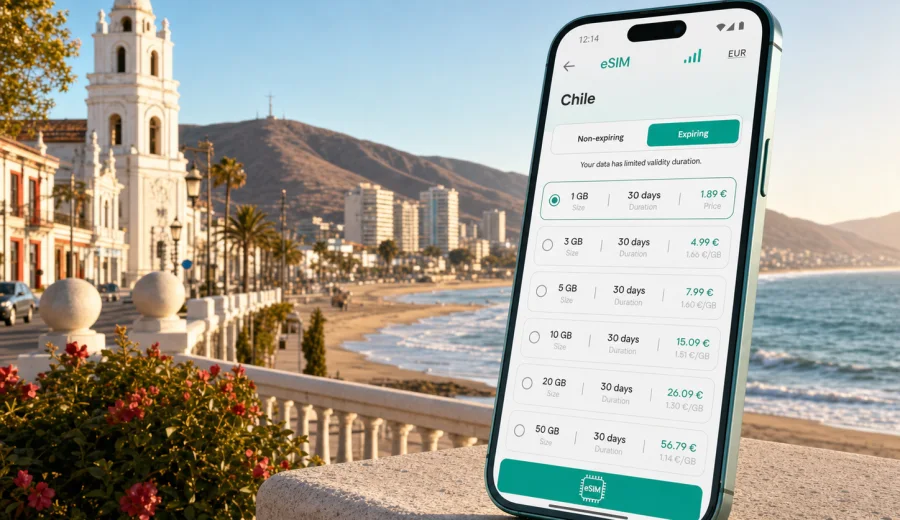
La Serena eSIM: mobile connection and internet for your trip to Chile
La Serena is easier to enjoy when your phone is ready before you land. The old streets around the center, the beach road toward Coquimbo, the hotel areas near Avenida del Mar, and day trips into the Elqui Valley all depend on the same small habit: having mobile internet when you need a map, a ride, a booking confirmation, or a message from your host.
An eSIM helps you prepare that connection without searching for a physical SIM card after arrival. For a trip to La Serena, it is useful because the city works as both a beach destination and a base for regional travel. You may arrive through La Florida Airport, connect from Santiago, stay near the waterfront, visit Coquimbo, or continue inland toward Vicuña and the observatories. In each case, the practical question is not only whether you can get online, but whether you can do it calmly when the city starts moving around you.
This guide explains how to think about eSIM, mobile connection, and internet access for La Serena. It focuses on real travel situations: arrival, local transport, hotels, navigation, business days, stopovers, beach time, and short trips from the city.
Why mobile internet matters in La Serena
La Serena is not a city where travelers usually stay in one compact district all day. A typical itinerary may move between the colonial center, the Japanese Garden, the lighthouse area, Avenida del Mar, Coquimbo, the bus terminal, shopping areas, and coastal restaurants. If you add a trip to the Elqui Valley, your phone becomes a planning tool rather than just a way to browse.
Mobile internet is useful for:
- checking the route from the airport or bus terminal to your hotel;
- confirming apartment access codes or reception messages;
- using maps between La Serena and Coquimbo;
- comparing ride-hailing, taxi, bus, and walking options;
- receiving updates from tour operators for Elqui Valley trips;
- translating menus, signs, and practical messages;
- keeping boarding passes, reservations, and payment confirmations available;
- sharing a live location with colleagues or family when plans change.
Public Wi-Fi can help in hotels, cafes, and some public spaces, but it does not cover the moments when travel is usually least predictable: leaving the airport, finding the right street after dark, changing transport, or waiting outside a rental apartment. A travel eSIM is a way to reduce that gap.
Where La Serena travelers usually need data
The city has several travel zones, and each creates a slightly different internet need.
| Area or route | Typical mobile internet task | Practical note |
|---|---|---|
| La Florida Airport | Ride booking, route check, hotel message | Set up your eSIM before arrival if possible, then activate according to the tariff instructions. |
| Historic center | Walking navigation, translation, restaurant searches | Streets are easy to explore, but maps help when moving between sights and services. |
| Avenida del Mar | Beach plans, rides, restaurant bookings | Hotels and apartments are spread along the coast, so mobile data helps with short local moves. |
| Coquimbo | Navigation, event plans, waterfront visits | La Serena and Coquimbo often work as one travel area, but transport choices can vary by time of day. |
| Bus terminal | Ticket checks, onward travel, messaging | Keep your reservation details available offline as well as online. |
| Elqui Valley route | Maps, tour updates, weather checks | Download key route information before leaving the city, because conditions can vary outside urban areas. |
For a short beach break, a small data package may be enough for maps, messages, and bookings. For remote work, navigation-heavy days, or frequent photo backup, choose a larger package and check the validity period carefully.
Arrival: airport, bus terminal, and first ride
La Serena's airport is close to the city compared with many large international airports, but the first transfer still matters. You may be tired, carrying luggage, and deciding whether to take a taxi, arrange a pickup, or use a ride-hailing app. If your mobile connection is ready, you can check the address, share your arrival time, and confirm that the driver is heading to the right district.
If you arrive by bus, the same logic applies. The terminal area is practical, but it is not always the place where you want to pause and solve connectivity problems. A working eSIM lets you open your map, check whether your accommodation is closer to the center or the coast, and avoid guessing at the route.
Before travel, save these items offline:
- hotel or apartment address;
- booking confirmation;
- arrival instructions from the host;
- the name of your first district, such as Centro, Avenida del Mar, Peñuelas, or Coquimbo;
- a screenshot of your eSIM installation details, if the service provides them.
Offline preparation is still useful because eSIM setup depends on device compatibility, correct installation, and the selected tariff conditions. Treat mobile data as part of your arrival plan, not as the only copy of your travel information.
Choosing an eSIM plan for La Serena
The right eSIM plan depends on what you will do in and around the city. La Serena is flexible: it can be a one-night stop, a family beach stay, a business visit, or a base for several regional trips. Match the data package to your behavior, not just to the number of days.
For light use, you may only need maps, messaging, email, and occasional web searches. For a beach holiday with social media, restaurant searches, and ride-hailing, you may want a medium package. For remote work, video calls, file transfers, or daily hotspot use, consider a larger allowance and confirm whether tethering is allowed under the selected tariff.
Use this simple planning rule:
| Trip style | Data use pattern | What to check before purchase |
|---|---|---|
| One or two nights | Maps, messaging, bookings | Validity period and activation timing. |
| Beach week | Maps, messaging, social media, restaurants | Data allowance and top-up options. |
| Business trip | Email, calls through apps, document access | Reliability needs, hotspot rules, and backup Wi-Fi. |
| Elqui Valley base | Navigation, tour updates, photos | Coverage expectations outside the city and offline maps. |
| Family travel | Several devices and shared logistics | Whether each traveler needs a separate eSIM-compatible device. |
Kaspersky eSIM Store is an app and website where you can choose, arrange, and activate an eSIM with a suitable mobile internet tariff for an international trip. It is not a mobile operator, and conditions depend on the tariff you choose. Before paying, read the data amount, validity period, destination, activation rules, and any hotspot notes.
Check phone compatibility before you buy
Not every phone supports eSIM, and some devices may be locked to a mobile operator. This is worth checking before your trip to La Serena, because discovering the problem at the airport or in a hotel lobby can waste time.
Before choosing a tariff, check your device. Also confirm that:
- your phone supports eSIM for your model and region;
- the device is not locked to one operator;
- you have a stable internet connection for installation;
- you can access your email or account where eSIM details are delivered;
- you know which SIM will handle mobile data after installation;
- you understand whether the eSIM activates on installation or on first connection, according to the selected tariff.
If you use a dual-SIM phone, keep your home SIM active only for what you need, such as receiving bank messages or calls, and set the eSIM as the mobile data line for travel. Check roaming settings carefully so that your phone does not use the wrong line for data.
A practical setup timeline
For most travelers, the best time to prepare eSIM is before departure, while you still have a stable home or office connection.
1. A few days before the trip, check whether your phone supports eSIM.
2. Choose Chile as your destination and compare available data packages.
3. Read the validity period, activation rules, and data allowance.
4. Install the eSIM using a stable Wi-Fi connection.
5. Keep your primary SIM for calls or messages if you need it.
6. On arrival, switch mobile data to the eSIM line according to your phone settings and tariff instructions.
7. Test maps, messaging, and a browser before leaving the airport or terminal area.
For La Serena, this timeline is useful because the first day often combines transfer, check-in, food, a beach walk, and planning the next morning.
When you are ready to compare options, you can choose an eSIM tariff for your trip to La Serena and Chile through Kaspersky eSIM Store and review the data amount, validity period, and destination before you arrange the eSIM.
How to install an eSIM before traveling
The installation process depends on your phone, but the general idea is simple: add the eSIM profile, label it clearly, and choose which line handles mobile data. Do this on Wi-Fi and avoid deleting the eSIM profile unless the instructions tell you to do so.
For detailed setup steps, use the official guides for Android installation or iOS installation. After installation, name the line something obvious, such as Chile travel or La Serena data. That helps you avoid switching the wrong line on the first day.
Before boarding, check that the eSIM is installed. After landing, turn on the travel line for mobile data according to the selected tariff instructions. Some tariffs may require data roaming for the eSIM line. This does not mean you should turn roaming on for every SIM in your phone, so review line labels before changing settings.
Local movement, hotels, and short trips
La Serena is walkable in parts, but many useful trips cross several zones: the center, the lighthouse area, Avenida del Mar, Peñuelas, Coquimbo, and the bus terminal. Mobile data helps you decide whether to walk, book a car, take local transport, or change plans.
For hotels and apartments, keep the exact address, building name, reception hours, parking instructions, and check-in method offline. Coastal apartments may use door codes or host messages, while central hotels may still require navigation from the terminal. Do not rely only on property Wi-Fi for the first hour.
Business travelers should treat eSIM as a backup for movement and urgent work, not as the only channel for large files or long video calls. Install it before departure, download documents, test authentication apps, and confirm whether hotspot use is allowed. Use hotel or office Wi-Fi for heavy transfers when possible.
For a stopover, keep the setup light: enough data for maps, tickets, food searches, and the next departure. For La Serena plus Coquimbo, mobile internet is useful for route checks and late changes. For Elqui Valley trips, download offline maps, save tour contacts, and keep mobile data for updates rather than heavy use.
To make a travel data package last longer:
- disable automatic app updates on mobile data;
- pause photo and video backup until Wi-Fi;
- download La Serena, Coquimbo, and valley map areas offline;
- use hotspot only for short tasks if the tariff allows it;
- keep boarding passes, hotel details, and tickets saved offline.
An eSIM can support maps, messaging apps, bookings, email, and internet-based calls, but it usually does not include a local phone number, voice calls, or SMS unless the selected tariff says so. It also cannot promise identical signal in every building, beach area, or valley road. The strongest setup is eSIM plus offline preparation plus careful phone settings.
FAQ: eSIM and internet in La Serena
Should I install the eSIM before arriving in Chile?
In most cases, yes. Install it on a stable connection before travel, then activate or switch data settings according to the selected tariff instructions. This reduces pressure during arrival.
Can I use eSIM for calls?
Travel eSIM tariffs are usually focused on mobile data. Voice calls and SMS are not included unless the tariff clearly says so. You can often use internet-based calling and messaging apps through mobile data.
Is La Serena the same as choosing a Chile eSIM?
For a city article, the travel focus is La Serena, but the destination tariff is normally chosen for Chile. That is the correct country context for the city and for nearby trips such as Coquimbo or the Elqui Valley.
Final preparation before you go
Before you leave for La Serena, make your phone part of the itinerary. Check eSIM compatibility, choose a data package that fits your trip length, install the eSIM on Wi-Fi, label the line clearly, and save key travel details offline. Once you arrive, test maps and messaging before you leave the airport, terminal, or first Wi-Fi point.
Kaspersky eSIM Store helps you prepare mobile internet for international travel through a site and app where you can select, arrange, and activate an eSIM with a suitable tariff. For La Serena, that preparation can make the difference between guessing your way through the first day and moving through the city with practical information already in your hand.
If your trip is confirmed, prepare an eSIM tariff for Chile before visiting La Serena and review the data allowance, validity period, and activation rules before you travel.