
Travel connectivity guide
Labasa eSIM: Mobile Internet for Fiji Travel
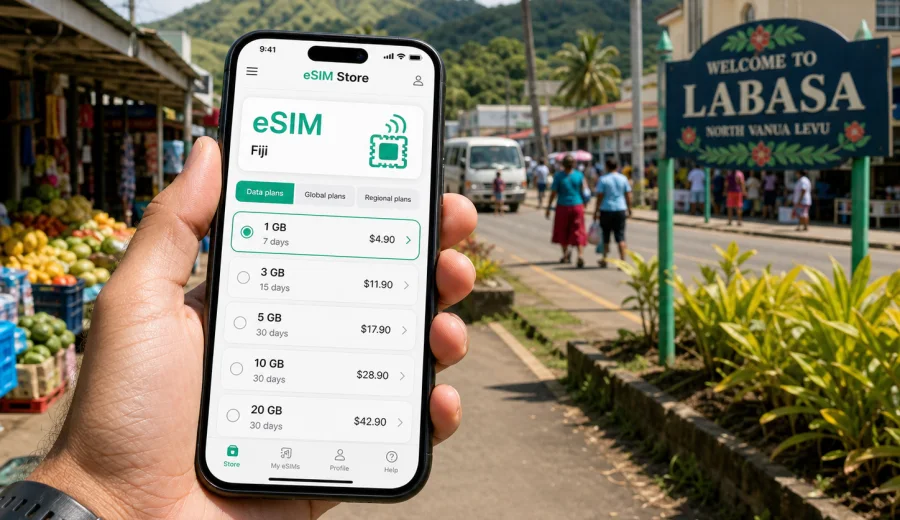
Labasa eSIM: mobile connection and internet for a trip to northern Fiji
Labasa is not the Fiji many travelers picture first. It is a working town on Vanua Levu, surrounded by cane fields, river flats, market streets, small hotels, offices, temples, bus stands, taxis, and roads that lead toward Savusavu, Nabouwalu, villages, farms, and the northern coast. That makes mobile internet more than a convenience. In Labasa, a reliable data setup helps you land, find your driver, confirm your hotel, navigate short local rides, coordinate business meetings, and plan trips beyond town without depending on the next cafe or lobby Wi-Fi.
An eSIM is useful for this kind of trip because it lets you prepare mobile data before you need it. You can keep your physical SIM in the phone, add a digital SIM profile for Fiji, and use mobile internet for maps, messaging, translation, banking notifications, ride coordination, and travel documents. It is especially helpful if you arrive through Labasa Airport, travel between town and rural areas, or use Labasa as a practical base for the north of Vanua Levu.
This guide focuses on Labasa as a city destination: arrival, local movement, hotels, business travel, stopovers, day trips, and choosing an eSIM setup for Fiji without turning the trip into a general country plan.
Why mobile data matters in Labasa
Labasa is compact enough for short taxi rides, but it is spread across practical travel points: the airport area at Waiqele, the town center, market streets, riverside routes, residential zones, schools, government offices, sports grounds, temples, and roads out toward villages and other Vanua Levu towns. You may not need constant high-speed data every minute, but you do need dependable access at specific moments.
Common moments when mobile internet helps in Labasa:
- checking your arrival time and flight updates before leaving Nadi or Suva;
- messaging a hotel, host, colleague, or driver after landing;
- finding the correct taxi pickup point at the airport or in town;
- navigating between Labasa Airport, town hotels, the market, and meeting venues;
- paying attention to weather, road conditions, and ferry or onward travel changes;
- using maps on routes toward Savusavu, Nabouwalu, Seaqaqa, or coastal villages;
- keeping work apps and email available during a short business stay;
- avoiding the need to ask for public Wi-Fi passwords in every stop.
Labasa also has a different rhythm from major tourist hubs. Shops may close earlier than expected, local transport can depend on the time of day, and rural trips can require coordination before departure. A prepared mobile data plan gives you more control when plans shift.
Arrival in Labasa: where an eSIM helps first
Most air travelers arrive at Labasa Airport, near Waiqele, a short drive from town. The airport is small compared with international hubs, which is convenient, but it also means you should not assume there will be a long list of airport services available exactly when you need them. If your eSIM is installed before arrival, you can turn on the right data line after landing and immediately check messages, map the route to your hotel, or confirm pickup details.
For many visitors, Labasa is reached after an international arrival in Nadi or Suva and a domestic flight onward to Vanua Levu. That means the most stressful connectivity moment may not be in Labasa itself, but during the transfer between flights: confirming baggage, checking a domestic schedule, updating a local contact, or changing plans if a flight moves. Preparing an eSIM before the first leg helps you avoid relying only on airport Wi-Fi during those handoffs.
If you arrive by road or ferry connection from another part of Vanua Levu, mobile data is still valuable. The route may involve rural stretches where you want offline maps ready, but you will still need data when coverage is available to message your destination, check the next connection, or share your estimated arrival time.
Labasa travel scenarios and data needs
Different visitors use Labasa in different ways. A traveler attending a meeting needs another kind of data plan than a family staying with relatives or a backpacker using the town as a connection point. Before choosing a tariff, match your mobile internet needs to your actual routine.
| Trip type in Labasa | Typical online tasks | Practical eSIM approach |
|---|---|---|
| One-night stopover | Maps, hotel messages, flight updates, light browsing | Small data package for a short validity period |
| Business visit | Email, calendar, messaging, document access, hotspot for a laptop if allowed | More data and enough validity for the full work window |
| Family visit | Messaging, video calls, photo sharing, maps around town | Medium package, with careful use of video and cloud backup |
| Vanua Levu road trip | Navigation, weather checks, hotel coordination, route changes | Enough data for maps and messaging across several days |
| Remote work from Labasa | Video calls, cloud tools, backup connection outside hotel Wi-Fi | Larger package and clear hotspot conditions |
The main rule is simple: do not choose only by price. Look at data volume, validity, destination coverage, activation rules, and whether your device supports eSIM. A low-volume plan can be enough for navigation and messaging, while frequent video calls can use the same amount of data very quickly.
Getting around Labasa with mobile internet
Labasa is navigable, but a phone with data makes everyday movement smoother. Taxis are common for airport transfers and point-to-point rides. Local buses and minibuses can be useful for budget travel and routes outside the center, but they may be easier to use when you can confirm directions, ask a local contact, or keep a map open. If you rent a car for Vanua Levu, mobile data supports navigation and route planning, but you should still download offline maps before leaving town.
Practical uses while moving around Labasa:
- save your hotel and airport as pinned locations before you arrive;
- use maps to estimate whether a ride should be short or longer than expected;
- message your host before entering a rural road or village area;
- keep screenshots of booking confirmations in case data is weak;
- check opening hours for banks, shops, and offices before crossing town;
- translate short phrases or addresses when needed.
Labasa town center is the easiest area for basic navigation. The more important planning happens when you leave the core streets. Roads toward Savusavu, Seaqaqa, and Nabouwalu can take you through less urban areas, so it is sensible to prepare both mobile data and offline backups.
How much data to prepare for Labasa
There is no perfect data amount for every traveler, but you can estimate your needs from behavior. Maps, messaging, email, and boarding passes use relatively little data. Video calls, social video, automatic photo backup, cloud file sync, and hotspot use can consume a package quickly.
Approximate planning guide:
| Activity | Data impact | Tip for Labasa |
|---|---|---|
| Text messaging and map searches | Low | Good for arrival, taxis, and quick errands |
| Email and travel apps | Low to medium | Fine for a short business trip if attachments are controlled |
| Photo sharing | Medium | Send over hotel Wi-Fi when possible |
| Video calls | High | Use Wi-Fi for longer calls; keep eSIM for backup |
| Hotspot for laptop | High | Check tariff conditions before depending on it |
| Cloud backup and app updates | Very high | Turn off automatic updates on mobile data |
For a weekend in Labasa, a small or medium package can be enough if you mainly use maps and messaging. For a work trip or a Vanua Levu route with several stops, choose more data and validity that covers your full stay. Keep a modest buffer for the departure day.
Choosing an eSIM tariff for Fiji before Labasa
When the city is Labasa, the correct eSIM destination is Fiji. A city article should not send you to a separate Labasa-only page if the tariff is selected by country. You can use Kaspersky eSIM Store to choose an eSIM tariff for your trip to Labasa and Fiji after comparing the available data volume, validity period, destination, and price shown for the selected option.
Before you choose, check five things:
1. The tariff destination includes Fiji.
2. The validity period covers the whole Labasa stay, including arrival and departure days.
3. The data volume fits your actual tasks, not only your best-case plan.
4. Your phone supports eSIM and is not locked in a way that prevents adding another mobile profile.
5. The activation instructions match your device and travel timing.
Kaspersky eSIM Store should be understood as an app and website that helps you choose, arrange, install, and activate an eSIM with a suitable data tariff for travel. The mobile internet service itself depends on the selected tariff conditions and local network availability. That distinction matters because no travel eSIM can promise the same experience in every street, building, rural road, or weather situation.
Device compatibility before you travel
Before buying any eSIM, confirm that your phone or tablet supports eSIM and can use it for mobile data. Some devices support eSIM only in certain regional versions, and some phones may be locked by an operator. If your device is not compatible, you may need a physical SIM or another connection method.
Use this quick checklist:
- your device model supports eSIM;
- the device is not locked to a single carrier;
- the operating system is updated enough for eSIM installation;
- you can access email or the app to receive setup details;
- you know which SIM line will handle mobile data after activation;
- you understand that a travel eSIM usually provides mobile data, not a regular local phone number, unless the tariff says otherwise.
If you are unsure, check your device before you pay. This is especially important if you use an older phone, a company-managed device, or a model purchased in a market where eSIM support differs by version.
Installation and activation: a practical sequence
Install the eSIM when you have a stable internet connection, such as home Wi-Fi, office Wi-Fi, or hotel Wi-Fi. Do not leave the first setup attempt until you are standing outside the airport with low battery and luggage. After purchase, the eSIM details appear in your profile or app, and you may also receive setup information by email.
A sensible sequence for Labasa:
1. Before travel, choose the Fiji destination and suitable data package.
2. Install the eSIM profile on your compatible device while you still have stable Wi-Fi.
3. Keep your primary SIM available for calls, banking messages, or home-number services if needed.
4. On arrival in Fiji, select the eSIM line for mobile data according to the tariff instructions.
5. If required by the device or tariff, enable data roaming for the eSIM line.
6. Test maps and messaging before leaving the airport or hotel.
For device-specific setup, follow the Android installation guide or the iOS installation guide. The exact wording in your phone menu may vary by model and operating system version, so follow the screen prompts carefully.
What to do before leaving the town center
Labasa is a useful base for trips around northern Vanua Levu. You may go toward Savusavu for the bay and marina area, toward Nabouwalu for ferry connections, toward Seaqaqa, or toward villages and farms outside the urban area. Mobile data is useful on these routes, but it should not be your only preparation.
Before you leave the center:
- download offline maps for Vanua Levu;
- save hotel, airport, ferry, and meeting locations;
- tell someone your route and expected arrival time;
- charge your phone and carry a power bank for longer drives;
- keep copies of bookings and addresses offline;
- check whether your eSIM package has enough data left for navigation and messages;
- avoid starting large app updates or cloud backups on mobile data.
If you travel for work, keep key documents downloaded. If you travel for family visits, save contact numbers in the phone rather than relying only on messaging apps. If you are driving, prepare the route while still in an area with stable connectivity.
Labasa business travel and hotel routines
Labasa is an administrative and commercial center for the north of Vanua Levu, so many trips are practical rather than purely leisure-focused. You may be visiting an office, school, hospital, government service, farm, supplier, or family business. If you stay in town, use hotel Wi-Fi for heavier tasks and eSIM data for movement. If you stay outside the center, the eSIM becomes more important for coordination: letting someone know you are on the way, checking the route, or arranging a pickup.
Good habits for a work trip:
- sync documents on Wi-Fi before leaving your hotel;
- disable automatic video preview in messaging apps;
- use audio calls instead of video when mobile data is limited;
- keep calendar invitations available offline;
- test hotspot only after checking your tariff conditions;
- leave a data buffer for the departure day.
Use eSIM data for mobility and critical tasks; use reliable Wi-Fi for large downloads, long meetings, and backups when available.
Short stopover in Labasa
If Labasa is only a stopover between flights, meetings, or road segments, your eSIM needs are simpler. You need enough data for arrival messages, taxi coordination, maps, weather, and the next booking. A short-validity plan may be appropriate if your entire Fiji stay is brief, but check the validity period carefully if your return through Labasa happens several days later.
Stopover checklist:
- activate data only when you need it if your tariff validity starts on first use;
- keep flight and hotel details offline;
- pin Labasa Airport and your hotel in maps;
- confirm the next transfer before leaving Wi-Fi;
- avoid streaming and app updates;
- keep battery for boarding passes and communication.
Short stays are where eSIM preparation feels most useful. You do not spend time looking for a local SIM shop, explaining your travel dates, or changing tiny cards in a hurry. You arrive with the connection method already prepared and use it when needed.
Common mistakes to avoid
Avoid these mistakes when preparing mobile internet for Labasa:
- buying a tariff without checking device compatibility;
- installing the eSIM for the first time while rushing through the airport;
- choosing a plan that expires before the last travel day;
- forgetting to set the eSIM as the mobile data line;
- leaving cloud backup, app updates, or video autoplay enabled;
- assuming hotel Wi-Fi will be enough for every movement around town;
- relying on mobile data alone for rural routes without offline maps.
It is also worth remembering that a travel eSIM normally supports mobile data. If you need voice calls or SMS on a local number, check the specific tariff conditions before you rely on it. Many travelers use messaging apps for calls over data instead.
FAQ: eSIM and mobile internet in Labasa
Is an eSIM useful if Labasa is a small city?
Yes. It is useful for arrival, taxis, maps, hotel messages, business coordination, and trips outside the center, especially when Wi-Fi is not available exactly when you need it.
Should I buy a Labasa-specific eSIM?
Choose the Fiji destination rather than searching for a separate city-only option. Labasa is in Fiji, and the relevant travel tariff should match the country destination shown in the eSIM store.
Can I keep my normal SIM active?
In many dual-SIM phones, you can keep your primary SIM for calls or messages and use the eSIM for mobile data. The exact setup depends on your device, carrier lock status, and phone settings.
When should I install the eSIM?
Install it before travel or while you have stable Wi-Fi. Activation timing depends on the tariff instructions, so read them before turning on the data line.
Does an eSIM replace hotel Wi-Fi?
Not completely. It is better to use eSIM data for mobility and essential tasks, and hotel Wi-Fi for heavy downloads, long calls, updates, and media backup when the connection is reliable.
Prepare your eSIM before traveling to Labasa
Labasa rewards practical preparation: flight details, hotel address, driver contact, offline maps, and a mobile data option that works with your device and travel dates. An eSIM helps you manage those details without changing a physical SIM card or depending on the next Wi-Fi network.
Before you fly or drive north on Vanua Levu, review your route, check your phone compatibility, choose a tariff with enough data and validity, and install the profile while you have stable internet. Then you can arrive in Labasa ready to navigate the airport transfer, town errands, business meetings, family visits, and onward trips across Fiji with less uncertainty.
Use Kaspersky eSIM Store to prepare an eSIM tariff for Fiji before your Labasa trip and choose the data package that fits your itinerary, device, and travel timing.