Travel connectivity guide
Lae eSIM: Mobile Internet for Travel in Papua New Guinea
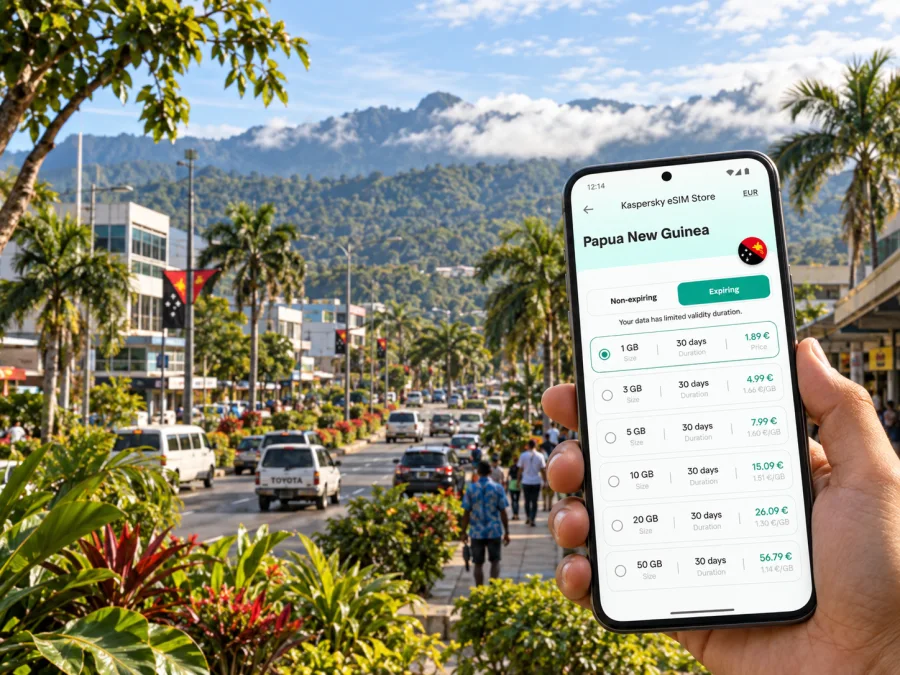
eSIM for Lae: mobile connection and internet for a trip to Papua New Guinea
Lae is the capital of Morobe Province and one of the main working, trading and travel centres of Papua New Guinea. A visit may combine a flight into the Lae area, meetings in the city, a hotel stay near Top Town or the industrial area, and short excursions towards the coast, the Markham Valley or other parts of Morobe. In each of these situations, mobile internet is useful from the first transfer onwards: it helps you keep a booking visible, share your arrival details, open a map, message a driver and coordinate a change of plan.
An eSIM can keep that preparation simple because it is a digital SIM profile rather than a physical card. You can arrange the selected tariff before departure, install it on a compatible phone and decide when it should be used for mobile data. Kaspersky eSIM Store is an app and website that helps you choose, complete and activate an eSIM tariff for mobile internet during an international trip. The eSIM itself works according to the tariff conditions and the local network available at your destination.
Why an eSIM can be useful in Lae
Lae is not a resort where every part of the trip happens inside one compact hotel complex. The airport serving the city is at Nadzab, outside the urban centre, while the places you need in Lae can be spread between commercial streets, accommodation, offices, markets, the port area and green spaces. That makes a working data connection useful as soon as you leave the arrivals area.
Typical first-day tasks include:
- locating the meeting point for a pre-arranged transfer from Nadzab;
- opening a hotel confirmation while travelling into Lae;
- sending a message when the flight or road transfer is delayed;
- checking a map before walking or asking a driver to take you to a different district;
- translating a short message or saving important details for offline access;
- sharing your location with a colleague or family member when plans change.
The important point is to plan for the way you will actually move through Lae. A large data allowance is not automatically the right choice for a short business stop, while a small allowance may be inconvenient if you expect to use navigation repeatedly, upload photographs or work from the hotel. Choose around your itinerary, not around a generic idea of travel.
Arriving through Nadzab and reaching Lae
Travellers heading to Lae usually plan around the airport in the Nadzab area rather than expecting an airport in the centre of the city. The transfer into Lae is therefore part of the trip, not a minor detail after landing. Before you board, save the name and address of your accommodation, the contact details for the person meeting you and any confirmation number you may need at check-in. Keep those details available on the phone even if you expect to have data, because a saved copy is useful during a change of signal or a long transfer.
An eSIM is especially convenient at this stage when it has been installed before the flight. After landing, you can select the travel eSIM for mobile data and keep your primary line available for messages if your phone supports dual-SIM use. The exact menu names depend on the device. Do not remove your regular SIM simply to install an eSIM; first check which line is assigned to data and whether data roaming is enabled for the travel profile when the tariff instructions require it.
Use this arrival sequence:
- Leave the airport with your accommodation details and transfer plan already saved.
- Confirm which line is selected for mobile data.
- Wait until the phone shows that the eSIM profile is active before closing the settings screen.
- Open the map only after the connection is ready, then check the route to your accommodation.
- Message your driver or contact when you have enough information to give a clear update.
Moving around Lae: plan by destination, not by a single city-centre label
Treat every Lae stop as its own small journey. Your accommodation, office, market and sightseeing location may require different arrangements, so confirm the destination with the driver or hotel before setting out. Around Top Town, commercial streets, hotel districts, the port and industrial areas, ask a local contact for the precise entrance and a nearby landmark rather than relying on a map pin alone. Use mobile internet to confirm a vehicle or send an update, then keep the phone away while travelling.
A useful city-day routine looks like this:
| Moment | What to prepare on your phone |
|---|---|
| Leaving the hotel | Destination name, contact person and pickup details |
| Travelling to a meeting | Route, arrival window and a message draft |
| Visiting a market or garden | Saved location, payment notes and return plan |
| Changing districts | New address confirmed in writing before departure |
| Returning at dusk | Accommodation address and a pre-arranged transfer option |
Hotels, work trips and a short stopover
Use the first evening at your Lae hotel to save the address, the next meeting point and the contact details for your host. Hotel Wi-Fi may help with larger downloads, but a travel eSIM gives you a separate mobile-data option for arrival, urgent messages and navigation outside the hotel. Confirm pickup arrangements with reception, keep valuables secure in public places and save the return plan before leaving for a market, garden or memorial site.
Lae’s role as a provincial capital, port city and industrial centre means a work trip may involve several addresses. Save each venue separately, download the agenda and key documents, keep photo uploads manual and carry a charger. For a site visit, ask the organiser for the exact entrance, vehicle and waiting point; a map pin cannot replace local instructions. Video calls and hotspot use can consume more data than messages or navigation, so include them in your estimate.
A one-night stopover is best kept compact. Possible city-focused visits include the Lae National Botanic Gardens, Rainforest Habitat, Lae War Cemetery and local markets, subject to current access and opening arrangements. Choose one or two places, leave time for the transfer back to the hotel and confirm any onward departure point with your host. If you continue towards the Markham Valley, the Highlands or the coast, plan that as a separate regional journey rather than assuming that a city-day route will apply.
How to choose an eSIM tariff for Lae
Start with the destination. For this article, the relevant country is Papua New Guinea, while the city focus is Lae. Then compare the travel dates, data allowance and validity period shown for the available tariff. Conditions can vary, so read the product details rather than choosing by the largest number on the screen.
Use this checklist:
- Length of stay: include the arrival and departure days, especially if the airport transfer is at a different time from your hotel check-in.
- Main activities: navigation and messaging need less data than repeated video calls, hotspot use or photo uploads.
- Route: include Nadzab, Lae and any confirmed excursion outside the city when considering how much data you need.
- Backup connection: decide whether you will keep your regular line active for calls and texts while using the eSIM for data.
- Validity: check when the tariff starts counting time and whether activation must happen before or after arrival.
- Device: confirm eSIM support and operator-unlock status before you complete the order.
At the midpoint of your preparation, you can choose an eSIM tariff for a trip to Papua New Guinea. Review the allowance, period and conditions for your route to Lae, then keep the confirmation available on the same phone you plan to use after landing.
Do not choose based on a promise that one option will suit every itinerary. A traveller who needs maps and messages for a weekend has a different pattern from a consultant working in Lae for several weeks. If you are unsure, estimate your daily use, add a reasonable margin for the airport transfer and work calls, and limit background activity that you do not need.
Install and activate the eSIM
Install the profile when you have a reliable internet connection and enough battery. Keep the QR code or activation details accessible on another screen or in the Kaspersky eSIM Store profile. The exact labels can differ between phone models, but the sequence is broadly the same.
For model-specific steps, use the Android installation instructions or the iOS installation instructions.
1. Check the phone before installation
Confirm that the phone supports eSIM and is not locked to an operator. Some models differ by market, so check the exact model rather than relying only on the family name. You can check your device compatibility before finalising the travel plan.
2. Open mobile-network settings
Go to the mobile-network or cellular settings and choose the option for adding an eSIM or mobile plan. Keep your regular SIM installed if you need its number for calls or messages.
3. Scan or enter the activation details
Scan the QR code from your order or enter the details manually if the phone offers that option. Follow the on-screen prompts and wait for the profile to finish installing.
4. Label the travel line
Give the new profile a clear label such as “Lae trip” so it is easy to identify beside your primary line. A clear label reduces the chance of changing the wrong setting at the airport.
5. Select the data line
Choose the travel eSIM for mobile data when you are ready to use it. Keep data switching under control if your phone offers automatic switching between lines.
6. Enable the required data setting
If the tariff instructions require data roaming for the travel profile, enable it for that profile. Do not enable settings blindly on your primary line; check which SIM is selected for data first.
7. Wait for activation
Activation can take a few minutes. If you want to use the eSIM only after landing, install it before departure and leave the travel line inactive or unused until the appropriate moment, following the tariff conditions.
After activation, open a simple webpage or send a short message to confirm that mobile data works. Avoid testing by streaming a large video. If the connection does not appear, check the selected data line, restart the phone if the device instructions suggest it and review the profile details before making another change.
Device and data settings to review
Before leaving, check the exact phone model, available storage, QR-code access and operator-unlock status. If you use two lines, label them clearly and decide which one handles data, calls and messages. Keep your regular number available only if you need it, and check your home operator’s roaming conditions separately.
In Lae, set automatic backups, app updates and video autoplay to Wi-Fi only or manual. A travel eSIM is generally intended for mobile data; it does not automatically provide a local number, ordinary calls or SMS unless the tariff says so. Messaging apps can work over data where appropriate.
Frequently asked questions
Is Lae a city-specific destination for an eSIM tariff?
Choose the country destination shown in the product details: Papua New Guinea. Lae is the city you are visiting, while the tariff’s geographic scope determines whether it suits the route. Read the conditions before activating it.
Should I install the eSIM before flying to Lae?
Yes. Installing it before departure lets you use a reliable connection and take your time. You can wait to select it for mobile data until the tariff conditions and your arrival plan make that appropriate.
Can I keep my regular SIM and use an eSIM together?
Usually, a compatible dual-SIM phone can keep both profiles installed, but combinations depend on the model. Choose the travel eSIM for data and check your home operator’s roaming conditions separately.
Will the eSIM give me a phone number in Papua New Guinea?
Not necessarily. Unless the tariff explicitly includes voice or SMS, treat it as a mobile-data option and keep contacts and messaging apps ready.
What should I do if mobile data does not start after landing?
Check that the travel profile is switched on, selected for mobile data and configured as instructed. Wait a few minutes and restart only if recommended for your device. If it remains offline, use the order or app support route rather than deleting the profile.
Do I need a separate plan for a trip outside Lae?
Not automatically. Check the tariff’s country or regional scope for the places on your route. Plan data and transport with your guide or host.
Prepare your Lae connection before departure
For a smooth Lae visit, do the important work while you still have time: confirm the airport transfer, save the hotel and meeting addresses, check the exact phone model, install the eSIM profile, review the travel line and download the documents you may need offline. After landing, use mobile data for the tasks that genuinely depend on it—navigation, messages, coordination and essential work—while keeping your battery and allowance under control.
When your destination, dates and data needs are clear, choose an eSIM tariff for your Papua New Guinea trip, install it on a compatible device and activate it according to the instructions. That leaves you free to focus on arriving in Lae, getting to the right place and making the most of your time in Morobe.


