Travel connectivity guide
Lagos eSIM Guide: Mobile Data in Portugal
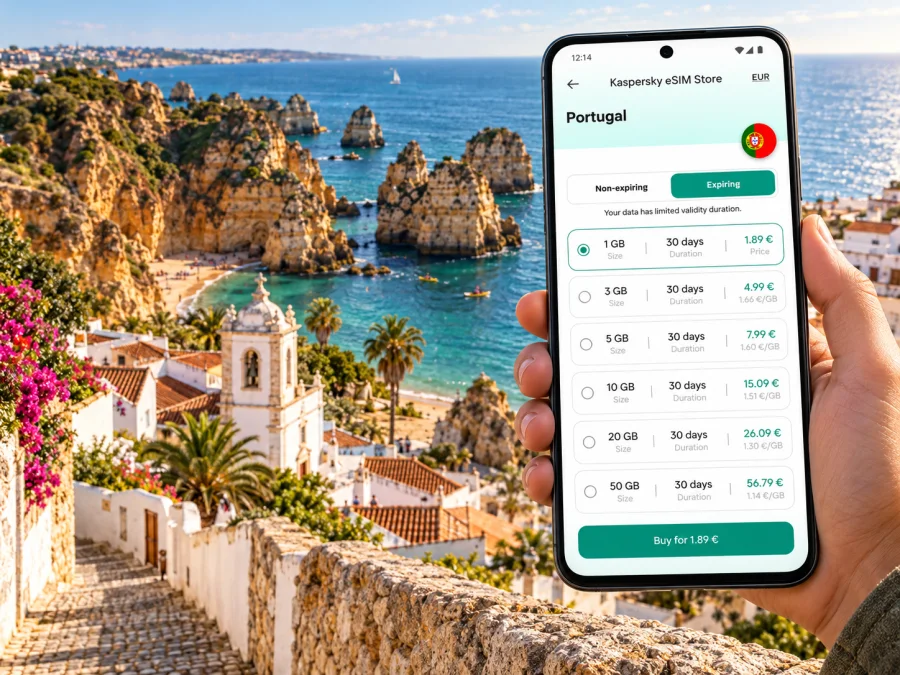
Lagos eSIM: mobile connection and internet for the Algarve coast
Lagos is a compact coastal city in Portugal’s Algarve, but a visit rarely stays within one small circle. You might arrive through Faro, check in near the old town or marina, walk to a beach, then head west to Ponta da Piedade or east across the water to Meia Praia. A working mobile connection helps with maps, transport updates, reservations and messages as those plans change. An eSIM can provide mobile data without replacing the physical SIM already in your phone.
The useful question is not simply whether an eSIM works in Portugal. It is whether the plan you choose covers Portugal, fits the length and style of your Lagos trip, and can be installed on your exact device. This guide explains how to plan for arrival, city walks, beach days and onward travel while keeping those details clear.
What to know before you arrive
Lagos is in the western Algarve, in southern Portugal. It is a city and municipality, not the Nigerian megacity with the same name. The distinction matters when searching for hotels, transport, maps and mobile data plans: select Portugal as your destination, then use Lagos as your local itinerary point.
The historic centre, Avenida dos Descobrimentos and the marina are close enough to combine on foot. Other places—such as Meia Praia, Praia do Camilo, Praia Dona Ana, Porto de Mós and Ponta da Piedade—are spread along the coast and may require a longer walk, a local bus, a taxi or a seasonal tourist service. A map is especially useful when a beach access path ends at steps or a viewpoint rather than at the sand itself.
| Part of the trip | Where mobile data is useful |
|---|---|
| Arrival | Checking a transfer, finding the correct bus stop, messaging your accommodation |
| Old town | Walking directions, opening hours, restaurant bookings and translation |
| Coast | Locating a beach entrance, checking a return route and sharing your location |
| Day trip | Comparing departure points and checking changes to bus or train plans |
| Work | Video calls, email, hotspot use and navigation between meetings |
Treat the phone as a planning aid rather than the only source of directions. Save your accommodation address, transport tickets and essential maps for offline use before leaving reliable Wi-Fi. This is useful if a building, cliff path or busy beach temporarily weakens reception, or if you want to preserve data for the rest of the day.
Getting from Faro Airport to Lagos
Faro Airport is the Algarve’s main air gateway for many visitors to Lagos. The airport lists the Vamus “Aerobus Get On” service among the connections serving Lagos, Portimão and Albufeira. Timetables can vary by date and season, so check the current departure before relying on a particular connection. A journey planner or transport app is easier to use when you have data immediately after landing.
There are several possible transfer patterns:
- Direct bus, when the schedule suits. Check the Vamus route and stop information for the day you travel. Confirm where it stops in Lagos and how far that is from your accommodation.
- Via Faro city and rail. The airport has buses and taxis into Faro, where the railway station connects with Algarve destinations. The regional line serves Lagos; review the latest CP timetable and any planned changes before setting out.
- Pre-booked transfer or taxi. This can simplify a late arrival, a group journey or travel with bulky luggage. Confirm the meeting point, fare basis and any toll or luggage charges with the provider.
- Rental car. Useful if your plans include several beaches or towns, but check parking and access at each stop. Do not assume a car is easier for the narrow streets of the historic centre.
At the airport, connect to Wi-Fi if needed to retrieve a ticket or message your driver. Once you leave, mobile data can help you check live information and navigate to your accommodation. Keep the booking confirmation and address available offline in case you need them during the transfer.
Lagos railway station is beside the marina area. The station and central streets are linked by a pedestrian bridge across the marina, making the final approach manageable on foot if you are travelling light. With a suitcase, mobility needs or a hotel farther uphill, check the walking route and arrange a short ride if appropriate.
Moving around the city and coast
For the centre, walking is often the simplest way to move between Praça Gil Eanes, Praça Infante D. Henrique, the old streets, Avenida dos Descobrimentos and the marina. Narrow lanes and uneven surfaces make turn-by-turn directions helpful, but the most direct route on a map is not always the easiest route with luggage, a stroller or limited mobility. Look at the full route before setting off, including slopes, stairs and crossings.
Lagos has urban buses connecting parts of the city and beaches. Official visitor information describes Onda buses and notes that stop shelters generally display route and timetable information. Check the latest service details for your travel date; local routes and seasonal frequency can change. For beaches farther from the centre, identify both the outbound stop and the return option before you go.
Ponta da Piedade is a coastal headland with eroded rock formations, paths and viewpoints. The place name may refer to the headland, the lighthouse area, a walking route or a boat departure, so check the map pin and meeting instructions carefully. Boat trips leave from the marina area, not from the cliffs themselves. If you book a boat excursion, keep the operator’s meeting point and check-in time saved in your messages.
At the beaches, use a map to distinguish the access road or stairs from the beach itself. Praia do Camilo, for example, is reached by a long staircase; other shoreline areas have different approaches. A navigation pin that lands at a car park or cliff-top viewpoint does not guarantee step-free access to the water. Check local signs and current access details, and allow for the return climb.
For a day beyond Lagos, the railway provides a useful regional option and intercity buses connect Algarve towns. Check whether your chosen departure is from the railway station, marina, or a separate bus terminal; they are not interchangeable locations. Keep a little schedule flexibility, especially when coordinating a connection, and verify the return service before committing to a late outing.
Choosing mobile data for a Lagos itinerary
A short city break with hotel Wi-Fi and occasional map use has different needs from a week of beach hopping, remote work or video uploads. Estimate what you will do on mobile data rather than choosing only by trip length.
| Typical use | Planning approach |
|---|---|
| Maps, messaging and searches | A modest data allowance may be sufficient; download maps and tickets on Wi-Fi |
| Photos and frequent social updates | Allow for uploads and automatic backups, which can use more data than browsing |
| Video calls or hotspot | Check the plan’s data amount, validity, tethering terms and your expected meeting hours |
| Multi-stop Algarve trip | Confirm that the coverage destination is Portugal and the validity period includes every travel day |
| Longer stay | Compare the cost and data of a larger allowance with the option to top up, if available |
To compare plans, check the destination, data amount, validity, price, start-of-validity rules and any fair-use or hotspot conditions. A plan labelled for a region may have different included countries or terms from a Portugal-specific plan. Read the terms attached to the particular offer before payment; do not infer network coverage from a product name or from a map of Portugal as a whole.
Portugal’s mobile market includes MEO, NOS, Vodafone Portugal and Digi Portugal. That describes the country’s operator market; it does not identify the network used by a particular travel eSIM. The eSIM’s available network depends on the selected plan and its roaming arrangements, and it may not behave like a domestic subscription from a Portuguese operator. Check the provider and network details shown for the selected offer where available. Coverage and speed can also vary by building, terrain, congestion and device; no country-level description guarantees a signal at every beach, cliff path or indoor venue.
When you are ready to compare the destination and terms, choose an eSIM data plan for Portugal. Kaspersky eSIM Store is an app and website where you can select, purchase and activate an eSIM plan for mobile data during an international trip. The plan’s own conditions determine its data allowance, duration and supported service.
Set up before you leave
First confirm that your phone supports eSIM and is not restricted by a carrier lock. Support can differ between closely named model variants sold in different markets, so check the exact model identifier and region of sale rather than relying on a family name alone. If you use a work-managed phone, ask whether the administrator allows adding a travel eSIM. Check your device’s eSIM compatibility before choosing a plan.
A practical setup sequence is:
- Choose Portugal and compare the plan’s allowance, validity and conditions with your itinerary.
- Complete the purchase while you have a stable internet connection and access to the email or account used for the order.
- Follow the relevant Android installation instructions or iOS installation instructions. Menu names vary by operating-system version and manufacturer.
- Label the new line clearly, for example “Portugal data,” so you can distinguish it from your home SIM.
- Before travel, decide which line should handle mobile data and which should remain the default for calls and messages. Keep your home line active only if you want and can afford its roaming services.
- Read the plan’s activation rule. Some plans begin their validity on installation; others begin when the eSIM first connects to a supported network. Follow the instructions for the specific plan.
- After arrival, select the travel eSIM for mobile data and enable data roaming for that line only if the plan instructions require it. Confirm that the home SIM has not been selected for roaming data by mistake.
Installation and activation are different steps. Installing adds the eSIM profile to the phone; activation or first network use may happen later, depending on plan terms. Avoid deleting an installed eSIM to troubleshoot unless the plan instructions or support team tells you to do so, because some profiles cannot simply be downloaded again.
Use data thoughtfully in town
A small set of settings can make a city trip easier to manage:
- Turn off automatic photo and video backup over mobile data if you do not need it while travelling.
- Download an offline map of Lagos and save the hotel pin, transfer details and key meeting points.
- Use Wi-Fi for operating-system updates, large uploads and streaming where practical.
- Check which SIM is selected for mobile data after changing a line or restarting your device.
- Keep low-power mode in mind on long beach days; navigation and camera use can drain the battery together.
- Carry a charging cable or power bank and protect the phone from sand, salt spray and heat.
If data seems unavailable, first check that the eSIM line is switched on and selected for mobile data. Then check the plan’s activation instructions, the phone’s data-roaming setting for that line, and the available network selection options. Move to an open area and retry; thick walls, terrain and local congestion can affect service. If the issue continues, use the plan’s support channel over Wi-Fi and keep the order details available.
Remember that a data-only eSIM does not automatically provide a Portuguese phone number, ordinary voice calls or SMS. Those services are included only if the selected plan explicitly says so. Internet-based calling and messaging apps can work over data, subject to the apps’ own requirements and your contacts’ availability.
Scenarios: match the plan to the day
A two-night old-town stay. You may use maps between the station, hotel, historic centre and marina, check restaurant details and message your host. Download maps and tickets before arrival, then estimate how much browsing and photo sharing you actually expect. Hotel Wi-Fi can take care of larger downloads.
A beach day with a boat trip. Save the exact marina meeting point and the booking confirmation. Check the return bus or walk before leaving the centre. A data connection can help with a last-minute message, but do not depend on it as the only record of departure time or location.
A remote-work morning. Test the accommodation’s Wi-Fi before scheduling important calls. If mobile data is your backup, verify hotspot terms and estimate video-call consumption; keep the eSIM’s remaining data in view. A travel plan is not a guarantee of uninterrupted service indoors.
An onward trip to another Algarve town. Compare departure locations and return times before the day begins. The train station near the marina, local urban stops and intercity bus stops can be separate. Save the tickets and route offline, then use mobile data for any changes while leaving enough time to reach the correct stop.
FAQ
Is Lagos a city in Portugal or in Nigeria?
This guide is about Lagos in the Algarve, Portugal. It is a coastal city in southern Portugal. Select Portugal as the eSIM destination; Lagos is the city you are visiting, not a separate country-level plan destination.
Is a Portugal eSIM useful if I am staying only in Lagos?
It can be useful if you want mobile data for maps, messages, transport checks and bookings during the stay. Compare the offer’s data amount, validity and conditions with your own use. The place name alone does not determine which plan or network will serve your device.
Will an eSIM work at every beach and viewpoint?
No plan should be treated as a guarantee of uninterrupted service at every location. Coastal cliffs, indoor spaces, crowd levels and network arrangements can affect reception. Save essential information offline and check the selected plan’s Portugal coverage details.
Can I keep my usual number?
In many dual-SIM phones, you can keep the physical SIM installed while using the eSIM for data. The exact options depend on your device and carrier. Check which line handles calls, messages and mobile data, and review your home operator’s roaming charges.
Does the eSIM include calls and text messages?
Only when the selected plan explicitly includes them. Many travel eSIM plans are intended for mobile data and do not come with a regular local number. Apps that use internet data may be an option for calls and messages.
Should I install the eSIM before travelling?
That can make setup easier because you have a reliable connection and time to follow the instructions. Check when the plan’s validity begins before installing or connecting, and follow the specific activation guidance supplied with the plan.
What if my phone has a regional variant?
Check the exact model number and market version for eSIM support, and confirm that the device is carrier-unlocked. Similar product names can refer to hardware variants with different SIM capabilities. Use the compatibility check and the manufacturer’s details for your exact device.
A simple pre-departure checklist
- [ ] Portugal is the selected destination and the offer covers your travel dates.
- [ ] Data allowance, validity, price and activation rule match your itinerary.
- [ ] Your exact phone variant supports eSIM and is not carrier-locked.
- [ ] Accommodation address, tickets and key Lagos map pins are saved offline.
- [ ] You know which SIM will handle mobile data and have reviewed home-line roaming.
- [ ] You have checked the current airport transfer, local bus or train timetable for your travel day.
- [ ] The plan’s support details and purchase confirmation are accessible if you need help.
Lagos is easiest to explore when you can move between the old town, marina and coast without having to solve every practical detail from scratch. Prepare the route and key information offline, then choose mobile data around the way you will actually use your phone. With Kaspersky eSIM Store, you can review eSIM options for a Portugal trip, select a suitable plan and follow its setup instructions before or during your journey.


