Travel connectivity guide
Lambarene eSIM: Mobile Internet for Your Trip
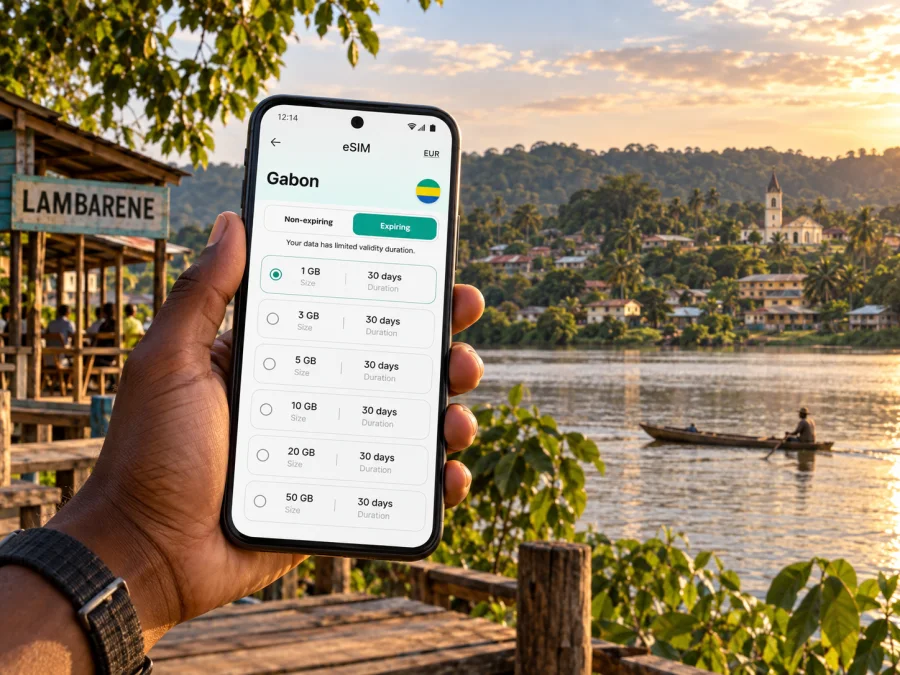
Lambarene eSIM: mobile connection and internet for a river city
Lambarene is a practical stop for travelers who want to understand Gabon beyond its capital. The town sits beside the Ogooué River, and water is part of its geography as much as its scenery: the river shapes how visitors orient themselves, plan journeys and decide how much time to leave between appointments. Mobile internet can make those small decisions easier, from checking a saved hotel location to sending a message when a road journey takes longer than expected.
This guide focuses on using a phone around Lambarene: arriving from Libreville, moving between the riverbanks, arranging a boat outing, choosing a place to stay and preparing for a work visit. It does not assume that every road, boat or mobile connection will be available at every hour. Confirm local arrangements with your host or transport provider, and keep important addresses available offline.
Start with the shape of Lambarene
The Ogooué is the town’s main geographical reference. Lambarene is commonly described through three parts: Rive Gauche, Ile Lambarene and Rive Droite. The names themselves are useful when reading directions or discussing a meeting point, but they do not replace a precise address. Ask which bank or part of town a hotel, clinic, office or pickup point is on, then save the exact location before setting out.
The river setting gives Lambarene a different rhythm from a compact grid of streets. A place that looks close on a map may require a road route, a bridge crossing or a boat arrangement, depending on where you are and what you plan to do. Do not estimate travel time from straight-line distance alone. Check the route with a local contact and allow margin, especially if you have a timed appointment or onward transfer.
| Before you set out | What to confirm |
|---|---|
| Hotel or guesthouse | Full address, nearby landmark, bank or island, and a working contact number |
| Meeting in town | Exact entrance or recognizable meeting point, not just the neighborhood name |
| River excursion | Departure place, return plan, duration, weather conditions and what the fee includes |
| Road transfer | Pickup location, expected journey time and how the driver will identify you |
| Essential errands | Opening hours and whether you need an appointment or local assistance |
Arriving from Libreville
Many itineraries reach Lambarene by road from Libreville. The journey is long enough to plan as a transfer, rather than as a quick local ride. Conditions, stops and actual travel time can vary, so arrange the departure and pickup directly with a driver, tour organizer or accommodation. Avoid building a same-day schedule around an unconfirmed arrival estimate.
Before leaving the capital, send your destination address to the person meeting you and confirm how you will recognize one another. Keep the accommodation name, address and a contact number in a note that is available without a connection. If your driver uses a messaging app, exchange the vehicle description and meeting instructions before departure. These details reduce confusion if data is intermittent along the route.
A useful arrival sequence is simple:
- Confirm the drop-off point with your host before the vehicle departs.
- Keep your phone charged and store the address offline.
- Send a short update when you have a reliable connection and know your estimated arrival.
- On reaching town, verify the bank, neighborhood or landmark before leaving the vehicle.
- Save the route back to your accommodation while you are connected.
If you are continuing onward after a short stay, avoid assuming that a convenient connection will be available at the last minute. Confirm the next leg, departure point and pickup time in advance. If the plan includes a boat, ask whether the trip is a transfer or an excursion and what happens if weather or river conditions change. Your phone is useful for coordination, but local confirmation remains essential.
Moving around: roads, river and local help
Lambarene is not a city where a visitor should assume one transport pattern covers every journey. Road transfers are useful for getting between addresses on land; a boat may be relevant for some river or lake excursions. Ask your accommodation which option applies to your destination and who can arrange it. The availability, price and timing of local transport are details to verify on the day rather than facts to infer from a map.
Mobile data supports these arrangements in small but useful ways: a message can confirm that a driver has arrived, a shared pin can identify a hotel entrance, and a call over an internet app can resolve a changed meeting point. It is still wise to have the important information in writing. If a map shows a route that conflicts with instructions from someone local, pause and ask before proceeding.
Planning mobile internet for Lambarene
A connection is most useful when it supports tasks tied to the town: finding the correct lodging, contacting a driver, checking a map, confirming a river departure or messaging a colleague. Before choosing a travel data plan, estimate how long you will stay and how often you will use maps, calls through messaging apps, email and photo uploads. Download maps and travel documents over Wi-Fi beforehand if that is convenient, and avoid relying on continuous video or large uploads during a day out.
Coverage and performance can vary by location, device, network and surrounding conditions. A phone may behave differently along a road or on the water than it does at your lodging. Review the plan details for its destination, data allowance, validity period and activation conditions, and keep offline copies of anything you must access during the trip. A travel eSIM is intended for mobile data; check the plan terms for what it includes rather than assuming it provides a local voice number or conventional SMS.
Kaspersky eSIM Store is an app and website where you can choose, purchase and activate an eSIM with a suitable plan for mobile internet during an overseas trip. To compare the options for Gabon, review eSIM plans for your trip to Gabon. Check the destination and plan terms against your itinerary, including whether you will use data only in Lambarene or also during the road journey and other stops.
Estimate what you will use
A short itinerary with maps, messaging and occasional email has different needs from a work visit that includes frequent video meetings or photo transfers. Think through an ordinary day rather than choosing by a single headline number. The table below is a planning aid, not a promise about how much data any app will consume.
| Your likely use | Preparation idea |
|---|---|
| Maps and short messages | Save key areas offline and use mobile data for live updates or coordination |
| Email and document access | Download essential files in advance and check them before leaving Wi-Fi |
| Photos and cloud backup | Wait for a trusted Wi-Fi connection before uploading large files |
| Work calls | Test your meeting app before travel and identify a lower-bandwidth backup plan |
| Longer route days | Keep the driver’s number and destination notes available offline |
Choose a plan by matching its data allowance and validity to your expected use, not by assuming that more data will solve every connectivity issue. A plan cannot guarantee reception in every building or along every stretch of road. If a task is time-sensitive, arrange a backup way to contact the person involved.
Riverside landmarks and time in town
The Albert Schweitzer Hospital is one of Lambarene’s best-known landmarks and an important part of its history. Visitors interested in the site should check current access and visitor arrangements before going; a medical institution is first of all a place of care, not simply a tourist attraction. Follow local guidance, respect privacy and do not photograph patients or staff without permission.
The Ogooué waterfront and nearby waterways are central to the experience of the area. A guided excursion can provide context that a phone map cannot, but choose arrangements through a local host or a clearly identified guide. Ask what route is planned, how long the outing will last, whether equipment is provided and how the group will return. Keep the guide’s number and the agreed meeting point saved before departure.
Markets and everyday town streets are best explored with a little flexibility. Ask your host which market or neighborhood is suitable for your timing and what transport is appropriate. Prices, opening hours and availability change; do not rely on old screenshots or assumptions. If you are buying something or arranging a service, confirm the amount and details clearly before committing.
Choosing a place to stay and planning a work visit
Accommodation choice in Lambarene is less about picking a famous district and more about matching the location to your plans. Ask whether the property is convenient for your meeting, hospital visit or excursion; which bank or part of town it is in; and whether the property can help arrange a driver or guide. Confirm these points directly, since names and map pins may not make the practical distance obvious.
For a business trip, request the exact office location and a local contact before the day of the meeting. A pin shared in a message is helpful, but ask for the building name, entrance and any recognizable nearby feature as well. Put the appointment time, contact name and return transport plan in your calendar. If the meeting depends on a boat crossing or a road pickup, agree who will arrange it and how delays will be communicated.
A compact preparation checklist:
- Save the accommodation’s full address and phone number.
- Ask which part of Lambarene the property is in and what transport is practical.
- Store meeting or excursion locations in the map app while online.
- Keep names and pickup instructions in a note that opens offline.
- Carry identification, payment methods and any documents your host has asked you to bring.
- Leave a margin between a road transfer, appointment and onward journey.
Set up your eSIM before departure
If you plan to use an eSIM, check that your phone supports it and is not restricted from using another carrier before you buy a plan. Check whether your device supports eSIM. Keep access to Wi-Fi for setup, read the activation instructions and install the profile at a time when you can follow the steps without rushing. Some plans begin their validity at activation or connection, so review the terms for the specific plan you choose.
A practical setup sequence:
- Confirm device compatibility and make sure your phone is updated.
- Choose a plan that matches Gabon and your expected trip length and data use.
- Read the plan’s validity and activation conditions before purchase.
- Install the eSIM while you have a stable internet connection, following the supplied steps.
- Label the travel line clearly in your phone settings so you can identify it later.
- Review which line is selected for mobile data and keep your usual line settings as intended.
- At the destination, follow the plan’s instructions to activate or connect; check the displayed line and data settings if it does not connect.
For device-specific steps, use the Android eSIM installation instructions or the iOS eSIM installation instructions. Menu names can differ slightly between operating system versions. Do not delete an installed eSIM profile while troubleshooting unless the instructions for your plan tell you to do so; you may need the original installation details to add it again.
Before leaving your accommodation each day, check that the travel line is available, your phone has enough charge and your important addresses can be opened offline. If data is not working, verify that the correct line is selected for mobile data, that the plan is within its validity period and that required settings match the plan instructions. Move to a place where it is safe to pause and check; avoid changing several settings at once while navigating.
Common questions
What should I check when selecting an eSIM plan?
Check that Gabon is included, then compare the data allowance, validity period, activation timing and any other stated conditions with your itinerary. Confirm that your phone supports eSIM and is not carrier-restricted. Treat voice and SMS as separate unless plan terms explicitly say they are included.
Is a travel eSIM a substitute for every local communication need?
A data eSIM can support maps, email and internet messaging, but it may not include a local telephone number or standard calls and SMS. If a hotel, driver or workplace needs to call you, agree on a suitable contact method in advance.
What if I am only passing through?
Save your onward address, pickup point and host contact before you reach Lambarene. Keep enough time for the transfer and confirm the next leg directly. A brief stop is easier when the one or two essential destinations are pinned before arrival.
Before you leave your room
Take a moment to check the day’s route, meeting point and return arrangement. Make sure your phone is charged, your important notes are available offline and someone knows how to reach you. In Lambarene, where the Ogooué shapes both orientation and travel, a clear plan and a local confirmation are more dependable than assuming every journey follows the map’s shortest line.
Match mobile data to your route and keep key information offline. When ready, choose an eSIM plan for Gabon through Kaspersky eSIM Store, then follow the plan’s activation instructions.


