Travel connectivity guide
Langkawi eSIM: Mobile Internet and Travel Guide
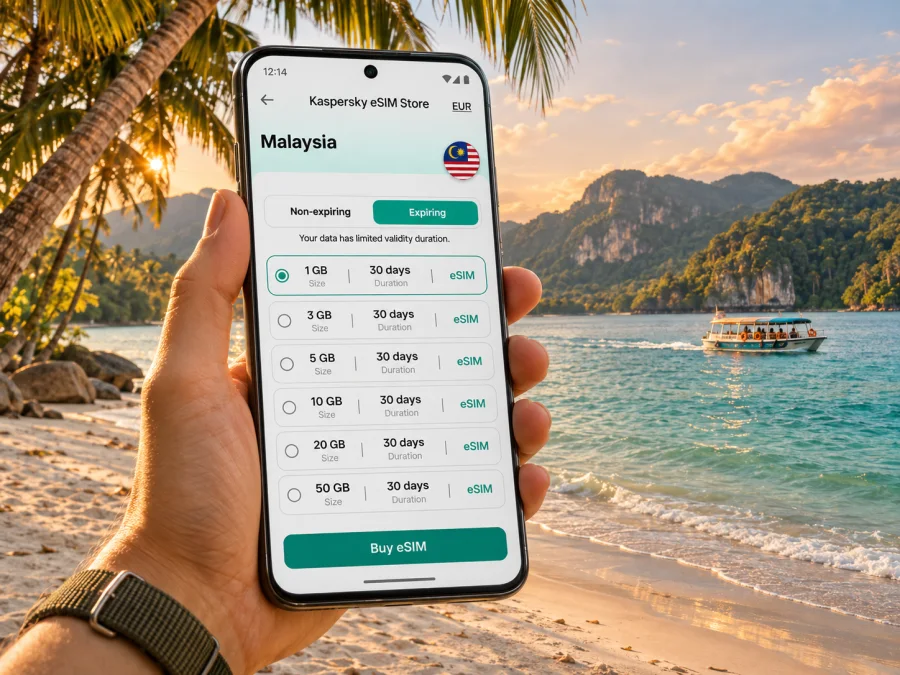
Langkawi eSIM: mobile connection and internet across the island
Langkawi is an archipelago in the Malaysian state of Kedah rather than a conventional city. The main island, Pulau Langkawi, is the practical base for most visitors; smaller islands, beaches, mangroves and mountain areas make the destination feel very different from a compact city break. That matters when you plan mobile internet: a connection that works at your hotel in Kuah or Pantai Cenang may behave differently on a boat, in a forested valley or inside a resort building.
An eSIM can make it easier to get online without swapping the physical SIM in your phone. You can use mobile data for maps, ride arrangements, translation, booking messages and weather updates while keeping your usual SIM available if your device supports dual SIM. The useful choice is not simply “an eSIM for Langkawi”; it is a plan whose destination coverage, data allowance, validity and activation rules fit your route through Malaysia.
Where you are going: an island destination, not a single centre
Tourism Malaysia describes Langkawi as a group of islands off the north-west coast of Peninsular Malaysia, with the main island known as Pulau Langkawi. Kuah is the principal town and the ferry arrival point; the international airport is at Padang Matsirat. Pantai Cenang and Tengah are popular west-coast beach areas, while the north and north-west include quieter stretches such as Tanjung Rhu and Datai Bay. The UNESCO Global Geopark designation reflects the archipelago’s landscapes, including mangroves, limestone formations, beaches and forested hills.
These places are spread out. A day may begin in Kuah, continue to a beach on the west coast, and finish at a viewpoint or a jetty on the north side. There is no single dense public-transport grid to rely on for every leg, so visitors commonly plan around a rental car, taxi or pre-arranged transfer. Keep the exact hotel pin, pickup point and attraction entrance saved offline before setting out. A mobile connection is valuable for checking the route and confirming a driver, but an offline map is a sensible backup on a long or remote drive.
| Area or arrival point | What it is useful for | Connectivity planning |
|---|---|---|
| Kuah | Main town, ferry terminal, shops and services | A practical place to download maps, check bookings and handle errands after arriving by sea. |
| Padang Matsirat | Langkawi International Airport and the island’s west-central side | Arrange onward transport before landing; keep hotel details available offline. |
| Pantai Cenang and Pantai Tengah | Beach stays, restaurants and visitor services | Expect to use data for navigation and reservations; indoor signal can vary by building. |
| Oriental Village and the Machinchang range | SkyCab access and elevated viewpoints | Download tickets and directions in advance; terrain and crowds can affect reception. |
| Kilim and other mangrove areas | Boat tours and nature outings | Save the operator’s meeting point and return details before leaving the main road. |
| Tanjung Rhu, Datai Bay and quieter north-west areas | Beaches and resort stays away from the busiest centre | Do not assume the same indoor or roadside signal as in Kuah; keep an offline route. |
Arriving by air or ferry
Langkawi International Airport is in Padang Matsirat. Tourism Malaysia places it about 20 km from Kuah and about 8 km from Pantai Cenang. Those are useful orientation distances, not reliable journey-time estimates: traffic, weather, pickup arrangements and the precise hotel location all matter. Before departure, save your accommodation address, the name of the person meeting you and a second way to contact them. If you need a ride after landing, having the destination written down can help even when mobile data is slow to come up.
Visitors arriving by ferry generally disembark at the jetty in Kuah. If your first stay is on the other side of the island, you will need onward road transport. Confirm whether your ferry ticket, hotel or tour includes a transfer; do not assume that a booking reference alone tells you where to meet. A screenshot of the ticket and a saved map pin are useful when the terminal is busy or you have no immediate data connection.
Choosing mobile data for an island itinerary
Start with your daily habits. Navigation, messaging, web searches and occasional photos use less data than extended video streaming, cloud backups or uploading large files. A short stay focused on maps and messages may need a modest allowance; a longer visit with remote work, hotspot use or frequent media uploads calls for a larger buffer. Estimate from your own recent usage if you can, then account for the days when you will be away from reliable Wi-Fi.
Check these terms before paying:
- Destination. Confirm that the plan explicitly includes Malaysia. Langkawi is part of Malaysia, but the offer’s destination list and eligible partner networks determine whether it can connect there.
- Validity. Read when the validity period begins. It may begin at purchase, installation or first network connection, depending on the offer.
- Data amount and speed conditions. Check whether the package has a fixed data allowance, a daily limit or any fair-use terms. “Unlimited” should not be read as unlimited high-speed data unless the conditions say so.
- Tethering. If you plan to connect a laptop or a second phone, verify that hotspot use is permitted and understand that it can consume data quickly.
- Voice and SMS. A travel data eSIM may not provide a regular local number or conventional calls and texts. Keep your main line available for services that depend on it, and use internet messaging where suitable.
- Activation and deletion rules. Follow the provider’s instructions. Some eSIM profiles cannot be installed again after removal, so do not delete a working profile as a troubleshooting shortcut.
Kaspersky eSIM Store is a website and app for choosing, arranging and activating an eSIM plan for travel. It displays plan conditions so you can compare data amount and validity for your trip. The Malaysia page is the right place to review the currently listed options for this destination; offers and terms can change, so check the details shown at the time you choose. Review eSIM options for a trip to Malaysia.
Device, regional variants and setup checks
Before choosing a plan, make sure your exact phone variant supports eSIM and is not restricted to a different carrier. Support can vary between models with nearly identical names and between regional versions sold in different markets. Do not assume that a device supports eSIM because another version of the same product does. Check the manufacturer’s specifications for the model number and confirm that the phone is unlocked for another provider. Check whether your device supports eSIM.
Install before the travel day
Whenever possible, install the eSIM while you have stable Wi-Fi and time to read the instructions. Some plans are installed by QR code; others use an app or manual details. Keep the QR code or activation details available on a second screen if your phone cannot scan an image displayed on itself. The installation method and when the validity period starts are plan-specific, so follow the instructions supplied with your selected offer.
A practical sequence is:
- Confirm device compatibility, carrier-unlock status and the destination listed in the plan.
- Read the plan’s activation instructions and note any validity start trigger.
- Add the eSIM over reliable Wi-Fi, using the provider’s step-by-step instructions for Android or iPhone/iOS.
- Label the new line clearly, for example “Malaysia data,” so it is easy to distinguish from your home SIM.
- Choose which line handles mobile data. If you want to retain your usual number, check the settings for calls, messages and data roaming separately.
- Follow the plan’s directions for data roaming on the eSIM if required. Do not enable roaming indiscriminately on your home SIM; your home carrier may charge for it.
- When you reach Malaysia, turn on the travel line if the plan says to do so, allow it to register, and test a simple webpage or map before leaving Wi-Fi.
Getting around: maps, rides and meeting points
Langkawi is easier to navigate when you plan by area rather than treating every attraction as a short walk from the next. Kuah, the airport area, the western beaches and the northern coast are separate destinations. For a day with several stops, save a route in advance and check the distance between them. A live map can help with traffic and locating a pickup point, but road signs, parking entrances and the exact tour jetty may not match the most visible pin.
When meeting a driver, send both a map pin and a plain-language landmark or venue name. If the app permits it, share the pickup details before you enter a weak-signal area. For a rental car, download the map for the island and keep the booking company’s contact details offline. Do not use your phone while driving; set navigation before moving and pull over safely if you need to change the route.
Boat excursions introduce a different connectivity pattern. A data signal can weaken or disappear offshore, and a tour itinerary may pass through mangroves or around smaller islands. Confirm the departure jetty, return time and operator contact while you are still online. Download any digital ticket or waiver that you need to show, and tell your travel companion where to meet if you become separated. Do not make a safety-critical decision based only on a map app or a signal indicator.
Work, calls and data use
If you need to work from Langkawi, treat the connection as one part of a backup plan. Ask the accommodation about its Wi-Fi, workspace, power outlets and any known outages before booking. Test a video-call setup early in the stay instead of waiting until a meeting begins. A mobile data eSIM can provide another route to online tools where the local network and plan allow, but it is not a guaranteed substitute for a fixed connection.
Video meetings and cloud syncing can use considerably more data than text chat or document review. Pause automatic photo backups, operating-system downloads and streaming when you are relying on a limited allowance. Download large files in advance over trusted Wi-Fi, keep a copy of key documents on the device, and have a second way to contact colleagues if a call drops. If using hotspot, monitor both the plan allowance and battery level; tethering often drains the phone faster.
For ordinary calls to home, check your main SIM’s roaming terms before departure. A data-only travel eSIM generally does not replace your regular phone number. Internet calling and messaging apps can work over data, subject to their own account and service requirements. If a bank, airline or work account sends a verification code by SMS, confirm beforehand which line will receive it and whether your primary SIM can remain active without unexpected roaming charges.
When reception changes or data stops
Signal and speed can change with network load, building materials, device capability and terrain. If data stops working, check that the eSIM line is enabled and selected for mobile data, then confirm that the plan still has data and validity remaining. Move to an open area, briefly toggle airplane mode, and give the phone time to register again. Use Wi-Fi to check the plan’s network or APN instructions and contact the support channel shown with the offer if the issue continues. Avoid deleting a working eSIM profile unless the provider tells you to.
Choose a plan for the way you will use Langkawi
A useful allowance is the one matched to your trip, not the largest number on a screen. Sketch a typical day: map checks and messages; a few searches and reservation updates; photo sharing; perhaps a video call or hotspot session. Add more data if you expect frequent streaming, uploading or laptop tethering. If you travel onward elsewhere in Malaysia, verify that the destination list and validity cover the whole itinerary rather than only the island days.
Consider these three sample patterns:
- A weekend by the beach: use data for airport or ferry transfers, directions, messages, restaurant searches and occasional photos. Download maps and entertainment over Wi-Fi beforehand; a small allowance may be enough if your usage is light.
- A week exploring different coasts: expect more navigation, ticket checks, ride coordination and photo sharing. A moderate allowance with a buffer can reduce the need to ration every map lookup. Keep offline maps for the longer drives.
- A work-and-leisure stay: estimate video-call and hotspot use separately from ordinary browsing. Check the plan’s tethering rules, data cap and validity; arrange accommodation Wi-Fi as the main work connection and mobile data as contingency.
Frequently asked questions
Is Langkawi a city?
No. Langkawi refers to an archipelago and its main island in Kedah; Kuah is the main town. The article uses “Langkawi” as the travel destination because that is how visitors commonly plan the island stay and search for arrival, navigation and mobile-data advice.
Will a Malaysia eSIM work everywhere on Langkawi?
No plan should be treated as a guarantee for every beach, resort room, boat route or forested area. Check that the plan includes Malaysia and understand its supported network, then allow for local variation. Download maps and important booking details for offline access.
Can I keep my regular number?
Often you can keep a physical SIM active alongside an eSIM on a compatible phone, but the available combinations depend on the specific device and regional version. Choose the data line carefully and review your home carrier’s roaming charges. A data eSIM does not necessarily include a local voice number or SMS.
Should I install the eSIM before flying?
Installing over stable Wi-Fi before travel is often more convenient, but read the plan terms first. Some validity periods begin only when the eSIM connects; others may use a different trigger. Keep the profile installed and follow the activation directions for that plan.
Do I need 5G for Langkawi?
Not necessarily. For maps, messaging and ordinary browsing, a supported 4G connection can be sufficient. Actual 4G or 5G availability depends on the local network, device and location. Select a plan by destination, data and validity rather than assuming a particular generation of service will be present at every stop.
What if my phone variant has no eSIM option?
Do not purchase on the basis of a similarly named model. Confirm the exact model number with the manufacturer and check the compatibility guidance. If your phone does not support eSIM, use another travel connectivity option that is compatible with your device, such as a physical SIM where available, or rely on trusted Wi-Fi with offline maps as a backup.
A simple pre-trip checklist
- Confirm that Langkawi is the right destination listing for the Malaysia portion of your trip.
- Check your exact device variant, eSIM support and carrier-unlock status.
- Compare validity, data allowance, activation timing, supported network and hotspot terms.
- Install over Wi-Fi and save the setup steps; keep your main SIM’s roaming settings in mind.
- Save accommodation details, transport bookings, map areas, tour meeting points and emergency contacts for offline use.
- At arrival, verify that the intended line is active and mobile data works before leaving the airport or jetty Wi-Fi.
- Keep some battery and data in reserve for the return route or a changed pickup arrangement.
Prepare your connection for Langkawi
Choose a Malaysia plan that matches the length and style of your stay, check the exact conditions, and install the eSIM on a compatible unlocked device before you set out. Kaspersky eSIM Store helps you review and activate an eSIM plan through its app or website; local network availability still depends on the plan, device and location. Explore current eSIM options for Malaysia and keep your maps and arrival details available offline for the parts of Langkawi where reception may vary.


