
Travel connectivity guide
Larnaca eSIM: Mobile Internet for Cyprus Trips
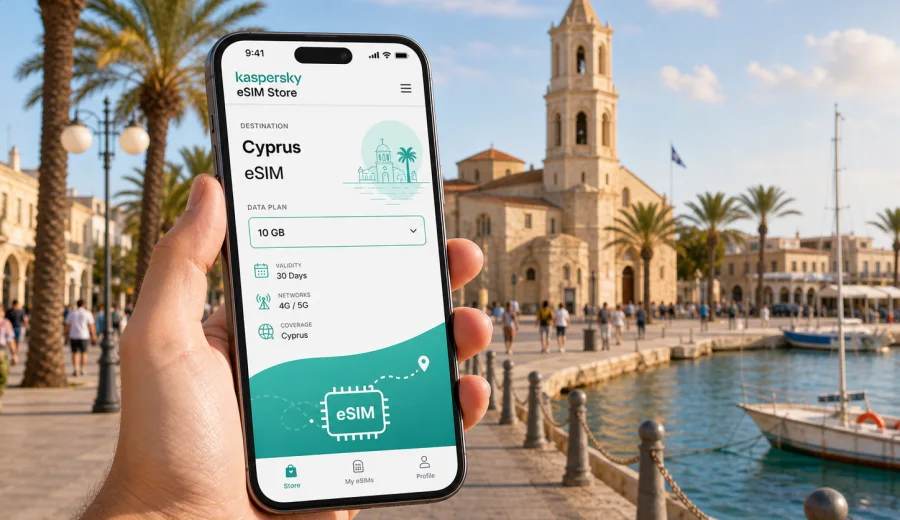
Larnaca eSIM: mobile connection and internet for your city trip
Larnaca is an easy city to underestimate. Many travelers first see it as an arrival point: the airport is close, the seafront is compact, and the road to other parts of Cyprus is straightforward. But that simplicity is exactly why mobile internet matters here. You may land, pick up a rental car, find a hotel near Finikoudes, meet colleagues near the marina, or continue toward Ayia Napa, Nicosia, Limassol, or the Troodos foothills on the same day. A prepared eSIM helps you keep maps, transport details, hotel messages, and travel apps available from the first practical moment of the trip.
This guide focuses on Larnaca as a city: airport arrival, local movement, beach districts, hotels, business trips, stopovers, and short routes from the city. It explains how to think about eSIM mobile data for a trip to Larnaca, what to check before you buy a plan, and how to use Kaspersky eSIM Store as an app or website where you can choose, arrange, and activate an eSIM with a suitable data plan for travel.
Why mobile internet is useful in Larnaca
Larnaca is walkable in the center, but a typical trip still depends on live information. The airport is a few kilometers from the seafront, public transport routes may require checking, rental car pickup often involves digital documents, and hotel communication usually happens through apps. If you arrive late, travel with family, or need to reach a meeting quickly, waiting to solve connectivity after landing can waste more time than expected.
Mobile data is especially useful in these Larnaca moments:
| Situation in Larnaca | Why internet helps |
|---|---|
| Arrival at Larnaca International Airport | Check transfer details, message your hotel, open ride-hailing or taxi information, and load maps before leaving the terminal. |
| Staying near Finikoudes Beach | Use walking navigation, restaurant bookings, parking apps, and messaging while moving between the promenade, marina, and old town. |
| Visiting the Salt Lake area | Keep offline maps backed by live navigation when walking or driving around the lake and nearby viewpoints. |
| Exploring Saint Lazarus Church and the old streets | Find opening times, routes, and nearby stops without depending on cafe Wi-Fi. |
| Renting a car | Use maps, road directions, hotel addresses, and fuel station searches when leaving the city. |
| Business travel | Keep email, calendar, chat, and document access available between the airport, hotel, and meeting venue. |
| Short stopover | Navigate efficiently when you have only a few hours between flights. |
An eSIM is not a replacement for every type of communication. Most travel eSIM data plans are designed for mobile internet, not for a local phone number, traditional voice calls, or SMS unless the selected plan clearly says otherwise. For many Larnaca trips, that is still enough: maps, messengers, email, boarding passes, translation tools, and hotel apps all work over mobile data.
Larnaca arrival: when connectivity matters first
Larnaca International Airport is the main gateway for many visitors to Cyprus. The airport is close to the city, so the first journey can feel simple, but there are several moments when being online is useful before you even reach the promenade.
If you are being met by a transfer driver, you may need to send a message after baggage claim. If you plan to take a taxi, you may want to confirm your hotel address and route. If you are renting a car, you may need to open a booking reference, check a deposit message, or navigate from the airport road toward the city, Oroklini, Pervolia, Ayia Napa, or Limassol. If your flight lands in the evening, a working data connection can make the difference between a smooth first hour and a stressful search for Wi-Fi.
For a short trip, activate your eSIM only when you are ready to start using the data plan, following the conditions of the plan you selected. Some plans start validity when installed, some when they connect to a supported network, and some have other rules. Read the plan details before travel so you do not use part of the validity period too early.
City areas where data is especially useful
Larnaca is not a huge city, but the travel experience changes by area. Your mobile data needs may also change depending on where you stay.
Finikoudes and the marina. This is the most familiar Larnaca base for first-time visitors. You can walk between the beach, cafes, marina, shops, and old town, but online maps still help with restaurant bookings, parking, bus stops, and finding quieter streets away from the promenade.
Saint Lazarus and the old town. The lanes around the church are good for slow walks, small shops, and cafes. Data helps when you are moving on foot and want to check routes without stopping at every corner.
Mackenzie Beach. This area is popular for beach time, evening meals, and airport proximity. If you are moving between Mackenzie, the airport, and central Larnaca, mobile internet helps with transfers and live navigation.
Salt Lake and Hala Sultan Tekke routes. These places are slightly less linear than the seafront. If you plan a walk, photo stop, or drive around the lake, a prepared data plan helps you check your route and return point.
Hotels outside the center. Some hotels and apartments sit beyond the easiest walking zone. In that case, mobile internet is useful for buses, taxis, car navigation, and messaging hosts.
How much data to plan for a Larnaca trip
There is no single correct data amount. A traveler who mostly walks, uses hotel Wi-Fi, and checks maps a few times a day needs much less than a remote worker or a family sharing navigation, video calls, and cloud photos. The point is to match the plan to your actual city routine.
| Trip style | Typical data use | Practical approach |
|---|---|---|
| One-day stopover | Maps, messages, boarding pass, light browsing | Choose a small plan if you only need data for arrival, walking, and departure. |
| Weekend in Larnaca | Navigation, restaurant search, messaging, photos, transport checks | Pick a plan with enough margin for two or three active days in the city. |
| Beach holiday | Maps, social apps, weather, bookings, occasional video calls | Consider more data if you will spend long days away from hotel Wi-Fi. |
| Business trip | Email, calendars, document access, video calls if needed | Choose a larger plan and keep hotspot needs in mind if your device and plan allow it. |
| Cyprus route from Larnaca | Navigation to other cities, car routes, hotel changes | Select a Cyprus plan that fits both Larnaca and onward travel within the country. |
To reduce unnecessary data use, download offline maps before departure, limit automatic cloud backups on mobile data, and update apps over Wi-Fi before the trip. Keep mobile data available for the moments where it matters most: arrival, navigation, communication, payments, and route changes.
eSIM, roaming, local SIM, or public Wi-Fi in Larnaca
Travelers usually compare four options for staying online: standard roaming, a local physical SIM card, public Wi-Fi, and an eSIM data plan. Each can work, but they solve different problems.
| Option | Strength | Trade-off |
|---|---|---|
| Standard roaming | Uses your existing mobile number and familiar operator account | Costs and data limits depend on your home operator and can be high for some travelers. |
| Local physical SIM | May be useful for longer stays or local voice needs | Requires finding a point of sale, handling a physical SIM, and possibly replacing your main SIM. |
| Public Wi-Fi | Available in many hotels, cafes, and some public places | Coverage is uneven, and you may not have it when moving, arriving, driving, or waiting outside. |
| Travel eSIM | Can be prepared before or during the trip without a physical SIM card | Requires an eSIM-compatible, unlocked device and usually focuses on mobile data. |
For Larnaca, an eSIM is often practical because the city involves many short transitions: airport to hotel, hotel to seafront, seafront to dinner, city to beach, city to another part of Cyprus. You do not need to build your first day around finding a shop or asking for Wi-Fi passwords before every route check.
Choosing an eSIM plan for Larnaca
When choosing a data plan for Larnaca, start with the trip pattern rather than the biggest number on the screen. Ask yourself four questions:
1. How many days will you actively use mobile data in Cyprus?
2. Will you stay mostly in Larnaca or travel to other cities and resorts?
3. Will you use mobile hotspot for a laptop or another device?
4. Will you make video calls, upload photos, or stream content on mobile data?
Kaspersky eSIM Store can help you compare available options for the destination, review details such as data volume and validity period, and prepare an eSIM before or during the trip. For a city trip based in Larnaca, use the Cyprus destination rather than looking for a separate city-only page: you can choose an eSIM data plan for your Larnaca trip in Cyprus and select the option that matches your expected data use and travel dates.
Before confirming a plan, read the details carefully. Check data allowance, validity period, destination coverage, activation rules, and whether mobile hotspot is allowed. If you plan to keep your main SIM active for banking SMS or calls, check your phone settings so the eSIM is used for mobile data and your primary SIM remains available only in the way you intend.
Device compatibility checklist
Before buying any eSIM plan, confirm that your phone or tablet supports eSIM and is not locked in a way that prevents adding a travel eSIM. An older phone, a regional device version, or a carrier-locked device may not work with eSIM even if the trip plan is otherwise correct.
Use this checklist before you travel:
- Confirm that your exact device model supports eSIM.
- Check that the device is unlocked for mobile network use if required.
- Make sure your operating system is up to date.
- Keep your main SIM settings clear so you know which line handles mobile data.
- Save hotel and transfer details offline in case you need them before activation.
- Keep access to your email or account where the eSIM instructions are delivered.
You can also check your device before purchase. If the device is not compatible, use another connectivity option for the trip rather than assuming eSIM will work after landing.
How to install and activate eSIM for a Larnaca trip
The exact installation flow depends on your device and the plan you select, but the preparation logic is simple. Buy and install the eSIM when you have a stable internet connection, then activate mobile data according to the plan instructions. Some travelers install before departure and activate after arrival; others complete the setup at the hotel or airport Wi-Fi. Follow the instructions shown for your plan and device.
General steps:
1. Choose Cyprus as the destination for your Larnaca trip.
2. Select a data plan based on duration and expected use.
3. Complete the order and open the eSIM details in your profile, app, or email.
4. Install the eSIM on the device that will use it.
5. Set the eSIM as the line for mobile data when you are ready to use it.
6. Turn on data roaming for the eSIM if the instructions for your plan require it.
7. Test mobile data before relying on it for navigation or transfers.
For device-specific setup, use the Android installation instructions or the iOS installation instructions. Do not delete an installed eSIM profile unless the plan instructions or support team tells you to do so, because some eSIM profiles cannot simply be reinstalled after removal.
Practical Larnaca scenarios
Late arrival. Your flight lands in the evening, and you need to reach a hotel near Finikoudes or Mackenzie. With mobile data ready, you can message the hotel, check the route, and keep your booking information available without waiting for airport Wi-Fi.
Family beach day. You start near the promenade, continue to Mackenzie Beach, then look for dinner nearby. Mobile data helps coordinate the group, check walking times, and use maps without relying on each venue’s Wi-Fi.
Business morning. You fly in, go directly to a meeting, and need calendar access, chat, and document links. A prepared eSIM plan helps keep the first day organized, especially if you do not want to depend on roaming charges or venue Wi-Fi.
Road trip from Larnaca. You pick up a rental car and drive toward Ayia Napa, Nicosia, Limassol, or mountain villages. Mobile data supports navigation, fuel stops, hotel changes, and route decisions.
Short stopover. You have several hours between flights and want to see the seafront or old town. A small data plan can be enough for maps, transport, and messaging while you keep the day efficient.
Data-saving habits in the city
Good data habits make a smaller plan last longer and keep the experience predictable. Use Wi-Fi at your hotel for heavy updates, video downloads, cloud backup, and large photo transfers. Keep mobile data for movement and decisions: maps, messages, booking apps, banking confirmation, and quick searches.
Useful settings before leaving your hotel:
- Download the Larnaca area in your map app if supported.
- Disable automatic app updates on mobile data.
- Pause cloud photo backup until Wi-Fi.
- Lower video quality in streaming apps or avoid streaming on mobile data.
- Check whether navigation apps are using satellite imagery or standard maps.
- Monitor data use in your phone settings during the first day.
These small steps are especially helpful if you plan to travel beyond Larnaca. Navigation and route changes across Cyprus can use more data than a simple city walk.
What eSIM will not solve
It is useful to be clear about limits. A travel eSIM data plan may not include a local phone number, voice calls, or SMS. If your bank, airline, or work system requires SMS to your primary number, keep your main SIM available according to your phone settings and home operator conditions. If you need to call a local restaurant, hotel, or taxi company, you may use internet-based calling apps when appropriate, or rely on your existing voice roaming if you choose to keep it active.
An eSIM also does not guarantee identical performance in every street, building, basement, beach area, or road outside the city. Mobile network experience depends on local network conditions, device support, signal environment, and the selected plan.
Quick preparation list before flying to Larnaca
Use this checklist a day or two before departure:
- Check that your device supports eSIM and is unlocked.
- Decide how many days in Cyprus need mobile data.
- Choose a plan size based on maps, messaging, work, and hotspot needs.
- Install the eSIM while you have stable Wi-Fi if the plan instructions allow it.
- Save the QR code or installation details where you can access them.
- Download offline maps for Larnaca and any planned routes.
- Keep your hotel address, transfer details, and booking references offline.
- Review which SIM line will handle mobile data, calls, and SMS.
- Read activation timing so the plan validity starts when expected.
FAQ: eSIM and mobile internet in Larnaca
Is Larnaca a good city for using eSIM?
Yes, for many travelers. Larnaca combines an international airport, a compact seafront, beach districts, hotels, business visits, and onward routes across Cyprus. That makes mobile data useful from arrival through local movement.
Do I need a Larnaca-specific eSIM plan?
Usually you choose a Cyprus destination plan rather than a separate Larnaca-only plan. That is practical if you will also visit places outside the city.
Can I install eSIM before I arrive?
In many cases you can install before travel, but activation and validity rules depend on the selected plan. Read the plan details before installing or switching on mobile data.
Will eSIM replace hotel Wi-Fi?
Not completely. Hotel Wi-Fi is still useful for large downloads, app updates, cloud backups, and streaming. eSIM is most useful when you are moving around the city or outside reliable Wi-Fi coverage.
Can I use eSIM for calls and SMS?
Most travel eSIM data plans focus on mobile internet. Traditional voice calls and SMS are not included unless the plan says so. Use internet-based messaging and calling apps where suitable.
What should I do if mobile data does not work after activation?
Check that the eSIM is selected for mobile data, data roaming is set as required by the plan instructions, airplane mode is off, and the device has signal. If the issue continues, contact support with your order details and device information.
Choose mobile internet for Larnaca before the trip
Larnaca works best when the practical details are already handled: airport arrival, hotel address, seafront navigation, dinner plans, work messages, and onward routes. Preparing an eSIM is a small step that can make those moments easier, especially if you do not want to depend on roaming costs, public Wi-Fi, or finding a physical SIM after landing.
Kaspersky eSIM Store is an app and website where you can choose, arrange, and activate an eSIM with a suitable data plan for travel. Before your flight, check your device compatibility, review the plan conditions, and prepare an eSIM data plan for your trip to Larnaca in Cyprus so mobile internet is ready when you need it.