
Travel connectivity guide
Las Terrenas eSIM: Mobile Internet Guide
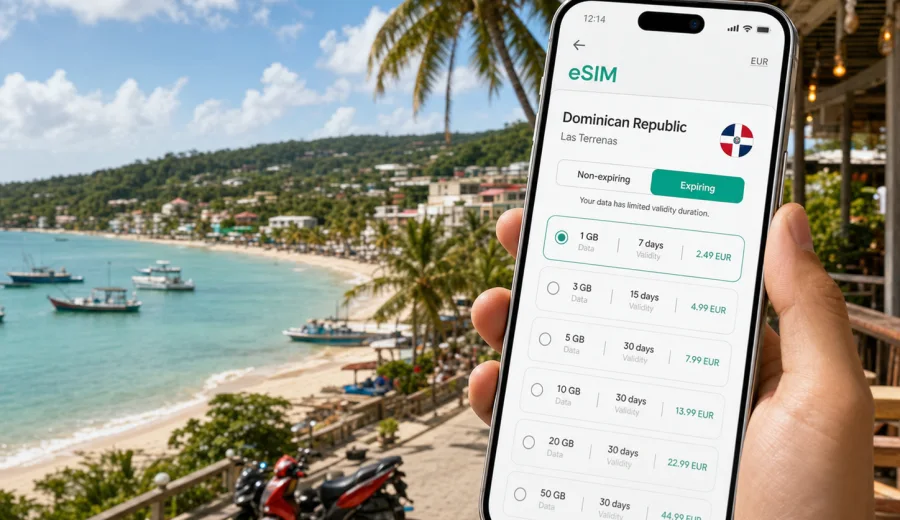
Las Terrenas eSIM: mobile connection and internet for a smooth city trip
Las Terrenas is a relaxed beach town, but the trip itself is full of small moments when mobile internet matters. You may land in the Dominican Republic after a long flight, cross the hills of the Samana Peninsula, check into a villa near Playa Las Ballenas, and still need maps, transfer messages, booking confirmations, translation, and payment alerts before the first swim. An eSIM helps you prepare that connection before arrival, without looking for a physical SIM card when you are tired or already on the road.
This guide focuses on Las Terrenas itself. The country matters because the eSIM plan is chosen for the Dominican Republic, but the practical use cases are local: airport transfers, beach areas, town-center restaurants, scooter routes, hotel check-in, business calls, short stopovers, and day trips from Las Terrenas to Samana, El Limon, Las Galeras, or Playa Rincon.
Kaspersky eSIM Store is an app and website where you can choose, arrange, and activate an eSIM with a suitable mobile data plan for travel abroad. It helps you review destination, data volume, validity period, and cost before you travel, then install the eSIM on a compatible device.
Why mobile internet matters in Las Terrenas
Las Terrenas looks simple on a map, but it is not one resort block. Beaches, hotels, villas, cafes, supermarkets, tour offices, and meeting points are spread along the coast and into smaller side streets. A typical stay can include Pueblo de los Pescadores, Playa Punta Popy, Playa Las Ballenas, Playa Bonita, Coson, El Limon, and Samana town. Even short rides can be easier when you can check a route, send a live location, or confirm a pickup point.
Mobile data is useful for:
- finding your hotel or villa after a transfer;
- messaging a driver, host, tour guide, restaurant, or dive center;
- checking routes between beach areas and the town center;
- using translation in shops, taxis, and guesthouses;
- keeping tickets, bookings, and payment alerts available;
- sharing your location with travel companions.
Wi-Fi is common in many hotels, apartments, restaurants, and cafes, but quality varies. Some places are good for light work, while others are suitable only for messaging. A travel eSIM gives you a separate mobile data option for the parts of the day when you are away from accommodation or when guest Wi-Fi is not enough.
Arrival scenarios: where an eSIM helps first
Many travelers do not arrive directly in Las Terrenas. They usually land elsewhere in the Dominican Republic, then continue by road. Your first need for internet may happen before you reach the beach.
| Arrival point | Typical Las Terrenas scenario | Why mobile data helps |
|---|---|---|
| Santo Domingo | Longer transfer across the island | Driver messages, maps, hotel updates, food stops |
| Samana El Catey | Regional airport when flights align | Pickup coordination and arrival messages |
| Puerto Plata | North coast route with a longer drive | Navigation, timing, weather, and stop planning |
| Bus or shared transport | Arrival near town or regional stops | Finding the exact hotel street or villa entrance |
If you arrive late, mobile internet is especially useful. Some villa entrances and beachside lanes are hard to identify after dark. With a working data connection, you can open the address, send a location, call through a messenger, and check whether the driver or host is waiting at the right point.
For business travelers, the first connection can also protect the schedule. You may need to answer a message, confirm a meeting in Santo Domingo, join a call after check-in, or upload a document before the hotel Wi-Fi has been tested. An eSIM is not a replacement for a stable work setup, but it is a practical backup during transfers and errands.
Las Terrenas areas where data is useful
The town has several travel zones, and each creates a different mobile internet need.
| Area | What you may do there | Useful mobile tasks |
|---|---|---|
| Town center | Restaurants, shops, banks, services | Opening hours, payments, taxi messages |
| Pueblo de los Pescadores | Dinner, nightlife, waterfront walks | Group coordination and route back to the hotel |
| Playa Punta Popy | Beach time, water sports, casual cafes | Weather, map pins, instructor messages |
| Playa Las Ballenas | Hotels, apartments, quieter beach stays | Check-in details, groceries, local rides |
| Playa Bonita and Coson | Wider beaches and more spread-out stays | Navigation by car or scooter, villa directions |
This is why a Las Terrenas eSIM plan should be chosen for your real movement, not only for the number of nights. A traveler staying in the town center and walking to dinner may use less data than someone driving to Coson, joining excursions, and working from several locations.
Choosing an eSIM data plan for Las Terrenas
The right plan depends on how you use your phone. Maps and messages need less data than video calls, cloud backups, hotspot use, or constant photo uploads. Before choosing, think about the full Dominican Republic itinerary: arrival city, transfer days, Las Terrenas nights, day trips, and departure route.
| Trip style | Likely data use | What to prioritize |
|---|---|---|
| Weekend beach stop | Low to moderate | Short validity and enough data for maps and messages |
| One-week holiday | Moderate | Daily navigation, chat, weather, and photo sharing |
| Remote-work stay | High | Larger data volume plus hotel Wi-Fi as the main line |
| Family or group trip | Moderate to high | Shared locations and transport coordination |
| Road trip from Las Terrenas | Moderate | Maps, route changes, stops, and bookings |
Do not choose only by headline price. Review the destination, validity period, data volume, activation rules, and whether the plan fits your stay. If you stream video, use automatic backups, upload large files, or share a hotspot, your data can run down much faster than during casual messaging and map use.
Device compatibility before you travel
Before arranging an eSIM for Las Terrenas, check that your phone or tablet supports eSIM and is not locked to another carrier. This matters more than the city itself: without a compatible, unlocked device, the eSIM cannot be used as intended. You can check your device before choosing a plan.
Also review these points:
- installation usually requires an internet connection, so it is easier before departure or on stable Wi-Fi;
- your primary SIM can often stay active if you still need calls or SMS on that number;
- data roaming may need to be enabled for the travel eSIM, depending on the plan instructions;
- a travel eSIM usually focuses on mobile data and may not include a local phone number, voice calls, or SMS unless the plan terms say so.
For everyday communication in Las Terrenas, many travelers use internet-based calls and messaging apps over mobile data. Keep any banking or account-verification SMS needs in mind before switching SIM settings.
How to install and activate your eSIM
The exact steps depend on your device, but the process is usually straightforward: choose the destination, select a plan, complete setup, install the eSIM profile, and activate it according to the instructions. If you need device-specific guidance, use the Android setup instructions or the iOS setup instructions.
A practical sequence for Las Terrenas:
1. Check that your device supports eSIM and is unlocked.
2. Choose a Dominican Republic plan with enough data for the whole route.
3. Install the eSIM profile while you have reliable Wi-Fi.
4. Keep your primary SIM available if you need calls or SMS.
5. On arrival, select the eSIM for mobile data.
6. Test maps, messaging, and your hotel route before leaving the airport or transfer point.
7. Monitor data use during the trip, especially if you share a hotspot.
Avoid deleting the eSIM profile after installation unless the instructions say it is safe to do so. Some profiles cannot be reinstalled or transferred to another device after activation, depending on the plan conditions.
When to arrange your Las Terrenas eSIM
The most comfortable time is before departure, while you have stable Wi-Fi and time to read the plan terms. That way, you are not trying to install an eSIM in a busy airport, in a transfer vehicle, or at a hotel reception desk.
For most visitors, a good timeline is:
- A few days before travel: check device compatibility and compare plan size.
- The day before travel: install the eSIM profile and save setup instructions.
- On arrival in the Dominican Republic: switch mobile data to the travel eSIM when appropriate.
- On the way to Las Terrenas: test maps, messages, and ride coordination.
- During the stay: monitor remaining data and use Wi-Fi for large downloads where possible.
If your itinerary includes Santo Domingo first, then Las Terrenas, then Samana or Las Galeras, choose a plan for the Dominican Republic rather than treating Las Terrenas as a separate destination. For a city article, the relevant country landing is the right place to compare available travel data options: you can choose a mobile internet plan for your trip to Las Terrenas through the Dominican Republic destination page.
Data planning for common Las Terrenas days
Data use in Las Terrenas often comes from small repeated actions, not one large download. Navigation, messages, ride coordination, weather checks, menus, payment alerts, and photo sharing each use a little. Over several days, they add up.
| Day type | Typical mobile tasks | Data-saving habit |
|---|---|---|
| Beach day | Maps, weather, messages, music, photos | Download playlists on Wi-Fi |
| Arrival day | Transfer, hotel contact, check-in messages | Save booking details offline |
| Day trip | Routes, guide messages, location sharing | Cache map areas before leaving |
| Remote-work day | Email, calls, hotspot, files | Use accommodation Wi-Fi for large transfers |
| Evening out | Restaurants, taxis, payments, group chat | Keep data for navigation back |
If you stay in a villa, ask for Wi-Fi details before arrival and save them offline. If you plan to work, check whether the accommodation has a desk, reliable Wi-Fi, and a backup option. The eSIM covers movement around town; the hotel or apartment connection should still be your main line for long calls and heavy uploads.
Transport and navigation around Las Terrenas
Transport choices affect your data needs. Walking is easy in some central areas, but you still need maps for side streets, restaurants, and meeting points. If you use a motoconcho, scooter, taxi, rental car, or guagua, mobile data helps you check the route before departure and share the destination clearly.
If you drive outside town, download offline map areas as a backup. Mobile internet is helpful, but rural routes should not depend on one tool. Keep the hotel address, a local contact, and your next destination saved on the phone.
Trips from Las Terrenas
Las Terrenas is often a base for the Samana Peninsula. Mobile data is useful because pickup points, weather, road timing, and tour plans can change.
Common side-trip scenarios include:
- El Limon waterfall: maps, guide messages, and cash-stop planning before the route inland.
- Samana town: marina plans, errands, transfers, and onward transport.
- Las Galeras: beach directions and return-trip coordination.
- Playa Rincon: navigation and transport planning, especially outside a group tour.
- Santo Domingo transfer day: traffic checks, hotel updates, and flight timing.
For these days, a minimal data plan may feel tight if you are sharing updates with a group or using hotspot mode. Check whether tethering is allowed under the selected plan and monitor usage if another device connects through your phone.
Hotel, villa, and apartment check-in
Las Terrenas has resorts, boutique hotels, apartments, villas, and guesthouses. Check-in is often simple, but mobile data helps when details are split across emails, booking apps, and chat messages.
Before arrival, save:
- the exact accommodation name and address;
- a map pin or coordinates for smaller lanes;
- host or reception contact details;
- gate, parking, or key-box instructions;
- screenshots of booking confirmations;
- Wi-Fi name and password, if provided.
If you arrive before the room is ready, mobile internet also helps you find a cafe, confirm luggage storage, or message the property while you wait.
Business trips, stopovers, and short stays
For remote work, treat the eSIM as one layer of your connectivity plan. Accommodation Wi-Fi should handle long calls and uploads; the eSIM is useful for transfers, backup messaging, hotspot use where permitted, and work tasks away from the room. Test the connection before an important call, especially if you are moving between the beach, a cafe, and your hotel.
For a short stopover, the value is speed. You may arrive, check in, take one beach walk, join a morning excursion, and leave the next day. Install the eSIM before travel, keep hotel details offline, and choose a validity period that covers the whole Dominican Republic route, not only the nights spent in Las Terrenas.
Practical checklist before you land
Use this checklist before leaving home or boarding a connecting flight:
- Confirm your phone supports eSIM and is unlocked.
- Choose the Dominican Republic as the destination for your Las Terrenas trip.
- Match data volume to your itinerary, not only the number of nights.
- Install the eSIM profile while you have stable Wi-Fi.
- Save setup instructions and QR details offline.
- Keep your accommodation address and a map pin saved.
- Turn off automatic cloud backups on mobile data if you want to conserve data.
- Download offline maps for Las Terrenas, Samana, and planned day-trip areas.
- Decide which SIM handles mobile data and which handles calls or SMS.
- Check plan validity so it does not expire before the final transfer day.
Common mistakes to avoid
| Mistake | Why it causes trouble | Better approach |
|---|---|---|
| Buying before checking compatibility | The eSIM may not install | Check support and carrier lock status first |
| Choosing too little data | Maps, photos, and hotspot use add up | Estimate by daily behavior |
| Installing only after arrival | Airport or transfer Wi-Fi may be inconvenient | Install on stable Wi-Fi before travel |
| Deleting the eSIM profile | Some profiles may not be reusable | Keep it unless instructions say otherwise |
| Ignoring validity period | A plan can end before your return route | Match validity to the full itinerary |
FAQ: eSIM and mobile internet in Las Terrenas
Is an eSIM useful if my hotel has Wi-Fi?
Yes. You still need internet away from the hotel: transfers, beaches, restaurants, day trips, maps, and messages.
Should I choose a city plan or a Dominican Republic plan?
For Las Terrenas, choose the destination that covers the Dominican Republic. City articles help with local planning, but the travel data plan is normally selected by country or region.
Can I keep my regular SIM active?
In many phones, yes. You can often keep your regular SIM for calls or SMS and set the eSIM as the mobile data line. Check your device settings and home carrier roaming costs before travel.
Does a travel eSIM include calls and SMS?
Usually, travel eSIM plans focus on mobile data. Calls and SMS are not included unless the selected plan clearly says otherwise.
Can I use the eSIM for a hotspot?
It depends on the selected plan and device settings. If hotspot use is allowed, monitor data carefully because laptops and tablets can use far more data than a phone.
Final preparation for Las Terrenas
Las Terrenas rewards travelers who arrive with the basics already handled. If your phone has mobile data ready, you can focus on the transfer, the check-in, the first meal near the beach, and the next day’s plans instead of searching for Wi-Fi or solving SIM-card logistics.
Before your trip, check device compatibility, choose a data volume that fits your route, install the eSIM while you have reliable Wi-Fi, and save key travel details offline. For the final step, use Kaspersky eSIM Store to prepare an eSIM plan for mobile internet in the Dominican Republic and keep your Las Terrenas itinerary easier to manage from arrival to departure.