
Travel connectivity guide
Las Vegas eSIM for mobile internet
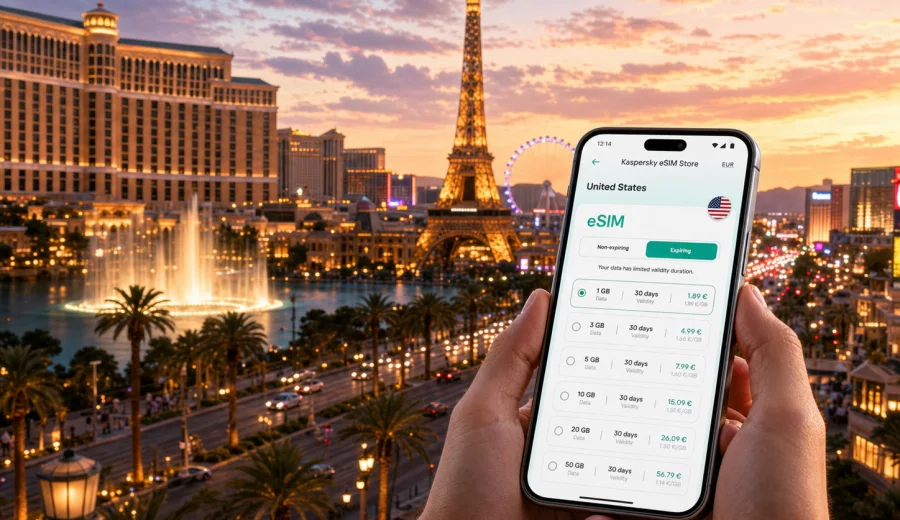
Las Vegas eSIM: mobile connection and internet for your trip
Las Vegas is a city where mobile internet becomes useful before you even see the Strip. You may need a ride from Harry Reid International Airport, a hotel confirmation at check-in, a map inside a large resort, a restaurant booking in Chinatown, a rideshare pickup point after a show, or a video call from a convention center lobby. An eSIM helps you prepare mobile data for these moments without looking for a physical SIM card after arrival.
This guide focuses on Las Vegas, not just the United States in general. The city has its own travel rhythm: short airport transfers, long indoor walks through resort corridors, dense evenings on Las Vegas Boulevard, business events at major convention venues, and day trips into the desert. A practical eSIM setup can make those scenarios easier, especially if your phone supports eSIM and you prefer to set up your data plan before the trip.
Kaspersky eSIM Store is an app and website where you can choose, arrange, and activate an eSIM with a suitable mobile internet plan for an international trip. The important detail is control: before you travel, you can check the destination, data amount, validity period, and conditions of the selected plan. Mobile signal and speed depend on the local networks used by the plan and on the places where you use your phone.
Why mobile internet matters in Las Vegas
Las Vegas looks simple on a map because many famous hotels stand along one corridor, but the city is not always simple in practice. Distances are longer than they appear, resort entrances are set back from the street, pedestrian bridges change your route, and rideshare pickup areas can be on a garage level rather than at the main door. Data access helps you adjust quickly instead of guessing.
Typical moments when a travel eSIM is useful in Las Vegas:
- finding the correct rideshare zone at Harry Reid International Airport;
- checking whether your hotel check-in is in the main tower, a separate lobby, or a connected resort;
- using maps between the Strip, Downtown Las Vegas, the Arts District, Chinatown, and the Convention Center area;
- coordinating with friends after a show, sports event, or conference session;
- using messaging apps if your travel eSIM plan is data-only;
- checking opening hours, reservation details, and digital tickets;
- navigating day trips to Red Rock Canyon, Hoover Dam, Valley of Fire, or the Grand Canyon region.
Public Wi-Fi exists in many hotels, cafes, and event venues, but it is not a complete travel strategy. You may be between venues, inside a rideshare, waiting at a taxi line, walking between properties, or standing in a crowded lobby where the network is slow or requires registration. A prepared eSIM gives you a separate mobile data option for routine travel tasks.
Las Vegas arrival scenarios
Most visitors arrive through Harry Reid International Airport, which is very close to the Strip. That short distance can be misleading: the first hour still involves baggage claim, terminal navigation, rideshare signs, taxi lines, shuttle desks, hotel messages, and sometimes a last-minute room or restaurant update. If your eSIM is installed before departure, you can activate it when the plan conditions allow and use data soon after landing.
For airport arrival, prepare these items before the trip:
- save your hotel address and confirmation number offline;
- check the rideshare pickup location for your terminal;
- keep your eSIM installation details available without relying on airport Wi-Fi;
- download a small offline map of Las Vegas as a backup;
- check whether your phone is unlocked and supports eSIM;
- decide whether the plan validity should cover only Las Vegas or a wider United States route.
If you are landing late at night, mobile data can be especially useful. Las Vegas is active around the clock, but not every hotel desk, shuttle counter, or restaurant has the same late-night process. A working data connection helps you message the hotel, confirm a transfer, or find the correct entrance without depending on a public network.
Getting around the Strip, Downtown, and nearby districts
The Strip is walkable in sections, but it is not a compact downtown grid. You may spend 20 minutes moving from one resort entrance to another even when buildings look close. Pedestrian bridges, casino floors, shopping corridors, tram connections, and convention walkways can change the route. Mobile navigation is useful for choosing whether to walk, take a rideshare, use a taxi, or use public transport.
Las Vegas also has several travel zones with different connectivity needs:
| Area | Why data helps there | Practical eSIM use |
|---|---|---|
| The Strip | Large resorts, shows, restaurants, rideshare zones | Maps, tickets, reservations, group messaging |
| Downtown Las Vegas | Fremont Street, bars, museums, local restaurants | Navigation after dark, rideshare pickup, payment apps |
| Arts District | Galleries, breweries, cafes, local events | Walking routes, opening hours, restaurant searches |
| Convention Center area | Business events, hotel shuttles, large halls | Calendar sync, email, messaging, maps |
| Chinatown and Spring Mountain Road | Restaurants and shops away from the Strip | Rideshare, menus, translation, route planning |
| Desert day trips | Longer routes outside the city core | Maps, safety check-ins, weather updates |
For a short leisure trip, you may use the most data on maps, messaging, ride apps, digital tickets, and social sharing. For a business trip, email, calendar sync, video calls, file previews, and team messaging can matter more. The best plan is not only about the number of days in Las Vegas; it is about the tasks you expect your phone to handle.
How much data do you need for Las Vegas?
Data use depends on habits, but you can estimate your plan more accurately if you separate essential tasks from entertainment. Maps and messaging are usually light. Video, cloud backups, social media uploads, and hotspot sharing can use much more.
Use this practical planning guide:
| Trip style | Typical length | Suggested planning logic |
|---|---|---|
| Stopover or one-night stay | 1-2 days | Choose enough data for maps, rideshare, hotel messages, and boarding passes. |
| Weekend on the Strip | 2-4 days | Add data for restaurant searches, tickets, social posting, and group coordination. |
| Conference trip | 3-6 days | Plan for email, calendar, documents, messaging, and possible hotspot use. |
| Las Vegas plus road trip | 5-10 days | Choose a longer validity period and more data for maps and route changes. |
| Remote-work style stay | 7+ days | Treat mobile data as a backup to hotel Wi-Fi, not as your only work connection. |
Before you choose a plan, check what your hotel includes. Resort Wi-Fi may cover your room, but it may not help in taxis, airport areas, restaurant lines, or convention halls. If you plan to share data with a laptop through hotspot mode, check the plan conditions and your phone settings first. Some plans and devices handle tethering differently.
Choosing an eSIM plan for Las Vegas and the United States
For a Las Vegas city trip, the destination to choose is the United States. That is important because city articles use the country plan page: the eSIM plan should match the country where the city belongs, not a separate city-only page. If your route includes only Nevada and nearby US destinations, a United States plan is usually the relevant starting point. If your itinerary crosses borders, compare whether a regional or global option better matches your route.
When you are ready to compare data amounts and validity periods, you can review eSIM options for the United States in Kaspersky eSIM Store and choose the plan that fits your Las Vegas trip. Check the plan details before payment, including data volume, validity duration, destination, and any conditions that affect activation or use.
A calm selection process looks like this:
1. Choose the destination: United States.
2. Match the validity period to the full trip, including arrival and departure days.
3. Estimate data use for maps, messages, ride apps, tickets, email, and social media.
4. Check whether you may need hotspot mode for a laptop or another device.
5. Confirm that your smartphone supports eSIM and is not locked to one carrier.
6. Install the eSIM while you have stable Wi-Fi, then activate it according to the plan instructions.
This approach is especially useful for Las Vegas because many travel moments happen in transition. You may leave a hotel, cross a pedestrian bridge, enter a large property, and need to find a different exit for your ride. Having your mobile data ready reduces small delays.
Device compatibility before you buy
Not every phone supports eSIM, and some phones are locked to a carrier. Before arranging a travel eSIM, check your exact device model and carrier status. A phone can be new and still not be suitable if eSIM support is disabled for that model, region, or carrier configuration.
Before purchase, use the compatibility window to check your device. Also confirm these points in your phone settings:
- the device supports eSIM or digital SIM profiles;
- the phone is not carrier-locked;
- you have a stable Wi-Fi connection for installation;
- you know which SIM will handle calls and messages during the trip;
- data roaming can be enabled for the eSIM if the selected plan requires it;
- you understand that many travel eSIM plans are for mobile data and may not include a local phone number, regular voice calls, or SMS.
If your main SIM remains active for calls or banking messages, review roaming costs with your home operator separately. You can often keep your primary number for calls and SMS while using the eSIM for mobile data, but the exact setup depends on your phone and home plan.
Installing your eSIM for a Las Vegas trip
Install the eSIM when you have reliable Wi-Fi, ideally before you leave or while you are still in a calm place such as home, office, or hotel. Installation and activation are related but not always the same step. Some plans start their validity when installed, some when first connected to a supported network, and some have specific activation instructions. Always follow the details shown for the selected plan.
For setup help, use the official guides for your device type: Android installation instructions and iOS installation instructions.
A simple travel setup checklist:
- install the eSIM profile while connected to Wi-Fi;
- label the eSIM clearly, for example "US travel" or "Las Vegas data";
- set mobile data to the eSIM when you are ready to use it;
- keep your primary SIM for calls only if that matches your roaming plan;
- turn off data switching if you want to avoid accidental data use on the wrong SIM;
- keep the QR code or installation details until the setup is complete;
- do not delete the eSIM profile unless you are sure you no longer need it.
If mobile data does not work immediately after arrival, check the basics first: correct data SIM selected, data roaming enabled for the eSIM if required, airplane mode toggled off and on, and APN settings if the plan instructions mention them. In crowded resorts and event halls, moving closer to an entrance or window can also help your phone reconnect.
Business trips, hotels, and events
Las Vegas is a major convention city, so mobile internet is not only for vacation photos. Meetings may move between the Las Vegas Convention Center, hotel conference floors, private suites, restaurants, and event spaces. For business travel, download large presentations on Wi-Fi, keep your calendar and venue maps available offline, use mobile data for urgent messages, and check whether hotspot mode is allowed by the selected plan.
Hotels and resorts also create a special Las Vegas use case. A single property may include several towers, a casino floor, theaters, restaurants, parking garages, pools, and separate rideshare zones. Mobile data helps you open a reservation email, message your group, find the right entrance, compare walking and taxi time, and locate late-night food after a delayed arrival. Hotel Wi-Fi may help once you are checked in, but it rarely covers the whole journey from airport to lobby to room.
Day trips and data-saving habits
Las Vegas is often a base for Red Rock Canyon, Hoover Dam, Valley of Fire, and longer routes toward the Grand Canyon region. Download offline maps before leaving the city, carry a power bank, save key addresses, and do not treat mobile data as your only safety tool in remote desert areas. Signal can vary outside the city and in canyon terrain.
To make your data last longer, turn off automatic photo and video backups, use hotel Wi-Fi for app updates, lower video streaming quality, close navigation when you no longer need it, and monitor plan balance during long days. The biggest data surprises are usually video, high-resolution uploads, background sync, and laptop tethering, not basic maps or messages.
Quick Las Vegas eSIM checklist
| Moment | What to check |
|---|---|
| Before departure | Phone supports eSIM, phone is unlocked, plan matches the United States and trip length. |
| Before installation | Stable Wi-Fi, access to installation details, activation rules understood. |
| After arrival | eSIM selected for mobile data, data roaming enabled if required, maps and messaging tested. |
| During the trip | Data use monitored, hotel Wi-Fi used for large downloads, primary SIM settings controlled. |
| Before leaving | Remaining validity checked, receipts kept, eSIM deleted only when no longer needed. |
FAQ: eSIM and mobile internet in Las Vegas
Is an eSIM useful for a short Las Vegas weekend?
Yes. Even a weekend can involve airport transfer, maps, rideshare apps, tickets, restaurant bookings, and group messaging.
Should I choose a Las Vegas plan or a United States plan?
Choose the United States as the destination because Las Vegas is in the United States and the relevant plan page is country-based.
Can I use an eSIM for calls and SMS?
Many travel eSIM plans focus on mobile data and do not include a local phone number, regular voice calls, or SMS unless the plan says otherwise. Messaging and calling apps can usually work over mobile data.
Is hotel Wi-Fi enough?
Hotel Wi-Fi helps in your room, but mobile data is useful at the airport, between resorts, in rideshares, at event venues, and during day trips.
When should I install the eSIM?
Install it while you have stable Wi-Fi and enough time to follow the instructions. Activation timing depends on the selected plan, so read the plan details before travel use.
Prepare your Las Vegas mobile internet before you travel
Las Vegas is easier when your phone is ready from the first minute: airport pickup, hotel check-in, Strip navigation, dinner reservations, show tickets, convention messages, and desert routes all depend on timely information. An eSIM is a practical way to prepare mobile internet for the trip while keeping the setup digital and flexible.
Before you fly, check your device compatibility, choose a plan that matches the full length of your stay, and install the eSIM while you have reliable Wi-Fi. To prepare for the city and the wider United States route, you can choose an eSIM plan for your Las Vegas trip in Kaspersky eSIM Store and review the plan conditions before activation.