
Travel connectivity guide
Lausanne eSIM for Mobile Internet in Switzerland
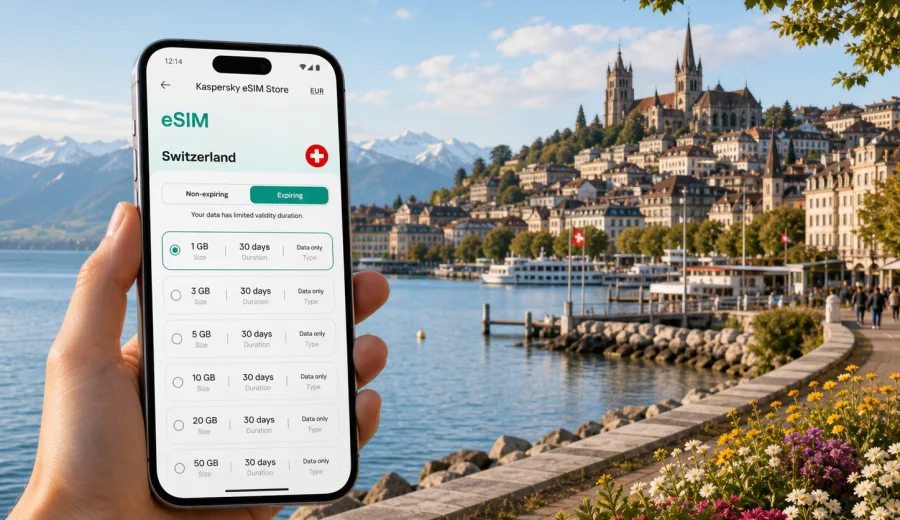
Lausanne eSIM: mobile connection and internet for your Switzerland trip
Lausanne is a city where mobile internet quickly becomes part of the trip. The hills are steep, the lakefront is spread out, the train station connects several regional routes, and many visitors move between the Old Town, Ouchy, Flon, EPFL, UNIL, hotels, conference venues, and nearby towns on the same day. If your phone supports eSIM, you can prepare a digital SIM profile before arrival and use mobile data in Switzerland without looking for a physical SIM card after landing or stepping off the train.
This guide focuses on Lausanne, not Switzerland in general. It explains when eSIM can be useful in the city, how to plan data for arrival, transport, business travel, study visits, lakeside weekends, stopovers, and day trips, and what to check before purchase.
Why mobile internet matters in Lausanne
Lausanne feels compact on a map, but the city is built on slopes above Lake Geneva. A short distance can involve stairs, a metro ride, a funicular-style climb, or a change from train to bus. Mobile data helps with the small decisions that make the trip smoother: which exit to take from the station, whether the metro is faster than walking, where the hotel entrance is, and how long it will take to get from Ouchy to a meeting near the university campus.
Typical Lausanne scenarios where eSIM can help:
- checking the route from Geneva Airport, Zurich Airport, or Lausanne railway station;
- opening metro, bus, boat, taxi, and train apps while moving around the city;
- navigating between Ouchy, the Old Town, Flon, Riponne, the cathedral area, Vidy, EPFL, UNIL, and Pully;
- messaging a hotel, apartment host, colleague, or study program coordinator;
- using maps on steep pedestrian routes where the direct path is not always the easiest one;
- confirming restaurant bookings, event tickets, museum hours, and lake boat schedules;
- using translation tools in shops, pharmacies, stations, and local services;
- keeping boarding passes, train tickets, and travel documents available.
Arrival in Lausanne: the first places where data helps
Lausanne does not have a large international airport inside the city. Many travelers arrive through Geneva Airport, take a train along Lake Geneva, and reach Lausanne station in the city center. Others arrive from Zurich, Bern, Basel, Milan, Paris, or other Swiss and European routes by rail. In both cases, mobile internet first helps with platforms, hotel routes, transport apps, and schedule changes.
If you prepare an eSIM before the trip, your arrival can be straightforward:
1. Install the eSIM profile while you still have a stable connection.
2. Keep your primary SIM available if you need calls, SMS, or banking codes.
3. After arrival, select the eSIM profile for mobile data.
4. Check whether data roaming must be enabled for that eSIM profile.
5. Open maps, booking details, transport apps, or work chat before leaving the station.
Lausanne station is central, but hilly exits can be confusing on a first visit. A hotel near the lake may look close, yet the route to Ouchy is often easier by metro than with heavy luggage.
Lausanne areas and common internet needs
Different parts of Lausanne create different mobile data habits. A lakeside weekend around Ouchy is mostly maps, photos, restaurants, weather, and boat information. A business stay near the station or Flon may involve email, calendar updates, ride-hailing, and document previews. A university or research visit around EPFL and UNIL can mean route checks, campus maps, messages, and hotspot use for a laptop.
| Lausanne area | Why travelers go there | Mobile internet use |
|---|---|---|
| Lausanne station | Arrival, departures, hotel transfers | Train updates, maps, luggage-friendly routes |
| Ouchy and the lakefront | Promenade, hotels, boats, Olympic Museum | Walking routes, weather, photos, restaurant search |
| Old Town and cathedral | Sightseeing, cafes, museums, viewpoints | Navigation through slopes and small streets |
| Flon and central Lausanne | Restaurants, nightlife, offices, shops | Meeting points, ride apps, group messages |
| Riponne and Palais de Rumine | Museums, markets, central squares | Maps, tickets, local search, translations |
| Vidy | Lake parks, sports venues, events | Routes, event details, shared locations |
| EPFL and UNIL | Study visits, research, conferences | Campus navigation, email, hotspot, schedules |
| Pully and Lutry | Quiet stays, lake walks, local trips | Regional transport, maps, dining plans |
Plan around your real route. A visitor staying in Ouchy for two nights may need less data than someone attending meetings between Lausanne, Geneva, and the university campus.
How much data you may need in Lausanne
Data use depends on apps, background settings, and travel style. The table below is a practical planning tool, not a promise. Video streaming, cloud photo backup, large file uploads, and long video calls can increase usage quickly.
| Trip style | Typical phone use | Planning approach |
|---|---|---|
| One-day stopover | Maps, messages, train tickets, cafe search | A smaller plan may work if you avoid streaming |
| Weekend by Lake Geneva | Navigation, photos, restaurants, weather, boat times | Choose enough data for daily maps and messaging |
| Business trip | Email, calendar, chat, document previews, internet calls | Consider a larger allowance and check hotspot rules |
| University or conference visit | Campus routes, schedules, files, calls, group chat | Plan for steady daytime use and possible top-ups |
| Switzerland route from Lausanne | Trains, hotels, maps, translation, weather | Choose validity that covers the full Swiss route |
| Cross-border itinerary | Lausanne plus France, Italy, or other countries | Read destination and regional coverage conditions carefully |
Before you choose a plan, review your own habits. Automatic photo backup, app updates, video autoplay, and large file sync can use data quickly. Download offline maps, save tickets and hotel addresses, and use trusted hotel or office Wi-Fi for large files when appropriate.
Choosing an eSIM plan for Lausanne
For a Lausanne city trip, the relevant destination is Switzerland. You do not need a separate plan for Lausanne as a city; you need an eSIM plan whose destination, validity period, and data allowance match your stay in Switzerland. If Lausanne is part of a wider route through Geneva, Bern, Zurich, Montreux, Zermatt, Interlaken, or Basel, choose dates and data volume with the whole route in mind.
Use this checklist before choosing:
- Destination: does the plan cover Switzerland for your Lausanne stay?
- Validity period: does it include arrival, departure, and any day trips?
- Data allowance: does it fit maps, messaging, work, tickets, and hotspot needs?
- Activation rules: when does the selected plan start counting validity?
- Device compatibility: does your exact phone model support eSIM?
- Operator lock: is your phone restricted to a specific mobile operator?
- Hotspot use: do you need to share data with a laptop or tablet?
- Calls and SMS: do you understand whether the plan is data-only or includes additional services?
Kaspersky eSIM Store is an app and website where you can choose, set up, and activate an eSIM with a suitable data plan for mobile internet during a foreign trip. It is not a mobile network operator and does not replace the local network. The practical benefit is that you can review destination, data volume, validity, and price before you travel, then install the eSIM on a compatible device.
If you are planning a Lausanne trip and want to prepare mobile internet before arrival, you can choose an eSIM plan for Switzerland and compare options that fit your dates, route, and expected data use.
Setup before you travel
Lausanne is easier when the phone is ready before the first train, metro ride, or walk uphill with luggage. Prepare the essentials while you still have a reliable connection at home, at the airport, or in your hotel before changing cities.
Recommended setup sequence:
1. Confirm that your phone supports eSIM and is not locked to one operator.
2. Choose Switzerland as the destination if Lausanne is your main city.
3. Compare data volume, validity period, price, and plan conditions.
4. Install the eSIM profile using the instructions for your device.
5. On arrival, select the eSIM profile for mobile data and test maps or messaging.
For device-specific setup, use the Android eSIM installation guide or the iOS eSIM installation guide. Before purchase, also check your device compatibility, because eSIM support depends on the exact model, region, and operator restrictions.
Transport, slopes, and local movement
Lausanne is one of those cities where mobile data can save energy as much as time. The direct walking line on a map may involve a steep climb, while a metro connection may be easier with luggage. A bus may be better for Vidy, Pully, or parts of the university area. Mobile data helps you compare the route, find the right station exit, open travel passes, share your location, and check weather before a lakefront walk.
For a short stay, reduce map satellite view, avoid automatic app updates, keep a small power bank for long sightseeing days, and save your hotel address offline.
Business trips, meetings, and study visits
Lausanne attracts business travelers, researchers, students, conference guests, and visitors to companies and institutions around the Lake Geneva region. Meetings can be near the station in the morning, on campus in the afternoon, and by the lake in the evening. Plan data for email, calendar changes, team chat, document previews, authentication apps, internet calls, and taxi or train updates.
Many travel eSIM plans are focused on mobile data and may not include a regular phone number, voice calls, or SMS unless the selected plan says so. If work depends on your usual number, keep your primary SIM active where your device supports dual SIM use.
Day trips from Lausanne
Lausanne is a strong base for Lake Geneva and western Switzerland. Visitors often take trains or boats to Vevey, Montreux, Geneva, Nyon, Morges, Lutry, Lavaux villages, or the vineyards above the lake. Before a day trip, check that the plan remains active through the return, that the data allowance fits a full day of maps and messages, and that the destination coverage matches the route. Cross-border trips into France or wider European routes need careful review of plan conditions.
Practical data-saving checklist for Lausanne
Small settings can make a travel data plan last longer. This is especially useful if you plan several days of navigation, photos, transport checks, and messages.
- download offline maps for Lausanne, Ouchy, the station area, and your hotel district;
- save hotel, campus, meeting, and restaurant addresses;
- turn off cloud photo backup on mobile data;
- disable automatic app updates over mobile data;
- download tickets, confirmations, and insurance PDFs in advance;
- use trusted Wi-Fi for large files when it is appropriate;
- reduce video autoplay in social and news apps;
- monitor data use in your phone settings or service profile.
The goal is to reserve mobile data for moments when it matters: arriving, moving, coordinating, checking tickets, finding addresses, and handling changes away from Wi-Fi.
Frequently asked questions
Is Lausanne a separate eSIM destination?
Usually you choose an eSIM plan by country or region, not by city. For Lausanne, the relevant country is Switzerland. If your itinerary continues beyond Switzerland, compare the conditions of country and regional plans before choosing.
Can I install an eSIM before arriving in Lausanne?
In many cases, yes. It is often practical to install the eSIM profile before departure while you have stable internet. Read the activation rules for the selected plan, because validity may start according to that plan's conditions.
Will an eSIM give me a Swiss phone number?
Do not assume that. Many travel eSIM plans are data-focused and do not include a regular local phone number, voice calls, or SMS unless the plan details state otherwise. You can usually use internet-based calling and messaging apps over mobile data.
What should I do if mobile data does not start?
Check that the eSIM profile is installed, selected for mobile data, and allowed to use data roaming if the plan instructions require it. Restarting the phone can help in some cases. If the issue continues, review the setup instructions and contact support through the available Kaspersky eSIM Store support channel.
Prepare mobile internet for Lausanne
Lausanne is easier when you can adjust plans without searching for Wi-Fi: take the metro instead of walking uphill with luggage, check a lake boat time, message a hotel, find a campus building, or change a dinner route after a meeting. A prepared eSIM can support those everyday travel moments without requiring a physical SIM card.
Before your trip, check device compatibility, choose Switzerland as the destination if Lausanne is your main city, review the data allowance and validity period, install the eSIM profile with a stable connection, and keep your primary number available if you need calls or verification codes. When you are ready to prepare data for the trip, review eSIM options for Switzerland in Kaspersky eSIM Store and choose the plan that matches your Lausanne dates, route, and expected mobile internet use.