Travel connectivity guide
Le Robert eSIM: Mobile Internet for Your Trip
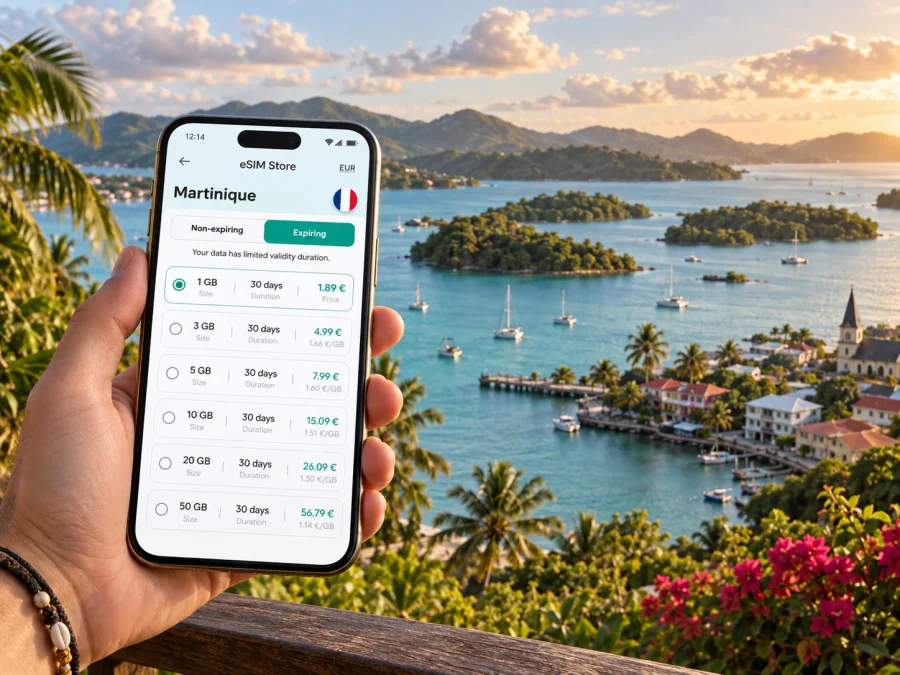
Le Robert eSIM: mobile connection and internet for your trip
Le Robert offers a different Martinique stay: a town beside a broad, sheltered bay dotted with islets, with hills rising inland toward Vert-Pré. A phone can help coordinate an airport pickup, find a guesthouse, follow a road inland or meet a boat operator at the waterfront. Preparing mobile internet before arrival makes these transitions easier, especially when plans change.
This guide focuses on arrival, local movement, navigation, places to stay and time on the water. It does not assume that transport, excursions or mobile reception are available at every place or hour. Check date-specific details and keep offline backups for moments without a dependable connection.
What to plan before going to Le Robert
Le Robert lies on Martinique’s Atlantic side, east of the central area around Fort-de-France and Le Lamentin. Its character comes from the bay and surrounding hills rather than a compact resort strip. The centre, waterfront, residential areas and Vert-Pré are distinct locations; confirm your accommodation address and meeting points before estimating travel time.
The bay is associated with a chain of ten islets. Excursions may visit Îlet Chancel or Îlet Madame, and shallow sandbanks are part of the area’s appeal. A boat trip is a separate leg: save the operator’s meeting point, booking details and return arrangements before you leave the mainland, since data service can vary over water.
Before you go, save your lodging address offline, decide how you will travel from the airport, prepare an eSIM over Wi-Fi and download a map of the planned area.
Arrival: from Aimé Césaire Airport to Le Robert
Martinique Aimé Césaire Airport is in Le Lamentin. From there, reaching Le Robert means continuing across the island by road. Depending on arrival time and arrangements, you may use a rental car, taxi or pre-booked transfer. Confirm the pickup location, hours and payment method with the provider.
If someone is meeting you, agree on a precise exit or pickup point and share flight details beforehand. Keep the driver’s number, booking confirmation and accommodation address available offline as well as in your inbox. With a rental car, review the route and final approach while parked; a map pin may not explain a narrow entrance or parking arrangement. Ask your host for written directions if the property is outside the centre.
For local transport, verify current routes and operating times for your travel date. Do not assume that a direct airport-to-town bus is available. A late arrival, short stop or luggage-heavy journey may be simpler with the final leg arranged in advance. Set directions before driving and keep battery for messages after landing.
A useful arrival checklist
- [ ] Accommodation address saved in full, including commune and any access notes.
- [ ] Pickup point and driver or host contact confirmed.
- [ ] Transport payment method ready, with a backup option if practical.
- [ ] eSIM installed and its settings understood before leaving Wi-Fi.
- [ ] Offline map available for the airport-to-Le Robert route.
- [ ] Phone charged, with a charging cable or power bank in your day bag.
Choosing an eSIM setup for Martinique
An eSIM is a digital SIM profile that can provide mobile data on a compatible, unlocked device. It can be useful when your plans involve airport coordination, map directions, messages with a host, online reservations and checking changes to a day trip. Kaspersky eSIM Store is an app and website where you can select, arrange and activate an eSIM with a suitable data plan for an international trip. The plan’s destination, data allowance, validity and activation conditions are set out in its offer; review those details before choosing.
For Le Robert, think about what you will actually do with data rather than selecting a plan based on a generic daily figure. A visitor who checks maps a few times and sends messages may use data differently from someone who uploads video, joins work calls or shares a connection with another device. Accommodation Wi-Fi may help with heavier tasks, but availability, speed and reliability depend on the property. Treat Wi-Fi as a useful option, not as the only part of your connectivity plan.
| Your use in Le Robert | What to consider |
|---|---|
| Navigation between lodging, town and meeting points | Keep maps downloaded; online directions can use data and battery. |
| Messages and booking updates | Allow for photos or voice notes if you exchange them often. |
| Boat excursion coordination | Save the departure point and contact before leaving the waterfront. |
| Remote work | Ask the accommodation about its Wi-Fi and use mobile data as a separate backup if suitable. |
| Sharing a hotspot | Check whether your plan and device support it, and remember that tethering can use data quickly. |
The best choice depends on your itinerary, trip length and typical phone use. Review whether a listed plan covers Martinique, when its validity starts, how activation works and what happens when the data allowance is used. If your trip also includes another island or country, do not assume that one destination plan covers the whole route. Check each destination in the offer before purchase.
You can compare eSIM data options for a trip to Martinique and choose a plan that fits the places and activities on your itinerary. Keep the plan details available after purchase, including any setup instructions and the conditions for when service begins.
Getting around town and the wider commune
Le Robert is more than a single map pin. The centre and waterfront are useful reference points, but accommodation may be in a residential area or farther inland around Vert-Pré. Check distances to the places you will actually use: shops, restaurants, your boat meeting point and the road for day trips.
Road times vary with traffic, weather and route. Use a live map as an aid, leave a margin for transfers and departures, and verify local bus routes and schedules close to your travel date. A rental car may suit dispersed lodging; for one airport journey, a prearranged transfer can be simpler. Walking may work nearby, but check hills, lighting and the practical route with your host.
Navigation habits that work well
Save a map before leaving Wi-Fi, along with the written address, meeting point and contact details. Check a route while stationary, keep a little time in reserve, and follow local signs if a map suggests an uncertain shortcut. Offline directions are a useful fallback if data drops or you need to conserve battery.
The bay, islets and days on the water
The bay is central to Le Robert’s identity. Boat outings may include Îlet Chancel, known for its iguanas, Îlet Madame or shallow sandbanks. The itinerary depends on the operator and sea conditions, so confirm what is included rather than assuming every trip visits each stop.
Before leaving the mainland, save the operator’s name, departure point, check-in time, payment status, cancellation terms and return arrangements. Agree on a backup meeting point if travelling with others. Protect your phone from splashes and sun, but do not rely on a map or data connection while out on the water; reception can vary.
For shoreline visits, distinguish a scenic viewpoint from an access point to the water. The coast includes coves and mangrove areas, and not every appealing spot is a public swimming area. Follow local guidance and leave room for weather-related changes.
Where to stay: match the address to your plans
A town-centre stay may put everyday services and the waterfront within easier reach; an inland or hillside property can offer a quieter setting but may add travel time. These are broad differences, not promises about a particular hotel or rental. Check the full address, parking, check-in arrangements and Wi-Fi if you plan to work.
| Stay pattern | Ask before booking |
|---|---|
| Short stay near the waterfront | Is late check-in straightforward, and how far is the excursion meeting point? |
| Inland stay around Vert-Pré | What is the best arrival route, and how will you reach shops or meals? |
| Work trip | What Wi-Fi is available, and is there a quiet place for calls? |
| Island road trip | Is parking provided, and how do you reach a main road? |
For remote work, download files in advance and confirm connection quality before an important call. Mobile data can help with messages and backup access, but do not assume it will replace the accommodation’s Wi-Fi for every task.
A practical eSIM setup before departure
Prepare the eSIM before the first moment you need directions. First check that your device supports eSIM and is not restricted by a carrier lock; check your device’s eSIM compatibility. Then review the destination and terms of the plan you select. The plan may have specific installation or activation steps, and the start of validity can depend on its conditions, so read the instructions rather than guessing.
Install your eSIM before you need directions. Check that your device supports eSIM and is not carrier-locked; check your device’s eSIM compatibility. Review the destination, data allowance, validity and activation terms for the plan you select through Kaspersky eSIM Store.
- Confirm compatibility and read when validity begins.
- Install over Wi-Fi using the Android eSIM instructions or iOS instructions.
- Label the travel line and check which SIM is selected for data. Some plans or devices may require data roaming for that line; follow the plan guidance.
- Check your home carrier’s roaming terms if you intend to retain your regular line.
Avoid deleting the profile as an initial troubleshooting step; reinstalling may not be possible. If setup fails, check Wi-Fi, the instructions and profile status, and keep order details accessible.
Data, battery and offline backups
Maps, messages, photo uploads and video calls use data differently. Review background app activity before departure and download work files or entertainment over Wi-Fi. GPS, camera use and a bright screen also use battery, so carry a charging cable or power bank for a long day.
Keep an offline map of Le Robert and your route from Le Lamentin, saved accommodation and excursion details, key contacts, and a charger. Near the bay, use water-resistant protection for your phone. These backups remain useful if mobile data pauses or the battery runs low.
Short stopover versus a longer stay
A short visit benefits from one main activity, confirmed transport and a realistic return plan. Avoid packing several communes or a boat excursion into a few hours if you have a tight onward connection. A longer stay gives you room to separate town time, the bay and inland exploring across different days. Plan each drive independently; the island may look compact on a map, but every journey still needs time and a return option.
Frequently asked questions
Is an eSIM useful in Le Robert?
It can help with maps, messages and reservations. Suitability depends on your device, the plan’s destination and terms, and how you use data.
Will mobile data work everywhere around the bay?
Do not assume continuous service. Reception can vary by terrain, buildings, network conditions and whether you are on land or on a boat. Save key information offline.
Do I need a car?
That depends on your lodging and itinerary. A car can help with dispersed stays and island trips; local transport or a transfer may suit a more limited plan. Check current routes and schedules.
Does a travel eSIM include calls and texts?
It is generally intended for data unless the specific offer says otherwise. Check the plan details for voice or SMS inclusions. Your regular number may remain available depending on device settings and carrier terms.
When should I install the eSIM?
Installing over Wi-Fi before departure can make arrival easier. Follow the plan’s instructions for activation and validity timing.
Prepare your connection for Le Robert
A smooth stay in Le Robert comes from matching your connection plan to the shape of the trip: an airport transfer from Le Lamentin, a place to stay that fits your activities, road journeys between the town and inland areas, and time on the bay where service may vary. Save key information offline, check current transport and excursion details, and choose a data allowance that reflects how you use your phone.
Before departure, use Kaspersky eSIM Store to choose an eSIM plan for your trip to Martinique, follow the plan’s installation steps and keep the confirmation accessible. With the essentials ready before arrival, you can spend less time sorting out logistics and more time experiencing Le Robert at your own pace.


