Travel connectivity guide
Le Tampon eSIM: Mobile Internet in Reunion
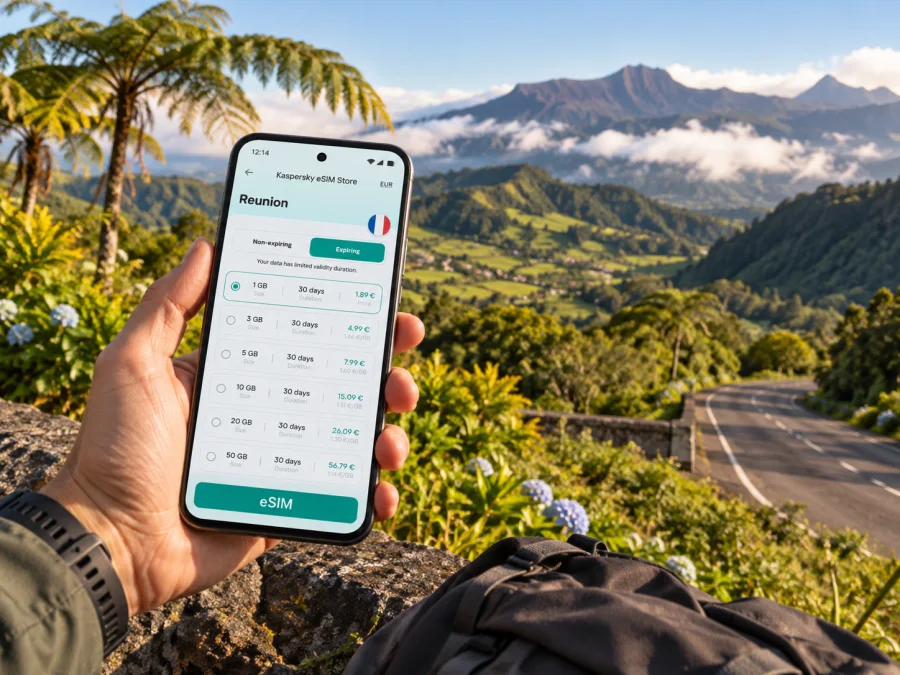
Le Tampon eSIM: Mobile Connection and Internet for Your Reunion Trip
Le Tampon is a useful base for discovering the south of Reunion, but it is not a compact seaside stop where every outing begins from a handful of streets. The commune rises inland from the area near Saint-Pierre toward the cooler, open landscapes of the Plaine des Cafres. If your plans include a hotel, a work meeting, a drive to Bourg-Murat, or an early start for the volcano road, mobile internet can help you coordinate each part of the day.
An eSIM lets you prepare mobile data for a trip without swapping a physical SIM card. In Le Tampon, that can mean checking a route, messaging your accommodation, or looking up a bus connection while moving between the lower town and the highlands. The right setup depends on your device, the terms of the chosen tariff, and how you expect to use data.
Read the geography before planning the day
Le Tampon rises inland from the area near Saint-Pierre toward the Plaine des Cafres, a highland area that includes Bourg-Murat. An address in the lower town and one in Bourg-Murat can mean different travel times, weather, and daily plans, even though both are described as Le Tampon.
The RN3 links the urban area with the highlands. From Bourg-Murat, the Route du Volcan continues toward the Piton de la Fournaise area. Allow time for the climb and return; straight-line map distance does not show how a winding road feels. Search using the complete destination name and confirm directions against road signs.
| Plan | What to consider |
|---|---|
| Town errands or a meeting | Confirm the full address; the commune covers a broad area. |
| Bourg-Murat or Cité du Volcan | Check access and opening details for your date. |
| Viewpoints or a hike | Check road and weather information; save key details offline. |
| Town and coast in one day | Treat Saint-Pierre as a separate journey and check return timing. |
Download an offline map before leaving reliable Wi-Fi. Use it for orientation alongside local directions, current road information, and trail signage.
Arriving and getting oriented
Visitors arriving at Roland Garros Airport in the north of Reunion still have a separate ground journey to Le Tampon. Share your lodging address and agree on a meeting point with anyone collecting you. If hiring a car, check the route and keep accommodation details offline. First establish whether your stay is in the lower town, on a rising residential slope, or in the Plaine des Cafres.
For a rural guesthouse, ask the host for a precise map pin, directions from the RN3, and the late-arrival procedure. This helps you decide whether a car, bus, or prearranged ride fits your arrival time and luggage.
Arrival checklist
- Save the full address, contact number, check-in details, and map pin.
- Confirm how you will collect a car, meet a driver, or reach a bus stop.
- Charge your phone and download an offline map of the lodging area.
- Check the current bus route, timetable, and stop if using public transport.
- Keep the final turn available until confirmed with your host or driver.
If you arrive late, avoid adding a distant viewpoint or long highland drive that evening. Check in, then review weather, road conditions, and opening details in the morning. A data connection helps coordination, but cannot resolve closures or changed hours.
Local transport: town, highlands, and coast
A car gives flexibility between the lower town, Plaine des Cafres, and inland stops. It is useful with hiking gear, a group, or an early departure. Plan the route and return time; short map distances can take longer on sloping or winding roads.
Buses serve the wider CASUD area, including Le Tampon, and may suit planned journeys between established stops. Check the current route, timetable, stops, and service notices. A daytime connection may not fit an early departure or return from a remote viewpoint, so keep the schedule saved offline.
A taxi or prearranged ride can fill gaps in the timetable. Confirm pickup time, location, and return plan in advance, particularly outside the centre.
Plan the journey in legs: lodging to the starting point, travel between visits, a realistic return time, and the route back to your stay. For a coast-and-highlands day, decide where you will sleep and plan around that point; Saint-Pierre, lower Le Tampon, and Bourg-Murat are different bases.
Choosing a place to stay
A stay near the lower urban area can make services, meals, and routes toward Saint-Pierre easier to reach. The Plaine des Cafres or Bourg-Murat can put you closer to highland scenery and the Route du Volcan, while making transport, weather, and nearby services more important to check.
Before booking, confirm the exact locality, access from the RN3, nearby shops or restaurants, transport needs, and late check-in procedure. Ask whether reception varies at the property or along your planned route. Compare roads and elevation as well as map distance, and ask the host for a practical estimate.
Choosing mobile data for the itinerary
A phone can hold your lodging details, directions, messages, transport information, and documents. Mobile data is useful when plans change between town and the highlands, but reception and performance can vary with terrain, location, network conditions, and tariff terms. Do not assume there will be a signal on every road or trail.
Kaspersky eSIM Store is an app and website where you can choose, arrange, and activate an eSIM with a suitable tariff for mobile internet on an international trip. Compare the destination, data allowance, validity, and other displayed conditions. If visiting more of Reunion, check that the tariff applies to the whole itinerary.
To prepare, review eSIM tariff options for Reunion and compare their terms with your plans. Estimate whether you will mainly message and check directions or also upload photos and join video calls. Download maps and essential documents over Wi-Fi beforehand.
Estimate your data needs
Choose based on a typical day, not trip length alone. Messaging and occasional searches use less data than video or large photo backups. Include work calls and file transfers if relevant; outdoor days benefit from offline maps.
| Likely use | Planning approach |
|---|---|
| Occasional messages and directions | Save maps and details; use data for updates. |
| Navigation and photo sharing | Include regular map use and uploads; review backups. |
| Remote work | Check video and file needs; use stable Wi-Fi where practical. |
| Several island stops | Confirm destination and validity for the entire trip. |
Add a small margin for changed plans and pause background uploads or app updates if you want to manage data use.
Before installing an eSIM
Check that your phone supports eSIM and is not locked to an operator. Support can differ between models and regional versions, so confirm your device before arranging a tariff. Check whether your device supports eSIM. Review installation steps and tariff conditions, including when validity begins.
Keep Wi-Fi available if setup requires an internet connection. Save the QR code or installation details where you can access them, then follow your device prompts. Do not delete an installed profile to troubleshoot unless the instructions say to; some profiles may not be reusable after deletion or transfer.
Installation steps to prepare before travel
- Check eSIM support and any operator lock.
- Choose a tariff after reviewing destination, data allowance, validity, and activation conditions.
- Follow the instructions for your phone: Android eSIM installation instructions or iOS eSIM installation instructions.
- Install the profile and keep confirmation details accessible.
- Select the SIM for mobile data; review roaming settings if the instructions require them.
- After arrival, enable the profile as instructed. Allow time for registration and check the data line if it does not connect.
A travel eSIM is for mobile internet and does not automatically include a regular number, calls, or SMS unless the tariff says otherwise. Keep your usual number active if needed, and review home-operator settings to understand which line uses data and what charges could apply.
Navigation and phone settings
Download an offline map for your lodging, town, Bourg-Murat, and planned roads. Offline maps may not show a new closure, so check current road information too. Confirm your destination before driving and stop safely before changing directions.
For a walk, save the trailhead and return route, follow signs and local guidance, check highland weather, tell someone your plan, and carry water and suitable clothing. Mobile service is not an emergency guarantee.
Set the eSIM as the data line only when intended, pause large backups if needed, keep bookings and transport details offline, and carry a charger for a long day. If a map stops updating, check the selected data line when safely stopped; otherwise use the saved map or ask locally.
Sample plans for Le Tampon
One night in town: confirm the lodging address, arrange a meal, and decide how to continue the next day. Save check-in messages and directions offline; book transport in advance if leaving early.
A highland day from Bourg-Murat: check the road, weather, opening, and access information for your date. Keep the return route and host’s number available. Cité du Volcan and Bourg-Murat are useful reference points, but online updates should complement preparation.
A work meeting: confirm the full address and whether it is in town or farther up toward Plaine des Cafres. Download documents and allow time for the road journey. Use dependable Wi-Fi for video calls where practical.
A family or group visit: agree on a meeting point and save it on everyone’s phone. Give each person the lodging address and an offline map, especially if the group splits between town and highlands.
A stop on a longer island trip: check the next destination and travel time before committing to a tight departure. An eSIM tariff for Reunion may suit several stops if its terms cover the itinerary.
When plans change
Rain, road conditions, or a delayed arrival can alter the day. Keep flexibility in the schedule; if a highland outing no longer makes sense, choose a nearer activity instead of trying to recover time by driving faster. Update your saved address if accommodation changes.
If mobile data is unavailable, check while safely stopped that the eSIM is enabled, the correct data line is selected, and the tariff is still valid. Follow the supplied troubleshooting steps. Meanwhile, use offline maps, saved contacts, booking details, and local assistance.
Frequently asked questions
Is Le Tampon a good base for visiting the volcano?
It can be a practical starting point toward Bourg-Murat and the Route du Volcan. Check road, weather, and access conditions before leaving.
Do I need a car?
A car makes it easier to connect the lower town, Plaine des Cafres, and more distant stops. Buses serve parts of the wider area; compare current routes and times with your lodging and schedule.
Can I use an eSIM only in Le Tampon?
Tariffs follow their listed destination and terms. If travelling elsewhere in Reunion, check that the option applies to those places and dates.
Will mobile internet work on every road and trail?
No. Reception and performance vary with terrain and network conditions. Save maps and essential details offline.
Does an eSIM replace my usual number?
A travel data tariff generally provides mobile internet, not a regular number, calls, or SMS unless its terms say otherwise. Your usual SIM may remain available for calls, subject to phone settings and operator charges.
What should I prepare for a day trip?
Save the route and return details, check weather and access, confirm transport, charge your phone, and tell someone your plan if hiking.
Final preparation checklist
Before leaving, confirm that you know whether your stay is in the lower town or Plaine des Cafres; have the full address and check-in details saved; know how you will travel between the airport, lodging, and highland stops; have checked current transport; and have confirmed eSIM support, tariff terms, and offline access to maps and bookings.
Le Tampon is easier to navigate when you plan around its lower and upland areas. Choose transport for the terrain and schedule, and treat mobile data as one part of a plan that includes offline maps and current local information.
Prepare your eSIM for Reunion
Before travelling, check the destination and tariff terms, confirm device compatibility, and install the eSIM using the instructions for your phone. Kaspersky eSIM Store is an app and website for choosing, arranging, and activating an eSIM with a suitable tariff for mobile internet on an international trip. Choose an eSIM tariff for your Reunion trip and keep maps, accommodation details, and essential travel information available offline.


