
Travel connectivity guide
eSIM for Lesotho: Mobile Internet Guide
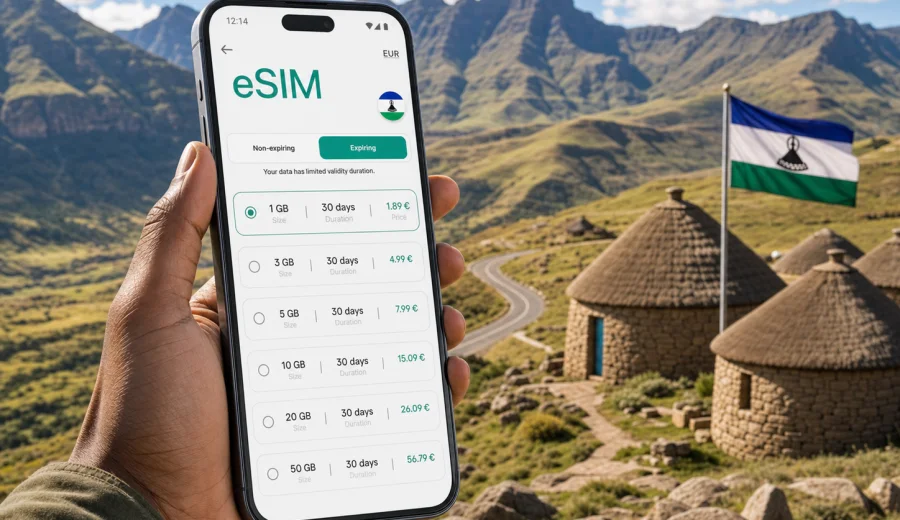
eSIM in Lesotho: mobile connection and internet for your trip
Lesotho is a compact country with a big travel rhythm: high mountain roads, long drives between towns, border crossings from South Africa, guesthouses in remote valleys, and days when your route can change because of weather or road conditions. For this kind of trip, mobile internet is not just a convenience. It helps you check maps, message your host, confirm transport, translate details, manage bookings, and stay reachable while moving between Maseru, Leribe, Butha-Buthe, Mokhotlong, Qacha's Nek, Thaba-Tseka, and smaller villages in the highlands.
An eSIM is useful because it lets you prepare mobile data without searching for a physical SIM card after arrival. You choose a suitable data plan, install the eSIM profile on a compatible phone, and use mobile data during the trip according to the terms of the selected plan. Kaspersky eSIM Store is an app and website that helps travelers choose, arrange, install, and activate an eSIM with a suitable data plan for international travel.
This guide explains how to think about eSIM for Lesotho, what to check before buying, how much data you may need, and how to keep your connection practical on mountain routes where planning matters.
Why mobile internet matters in Lesotho
Lesotho is often called the Mountain Kingdom, and the name is practical as much as poetic. Many journeys involve elevation, winding roads, and areas where services are concentrated in towns rather than along every route. If you are driving from Maseru toward Semonkong, Katse Dam, Mokhotlong, or the eastern border, you may spend long stretches outside dense urban areas.
Reliable trip planning is easier when your phone can handle the basics:
- opening offline and online maps;
- checking driving time before a mountain pass;
- messaging hotels, guides, and drivers;
- receiving booking confirmations;
- using translation tools when needed;
- sharing location with fellow travelers;
- checking weather before high-altitude routes;
- using banking and travel apps securely from your own device.
An eSIM does not make mobile coverage universal and does not replace sensible offline preparation. It gives you a way to prepare mobile data for your trip without relying only on roaming, public Wi-Fi, or a physical SIM purchase after arrival.
What an eSIM does for a Lesotho trip
An eSIM is a digital SIM profile installed on a compatible smartphone or tablet. Instead of inserting a plastic SIM card, you install a profile by following the instructions for your device. After activation, your phone can use the selected mobile data plan in the destination covered by that plan.
For most travel eSIM plans, the main purpose is mobile internet. Voice calls and SMS are usually not included unless the specific plan says so. You can still use internet-based calls and messages through apps such as messengers, video-call tools, email, and booking platforms, provided you have data available.
Before you rely on eSIM in Lesotho, keep three points clear:
| Point to check | Why it matters |
|---|---|
| Device compatibility | Not every phone supports eSIM, and some devices are locked by an operator. |
| Plan conditions | Data volume, validity period, destination coverage, and price depend on the chosen plan. |
| Activation timing | Some plans start counting validity after installation, others after first network use. Read the plan details before you activate. |
This is especially important if Lesotho is part of a wider route through South Africa. You may need a country plan, a regional plan, or separate plans depending on the itinerary and available options.
Where eSIM is most useful in Lesotho
Lesotho trips are often practical rather than linear. You may arrive through Maseru Bridge, fly into Moshoeshoe I International Airport, drive from Bloemfontein or Johannesburg, or enter from KwaZulu-Natal through high-altitude crossings. Mobile internet helps at different stages of the journey.
Maseru and nearby areas
In Maseru, mobile data is useful for airport transfers, accommodation check-in, maps, restaurant searches, banking apps, and messaging. If you need to coordinate a driver or confirm a meeting, having mobile internet already installed can save time after a long border or road journey.
Semonkong and Malealea
Routes toward Semonkong and Malealea are popular for scenery, pony trekking, lodges, and Maletsunyane Falls. Data is useful for route checks, sending arrival updates, and keeping booking details available. You should still download offline maps before leaving larger towns.
Katse Dam and the central highlands
Katse Dam and surrounding highland roads can involve long drives and limited service stops. Mobile data can help with weather, navigation, and communication, but you should not depend on a connection at every bend in the road. Save key information offline and treat eSIM as part of your travel setup rather than your only safety measure.
Northern and eastern routes
Travel toward Butha-Buthe, Mokhotlong, Afriski, and Sani Pass often involves mountain weather and changing road conditions. If your phone supports eSIM, preparing data before you go can make it easier to coordinate border crossings, drivers, guesthouses, and route changes.
How much data do you need for Lesotho?
Data use depends on your habits. A traveler who mainly uses maps and messaging needs much less data than someone who uploads video, uses cloud backup, or streams on mobile data. The safest way to choose a plan is to match data volume to your real travel behavior.
| Trip style | Typical data use | Practical plan logic |
|---|---|---|
| Light weekend trip | Messaging, maps, email, booking apps | A smaller data package may be enough. |
| One-week road trip | Maps, daily photos, weather, calls through apps | Choose enough data for regular navigation and communication. |
| Remote-work stop | Hotspot, video calls, file sharing | Look for a larger allowance and check hotspot conditions. |
| Multi-country route | Lesotho plus South Africa or nearby countries | Compare a Lesotho plan with regional coverage if available. |
Video is the fastest way to use data. To make your allowance last longer, download maps and travel documents over Wi-Fi, pause cloud photo uploads, and turn off automatic app updates on mobile data.
Preparation checklist before you buy
The best time to prepare eSIM is before the moment you urgently need internet. Run through this checklist while you still have a stable connection at home or at your accommodation.
- Make sure your phone supports eSIM.
- Check that the device is not locked to one mobile operator.
- Confirm that Lesotho is included in the plan destination.
- Check data volume, validity period, and price before payment.
- Read when the plan validity starts.
- Keep the installation QR code or instructions available until setup is complete.
- Download offline maps for your route through Lesotho.
- Save hotel addresses, booking references, and emergency contacts offline.
- Keep your main SIM active if you need calls, SMS, or bank verification messages.
Before purchasing a plan, check your device so you know whether it supports eSIM and can use a travel data profile. This small step prevents the most common problem: choosing a plan before confirming that the phone can install it.
Choosing an eSIM plan for Lesotho
When comparing plans, avoid choosing only by the first number you see. A plan with more data may be better for a long road trip, while a smaller plan may be enough for a short stay in Maseru. The right choice depends on route, duration, and the number of apps you expect to use on mobile data.
Use this simple decision process:
1. Count how many days you will be in Lesotho.
2. Decide whether you will mostly stay in towns or drive through mountain areas.
3. Estimate whether you will use video, hotspot, or cloud uploads.
4. Check whether Lesotho is your only destination or part of a regional route.
5. Compare data volume and validity period before you activate.
If your phone is compatible and your route is clear, you can choose an eSIM plan for Lesotho in Kaspersky eSIM Store and prepare mobile internet before the trip. Review the plan details carefully, especially destination coverage, validity, data allowance, and activation rules.
eSIM, roaming, local SIM, and public Wi-Fi
Travelers often compare four options for mobile internet in Lesotho: international roaming from a home operator, a local physical SIM card, public Wi-Fi, and a travel eSIM. Each option can work, but each has trade-offs.
| Option | Advantages | Points to consider |
|---|---|---|
| Home roaming | Uses your existing number and SIM | Conditions can be expensive or unclear; check your operator before travel. |
| Local physical SIM | Can be useful for longer stays | Requires finding a seller, presenting required information if requested, and changing SIM setup. |
| Public Wi-Fi | Good for downloads at hotels or cafes | Not always available on routes; avoid sensitive activity on unknown networks. |
| Travel eSIM | Can be prepared before arrival and used on a compatible device | Mainly for mobile data; plan conditions and coverage depend on the selected offer. |
An eSIM is often attractive because it reduces arrival friction. You do not need to make your first stop a SIM shop, and you can keep your main physical SIM in the phone if your device supports dual SIM. That is useful when you still need banking messages or calls on your primary number.
Step-by-step: installing and activating eSIM
The exact steps depend on your phone model and operating system, but the general process is straightforward. First, choose the destination and plan. Then complete the purchase, install the eSIM profile, and follow your device settings to select it for mobile data.
For Android, use the Android eSIM installation instructions and follow the steps for adding a mobile plan or SIM profile. For iPhone, use the iOS eSIM installation instructions and check that the new eSIM is selected for cellular data when you want to use it.
A practical setup sequence looks like this:
1. Install the eSIM while you have stable Wi-Fi.
2. Give the eSIM a clear label, such as "Lesotho data".
3. Keep your home SIM active for calls or SMS if needed.
4. Set the eSIM as the line for mobile data when you want to use it.
5. Enable data roaming for the eSIM if the plan instructions require it.
6. Test a low-data task, such as opening a map or sending a message.
Do not delete the eSIM profile after installation unless you are certain you no longer need it. Some eSIM profiles cannot be reinstalled after removal, depending on the plan conditions.
Practical data-saving settings
Lesotho is a good destination for photography and route planning, which means phones can quietly use data in the background. Before you leave a town or hotel Wi-Fi, take a few minutes to reduce unnecessary usage.
- Download Google Maps or another map app for offline use.
- Save your route to guesthouses, lodges, and border posts.
- Turn off automatic app updates on mobile data.
- Pause cloud photo and video backup.
- Disable autoplay video in social apps.
- Use lower quality for video calls if the connection is limited.
- Send compressed images in messengers when full quality is not needed.
- Check the phone's data usage screen every day on longer trips.
These settings help you spend data on the things that matter: navigation, communication, booking changes, and safety updates.
Route scenarios for Lesotho travelers
Short visit from South Africa
If you cross into Lesotho for two or three days, you may only need maps, messaging, hotel communication, and occasional browsing. Install your eSIM before the crossing, save the border and accommodation addresses offline, and keep your main SIM available for SMS if your bank requires verification.
Mountain road trip
For routes through Semonkong, Katse Dam, Thaba-Tseka, Mokhotlong, or Sani Pass, choose data with enough validity for the full route. Download offline maps and do not postpone important calls until you are already deep in the mountains. Mobile signal can vary by location, terrain, and network conditions.
Work-and-travel stay
If you plan to work while staying in Maseru or a lodge, check whether your accommodation has stable Wi-Fi and use eSIM as a backup or for movement around the country. If you need hotspot, check whether the selected plan and device settings allow tethering. For video meetings, keep a data reserve instead of using the whole allowance on entertainment.
Family or group trip
For a group, each traveler with a compatible device can use their own eSIM, or one person may use hotspot if the plan allows it. Hotspot use drains battery and data quickly, so keep it for maps, messages, and bookings first.
Common mistakes to avoid
The most common eSIM problems are usually planning issues rather than technical failures. You can avoid many of them with a short pre-trip check.
| Mistake | Better approach |
|---|---|
| Buying before checking compatibility | Confirm eSIM support and operator unlock status first. |
| Activating too early | Read when validity starts and activate at the right time. |
| Forgetting offline maps | Download route areas before remote drives. |
| Using video on mobile data all day | Save streaming and large uploads for Wi-Fi. |
| Deleting the eSIM profile | Keep it installed until the trip is complete. |
| Expecting a phone number | Treat most travel eSIM plans as mobile data unless the plan states otherwise. |
What to know about coverage expectations
No travel data option can guarantee the same connection quality in every valley, pass, lodge, and roadside stop. Lesotho's terrain matters. Mountains can affect signal, and some rural areas may have weaker or less consistent service than towns. This is normal for many highland destinations.
Plan for a layered setup:
- eSIM for prepared mobile data;
- offline maps for navigation when signal drops;
- saved documents for check-in and border details;
- accommodation Wi-Fi for large downloads;
- a power bank for long driving days;
- a backup communication plan for remote routes.
This approach is more realistic than expecting one tool to solve every connection scenario. eSIM helps you prepare, but good travel planning still matters.
FAQ: eSIM and mobile internet in Lesotho
Can I use eSIM as soon as I arrive in Lesotho?
You can use it after the eSIM is installed, activated according to the plan rules, and connected to an available supported network. Install it while you have stable Wi-Fi, and check the plan instructions before arrival so you know when validity begins.
Does eSIM include calls and SMS?
Most travel eSIM plans focus on mobile data. Calls and SMS are not included unless the selected plan clearly says so. For calls and messages, use internet-based apps or keep your main SIM active if you need your usual number.
Is eSIM better than roaming?
It depends on your home operator's roaming conditions and your travel habits. eSIM can be a more predictable option because you choose a data allowance and validity period before use. Always compare the details rather than assuming one option is best for every trip.
Should I buy a Lesotho plan or a regional plan?
If you only travel in Lesotho, a country plan may be enough. If your route includes South Africa or other nearby destinations, compare available regional options with separate country plans. The right choice depends on route length, destination coverage, and data needs.
Can I install eSIM before leaving home?
Yes, installation before departure is often convenient because you can use reliable Wi-Fi and avoid setup pressure on arrival. Check whether activation or validity starts immediately after installation or only after first network connection.
What if mobile data is weak in the mountains?
Move to an open area if it is safe, restart mobile data, check that the eSIM is selected for data, and confirm whether data roaming needs to be enabled for that profile. Keep offline maps and key documents available because terrain can affect coverage.
Final checklist before your Lesotho trip
Before you close your suitcase, check the connection setup the same way you check passport, charger, and accommodation details.
- Your phone supports eSIM and is not operator-locked.
- The eSIM profile is installed or ready to install over Wi-Fi.
- You know when the plan validity starts.
- Lesotho is included in the selected destination coverage.
- Offline maps are downloaded for Maseru and your mountain route.
- Important addresses and booking details are saved offline.
- Background data use is reduced.
- A power bank is packed for long travel days.
When you are ready to prepare mobile internet for the trip, open Kaspersky eSIM Store and select an eSIM plan for Lesotho that matches your route, trip length, and data needs. Check compatibility first, review the plan terms carefully, and install the eSIM while you still have a stable connection.