Travel connectivity guide
Levi eSIM: Mobile Internet for Your Trip
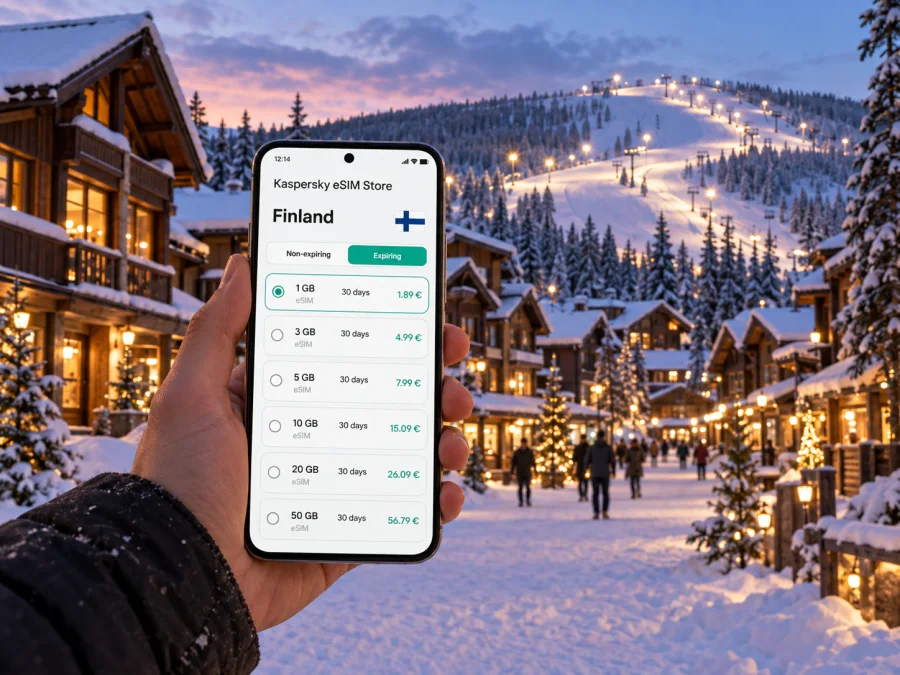
Levi eSIM: mobile connection and internet for your trip
Levi is a compact resort village in Finnish Lapland, where a day can move between an airport transfer, a hotel check-in, a lift queue, a forest trail and dinner in the centre. A reliable mobile connection helps you coordinate those small transitions: check a booking, message your host, follow a route or let someone know when plans change. An eSIM can make mobile internet easier to prepare before you travel, without replacing your usual SIM card.
Levi is often used as a base for winter sports and Lapland experiences, but the same practical questions matter in every season: how will you get from the airport, where is your accommodation relative to the village, and what will you need to look up while moving around? This guide focuses on using mobile internet around Levi and planning the connection for the shape of your own trip.
Start with the geography of your stay
Levi is in the municipality of Kittilä, in northern Finland. The resort centre, accommodation areas and ski slopes are spread across a relatively small destination, but they are not all at the same doorstep. Your hotel may be in the village core, beside a slope, or a short ride away. That distinction affects what you will use your phone for: walking directions, a transfer pickup point, a shuttle timetable, a restaurant reservation or a trail map.
Before departure, save the exact accommodation name and address in a note. If a booking confirmation includes a map pin, keep it available offline as well as in your email. Search results can show several properties with similar names, and the word “Levi” may refer to the wider resort rather than a particular street or entrance.
A quick arrival note can include:
- the property’s full name and street address;
- the agreed transfer meeting point and the driver’s contact method;
- check-in instructions and the latest arrival time;
- the name of the nearest village stop, lift or service point, if your host has supplied one;
- a backup way to reach your accommodation if your first connection is delayed.
Keep those details in a format you can open without a live connection. Mobile data is useful, but a saved address is a simple fallback when you are tired, outdoors or waiting for a transfer.
Getting from Kittilä Airport to Levi
Kittilä Airport is the usual air gateway for many visitors heading to Levi. The resort is close enough for the airport-to-accommodation leg to be a short regional transfer rather than a long cross-country journey, but the precise time depends on road conditions, weather, traffic and the drop-off location. Arrange transport using the details for your own booking: options and schedules can vary with the season and date.
Once you land, mobile internet can help with the practical parts of the handover. You may need to confirm a pickup, send a message if baggage takes longer, reopen a transfer voucher or check that you are standing at the agreed place. If you are travelling with other people, sharing a live update can also prevent a group from splitting between the terminal and the vehicle area.
A low-stress airport routine
- Before your flight, take a screenshot of your transfer confirmation and accommodation address.
- At the airport, check messages and follow your provider’s directions to the pickup point.
- If plans change, send a short update with your location.
- Before leaving, check that everyone in your group has the accommodation address and the host’s arrival instructions.
- After reaching Levi, save the route from your lodging to the village centre or your first activity.
Do not rely on a map app to decide where a shuttle stops or where a driver is allowed to wait. Use the transport company’s current directions for that detail, then use navigation to help you walk between the named meeting point and your destination.
Choose a connection for the way you travel
A city break with a single hotel and a few walks uses data differently from a ski holiday with daily transfers, activity bookings and frequent changes of plan. Think about the moments when you genuinely need to be online rather than choosing a package by habit. For some travellers, messaging and maps are the main uses; others may upload photos, join calls or use cloud services throughout the day.
Kaspersky eSIM Store is an app and website where you can choose, purchase and activate an eSIM with a suitable mobile data plan for an international trip. Before deciding, compare the plan’s data allowance, validity period, destination and price with your expected stay. The available options and their terms are shown for the selected destination, so review those details before purchase. For a trip centred on Levi, you can review mobile data plan options for Finland.
Estimate the data you may use
| Travel habit | What can use data | Planning thought |
|---|---|---|
| Occasional navigation | Map searches, route refreshes and place details | Download offline map areas where your app allows it, then use data for updates and searches. |
| Group coordination | Messages, pickup changes and meeting updates | Allow enough data for regular messaging, especially if plans are flexible. |
| Photos and social sharing | Uploading images or short videos | Upload over Wi-Fi when convenient if you want to reserve mobile data. |
| Remote work | Email, document access and video meetings | Check whether your accommodation has suitable Wi-Fi and keep mobile data for backup or travel between locations. |
| Streaming | Music or video over a mobile connection | Pre-download media where possible; streaming can use data quickly. |
These are usage patterns, not a promised consumption estimate. App settings, image quality, background refresh and the number of devices sharing a connection all change how much data you use. If you are unsure, choose a plan after checking the allowance and validity, and leave room for the activities you already know you will need online.
Make a Levi map that works offline
Levi’s resort centre, lodging and activity areas do not all share one address. Download an offline map if your app allows it, then save the exact entrance to your accommodation, the village centre and each activity’s meeting point. The broad name “Levi” may not identify the door you need.
Use live data for changes such as a host’s message or an updated pickup time. Keep stable details—addresses, confirmations and return instructions—in screenshots or notes. Check whether a route is for walking or driving: a vehicle route may not suit pedestrians, and snow gear can make a short walk take longer.
Save your lodging, transfer and activity locations. Follow local signs and provider instructions if they differ from your map.
Getting around the resort
Plan each day around your lodging and booked activity. Depending on distance, conditions and schedule, walking, a seasonal shuttle, taxi or prearranged transfer may suit different legs. Confirm current operating details with the provider; services and timetables can vary. A map app does not necessarily show the correct stop or where a driver may wait.
Before leaving, open the route, check the meeting point and agree on a return plan. Leave time to find an activity entrance. Share a meeting place if your group splits up. In cold weather, keep the phone warm and consider a power bank.
Use mobile data for the tasks that need it
Maps, messages and booking updates are useful while moving around Levi. Large downloads, streaming and photo backups can often wait for Wi-Fi. Before travelling, download playlists and map areas, switch off automatic video playback if you do not need it, and decide whether cloud photo backup should use mobile data.
| Travel habit | Online task | Planning note |
|---|---|---|
| Light use | Route searches and messages | Saved maps and confirmations reduce repeated searches. |
| Active holiday | Pickup updates, activity details and photos | Upload photos over Wi-Fi when practical. |
| Remote work | Email, documents and meetings | Ask your accommodation about Wi-Fi; reserve mobile data for travel or backup. |
| Media use | Streaming music or video | Pre-download where possible; streaming may use data quickly. |
This is a guide to habits, not a data guarantee. App settings, video quality and connected devices affect consumption. Compare allowance, validity, destination and price with your dates and expected use, and check when validity begins under the selected plan’s terms.
Prepare and install your eSIM
Kaspersky eSIM Store is an app and website where you can choose, purchase and activate an eSIM with a suitable mobile data plan for an international trip. Before buying, check that your phone supports eSIM and is not carrier-locked. Review your device’s eSIM compatibility; support can depend on the exact model, market and configuration.
Install the eSIM over a stable internet connection and follow the steps for your device: Android eSIM installation instructions or iOS eSIM installation instructions. Read the selected plan’s activation conditions so you know when its validity begins. On some phones you may need to select the travel eSIM for mobile data or enable data roaming for that line; follow the instructions that apply to your device and plan.
Before departure, confirm the eSIM is installed, label the line clearly in settings, and decide which SIM will handle data and which will keep your usual number available. A travel eSIM is intended for mobile data; ordinary voice calls and SMS are not included unless the plan explicitly says otherwise. Internet-based messaging can work over data. Avoid deleting an installed profile as a troubleshooting shortcut, because reinstallation or transfer may not be allowed under every plan’s conditions.
Hotels, work and group travel
If dependable Wi-Fi matters for a video meeting, ask your accommodation about its connection before arrival. Download work materials and keep calendar details available offline. When working around Levi, use suitable accommodation Wi-Fi for large files or longer calls, and mobile data for directions and messages while moving. Follow your employer’s approved practices on work devices.
For families and groups, agree on a meeting point before separating and share the lodging address. Mobile data can help coordinate staggered arrivals or a changed dinner plan, but do not assume a data-only eSIM provides a new phone number. Keep a backup contact method in mind, especially if only one traveller has mobile data.
Short stays and trips beyond Levi
For a short stopover, prioritize transfers, check-in and the return journey, then fit activities around confirmed transport. Save departure and booking details offline. Levi can also be a base for excursions elsewhere in the Kittilä area or farther across Lapland. Confirm the operator’s meeting point rather than inferring access or coverage from a map.
If your wider itinerary crosses into another country, check that the chosen plan covers each destination; a Finland plan should not be assumed to include another country. Save directions, pickup time and your return plan before leaving the resort.
If mobile data is not working
Check the basics before changing or removing an eSIM: make sure the travel line is selected for data, review airplane mode and mobile data settings, and confirm the plan’s allowance, validity and activation conditions in your account. If reception is weak indoors, try again from a safe open area. Restart the phone only if simpler checks do not help, then follow the device and plan instructions. If the issue continues, contact the appropriate support channel. Keep important addresses and bookings offline while you troubleshoot.
Frequently asked questions
Is Levi a city or a resort area?
Levi is a resort destination in the municipality of Kittilä, Finnish Lapland. Use the exact address for your accommodation or activity when navigating.
Do I need data as soon as I land?
Not if your transfer and check-in details are saved. Data helps with pickup messages and route updates; screenshots and offline notes provide a fallback.
Can I keep my regular number?
A compatible dual-SIM phone may let your usual SIM remain active while an eSIM handles data. Settings vary by device, and ordinary calls or SMS are not included unless a plan states otherwise.
How much data should I choose?
Consider trip length and habits: map searches and messages differ from streaming, uploads or video calls. Compare your needs with the plan’s allowance and validity.
Should I install before travelling?
Installing over a stable connection gives you time to follow the steps. Activation timing depends on plan conditions; keep the eSIM profile installed unless instructions say otherwise.
Is reception guaranteed throughout Levi?
No. Reception depends on location, device settings and the network used by the selected plan. Keep essential details available offline.
A calm connection plan for Levi
Save your accommodation and transfer details, map your main destinations and decide which tasks need mobile data. Confirm current transport instructions, keep the phone warm in cold weather and carry essential information offline. Compare a Finland plan’s allowance, validity and destination with your trip, then install the eSIM according to its terms.
Get ready for your trip
Choose a plan that fits your dates and expected use, then install the eSIM before departure or at the time its terms allow. Kaspersky eSIM Store lets you select, purchase and activate an eSIM for an international trip through its app or website. Choose a mobile data plan for your trip to Finland and keep your Levi arrival details within easy reach.


