
Travel connectivity guide
Levuka eSIM: Mobile Internet for Fiji Travel
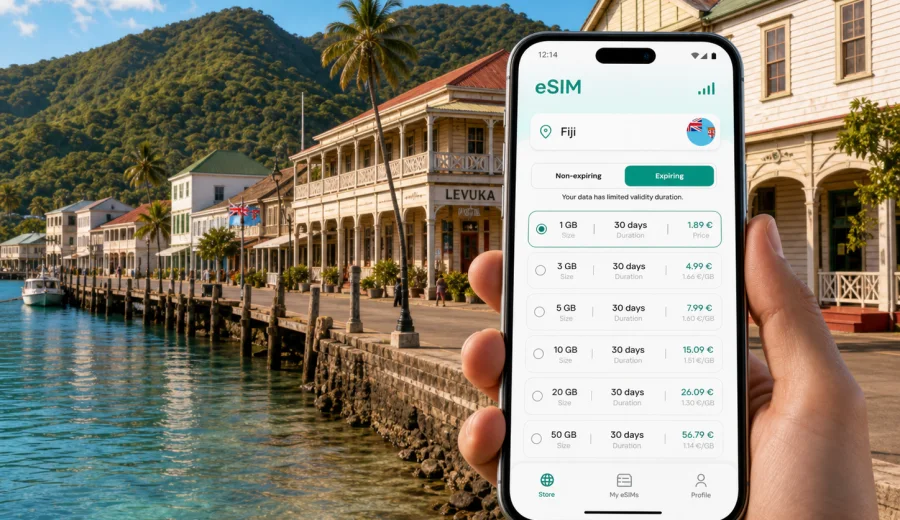
Levuka eSIM: mobile connection and internet for your Fiji trip
Levuka is a small port town where mobile internet can matter more than it first seems. You may arrive on Ovalau Island by boat, arrange a transfer from the wharf, message your hotel, check the weather before walking along Beach Street, or use maps to find the right guesthouse on a hillside road. In a place built around the waterfront, colonial-era streets, local buses, and short trips between villages, an eSIM helps you prepare a practical mobile connection before you need it.
This guide is for travellers visiting Levuka, Fiji, and planning how to stay online without buying a physical SIM card after arrival. It focuses on city-level use: getting into town, moving around Ovalau, checking bookings, navigating the historic port area, working remotely for a short stay, and making side trips from Levuka. Fiji is the destination for the mobile data plan, but Levuka is the travel scenario.
An eSIM is a digital SIM profile installed on a compatible phone or tablet. For a trip to Levuka, it can be useful if you want mobile internet for maps, messaging, taxi or transfer coordination, ferry updates, hotel check-in details, email, and everyday travel tasks. It does not automatically replace a local phone number, voice calls, or SMS unless those features are stated in the conditions of a specific tariff. Most travellers use internet-based calls and messages while keeping their primary SIM active for essential incoming texts.
Why mobile internet matters in Levuka
Levuka is compact, but it is not a city where every travel step happens inside one airport terminal or a large hotel district. Many visitors approach it as part of a Fiji route: first Viti Levu, then a road transfer to a ferry point, then the crossing to Ovalau, then the final ride into town. The moment when you need internet may come before you are settled in your room.
Common online tasks in and around Levuka include:
- confirming the latest pickup point with a guesthouse or driver;
- checking ferry or boat timing before leaving Suva, Nausori, or another part of Viti Levu;
- saving the location of your hotel before roads become unfamiliar;
- using maps around Beach Street, the wharf, the post office area, and hillside accommodation;
- messaging family after the crossing to Ovalau;
- translating short practical phrases or reading booking instructions;
- checking weather and sea conditions before day trips or walks;
- joining a work call when your hotel Wi-Fi is limited or busy.
Levuka is also Fiji's former capital and a historic port town. Visitors often move slowly through the centre, stopping for photos, cafés, small shops, churches, and colonial-era buildings. Preparing eSIM mobile internet in advance keeps the arrival routine simpler.
Arrival scenarios: when an eSIM is useful
Your mobile connection needs depend on how you reach Levuka. The town is on Ovalau Island, so many routes involve more than one transport step. Even if you plan carefully, local timing can shift, and being able to message someone or check saved details is useful.
| Travel moment | What you may need online | Why eSIM helps |
|---|---|---|
| Before leaving Viti Levu | Ferry timing, transfer messages, map pins | You can check details without relying on café or hotel Wi-Fi |
| At the ferry point | Contacting a driver or accommodation | You can send updates if your crossing time changes |
| Arriving on Ovalau | Navigation to Levuka, pickup coordination | You have data before reaching your hotel |
| First walk in town | Maps, opening hours saved from your booking notes, messages | You avoid roaming surprises and do not need a physical SIM stop |
| Remote work window | Email, chat, authentication, hotspot backup | You have a separate travel data option on a compatible device |
If Levuka is part of a wider Fiji trip, eSIM is especially practical because the same country plan can support your arrival city, onward transfers, and other stops where the selected tariff applies. Always check the tariff's country or regional coverage, data amount, validity period, and activation rules before payment.
Choosing the right amount of data for Levuka
Levuka does not usually require the same data volume as a long stay in a major business capital, but small-town travel still uses data steadily. Maps, ride coordination, photo backups, messaging, and weather checks can add up. Choose by length of stay, route, and work needs, not only by the lowest price.
For one or two days, you may only need enough data for maps, messages, ferry coordination, and light browsing. For a longer stay, add capacity for video calls, remote work, cloud backups, or hotspot use. If Levuka is one stop in a wider Fiji route, choose a tariff that covers the full trip.
Practical data planning:
- Light use: maps, text messages, check-ins, email, and occasional browsing.
- Moderate use: maps plus social media, photo sharing, messaging, and several short calls.
- Heavy use: hotspot, video meetings, streaming, large backups, or frequent navigation across Fiji.
Avoid choosing only by price. A very small data allowance can become inconvenient if your trip includes long transfers, a delayed crossing, or limited Wi-Fi at accommodation. A suitable validity period matters too: a plan that expires before your final day may be less useful than a slightly larger option with a better time window.
When to prepare your eSIM
The most comfortable option is to prepare the eSIM before travelling to Ovalau. You can install the eSIM profile while you still have stable Wi-Fi, review the instructions calmly, and keep your primary SIM in place. Depending on the tariff conditions, you may activate mobile data before departure or after arrival. Always read the start-of-validity rules, because some tariffs begin when installed, while others begin when they first connect to a supported network.
Good preparation checklist:
- Check that your phone or tablet supports eSIM.
- Make sure the device is not locked to one mobile operator.
- Choose Fiji as the destination, unless your route requires a regional option.
- Compare data size, validity period, price, and any stated limitations.
- Install the eSIM profile while you have stable internet.
- Keep the QR code or installation details accessible.
- Decide which SIM will handle mobile data during the trip.
- Turn off background data-heavy apps if you have a small allowance.
If your phone supports dual SIM, you can usually keep your regular number available for calls or SMS while using the eSIM profile for mobile data. Device menus differ, so check the exact settings on your model before travel.
For Levuka travel, you can use Kaspersky eSIM Store to choose an eSIM tariff for your Fiji trip before you start the island transfer. The app and site help you compare available data amounts and validity periods for the destination, then install and activate the eSIM on a compatible device.
How to install an eSIM for Levuka travel
Installation is easiest when you are not rushing at a wharf, reception desk, or roadside pickup point. Use Wi-Fi at home, at your current hotel, or anywhere stable enough to complete the setup. After you choose a tariff, follow the instructions shown in the app, site, or email. The process can take a few minutes and depends on your phone model, operating system, and local network conditions.
Basic installation flow:
1. Open the eSIM setup details after choosing the tariff.
2. Add the eSIM profile to your compatible device.
3. Label it clearly, for example "Fiji data" or "Travel eSIM".
4. Set the eSIM as the mobile data line when you are ready to use it.
5. Enable data roaming for the eSIM if the tariff instructions require it.
6. Test that mobile data works after arrival, then keep Wi-Fi as a backup.
For setup details, follow the Android installation guide or the iOS installation guide, depending on your device. Do not delete an eSIM profile after activation unless you are sure it can be reinstalled under the tariff conditions.
Check device compatibility before you pay
Not every smartphone supports eSIM, and some devices are locked by an operator. This is important for Levuka because solving a compatibility issue after reaching Ovalau may be less convenient than handling it before your trip. Before choosing a tariff, check your device, confirm that eSIM is supported in your phone settings, and make sure your device can use mobile data from a travel eSIM.
Compatibility checks should include:
- eSIM support on the exact model, not just the phone series;
- no operator lock that prevents adding another mobile profile;
- enough battery and a stable connection during installation;
- enough time to complete setup before travel;
- a backup way to contact support if installation questions appear.
If you are travelling with a second device, such as a tablet or work phone, check that device separately. eSIM support can vary by region, model variant, and carrier policy.
How to manage data in a small island town
Levuka is not a place where you need constant high-volume streaming to enjoy the trip. Treat mobile internet as a travel tool and use Wi-Fi for heavier tasks when available.
Useful habits:
- download offline maps for Ovalau and your wider Fiji route;
- save hotel addresses, ferry notes, and confirmation numbers offline;
- pause automatic photo and video backups on mobile data;
- monitor data use in your phone settings;
- keep messaging apps available for transport and accommodation updates.
If your tariff supports top-ups or additional data, check the options before you run out. It is easier to add data while you still have a working connection.
Transport and navigation around Levuka
Levuka's centre is walkable, but your full route may include ferries, local vehicles, hotel transfers, and roads around Ovalau. Save the essential route information before departure, then use eSIM data for changes, messages, and live navigation when you need it.
Transport checklist for eSIM users:
- send your arrival time to your accommodation before boarding a boat;
- keep a screenshot of the address and map pin;
- share a live location only when needed, because it can use extra data;
- save important contacts in your phone, not only in a booking app;
- keep battery power for the final leg into town;
- check mobile data settings before leaving strong Wi-Fi.
If you use your eSIM as a hotspot, remember that hotspot use can consume data quickly. It is useful for a short email session, but less suitable for large updates or long video calls on a small allowance.
eSIM, roaming, local SIM, or Wi-Fi?
There is no single best option for every Levuka trip. Compare how much control you want before arrival with your need for a local number, heavy data use, or a backup connection.
| Option | Strengths | Points to check |
|---|---|---|
| eSIM | Prepared before travel, no physical card, useful for arrival and transfers | Device compatibility, tariff coverage, validity period, data amount |
| Standard roaming | Uses your existing SIM and number | Price, daily caps, speed limits, unexpected background data |
| Local physical SIM | May suit longer stays or local calling needs | Where to buy, registration rules, store hours, top-up process |
| Public Wi-Fi | Useful for large downloads at hotels or cafés | Availability, speed, privacy, time limits, reliability |
For many visitors, eSIM works well as the travel data layer: enough mobile internet for maps, messages, bookings, and backup connectivity. You can still use hotel Wi-Fi for heavier tasks and keep your primary SIM available when you need your usual number.
What to avoid
Avoid treating mobile internet as an afterthought. Levuka is relaxed, but travel logistics can still require quick messages and online confirmations. Install and check your eSIM while you have time, battery, and stable Wi-Fi.
Common mistakes:
- choosing a tariff without checking whether Fiji is included;
- ignoring the validity period and activation start rules;
- forgetting to set the eSIM as the data line;
- leaving data roaming disabled when the eSIM instructions require it;
- assuming eSIM includes a local phone number, calls, or SMS;
- deleting the eSIM profile after activation without checking whether reinstall is allowed.
The simplest approach is to prepare early, keep the instructions available, and test your settings calmly after arrival.
FAQ
Can I use eSIM for mobile internet in Levuka?
Yes, if your device supports eSIM, is not locked in a way that prevents adding a travel eSIM, and the selected tariff covers Fiji under its conditions. Availability, speed, and performance depend on the local network and your location.
Does eSIM include phone calls and SMS?
Most travel eSIM tariffs are designed for mobile data. They usually do not include a normal local phone number, voice calls, or SMS unless the specific tariff says otherwise. You can use internet-based calling and messaging apps over mobile data.
Can I keep my normal SIM active?
On many dual-SIM phones, yes. You can often keep your usual SIM for calls or SMS and set the eSIM as the mobile data line. Exact settings depend on your device.
Final preparation before your Levuka trip
Before you travel, make a small connectivity plan: decide when you need mobile data, check your device, choose a tariff that covers Fiji for the full route, and install the eSIM while you still have stable internet. Save the key travel details offline, keep your accommodation contact handy, and monitor data use once you arrive.
Kaspersky eSIM Store is an app and site where you can quickly choose, arrange, and activate an eSIM with a suitable mobile data tariff for an overseas trip. For a Levuka itinerary, that means preparing internet access for arrival, local movement, ferry coordination, hotel messages, maps, and everyday travel tasks before you are standing on the waterfront looking for a connection.
Choose a suitable option and prepare an eSIM tariff for your trip to Fiji before you go to Levuka.