
Travel connectivity guide
Liberia Costa Rica eSIM: Mobile Internet Guide
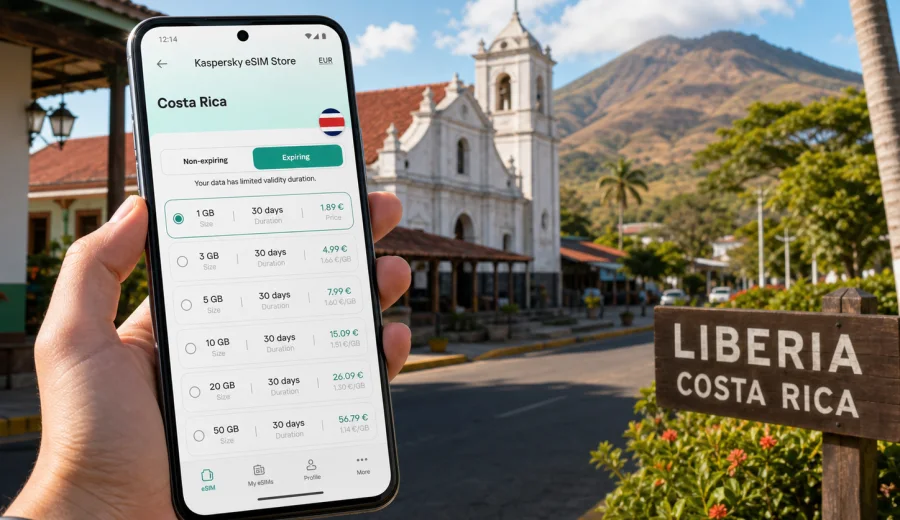
Liberia eSIM: mobile connection and internet for your Costa Rica trip
Liberia is one of the most practical arrival points in Costa Rica. Many travelers land at Daniel Oduber Quiros International Airport, collect a rental car or shuttle, and continue toward beaches, volcanoes, national parks, hotels, and business stops across Guanacaste. That makes mobile connection and internet planning especially important: the first decisions often happen before you reach your hotel.
An eSIM can help you prepare mobile internet for Liberia without looking for a physical SIM card after a long flight. With a compatible phone, you can install a digital SIM profile, choose a suitable data plan for Costa Rica, and use mobile data for maps, messaging, ride coordination, hotel check-ins, and route changes. The value is not only in being online; it is in reducing small arrival problems that can take time when you are tired, carrying luggage, or driving in a new country.
This guide focuses on Liberia as a city and travel base, not on Costa Rica in general. It covers airport arrival, city movement, hotels, stopovers, business trips, and routes from Liberia where data can make the trip easier.
Why Liberia is a city where mobile data matters
Liberia is compact, but many trips that start there are not. You may spend only a few hours in the city before going to Playas del Coco, Tamarindo, Papagayo, Rincon de la Vieja, or another Guanacaste destination. You may also stay in Liberia for a night, use it as a business base, or return there before an early flight.
For travelers, the city works like a connector:
- an international airport close to the urban center;
- car rental counters and shuttle pickups near the airport;
- hotels used for first-night and last-night stays;
- routes to beach resorts, national parks, and inland towns;
- errands, restaurants, pharmacies, and supermarkets before continuing the trip.
In this type of city, mobile internet is useful from the first hour. You may need to message a driver, load the route to your hotel, check a booking code, translate a menu, or confirm where to meet a tour operator. Public Wi-Fi can help, but airport, hotel, and cafe networks are not always available exactly when you need them.
Arrival at Liberia airport: what to prepare before landing
Daniel Oduber Quiros International Airport is close enough to Liberia for a quick transfer, but many travelers leave the airport area immediately for coastal or national park routes. A data plan prepared in advance can help during this first transition.
Before your flight, save the following details offline:
- your hotel name and full address;
- rental car confirmation and counter location;
- shuttle pickup instructions;
- the first route from the airport to Liberia or your next destination;
- emergency contacts and booking references;
- a screenshot of your eSIM installation details, if you are installing later.
Then decide when you want the eSIM ready. Some travelers install the eSIM profile before departure and activate mobile data after landing. Others install it on arrival using airport Wi-Fi. Installing before travel is usually calmer, especially if your first task in Liberia is driving, meeting a transfer, or leaving the airport quickly.
The main point: do not make your first connection plan depend on finding a shop or standing in a queue when your transfer time is limited.
eSIM, roaming, local SIM, or Wi-Fi: practical comparison for Liberia
Different connection options can work in Liberia, but they fit different travel styles. Use this comparison as a planning shortcut.
| Option | Best for | Watch out for |
|---|---|---|
| eSIM data plan | Travelers who want mobile data ready for airport arrival, navigation, and messaging | Requires an eSIM-compatible, unlocked device |
| Home roaming | Short trips where convenience matters more than cost control | Pricing and data limits depend on your home carrier |
| Local physical SIM | Longer stays where you want a local setup and have time to arrange it | You may need to visit a store and understand local terms |
| Public Wi-Fi | Hotel work sessions, large downloads, and backup connectivity | Not reliable for road navigation, pickups, or city movement |
For a Liberia trip, the strongest reason to use eSIM is continuity. The city may be your airport gateway, overnight stop, and route-planning point. A data plan already on your phone can support all three without changing your arrival routine.
Choosing a data plan for a Liberia itinerary
There is no single correct amount of data for every traveler. A good eSIM plan depends on how long you will stay in Costa Rica, how much you rely on maps, and whether you use your phone for work, calls over messaging apps, or media.
Use this simple estimate:
| Trip pattern | Typical Liberia use | Data planning idea |
|---|---|---|
| Short stopover | Airport, hotel, maps, messages | A smaller data package may be enough |
| Beach transfer | Airport to coast, navigation, chat apps, ride coordination | Choose enough data for route changes and daily messaging |
| Road trip from Liberia | Maps, hotel changes, tours, restaurant searches | A larger package gives more flexibility |
| Business trip | Email, video calls, document access, hotspot backup | Choose more data and keep hotel Wi-Fi as a secondary option |
| Family travel | Multiple maps searches, messaging, photos, booking changes | Plan extra data, especially if one phone becomes the group hub |
If you plan to use your phone as a hotspot, check whether tethering is allowed in the selected plan terms. Also remember that video calls, cloud photo backup, and streaming can use data quickly. For large downloads, hotel Wi-Fi is usually a better choice.
Device compatibility before you buy
An eSIM works only on devices that support eSIM and are not locked in a way that prevents adding another mobile plan. Before purchasing any plan, check your device. This is especially important if your phone was bought through a carrier, if it is an older model, or if you are unsure whether dual SIM features are enabled.
You should also check these points:
- your phone supports eSIM installation;
- the device is unlocked for mobile plans from other providers;
- you can access email or the QR code on another screen if needed;
- your battery is charged before you install or activate the profile;
- you know which SIM line will be used for mobile data after arrival.
If your regular SIM must stay active for bank messages or calls, keep it as your primary voice line and set the eSIM as the mobile data line. eSIM data plans for travel usually focus on internet access and may not include a local phone number, voice calls, or SMS unless the plan conditions say otherwise.
How Kaspersky eSIM Store fits into the trip
Kaspersky eSIM Store is an app and website where you can choose and activate an eSIM with a data plan for mobile internet in an international trip. For Liberia, the practical use is straightforward: choose Costa Rica as the destination, compare available data amounts and validity periods, install the eSIM on a compatible phone, and use mobile data when you arrive.
This can be useful when your route starts at Liberia airport and continues outside the city. You do not need to treat mobile connection as a separate errand after landing. Instead, you can prepare it as part of the same checklist as your passport, hotel booking, rental car confirmation, and first route.
When you are ready to plan the connection side of the trip, you can choose a mobile internet plan for Costa Rica before arriving in Liberia. Review the data allowance, validity period, destination, and price before paying so the plan matches your actual route.
Installing an eSIM for a Liberia trip
The basic process is simple, but it is worth doing it carefully. Install the profile when you have a stable connection, enough battery, and a few minutes without rushing.
1. Choose Costa Rica as the destination and select a suitable data plan.
2. Check that your phone supports eSIM and is unlocked.
3. Follow the installation flow on your device.
4. Keep your regular SIM available if you need calls or SMS on your usual number.
5. After landing, select the eSIM line for mobile data.
6. If the plan instructions require data roaming for the eSIM line, enable it only for that line.
7. Test maps, messaging, and a browser page before leaving the airport or hotel.
If you need device-specific help, use the Android installation guide or the iOS installation guide. Follow the steps for your device model and avoid deleting the eSIM profile unless you are sure the plan conditions allow reinstalling it.
Liberia routes where an eSIM is especially useful
Liberia often sits at the start of a wider Guanacaste route. Mobile internet helps most when the route includes transfers, unplanned stops, or areas where you do not want to rely only on hotel Wi-Fi.
| Route or scenario | How mobile data helps |
|---|---|
| Airport to central Liberia | Find the hotel, contact a host, check parking, or locate supplies before the next stage |
| Playas del Coco and Papagayo | Coordinate resort arrival, restaurant searches, boat trips, and group messages |
| Tamarindo | Support route recalculation, driver messages, and check-in updates during a longer transfer |
| Rincon de la Vieja | Keep tour and lodge details available while using offline maps as backup |
| City errands | Search pharmacies, supermarkets, fuel stops, restaurants, and translation help |
Hotels, stopovers, business trips, and local movement
Liberia is manageable, but visitors still benefit from live maps. Side streets, hotel entrances, rental car offices, and pickup points can be easier to find with a connected phone. If you use taxis or private transfers, mobile data helps you send a location pin, check the route, and keep the driver updated if baggage claim or immigration takes longer than expected.
For rental cars, download offline maps and keep the hotel address saved. Mobile data can then support live rerouting, restaurant searches, and quick changes, while offline maps remain a backup outside the city. For walking around central Liberia, it helps with simple tasks: finding dinner, checking opening hours, translating a phrase, or returning to your hotel.
Business travelers can use hotel Wi-Fi for longer calls and laptop work, while keeping eSIM mobile data ready for email, maps, taxi coordination, and backup access between meetings. Short stopovers follow the same logic: confirm the hotel address, message a shuttle, check the next morning's route, and monitor flight or transfer updates without depending only on lobby Wi-Fi.
A practical checklist before leaving for Liberia
Use this checklist before your departure day:
- Confirm your arrival airport and onward route.
- Save your first hotel and transfer details offline.
- Check whether your phone supports eSIM.
- Choose a data plan that covers Costa Rica and your full travel period.
- Install the eSIM profile while you have stable Wi-Fi.
- Keep installation instructions available in case you need to adjust settings.
- Download offline maps for Liberia, your hotel area, and your first route.
- Pack a charging cable or power bank.
- Decide which SIM line will handle mobile data after landing.
For families or groups, choose one main navigation phone and one backup phone. If only one device has an eSIM, make sure everyone knows the meeting point in case the group separates at the airport or hotel.
Quick answers about eSIM in Liberia
Is eSIM useful if I only land in Liberia and go straight to the beach?
Yes. That is one of the strongest use cases. You may need data for shuttle messages, navigation, hotel check-in, route changes, and contact with your group before you reach the coast.
Can I use eSIM for normal phone calls and SMS?
Travel eSIM plans usually focus on mobile internet. Voice calls, SMS, and a local phone number are not included unless the selected plan conditions say so. You can use messaging and calling apps over data.
Should I install the eSIM before or after arrival?
Installing before departure is often easier because you have stable Wi-Fi and time to check settings. You can then select the eSIM for mobile data when you arrive in Costa Rica, following the plan instructions.
Do I still need offline maps?
Yes. Offline maps are a smart backup for routes outside Liberia, especially toward beaches, national parks, and rural hotels. Mobile data adds live search and rerouting, but offline preparation is still useful.
Is Liberia the same as the country Liberia?
No. This article is about Liberia, the city in Costa Rica's Guanacaste province. The eSIM plan should match Costa Rica as the destination.
Final preparation for a smoother Liberia arrival
Liberia rewards travelers who prepare the practical details early. The city may be your airport entry point, your overnight base, or the place where you organize the next leg of a Guanacaste trip. In all those scenarios, mobile connection and internet access support the same core tasks: maps, messages, bookings, translation, transport, and route changes.
Before you fly, check your device, choose a data amount that fits your trip, install the eSIM profile carefully, and keep your first route saved offline. With mobile data prepared, you can leave the airport, find your hotel, coordinate transport, and continue toward the coast or inland destinations with fewer delays.
To prepare mobile internet for the trip, choose an eSIM data plan for Costa Rica through Kaspersky eSIM Store and review the plan conditions before you activate it on your device.