
Travel connectivity guide
Liberia eSIM: mobile internet for travel
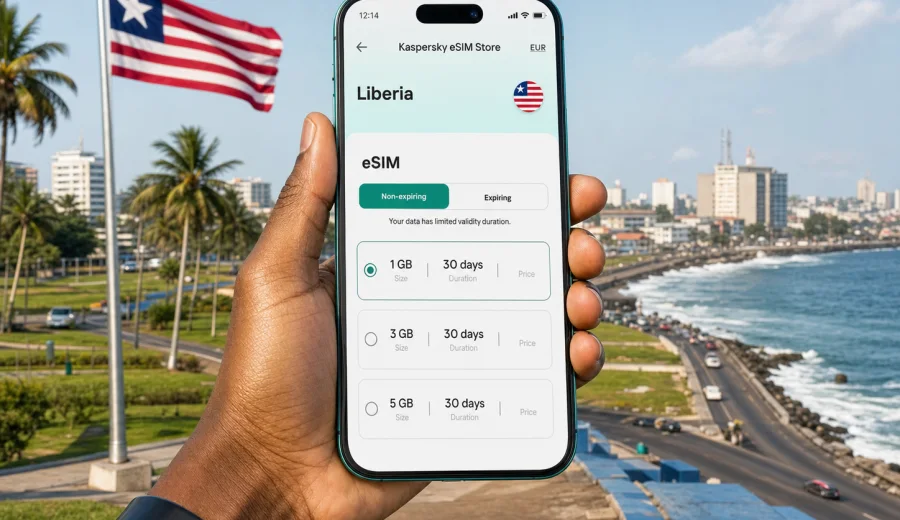
eSIM for Liberia: mobile connection and internet for a calmer trip
Liberia is a destination where mobile internet can make everyday travel much easier. You may need a map when leaving Roberts International Airport, a ride-hailing or taxi contact in Monrovia, a messenger chat with your hotel, a payment confirmation, or a quick check of your route before heading toward the coast or inland roads. In these moments, waiting to find a SIM card shop or depending only on public Wi-Fi can slow down the first hours of the trip.
An eSIM helps you prepare mobile internet before you travel, as long as your phone supports eSIM and the selected tariff covers your destination. Instead of inserting a plastic SIM card, you install a digital profile on your device, activate it when needed, and use mobile data through the chosen eSIM tariff. For many visitors, this is a practical way to stay online in Liberia while keeping the primary SIM card in the phone for calls, banking messages, or two-factor authentication.
This guide explains how to plan eSIM internet for Liberia, what to check before buying a tariff, how much data you may need, and how to avoid the most common setup mistakes. It focuses on country-level travel scenarios, including Monrovia, airport arrival, business trips, short visits, longer stays, and routes outside the capital.
Why mobile internet matters in Liberia
Liberia is not a destination where every travel step should depend on finding a stable Wi-Fi network. Hotels, offices, cafes, and public places may have Wi-Fi, but quality can vary. Even when Wi-Fi is available, you may still need mobile data between locations, during airport transfers, while communicating with hosts, or when checking maps in unfamiliar neighborhoods.
Mobile internet is especially useful for:
- opening maps and saving routes before moving around Monrovia;
- messaging drivers, colleagues, hosts, guides, or family;
- checking hotel details and booking confirmations;
- using translation, email, banking, and travel apps;
- sharing documents during a business visit;
- staying reachable if plans change during the day.
For a first trip, the key advantage of eSIM is preparation. You can choose a data tariff before departure, install the eSIM profile on a compatible device, and understand the plan conditions in advance. This does not remove the need to check coverage, device settings, or tariff details, but it gives you a more controlled start than looking for a physical SIM card immediately after arrival.
What an eSIM does during a Liberia trip
An eSIM is a digital SIM profile built into many modern smartphones and some tablets. In a travel context, it is usually used for mobile data. You choose a country or regional tariff, install the profile, and enable it for data when you want to use it.
For Liberia, that means you can prepare a data connection for tasks such as navigation, messaging, email, and app-based calls. A travel eSIM usually does not replace a full local phone subscription. Voice calls and SMS are not included unless the specific tariff says so. If you need calls, plan to use internet-based calling apps or keep your usual SIM active for incoming messages and account verification.
| Travel need | How eSIM helps | What to check |
|---|---|---|
| Airport arrival | Data can be ready shortly after landing if installed correctly | Activation rules and device settings |
| Monrovia meetings | Email, maps, messengers, document access | Data allowance and validity period |
| Hotel changes | Booking apps and directions remain available | Whether mobile data is enabled for the eSIM |
| Longer stay | A larger data package can reduce top-up pressure | Validity, recharge options, and usage habits |
| Two-SIM setup | Primary SIM can stay in the phone | Which line is used for data, calls, and messages |
The practical point is simple: eSIM is not magic coverage and it is not a guarantee that every road or building will have the same signal. It is a way to prepare mobile internet access through a selected tariff without handling a physical SIM card.
Before you buy: device compatibility comes first
The most important check is your device. Not every phone supports eSIM, and some models are restricted by region, carrier lock, or device configuration. Before choosing a tariff, confirm that your phone or tablet supports eSIM and can use it while travelling abroad. You can check your device before you continue.
Also review these points:
- Your phone should be unlocked for use with other mobile services.
- The operating system should be updated enough to support eSIM installation.
- You should have a stable internet connection for the initial installation.
- You should understand whether the eSIM activates immediately after installation or only after connecting in the destination.
- You should not delete the eSIM profile unless you are sure it can be reinstalled under the tariff conditions.
If you travel with a work phone, ask your company whether eSIM installation is allowed. Corporate device management can sometimes limit mobile plan changes, QR code scanning, or profile installation.
How much data do you need in Liberia?
The right package depends on your trip length and habits. A traveler who uses maps, messengers, email, and occasional web browsing needs far less data than someone who watches video, backs up photos, uses cloud storage, or shares a hotspot with a laptop.
Use this planning table as a starting point:
| Usage style | Typical activities | Practical data approach |
|---|---|---|
| Light | Maps, chat, email, booking apps | Choose a smaller package and use hotel Wi-Fi for heavy tasks |
| Moderate | Daily maps, photos in messengers, work email, browsing | Choose a mid-size package with enough validity for the full stay |
| Heavy | Video calls, cloud documents, social media uploads | Choose more data and monitor usage daily |
| Business | Email, file sharing, hotspot for laptop, calls through apps | Prioritize enough data and validity over the smallest package |
| Family travel | Several devices and shared planning | Consider separate eSIMs or a larger package if hotspot use is allowed |
Data can disappear quickly if background sync is active. Before departure, review automatic photo backup, app updates, cloud storage, podcast downloads, and video autoplay. Small settings changes can save a meaningful amount of traffic during a trip.
When to install and when to activate
A good setup usually has two stages: install before travel, activate when the tariff rules make sense. Some eSIM tariffs start counting validity after installation, while others start after the eSIM first connects to a supported network in the destination. Because conditions vary, read the selected tariff details before installing.
A cautious setup flow looks like this:
1. Confirm that your phone supports eSIM and is not locked.
2. Choose Liberia as the destination and compare data volume, validity, and price.
3. Install the eSIM while you still have reliable Wi-Fi.
4. Keep your primary SIM active if you need calls or SMS.
5. On arrival, select the eSIM line for mobile data.
6. Enable data roaming for the eSIM if the installation instructions require it.
7. Test maps, messaging, and browser access before leaving the airport or hotel.
If you prefer a written setup guide, follow the Android installation instructions or the iOS installation instructions before your departure day. Installing calmly at home or in the hotel lobby is easier than doing it in a taxi queue with low battery.
Liberia travel scenarios where eSIM is useful
Arrival at Roberts International Airport
Many visitors arrive through Roberts International Airport and then continue toward Monrovia or another destination. This is a moment when mobile data is useful right away. You may need to contact a driver, confirm an address, message your hotel, or share your arrival time. With eSIM prepared in advance, you can focus on getting oriented instead of searching immediately for a SIM counter or Wi-Fi password.
Keep a screenshot of your hotel address, driver details, and booking confirmation before landing. Even with eSIM prepared, this backup helps if your phone needs a restart or the mobile network takes a few minutes to register.
Staying in Monrovia
In Monrovia, mobile internet helps with maps, transport coordination, restaurant searches, business messages, and everyday logistics. If you move between meetings, hotels, offices, and coastal areas, a data connection can reduce the friction of asking for directions or waiting for Wi-Fi at each stop.
For business travelers, the main benefit is continuity. You can keep email, calendar updates, team chats, and document links available while moving between appointments. If you use a laptop, check whether the tariff allows tethering before relying on hotspot mode.
Trips beyond the capital
When travelling outside Monrovia, plan more conservatively. Coverage and speed may vary by area, weather, building density, and local network conditions. Download offline maps, save important addresses, and avoid leaving essential information only inside apps that require a live connection.
An eSIM can still be useful on regional routes, but it should be part of a broader preparation plan: charged power bank, offline documents, local contacts, and clear expectations about when data may be slower or unavailable.
Choosing a tariff for Liberia
Once you know your device is compatible and you have a rough data estimate, compare the available options by four practical criteria: data volume, validity, destination coverage, and whether the conditions match how you travel.
Do not choose only by the smallest number on the price line. A package that is too small can create stress during the trip, while a package with too much data may be unnecessary for a short visit. Think about the days when you will rely on mobile internet most: arrival, transfers, business meetings, route changes, and departure.
For a trip where you want the plan ready before arrival, you can use Kaspersky eSIM Store to choose an eSIM tariff for Liberia and review the available data and validity options before you travel.
The best tariff is the one that matches your real routine. If most heavy tasks happen on hotel Wi-Fi, a moderate mobile package may be enough. If your work depends on video calls and file access while moving around, choose more data and monitor usage from the first day.
Practical checklist before departure
Use this checklist a day or two before your flight:
- Confirm that your phone supports eSIM.
- Check that the device is not locked to one carrier.
- Update the operating system if needed.
- Choose a Liberia tariff with enough data and validity.
- Install the eSIM while you have stable Wi-Fi.
- Save the installation details in case you need to review them.
- Decide which SIM line will handle mobile data.
- Turn off unnecessary background data usage.
- Download offline maps for Monrovia and any regional routes.
- Keep your passport, booking, insurance, and address details available offline.
- Pack a charger and power bank for long travel days.
This preparation takes a few minutes, but it can prevent the most common travel connectivity problems: no data at arrival, wrong SIM selected for mobile data, fast data drain from background apps, and confusion about whether the plan has started.
eSIM versus roaming and local SIM cards
There is no single best option for every traveler. Roaming, local SIM cards, and eSIM each have trade-offs. The right choice depends on trip length, budget, device support, and how much you value preparation before arrival.
| Option | Strengths | Limits |
|---|---|---|
| Standard roaming | Uses your existing SIM and phone number | Conditions can be expensive or unclear, depending on your operator |
| Local physical SIM | Can be useful for longer stays and local calling needs | Requires purchase on arrival and may involve paperwork or store visits |
| Travel eSIM | Can be prepared before the trip and used without a plastic SIM | Requires compatible device and careful reading of tariff conditions |
For short visits, business trips, and travelers who want to avoid an extra store visit, eSIM is often the most convenient option. For longer stays where a local number is essential, a local SIM may still be useful. Some travelers use both: eSIM for data from arrival and a local SIM later if they need local voice services.
Managing data during the trip
Even a generous data package works better when you manage it deliberately. Liberia travel days can involve navigation, messaging, photos, and long transfers, so it is worth reducing background traffic.
Useful habits:
- Use offline maps for planned routes.
- Send compressed photos in messengers when quality is not critical.
- Disable automatic app updates on mobile data.
- Pause cloud photo backup until Wi-Fi is available.
- Use video calls only when the signal is stable and the call is necessary.
- Check mobile data usage in phone settings every day or two.
- Keep important documents available offline.
If your phone supports data limits or warnings, set a reminder at 50 percent and 80 percent of your package. This gives you time to adjust behavior or choose another package if your trip lasts longer than expected.
Common eSIM setup mistakes
Most eSIM problems come from small setup details. The good news is that many of them are easy to avoid.
| Mistake | Why it causes trouble | Better approach |
|---|---|---|
| Buying before checking compatibility | The phone may not support eSIM | Check the device first |
| Installing in a rush | Poor Wi-Fi or low battery can interrupt setup | Install with stable Wi-Fi and enough battery |
| Selecting the wrong data line | The phone may keep using the primary SIM | Set the eSIM as the mobile data line |
| Forgetting data roaming | Some travel eSIMs need roaming enabled | Follow the tariff instructions carefully |
| Deleting the eSIM profile | Reinstallation may not always be available | Keep the profile until the trip is finished |
| Ignoring background data | Apps can use data silently | Limit updates, sync, and video autoplay |
If mobile data does not work after arrival, check the basics first: airplane mode off, eSIM line enabled, correct data line selected, data roaming setting, and signal registration. Restarting the phone can also help it register the mobile profile correctly.
Short answers to common questions
Can I use eSIM in Liberia for calls and SMS?
Most travel eSIM tariffs are focused on mobile data. Calls and SMS are not included unless the selected tariff clearly says so. For voice communication, use internet-based calling apps or keep your main SIM active.
Can I install the eSIM before I fly?
Usually, yes, and it is often the easiest approach. Check the tariff details because validity may start at different moments depending on the plan conditions.
Will eSIM replace hotel Wi-Fi?
It can reduce dependence on Wi-Fi, but it does not have to replace it. Use Wi-Fi for large downloads, backups, and long video calls when it is reliable.
Can I share data with my laptop?
Hotspot availability depends on the selected tariff and device settings. Check the plan conditions before relying on tethering for work.
What should I do if my route includes areas outside Monrovia?
Download offline maps, save addresses, keep contacts available offline, and expect coverage to vary. Use mobile data as a helpful tool, not as the only copy of essential information.
Final preparation for mobile internet in Liberia
The best time to solve travel connectivity is before the first moment you urgently need it. Check eSIM compatibility, choose a tariff that matches your data habits, install the profile with stable Wi-Fi, and keep offline backups of key documents. This gives you a calmer start in Liberia and makes daily movement easier, whether you are in Monrovia for meetings, arriving for a short visit, or travelling beyond the capital.
Kaspersky eSIM Store is an app and website where you can quickly choose, arrange, and activate an eSIM with a suitable mobile data tariff for an international trip. Before departure, review the available options and prepare an eSIM tariff for your Liberia trip so mobile internet is one less thing to solve after arrival.