Travel connectivity guide
Libreville eSIM: Mobile Internet Guide for Gabon
Libreville eSIM: Mobile Connection and Internet for Your City Trip
Libreville is Gabon’s capital, set along the Atlantic coast beside the Gabon Estuary. A visit can combine airport transfers, meetings across a spread-out city, walks by the waterfront, markets and museums, or a boat trip toward Pointe Denis on the opposite side of the estuary. Mobile internet is useful throughout these changing plans: for checking an address before leaving, messaging a host, confirming a pickup, navigating between appointments and keeping a copy of travel details close at hand.
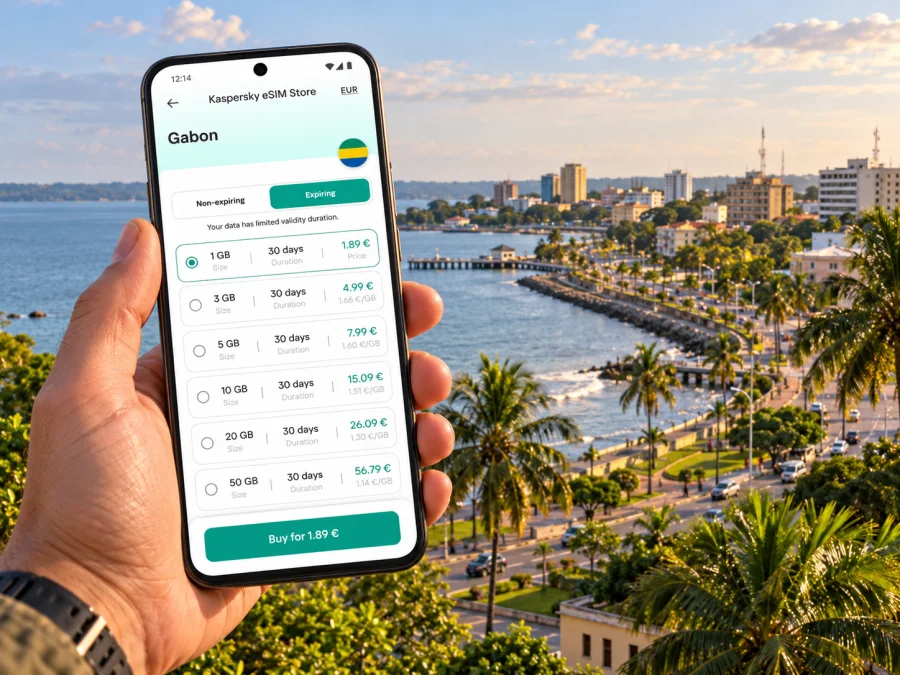
An eSIM can make the data part of that preparation simpler. It is a digital SIM profile installed on a compatible device, so you can arrange a data plan for Gabon without inserting another physical SIM. Kaspersky eSIM Store is an app and website where you can choose, purchase and activate an eSIM with a suitable plan for an international trip. The plan’s coverage, data allowance, validity and supported network depend on the specific offer and local partner arrangements; check the terms shown for the plan before you buy.
What mobile internet helps with in Libreville
Libreville’s coastal layout makes it useful to have directions and contact details available while you are moving between places. A map can help you check the route from Léon Mba International Airport to your accommodation, while messaging helps coordinate with a driver or meeting host. During the day, you may want to look up a location, translate a short phrase, confirm a reservation or share an updated arrival time.
A practical connection plan is especially helpful when your schedule changes. A meeting may finish later than expected, a restaurant may suggest another location, or a short stop by the waterfront may turn into a longer walk. Mobile data lets you check details as they change, without relying on finding an open Wi-Fi network each time.
Typical tasks where mobile data is useful include:
- opening maps and saving a route before leaving your hotel;
- contacting a driver, colleague or accommodation host through an internet messaging app;
- checking a booking confirmation, boarding pass or appointment address;
- viewing a translation, currency conversion or local weather forecast;
- sharing your location or a revised meeting time with someone travelling with you;
- looking up current information before planning a trip beyond the city.
An eSIM plan for travel is generally designed for mobile data. It does not automatically provide a local Gabonese phone number, ordinary voice calls or SMS; those are included only if the individual plan says so. Keep your usual number available for calls or texts if needed, and use internet-based messaging for data communications when appropriate.
Arrival at Léon Mba International Airport
Léon Mba International Airport (LBV) is Libreville’s airport. Its official passenger information lists services including taxis, car rental, Wi-Fi, an information desk, banks and foreign exchange. The airport also has arrival and departure information online. These facilities can be useful, but availability and opening hours may change, so confirm time-sensitive details with the airport or your transport provider before travel.
Before landing, save the address of your hotel or first appointment in a format you can show offline. If someone is meeting you, agree on a clear pickup point and exchange a working contact method before the flight. Once you have access to mobile data, you can message if your arrival time or baggage collection takes longer than expected. For a taxi or pre-arranged car, confirm the destination and fare arrangement directly with the driver or provider rather than assuming that a map estimate is a final price.
A low-stress arrival checklist
- Save your accommodation address and booking reference offline.
- Keep your passport, entry documents and essential contacts accessible without a data connection.
- Decide in advance how you will contact your driver or host.
- Check that your phone can use an eSIM and is not locked to a carrier.
- Install the travel eSIM while you have reliable internet, if the plan’s instructions allow it.
- After landing, select the intended line for mobile data and confirm the plan’s activation conditions.
Installing a profile and starting its validity period are not always the same event. Plan rules can differ: some begin when the eSIM first connects to a supported network, while others specify another activation point. Read the exact plan terms so you know when the validity clock starts. If you prefer to install the eSIM before departure but use it only after arrival, follow the plan’s instructions for when to enable it and when to allow data roaming.
Moving around the city
Libreville stretches along the sea, with the airport to the north of the central area and routes that can take longer than expected depending on traffic and the time of day. Rather than relying on one saved route for the whole visit, check the destination and estimated journey shortly before leaving. Keep the name and address of the next stop written down as well: a map pin is convenient, but a readable address can help if a driver needs clarification.
The official airport visitor guide describes the city through its waterfront, central monuments, markets and neighbourhoods. Boulevard Triomphal, the seafront, the Mont-Bouët market, Saint-Michel Church in Nkembo and the Museum of Arts and Traditions are among the places it highlights. Treat this as a starting point for choosing an itinerary, then check opening times, access and current local guidance before setting out.
| Trip purpose | Useful preparation | How mobile data can help |
|---|---|---|
| Airport to hotel | Save the address and agree on pickup details | Message your host if plans change; reopen the route |
| Meetings in different areas | Keep addresses and calendar notes together | Check the next route and update colleagues |
| Market or museum visit | Confirm the location and visit details | Find the destination and contact your group |
| Waterfront walk | Download an offline map as backup | Use live directions and share your location |
| Day trip outside the centre | Confirm transport and return plan in advance | Check updates and contact your provider while connected |
For a day of appointments, group your stops geographically where possible. Add each address to a saved list, leave enough time between meetings and check routes again before departing. If a map suggests an unfamiliar shortcut or a road appears closed, use local advice and choose a clear main route. A phone is a useful planning tool, but it cannot replace judgement about road conditions, personal safety or transport arrangements.
Choosing a data plan for a city stay
Estimate your likely use before choosing a plan. Navigation, messaging, email and occasional browsing are relatively light tasks compared with video calls, streaming or uploading large files. If your hotel has reliable Wi-Fi and you intend to use it for downloads or video, you may need less mobile data than someone working on the move throughout the day.
Think about the whole itinerary rather than the city name alone. A plan may cover Gabon as a country, while your trip could include Libreville and other destinations. Check the plan’s stated destination coverage and validity against every stop on your route. A plan listing Gabon should not be read as a promise of identical signal in every neighbourhood, building or remote area. Mobile service depends on the local network, terrain, indoor conditions, congestion and the agreement used by the travel eSIM.
In Gabon, the mobile market includes Airtel Gabon and Moov Africa Gabon Télécom. The fact that these operators serve the country does not by itself establish which network a particular travel eSIM will use in Libreville, nor guarantee a specific level of service. Check the operator or roaming information associated with the individual offer when it is provided, and use the plan’s stated coverage details as the deciding reference. A phone showing a network name is not proof that every service or speed will be available everywhere.
When comparing plans, review these details together:
- Destination: Does the plan explicitly include Gabon, and does it fit the full route?
- Data allowance: Is the allowance appropriate for maps, messages, work and any video use?
- Validity: Does the validity period cover your arrival, city stay and onward travel?
- Activation: What event starts the plan, and does it need manual activation or data roaming?
- Network and service: Which local partner details are listed, if any, and what limitations apply?
- Top-ups and support: Can you add data if needed, and how can you get help with activation?
If you are still comparing options, review eSIM plans for a trip to Gabon and use the displayed plan terms to match your dates and expected data use. The city is the focus of your stay, but choosing the country destination ensures the selected plan is intended for the correct national market.
Device compatibility: check the exact model
Not every phone that looks similar supports eSIM. Support can vary by manufacturer, model number, sales region and carrier-lock status. Some product families have regional variants with different SIM hardware; a model name alone is not enough to confirm compatibility. Check the exact device variant in its settings or manufacturer documentation, then check whether your device supports eSIM before purchase. Also confirm the phone is unlocked for use with another provider’s profile.
If your phone has a physical SIM and an eSIM, you can often keep both profiles available, but how the lines work together depends on the model and settings. Set the travel eSIM as the line for mobile data when you intend to use it. Keep calls and SMS on your regular SIM if that suits your needs, and review any roaming charges that could apply to that line. Avoid turning off a line you need for account verification or essential calls.
A few checks before departure can prevent avoidable setup problems:
- confirm that the exact regional variant supports eSIM;
- confirm that the device is not carrier-locked;
- install operating-system updates while you have stable Wi-Fi;
- make sure you can open the eSIM instructions and QR code or activation details;
- keep the order confirmation available offline or in your email app;
- know which line is selected for mobile data and whether data roaming is required by the plan.
Installing and activating your eSIM
If possible, install the eSIM before travelling, while you have a stable Wi-Fi connection and time to follow the prompts. Have your order details ready, and do not delete an installed profile to troubleshoot unless the plan’s support instructions tell you to; some profiles cannot simply be reinstalled after removal. The exact menu names differ between device brands and operating-system versions, so follow the steps displayed on your phone and the plan instructions.
A general setup sequence is:
- Open the eSIM or mobile network section in your phone’s settings.
- Choose the option to add a mobile plan or eSIM.
- Scan the QR code or enter the activation details provided for your order.
- Label the new profile, for example “Gabon travel data,” so you can identify it.
- Select the travel profile for mobile data when you are ready to use the plan.
- Enable data roaming for that profile only if the plan instructions require it.
- Check that the phone has registered on a supported network and test a simple webpage or message.
For device-specific steps, use the Android eSIM installation instructions or the iOS eSIM installation instructions. The plan may require a short wait before it connects. If it does not work, check that the profile is enabled, mobile data is assigned to the intended line, the destination is included and the plan is active. Then restart the phone if the instructions recommend it and contact support with your order information if the issue remains.
Practical itineraries and connection habits
One day between arrival and departure
For a short stop, keep the plan simple. Save your accommodation and the place you most want to see; avoid packing the schedule with distant stops. Keep your onward flight details offline, check the return journey before leaving your hotel and leave a buffer for the trip back to the airport. Use mobile data for maps and messages, and avoid large downloads unless you have confirmed the allowance.
A trip toward Pointe Denis
Pointe Denis lies across the Gabon Estuary from Libreville and is reached by boat. That makes it a separate excursion rather than another neighbourhood stop. Confirm the departure point, crossing arrangements, return time, weather considerations and payment details with your chosen provider in advance. Do not assume that a city mobile plan will have the same signal on the water or at the destination as it does in central Libreville. Save the provider’s contact details and key arrangements before boarding.
Continuing beyond Libreville
If you are travelling onward within Gabon, check that your eSIM plan includes each destination and the full period of travel. The country’s geographic scale and varied terrain mean that a city-focused connection should not be treated as a guarantee of coverage on every road or in every park. Download maps and reservations for offline access, confirm transport with the operator and carry a power bank if you expect a long day away from a charger.
When the connection is slower or unavailable
- move to a more open location and wait briefly for the network to refresh;
- confirm that the travel eSIM is switched on and selected for data;
- check that the plan is valid and the data allowance has not been used;
- verify the destination and any network selection instructions in the plan details;
- toggle airplane mode briefly or restart the phone if appropriate;
- use saved offline information while you troubleshoot.
Do not repeatedly delete and reinstall an eSIM profile unless support confirms it is safe. Keep essential travel details accessible offline and arrange a backup contact method for time-critical plans. If your itinerary depends on connectivity, tell your host or colleague how to reach you if mobile data is temporarily unavailable.
Frequently asked questions
Is Libreville in Gabon or in the Republic of the Congo?
Libreville is the capital of Gabon, in the province of Estuaire, on the right bank of the Komo estuary. It is distinct from Brazzaville, the capital of the neighbouring Republic of the Congo.
Will one Gabon plan work at every place I visit?
A plan’s destination listing describes the intended market, not guaranteed signal at every location. Coverage and performance can vary by local network, site, terrain, building and roaming arrangement. Check the plan details for the included destination and local network information.
Does a travel eSIM include a Gabonese number?
Usually, a data-focused travel eSIM is for mobile internet and does not include a regular local phone number, voice calls or SMS unless the plan specifically lists those services. You can continue using your usual number separately, subject to your home carrier’s charges and phone settings.
Can I install the eSIM before I arrive?
Often, yes, if the plan permits advance installation and you have a stable internet connection. Installation timing and the point when validity begins depend on the specific plan. Read its instructions and avoid enabling data use before you intend to start the plan if the terms make activation dependent on first network connection.
What if my phone supports eSIM only in some regional versions?
Check the exact model or part number for the device you own, including its region of sale. Do not rely on a family name or on another person’s version of the same phone. Carrier locks can also prevent a compatible phone from accepting a travel profile.
How much data should I choose?
Base the allowance on your own habits and trip length. Messaging, route checks and email generally use less data than video calls, streaming or frequent photo uploads. If you expect to work online, estimate that use separately and review the plan’s top-up rules.
Prepare your Libreville connection before you go
A little preparation makes arrival and city travel easier: save addresses offline, agree on transport details, check your exact device variant, and choose a Gabon plan whose coverage, allowance and validity match your itinerary. Keep the eSIM instructions and order details available, then activate the travel profile when the plan’s terms say it is time to use it.
Use Kaspersky eSIM Store, the app and website for choosing, purchasing and activating an eSIM for an international trip. Choose an eSIM plan for your trip to Gabon, review its terms, and complete setup before you need directions from the airport or between appointments in Libreville.


