
Travel connectivity guide
eSIM in Liechtenstein: mobile internet guide
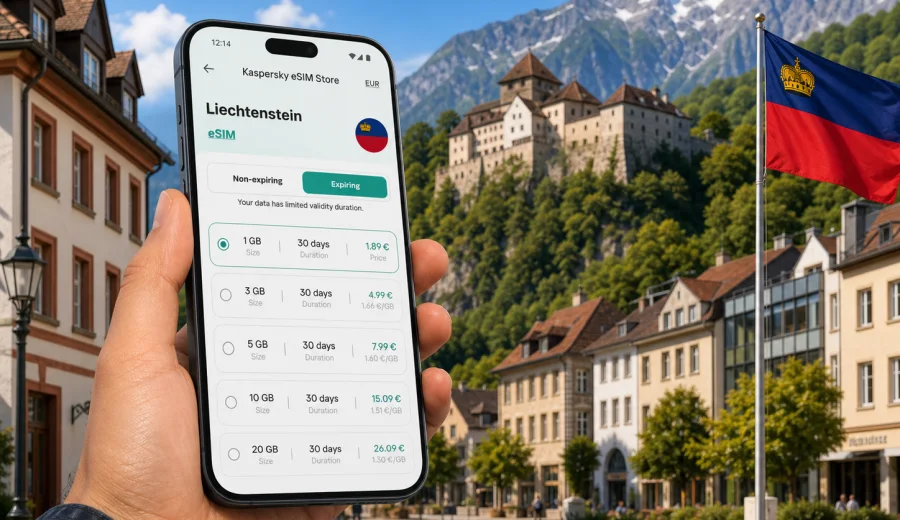
eSIM in Liechtenstein: mobile connection and internet for your trip
Liechtenstein is small on the map, but it is not a place where mobile internet is optional. A typical visit can include border crossings from Switzerland or Austria, a walk through Vaduz, mountain viewpoints above Triesenberg, museums, hotel check-ins, restaurant bookings, digital train tickets, navigation through Alpine roads, and messaging with people at home. A stable mobile connection helps you handle all of that without depending on hotel Wi-Fi or looking for a local SIM shop after arrival.
An eSIM is a practical way to prepare mobile internet for Liechtenstein before the trip. Instead of inserting a physical SIM card, you add a digital SIM profile to a compatible smartphone or tablet, choose a data package, and use mobile data when you need it. For many travelers, this is especially useful in Liechtenstein because the country is often part of a wider route: Zurich to Vaduz, Innsbruck to Feldkirch and Schaan, a Switzerland-Austria road trip, or a short business visit across the Rhine Valley.
Kaspersky eSIM Store is an app and website where you can quickly choose, arrange, and activate an eSIM with a suitable mobile internet tariff for an international trip. It is designed for the travel scenario: you select the destination, check the data amount and validity period, install the eSIM on a compatible device, and manage the plan through the site or app.
Why mobile internet matters in Liechtenstein
Liechtenstein is compact, but it rewards movement. You may arrive by train and bus through Sargans, Buchs, Feldkirch, or Zurich Airport, then move between Vaduz, Schaan, Balzers, Triesen, Malbun, and smaller villages. The distances are short, yet travel decisions often depend on live information: bus departures, route changes, weather in the mountains, parking rules, opening hours, and payment confirmation screens.
Mobile internet is useful in everyday travel moments:
- opening maps while walking from Vaduz Post to the castle viewpoint;
- checking regional transport connections between Switzerland, Austria, and Liechtenstein;
- using messengers when your group splits between a museum, a cafe, and a hotel;
- confirming accommodation details without asking for public Wi-Fi;
- checking cloud documents for a business meeting in Schaan or Vaduz;
- translating menus, parking signs, or short administrative notices;
- uploading photos only when your data package allows it.
The main advantage is control. You can plan your data use before arrival, keep your primary SIM for calls if you need it, and use the eSIM for mobile internet during the trip. That separation is helpful when you want to avoid surprises from standard roaming, especially on routes where your phone may move between networks near borders.
What an eSIM changes for a Liechtenstein trip
With a physical SIM card, you usually need to find a shop, present yourself at a counter, understand the available options, and swap cards or carry a SIM tool. With an eSIM, the setup is digital. You install a profile on a compatible device and use it for data when the trip begins.
For Liechtenstein, eSIM is useful for three common travel styles:
| Travel style | Typical route | Why eSIM helps |
|---|---|---|
| Short city visit | Vaduz, Schaan, Balzers | Enough data for maps, payments, messaging, and tickets without buying a physical SIM |
| Alpine weekend | Malbun, Triesenberg, hiking routes | Weather checks, navigation, hotel communication, and photo sharing with controlled data use |
| Cross-border route | Switzerland, Liechtenstein, Austria | Easier preparation before moving between countries and transport systems |
An eSIM data plan usually focuses on mobile internet. It may not include a regular phone number, voice calls, or SMS unless those options are clearly stated in the tariff conditions. For calls and messages, many travelers use internet-based apps over mobile data. Before purchase, check the selected plan terms, validity period, destination, and whether tethering is important for your trip.
Check your device before choosing a plan
Before you choose a tariff, confirm that your device supports eSIM and is not locked to a mobile operator. This is a practical step, not a formality. If your phone cannot install an eSIM profile, the plan will not solve your connectivity problem on arrival.
Use the compatibility check before you pay: check your device.
Also check these points:
- your phone or tablet supports eSIM in the model variant you own;
- the device is not carrier-locked;
- you have a stable internet connection for the initial installation;
- your operating system is up to date enough for eSIM management;
- you know which SIM will be used for mobile data after activation;
- you understand whether data roaming needs to be enabled for the eSIM profile.
If you travel with two devices, decide which one needs the eSIM. A work phone may be better for business email and maps; a personal phone may be better for tickets, banking apps, and family communication. In many cases, it is simpler to install the eSIM on the device you will carry every day, not on a tablet left in the hotel.
How much data to plan for Liechtenstein
Data needs vary by traveler, but Liechtenstein trips are usually easy to estimate because stays are often short and routes are compact. The biggest difference is whether you use mobile data only for practical tasks or also for heavy media.
| Use case | Light use | Moderate use | Heavy use |
|---|---|---|---|
| Maps and route checks | Low | Low to medium | Medium |
| Messaging and email | Low | Medium | Medium |
| Video calls | Medium | High | High |
| Photo backup | Medium | High | Very high |
| Streaming video | High | Very high | Very high |
| Laptop tethering | Medium | High | Very high |
For a one-day visit, a smaller package can be enough if you mainly use maps, messages, tickets, and searches. For a long weekend, choose more data if you plan to upload photos, make video calls, or use your phone as a hotspot. For business travel, consider the risk of unexpected downloads, cloud files, and online meetings. A plan that looks generous on paper can disappear quickly if a laptop starts syncing over tethering.
The safest approach is to estimate your daily needs, add a margin, and then choose a validity period that matches your stay. Do not select only by price. The best tariff for your trip is the one that matches your route, data habits, and travel dates.
Choosing an eSIM tariff before arrival
Liechtenstein does not have a large international airport, so many visitors enter through nearby Swiss or Austrian hubs. That makes preparation valuable. If you install your eSIM before leaving home, you can arrive with your mobile internet setup already organized and avoid solving connectivity while carrying luggage or changing trains.
When you are ready to compare options, you can choose an eSIM tariff for your trip to Liechtenstein through Kaspersky eSIM Store. Review the data volume, validity period, destination coverage, price, and activation details before confirming the order.
Use this checklist when comparing plans:
- Destination: make sure the plan is suitable for Liechtenstein.
- Validity: match the plan duration with your actual travel dates.
- Data volume: allow enough for maps, messaging, bookings, and any work tasks.
- Activation rules: check when the validity period starts.
- Device support: confirm eSIM compatibility before purchase.
- Hotspot needs: check whether you expect to share data with a laptop or tablet.
- Backup access: keep hotel addresses and key tickets available offline as well.
This kind of preparation matters most on short trips. If you only have a few hours in Vaduz, you do not want to spend the first part of the visit searching for Wi-Fi, opening roaming settings, or trying to understand a new local offer at the border.
How to install and activate eSIM
The usual process is simple, but it is worth doing it carefully. Install the eSIM while you still have a stable internet connection. This can be at home, in your hotel, or anywhere with reliable Wi-Fi. After installation, you can choose when to use the eSIM for mobile data according to the plan instructions.
General setup steps:
1. Check that your device supports eSIM and is unlocked.
2. Choose the destination and suitable data package.
3. Complete the order and open the installation details.
4. Add the eSIM profile to your phone.
5. Label the line, for example "Liechtenstein data".
6. Set mobile data to the eSIM when you want to start using it.
7. Enable data roaming for the eSIM if the plan instructions require it.
8. Keep your primary SIM selected for calls if you still need your usual number.
For device-specific setup, use the official installation guides: Android installation guide and iOS installation guide.
Do not delete the eSIM profile after activation unless you are sure you no longer need it. Some eSIM profiles cannot be transferred to another device or reinstalled after removal, depending on the plan conditions. If something does not look right, check the instructions or contact support before deleting the profile.
Practical scenarios in Liechtenstein
A one-day stop in Vaduz
You arrive from Zurich, Sargans, Buchs, or Feldkirch, leave luggage at a hotel or station locker, and spend the day in Vaduz. Mobile internet helps with bus connections, museum opening times, walking routes, restaurant searches, and payment confirmation. A light data package may be enough if you avoid streaming and large uploads.
A weekend in Malbun and the mountains
Mountain travel changes data habits. Weather checks, route planning, hotel messages, and map use become more important. Download offline maps where possible, but keep mobile internet available for changes. If you share photos or make video calls in the evening, choose a larger data package.
A business visit to Schaan or Vaduz
Business travelers often need more predictable connectivity. Email, cloud documents, video calls, ride coordination, and authentication apps can all depend on mobile data. If you use a laptop hotspot, choose your tariff with extra care. A meeting day can consume more data than a sightseeing day.
A Switzerland-Liechtenstein-Austria route
Many travelers cross borders without thinking about it, especially by train, bus, or car. Your mobile settings should be clear before you move. Know which SIM is handling mobile data, keep roaming settings aligned with the eSIM instructions, and check whether your plan is country-specific or regional. If you visit several countries, a regional plan may be worth comparing with a country plan.
What to do before departure
A good eSIM setup is part of travel preparation, just like tickets and accommodation. Use the following list before you leave:
- Install the eSIM profile while you have stable internet.
- Save the QR code or installation details where you can access them if needed.
- Keep your hotel address, transport tickets, and booking references offline.
- Check whether your banking and messenger apps work on mobile data.
- Turn off automatic cloud backup if you want to protect your data allowance.
- Download offline maps for Vaduz, Schaan, Malbun, and your cross-border route.
- Confirm which line is used for calls and which line is used for mobile data.
- Take a screenshot of key settings after setup.
The goal is not to make the trip technical. The goal is to remove small points of friction before they become annoying. When your mobile connection is prepared, you can focus on the route, schedule, and people you are meeting.
Common mistakes to avoid
The most common eSIM mistakes are easy to prevent:
| Mistake | Why it causes problems | Better approach |
|---|---|---|
| Buying before checking compatibility | The device may not install eSIM | Check support and carrier lock status first |
| Choosing too little data | Maps, cloud files, and calls can use more than expected | Estimate daily use and add a margin |
| Installing in a hurry at the border | Weak Wi-Fi or stress can slow setup | Install before the trip when possible |
| Forgetting mobile data settings | The phone may keep using the wrong SIM | Label lines and set the eSIM for data |
| Deleting the eSIM too early | Reinstallation may not be available | Keep the profile until the trip is over |
| Letting apps sync freely | Background data can drain the plan | Restrict cloud backup and large updates |
One more detail matters in border regions: if you keep your home SIM active, watch which line is using mobile data. Modern phones make dual-SIM travel convenient, but the settings must be clear. Give each line a simple label and review the data line after landing or crossing the border.
eSIM, roaming, and public Wi-Fi
Standard roaming is convenient because it uses your regular SIM, but prices and data conditions depend on your home operator. Public Wi-Fi can be useful in hotels and cafes, but it is not always available when you need maps, tickets, or messaging outdoors. A travel eSIM gives you another option: a prepaid mobile data setup for the destination.
The practical comparison looks like this:
| Option | Strength | Limitation |
|---|---|---|
| Standard roaming | Uses your existing number and SIM | Conditions depend on your home operator |
| Public Wi-Fi | Useful in hotels, offices, and cafes | Not reliable for movement between places |
| Local physical SIM | Can be useful for longer stays | Requires shop visit and physical card handling |
| Travel eSIM | Digital setup and clear data package | Requires a compatible, unlocked device |
For many Liechtenstein trips, eSIM is not about replacing every other option. It is about having mobile internet ready when you are between Wi-Fi zones, moving across borders, or trying to solve a practical task quickly.
FAQ
Can I use eSIM in Liechtenstein for calls and SMS?
Most travel eSIM plans are focused on mobile internet. A regular phone number, voice calls, or SMS may not be included unless the selected tariff says so. You can usually use messaging and calling apps over mobile data.
Should I activate the eSIM before or after arrival?
Install the eSIM while you have stable internet. Then follow the plan instructions about activation and data use. Some plans start validity only after connecting to a supported network, while others may have different conditions. Read the details before you travel.
Is eSIM useful for a one-day visit?
Yes, if you need maps, tickets, messaging, searches, or payment confirmations during the day. For very light use, choose a smaller data package and avoid streaming or large uploads.
What if my phone shows no mobile data?
Check that the eSIM line is enabled, selected for mobile data, and allowed to use data roaming if the instructions require it. Restarting the phone can also help after setup. Do not delete the eSIM profile as a first step.
Can I share eSIM data with a laptop?
It depends on the selected plan and device settings. If tethering is important for work, check the plan conditions and choose enough data for laptop use.
Do I need a separate eSIM for every country on my route?
Not always. If your trip includes several countries, compare country-specific and regional options. For a Liechtenstein-only stay, a country plan may be simple. For a wider route through Switzerland, Austria, Germany, or other European destinations, a regional option may fit better.
Final preparation for mobile internet in Liechtenstein
Before you travel, make three decisions: which device will use the eSIM, how much data you need, and when you want the plan to be ready. Then check compatibility, install the profile in a calm setting, and keep your mobile data settings clear.
Kaspersky eSIM Store helps you prepare the mobile internet part of the trip through an app or website: choose the destination, review the tariff details, install the eSIM on a compatible device, and manage the plan during travel. For Liechtenstein, that means less time dealing with connectivity and more time for the actual route, whether you are visiting Vaduz for a few hours, spending a weekend in the mountains, or moving between Switzerland and Austria.
If Liechtenstein is on your itinerary, prepare an eSIM tariff for your Liechtenstein trip before departure and keep your mobile connection ready for maps, messages, bookings, and everyday travel tasks.