
Travel connectivity guide
Lille eSIM for mobile internet
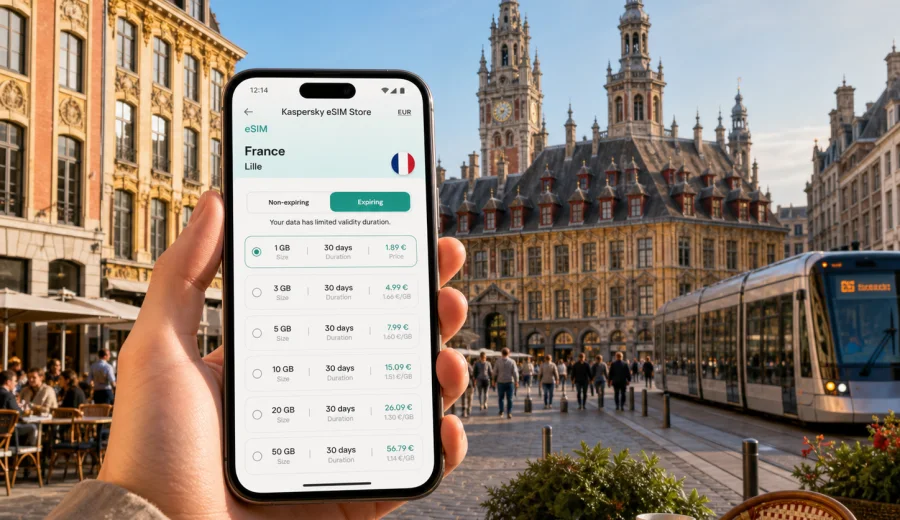
Lille eSIM: mobile connection and internet for a smooth city trip
Lille is compact, walkable, and very easy to underestimate. Many trips begin as a simple weekend in northern France and quickly turn into a route with train stations, hotel check-ins, museum tickets, restaurant bookings, and day trips to nearby towns. A reliable mobile connection helps you move through all of that without turning every stop into a search for Wi-Fi.
An eSIM is useful in Lille because the city rewards flexible movement. You may arrive at Lille Europe by international or high-speed train, cross to Lille Flandres for a regional connection, take the metro to a hotel in Euralille, walk into Vieux-Lille for dinner, and use a map again the next morning for Roubaix, Lens, Arras, or the Belgian border. Mobile internet keeps those small decisions simple: which exit to use, whether the tram is faster than walking, where the hotel entrance is, and how to send a message if plans change.
This guide explains how to prepare mobile internet for Lille with an eSIM, where you are most likely to use data in the city, and what to check before you travel.
Why mobile internet matters in Lille
Lille is not a difficult city, but it is a city of quick transitions. The historic center, business areas, universities, shopping streets, and transport hubs sit close together. That makes Lille convenient, yet it also means that visitors often switch between walking, metro, tram, train, and taxi in the same day.
Mobile data is especially useful for:
- navigating between Lille Europe and Lille Flandres stations;
- finding the correct metro entrance near Euralille or Republique Beaux-Arts;
- checking walking routes through Vieux-Lille, Grand Place, and Wazemmes;
- managing hotel check-in messages and digital booking confirmations;
- using ride-hailing, taxi, and public transport apps;
- translating menus, signs, and service messages;
- working from a hotel, cafe, coworking space, or station lounge;
- planning day trips from Lille without relying only on station screens.
Public Wi-Fi can help in hotels, cafes, museums, and stations, but it rarely covers the moments when you need directions outside, want to message someone from a platform, or need to change plans while walking. An eSIM gives your compatible device a separate mobile data profile, so you can prepare internet access before departure and use it when you arrive.
Arrival scenarios: where an eSIM helps first
Your first hour in Lille usually sets the tone for the rest of the trip. If your mobile internet is ready, you can focus on getting to your hotel instead of solving connectivity at the station or airport.
| Arrival point | Typical first task | Why mobile data helps |
|---|---|---|
| Lille Europe | Find metro, tram, taxi, or a walking route | The station sits near Euralille, but exits and pedestrian routes can feel confusing on a first visit |
| Lille Flandres | Connect to city transport or regional trains | You may need live platform information, maps, or a quick message to your hotel |
| Lille Airport near Lesquin | Arrange transport into the city | Data helps with route checks, taxi details, and arrival updates |
| By car | Navigate parking and low-traffic streets | Maps are useful around central streets, one-way systems, and hotel drop-off points |
| From Belgium or another French city | Continue by train or regional transport | You may be switching tickets, platforms, and local directions in a short time |
For a short stopover, mobile internet is mostly about speed: get your route, store your ticket, find food, and move. For a longer stay, it becomes part of the whole trip: maps, messaging, bookings, navigation, work, and backup when hotel Wi-Fi is weak.
Moving around Lille with connected maps
Lille's city center is manageable on foot, but your phone still matters. The city has many pleasant routes where the fastest way is not always the most obvious one. From Grand Place to Vieux-Lille, from Republique to Wazemmes, or from Euralille to the old town, walking directions help you avoid detours and spot nearby metro stations.
The public transport network includes metro, tram, and buses. Lille's automated metro is useful for moving between central areas, university zones, business districts, and nearby municipalities. Trams help with routes toward Roubaix and Tourcoing. Buses fill in the gaps for hotels, residential districts, and some local journeys. With mobile internet, you can check routes at the moment you need them instead of planning the whole day from a hotel room.
Practical city movements where data is useful:
- switching between walking and metro when rain starts;
- checking whether a tram route is better than a train for Roubaix or Tourcoing;
- finding the nearest entrance to a metro station after dinner;
- sharing your live location with a colleague or family member;
- opening a digital ticket, reservation, or QR code;
- checking whether a museum, shop, or restaurant is still open before you walk there.
Lille is also a good city for spontaneous stops. You may leave a planned route for a bakery, a bookshop, a beer bar, or a courtyard in Vieux-Lille. With data available, those decisions do not break the rest of your schedule.
Districts and trip styles in Lille
Different parts of Lille create different mobile internet needs. A visitor focused on architecture will use maps and photos differently from a business traveler moving between meetings, and a family staying near a station will need practical messages and transport updates.
| Area or route | Common visitor use | Data needs |
|---|---|---|
| Grand Place and Lille-Centre | Sightseeing, shopping, restaurants, photos | Maps, opening hours, messaging, cloud photo backup if enabled |
| Vieux-Lille | Walking routes, cafes, boutiques, evening plans | Navigation through narrow streets, reservations, translation |
| Euralille | Business, shopping, station access, hotels | Email, calendar, maps, transport checks |
| Wazemmes | Market visits, local food, informal walks | Directions, payments, messages, route changes |
| Vauban and university areas | Longer stays, students, visiting friends | Messaging, maps, work access, local transport |
| Roubaix and Tourcoing routes | Museums, events, day trips | Tram or train planning, return-route checks |
If you are visiting Lille for two or three days, maps, messages, tickets, translation, and browsing can stay moderate if you leave video streaming and large backups for Wi-Fi. If you work remotely, join calls, upload files, or use your phone as a hotspot, choose a larger data allowance and read the plan conditions carefully.
Choosing an eSIM plan for Lille
For a city trip to Lille, the main question is not only "how many days?" but "what will you do with mobile internet?" A light weekend traveler and a business visitor may need very different data packages.
A practical way to estimate your needs:
- Light use: maps, messaging, tickets, restaurant searches, and occasional browsing.
- Standard use: frequent maps, photo sharing, translation, social apps, and daily planning.
- Heavy use: work email, document uploads, hotspot use, video calls, or frequent media sharing.
Before you choose a package, check whether your route is only Lille or includes wider travel in France. A city article still uses the country plan page because the eSIM package is selected for the destination country. For Lille, you can review mobile internet options for France before your trip and compare data volume, validity period, destination, and price in one place.
Kaspersky eSIM Store is an app and website where you can quickly choose, arrange, and activate an eSIM with a suitable data plan for mobile internet in an international trip. Plan conditions depend on the selected tariff, so always read the details for data allowance, validity, activation rules, and destination coverage.
Device compatibility checklist
An eSIM only works on devices that support eSIM and are not blocked from using another mobile data profile. This is worth checking before you buy a plan, not after you arrive at Lille Europe with luggage in hand.
Use this checklist:
- confirm that your smartphone or tablet supports eSIM;
- make sure the device is unlocked for mobile data profiles if that applies to your market;
- update the operating system if a pending update affects cellular settings;
- keep your regular SIM active if you need your usual phone number for banking or messages;
- decide which line will use mobile data after arrival;
- save installation details somewhere accessible in case hotel Wi-Fi is not available.
You can check your device before choosing a plan. If you are not sure whether your device supports eSIM, do this step first. It is simpler to adjust your travel setup before payment than to troubleshoot under time pressure.
How to install and activate before Lille
The calmest approach is to buy and install your eSIM while you still have a stable connection at home or in your hotel before moving around the city. Activation timing can depend on the selected plan, so read the instructions shown during purchase.
A typical preparation flow looks like this:
1. Choose France as the destination and select a data package that matches your stay.
2. Check the plan conditions, especially data volume, validity period, and activation details.
3. Install the eSIM on your compatible device by following the setup steps.
4. Keep your primary SIM for calls or SMS if you still need your regular number.
5. On arrival in Lille, select the eSIM line for mobile data if it is not already selected.
6. Test maps and messaging before leaving the station, airport, or hotel.
If you need installation guidance, use the official Android setup instructions or iOS setup instructions. It is better to read the relevant guide before your trip, especially if this is your first time using a digital SIM profile.
Lille for business trips
Lille is a practical business destination because the stations, business hotels, conference venues, and central districts are close together. That convenience does not remove the need for mobile internet. In fact, short business trips are often where reliable data matters most.
Business uses in Lille include:
- checking meeting addresses while walking from Euralille;
- receiving calendar changes in real time;
- calling a taxi or ride service after a late meeting;
- joining a quick voice or video call from a hotel room when Wi-Fi is weak;
- using your phone as a backup connection for email or documents;
- finding a quiet cafe or coworking space between appointments.
If your trip includes confidential or work-sensitive tasks, follow your organization's security rules for devices, apps, and network use. An eSIM is a mobile data profile, not a security product, VPN, or anonymity tool. For work travel, the practical value is that you can arrange a data plan in advance and reduce dependence on public Wi-Fi for everyday connectivity.
Short stopovers and one-day visits
Lille is a natural stop between cities. Some travelers arrive for a few hours, leave luggage, walk around the old town, eat near the center, and continue by train. Others use Lille as a base for a work meeting or a quick museum visit.
For a stopover, keep your data use simple:
- save your onward ticket and hotel or luggage details before arrival;
- use maps for station exits and walking routes;
- pin one or two reliable return points, such as Lille Europe or Lille Flandres;
- avoid large downloads unless you are on Wi-Fi;
- keep enough battery for the return route and ticket checks.
A small data package may be enough for a short visit if you use it mainly for maps and messages. If the stopover is part of a longer trip through France or neighboring countries, compare the plan destination and validity period carefully.
Hotels, apartments, and Wi-Fi backup
Most travelers expect hotel Wi-Fi in Lille, and many hotels do provide it. The problem is that Wi-Fi quality can vary by room, time of day, and number of guests. Apartment stays can also have unclear login details or routers placed far from the workspace.
An eSIM is useful as a backup in these common situations:
- you arrive before check-in and need to contact the host;
- the hotel Wi-Fi login page does not load correctly;
- your room has weak signal but mobile data is stable near the window;
- you need directions before leaving the lobby;
- you need to upload a small work file before a meeting;
- you prefer not to use open public Wi-Fi for routine travel tasks.
If you plan to use tethering or hotspot mode, check whether the selected plan permits it. Laptop use can consume data much faster than phone navigation.
Day trips from Lille
Lille is well placed for short trips around northern France and nearby cross-border routes. You might visit Roubaix, Tourcoing, Lens, Arras, or the coast when your schedule allows. Mobile internet helps because platform details, return times, walking routes, weather, and restaurant reservations can change during the day.
For day trips, prepare this small kit:
- enough data allowance for maps and transport apps outside Lille;
- offline copies of key tickets and booking references;
- a power bank if you will be out all day;
- a clear return route to Lille in your map app;
- roaming/data settings checked before leaving the city.
Data-saving tips for Lille
You can make a moderate eSIM plan last longer with a few simple habits:
- download offline map areas before departure if your map app supports it;
- use hotel Wi-Fi for app updates, video streaming, and large photo backups;
- turn off automatic cloud backup on mobile data if your photo library is large;
- send compressed photos in messaging apps when quality is not important;
- close navigation when you no longer need live directions;
- check which apps are allowed to use mobile data in the background.
Do not make the plan too small if you know you will work, use hotspot mode, or upload media. A realistic margin is useful on station transfers and late returns.
Quick planning table
| Trip type | Suggested eSIM mindset | Lille-specific examples |
|---|---|---|
| Weekend city break | Prioritize maps, messages, tickets, and restaurant searches | Vieux-Lille walks, Grand Place, Wazemmes market |
| Business trip | Choose enough data for email, calendar, and backup work access | Euralille meetings, station-to-hotel transfers |
| Family visit | Keep data available for coordination and transport changes | Shared locations, hotel messages, route checks |
| Stopover | Use a compact plan if Lille is only one short segment | Station exits, luggage, food, onward train |
| Regional base | Check validity and data volume for trips beyond Lille | Roubaix, Tourcoing, Lens, Arras, coastal routes |
Common mistakes to avoid
The most common eSIM problems come from buying too late, skipping compatibility checks, or misunderstanding what the plan includes.
Avoid these mistakes:
- buying before checking that your device supports eSIM;
- assuming the eSIM includes a local phone number, calls, or SMS;
- waiting until you are outside with no stable Wi-Fi to install the profile;
- choosing a plan only by price and ignoring validity or data volume;
- forgetting to select the eSIM line for mobile data after arrival;
- using hotspot mode heavily without checking plan conditions;
- leaving automatic downloads active on mobile data.
An eSIM can make travel simpler, but it still needs preparation. Set it up before you need it, keep the instructions accessible, and test the connection before leaving a reliable Wi-Fi area.
FAQ: eSIM and mobile internet in Lille
Is an eSIM useful for a short trip to Lille?
Yes, especially if you rely on maps, train information, hotel messages, digital tickets, or translation. Lille is walkable, but connected navigation is still helpful around stations, Vieux-Lille, Euralille, and day-trip routes.
Do I need a France eSIM for Lille?
For a Lille city article, the destination is France. Choose a plan that lists France or a suitable regional destination in its conditions. If your route continues outside France, compare plan destinations carefully before purchase.
Can I keep my normal SIM active?
In many devices, you can keep your regular SIM for calls or SMS and use the eSIM for mobile data. The exact setup depends on your phone model and mobile settings.
Does an eSIM include calls and SMS?
Usually, travel eSIM data plans focus on mobile internet. A regular phone number, voice calls, and SMS are not included unless the selected plan states otherwise. You can use messaging and calling apps over mobile data.
When should I install the eSIM?
Install it when you have stable internet and enough time to follow the steps carefully. Many travelers prefer to install before departure and activate or select mobile data according to the plan instructions when they arrive.
Prepare your eSIM before you arrive in Lille
Lille is easiest when your phone is ready for practical travel: station exits, hotel routes, transport changes, restaurant bookings, work messages, and day trips. A prepared eSIM helps you stay online without searching for a physical SIM card after arrival or relying only on public Wi-Fi.
Before you travel, check your device, choose a realistic data allowance, read the activation conditions, and keep the setup instructions available. Then use Kaspersky eSIM Store to choose an eSIM plan for mobile internet in France that fits your Lille itinerary, whether you are coming for a weekend, a business meeting, a stopover, or a longer route through northern France.