Travel connectivity guide
Lillehammer eSIM: Mobile Internet for Your Trip
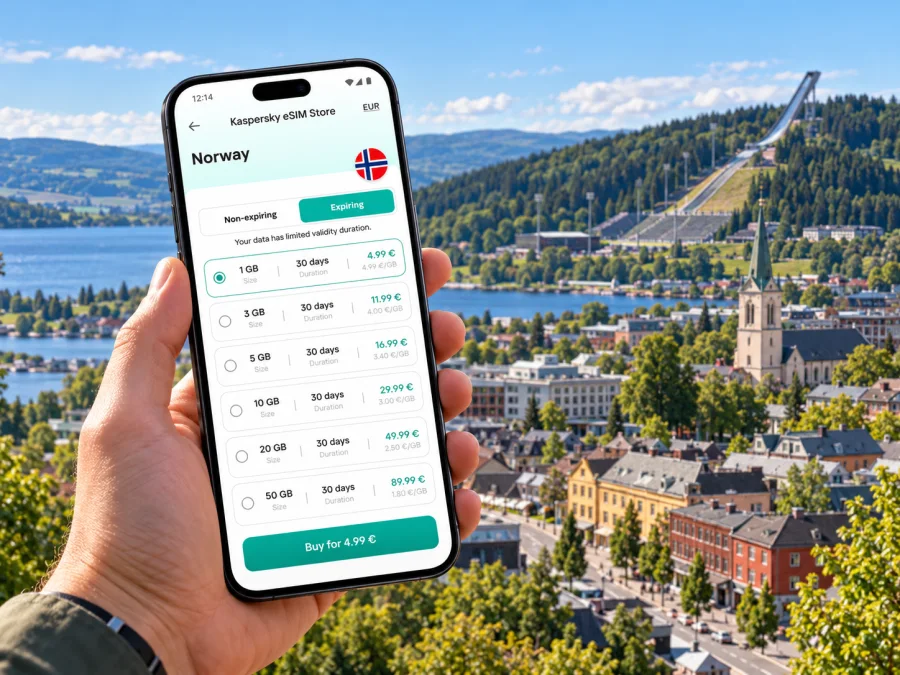
Lillehammer eSIM: Mobile Connection and Internet for Your Trip
Lillehammer is compact enough to explore on foot, yet its steep streets, lakeside setting and surrounding valleys make a dependable mobile connection useful from the moment you arrive. You may need internet to check a train platform, find your accommodation on a hillside, navigate between the station and the town centre, or confirm a seasonal bus to a ski area. A travel eSIM can provide mobile data without replacing the physical SIM already in your phone.
This guide focuses on using mobile internet in Lillehammer and planning the connections around it. It also explains what to check before choosing a Norway data plan, how to prepare your phone, and when offline maps or downloaded tickets are still sensible backups.
Why mobile data helps in Lillehammer
Lillehammer sits at the northern end of Lake Mjøsa, where the Gudbrandsdalen valley begins. The town centre is on the eastern side of the lake, and the municipality describes its central streets as steep. That geography shapes an ordinary visitor’s day: a route that looks short on a map can involve an uphill walk, while a trip to a museum, ski venue or accommodation may take you beyond the central grid.
Use mobile internet for tasks that change while you are travelling:
- checking a rail departure, platform or service update;
- comparing a walking route with a bus or taxi option;
- finding an entrance, reception desk or meeting point;
- translating a menu or reading opening information;
- messaging your host when arrival time changes;
- checking weather and trail or lift information before going into the hills;
- sharing a location with your group if you split up.
Data is especially handy when you arrive with luggage or in winter clothing. You can check the route before leaving the station rather than trying to orient yourself at a busy crossing. If you are walking, pay attention to elevation and route profile as well as distance: the town is not uniformly flat.
Arriving from Oslo Airport
Oslo Airport is a practical international arrival point for many Lillehammer trips. Vy regional trains serving the Oslo–Lillehammer corridor pass through the airport, so a rail journey can connect the terminal with Lillehammer without first travelling into central Oslo. The exact train, departure time and journey duration depend on the date and any planned works; check the current journey planner before you travel.
Keep these items available on your phone before boarding:
- Your rail ticket and any booking confirmation, saved for offline access where possible.
- The address of your first stay, including the Norwegian spelling if it differs from the booking listing.
- A map pin for Lillehammer station and your accommodation.
- A working data connection for live changes, messages and onward directions.
The train route is useful, but do not treat a saved timetable as a live one. Engineering work, seasonal schedules and disruption can affect services. Check updates shortly before departure, and allow time for a change of platform or a replacement bus if the operator announces one.
When the train reaches Lillehammer, the station is a convenient starting point for the centre and local onward travel. If your hotel is uphill, across town or outside the centre, check the last part of the journey before you leave the platform. A mobile map can help, but a taxi or local bus may be more comfortable with luggage, in bad weather or after a late arrival.
A short stop in town
If Lillehammer is a stop between longer journeys, use your connection for the essentials first: confirm the next departure, store the station location, check the walking time to your destination, and send any necessary messages. Then use the remaining time for a walk or meal. Do not rely on finding open Wi-Fi at every stop or on having time to buy a local SIM during a short transfer.
Getting around the town and nearby places
The central streets make it easy to combine a walk with short local journeys. Storgata and the surrounding centre are useful reference points for shops, cafés and services. The railway station and bus terminal help orient you when arriving or changing modes. From there, destinations such as Maihaugen, the Olympic venues and accommodation outside the centre may require an uphill walk or an onward ride.
| Trip or task | Why mobile data is useful | Practical note |
|---|---|---|
| Station to central accommodation | Map directions and host messages | Check elevation and luggage-friendly access, not just distance. |
| Centre to Maihaugen | Route choices and current visitor information | Confirm opening details before setting out. |
| Centre to an Olympic venue | Finding the right entrance and event updates | Event transport and access arrangements can vary. |
| Lillehammer to Hafjell or Øyer | Bus times and transfer planning | Check the current schedule; seasonal services may differ. |
| Walk beside Mjøsa or through nearby nature | Map position and weather checks | Download a map and tell someone your plan before heading farther out. |
Local and regional bus services can make it easier to reach places beyond the centre, including ski destinations in season. The departure point, operating dates and timetable depend on the route. Use a current Norwegian journey planner for the specific day rather than assuming a ski bus or an advertised seasonal service runs year-round. If you have a timed activity, leave a buffer for the walk to the stop and for the return journey.
For the centre itself, walking is often the simplest way to explore. The practical question is not only “How far?” but also “How steep?” A route between two nearby points can climb quickly. In snow or rain, allow more time, choose footwear with grip, and consider a bus or taxi for the uphill portion. Mobile directions are helpful, but follow local signs and keep your eyes on the pavement rather than the screen.
Choosing an eSIM for Norway
A city does not have its own separate mobile market. Lillehammer is in Norway, so look for a plan whose destination and conditions cover Norway. Then review the plan itself: data allowance, validity period, when validity starts, supported network access, hotspot rules if relevant, and any limits on speed or service. The name of a country plan alone does not guarantee identical service in every location or building.
Kaspersky eSIM Store is an app and website where you can select, arrange and activate an eSIM with a suitable mobile data plan for an international trip. The specific plan terms determine what is included.
Consider the shape of your trip
A short city break and a week that includes mountain activities have different data needs. Estimate your likely use instead of choosing only by trip length:
- Maps and messages: navigation, chat and occasional searches use less data than regular video viewing, but repeated live map use still adds up.
- Work and video calls: check the plan’s data allowance and whether tethering is permitted before relying on a laptop connection.
- Photos and social media: automatic cloud uploads and high-resolution video can use data in the background. Set upload preferences before departure.
- Streaming: download films, music and podcasts over Wi-Fi where possible, and use mobile data for the tasks that need it.
- Regional day trips: allow for the full itinerary, including return travel and schedule checks, rather than counting only the hours spent in Lillehammer.
A useful starting estimate is based on your own routine: note a typical day’s mobile data use at home, then adjust for extra map checks, travel searches and photo sharing. If the plan allows top-ups, read how they work before you need one. Do not assume an unused balance, validity period or add-on can be carried over; rely on the terms displayed for the particular plan.
You can compare eSIM options for a trip to Norway and choose a data allowance that suits your itinerary.
Coverage is a local question
Norway’s mobile service depends on the network used by the selected travel plan, the location and local conditions. A coverage map is an estimate, not a promise of a particular indoor signal or speed. Hills, terrain, building materials, the number of users nearby and the phone itself can all affect the experience. The centre, a hotel room, a train and a mountain trail are different radio environments.
Before purchase, check which network or networks the plan uses in Norway and whether its stated coverage suits the places on your itinerary. A map for one Norwegian operator does not describe every travel eSIM plan. If you are going beyond Lillehammer into a valley or mountain area, download directions and essential information in advance, and do not depend on uninterrupted data for safety-critical navigation.
Check your device before the trip
Compatibility is a property of the exact device, not of Lillehammer or Norway. The same phone family can have different hardware or eSIM support depending on its model number and the market where it was sold. Some regional variants differ from the versions commonly sold in Europe. Confirm the exact model with the manufacturer, and check that the phone is unlocked for use with another provider.
Before selecting a plan, check whether your device supports eSIM. If you use a dual-SIM setup, confirm which line will provide mobile data and whether data switching is enabled. Keep your regular number active if you need calls or SMS on it, and review its roaming settings so it does not incur unexpected charges.
A travel data eSIM generally provides internet access rather than a standard local phone number. Unless the selected plan explicitly says otherwise, do not expect it to include ordinary voice calls or SMS. Internet-based messaging and calling apps can work over data, subject to each app’s requirements and the connection available at the time.
Prepare and activate your eSIM
Complete setup while you have stable Wi-Fi and enough time to read the instructions. The installation process differs by phone model and operating system, and some plans begin their validity only when they connect to a supported network. Read the plan’s activation details before installing or switching the line on.
A simple preparation sequence:
- Check eSIM support and device unlock status.
- Choose Norway as the destination and compare the plan’s data, validity and network details with your itinerary.
- Install the eSIM following the Android setup instructions or the iOS setup instructions.
- Label the new line clearly, such as “Travel data”, so you can distinguish it from your home SIM.
- Before departure, review which line is selected for mobile data and disable automatic switching if you want to control which SIM uses data.
- When the plan should start, enable the eSIM and follow the plan-specific network and roaming instructions.
- Open a simple web page or map to confirm that data works. If it does not, check the selected data line, activation status and plan instructions before changing several settings at once.
If you prefer, install the eSIM before leaving and activate it according to the plan’s stated timing. If you wait until arrival, make sure you will have Wi-Fi for setup and keep your booking details accessible offline. Do not delete an installed eSIM to troubleshoot unless the instructions or support team specifically advise it; some profiles cannot be installed again after removal.
Use your data carefully in town
When you are walking through Lillehammer, a few settings can make your connection easier to manage:
- Turn off automatic app updates over mobile data if you want to reserve data for navigation and messages.
- Download maps, tickets, hotel details and travel documents before leaving Wi-Fi.
- Check photo backup and video autoplay settings; they can consume data without an obvious prompt.
- Use Wi-Fi for large downloads when it is available and trustworthy, but avoid treating public Wi-Fi as your only plan for getting around.
- Keep a portable battery or charging cable with you on long travel days. Navigation, cold weather and camera use can shorten battery life.
- Save addresses in both map form and plain text, including the accommodation phone number or check-in instructions.
If you lose data, first check whether the eSIM is enabled and selected for mobile data. Verify that the plan is active and that your phone has not selected a different line. Move to a more open location and retry; a basement, thick wall or remote stretch can affect reception. Restarting the phone may help after settings have been checked. If the issue continues, use the support details supplied with the plan while connected to Wi-Fi.
Three realistic travel scenarios
Weekend in the centre
You arrive by train, walk to a hotel near the centre, visit the art museum and browse Storgata. A modest data allowance may be sufficient if you mostly use maps, messaging and searches, but the right amount depends on your normal habits. Download your rail ticket and hotel directions beforehand, then use live data for route changes and messages.
Lillehammer with an event or museum visit
You are meeting someone at an Olympic venue or planning a visit to Maihaugen. Save the entrance pin and check current visitor information before setting out. If you have a timed booking, leave extra time for the uphill route and any bus connection. Keep your ticket available offline in case reception is inconsistent around a large venue.
A day beyond town
You plan to continue to Hafjell, Øyer or a trail area. Check the bus service for the date of travel and confirm the return option before leaving Lillehammer. Download a map and key details, and share your plan with a companion. Mobile data can help with updates, but remote terrain is a reason to prepare for a weak or unavailable signal.
Quick checklist before leaving
- [ ] Confirm your device model supports eSIM and is unlocked.
- [ ] Check the plan’s Norway destination, data allowance, validity, activation timing and network terms.
- [ ] Save your first accommodation address and arrival instructions offline.
- [ ] Check the current airport-to-Lillehammer train and any planned service changes.
- [ ] Review the last leg from Lillehammer station, including steep streets or local transport.
- [ ] Download tickets, maps and information for places you plan to visit.
- [ ] Set the travel eSIM as the data line when appropriate and review roaming settings for both SIMs.
- [ ] Carry a charger or power bank, especially for a long day outdoors.
Frequently asked questions
Is an eSIM useful for a short stay in Lillehammer?
It can be useful if you want mobile data for directions, messages, travel updates and bookings without changing your physical SIM. Whether it is worthwhile depends on your itinerary, your existing roaming terms and the specific plan’s price and data allowance.
Does a Norway eSIM guarantee reception everywhere around Lillehammer?
No. Service depends on the network specified by the plan, terrain, buildings, congestion and your device. Review the plan’s coverage information and prepare offline essentials for travel outside the town centre.
Can I keep my usual number active?
Many compatible phones support more than one line, but the available setup depends on the exact model and carrier. You can often keep your regular SIM for calls and texts while selecting the eSIM for data. Check device instructions and your home operator’s roaming conditions first.
Will the eSIM give me a Norwegian phone number?
A data-only travel plan usually does not include a regular local number, voice calls or SMS unless its terms explicitly state that it does. Messaging and calling apps can use an internet connection instead.
Should I install the eSIM before reaching Norway?
Installing it in advance can make setup easier, but the correct activation time depends on the selected plan. Read whether validity starts at installation, at a chosen date or when the eSIM first connects. Follow those instructions so the plan’s validity matches your trip.
What should I do if data stops working on the train?
Check the selected data line and the plan’s status, then wait until the train reaches an area with service and retry. Save tickets and directions offline before departure, because signal can vary along a route and inside carriages.
Plan your Lillehammer connection
For a smoother arrival, prepare the phone before the train ride, save your first address, and check the final route from the station. Once in town, use mobile internet for changing schedules and directions, but keep tickets and essential maps available offline. If your itinerary continues into the surrounding region, plan the network, data allowance and return transport for the whole journey.
Use Kaspersky eSIM Store on the website or in the app to choose and arrange a suitable travel data plan, then activate it according to its terms. Choose an eSIM data plan for Norway before your Lillehammer trip and keep the plan details close at hand.


