Travel connectivity guide
Lilongwe eSIM: Mobile Internet for City Travel
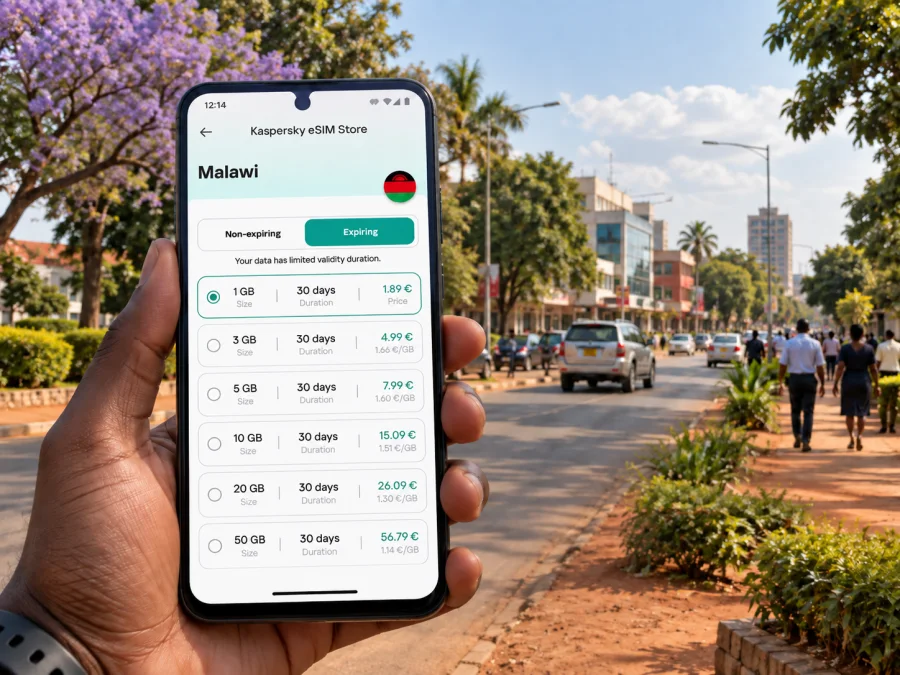
Lilongwe eSIM: mobile connection and internet for your city trip
A visit to Lilongwe often begins with a practical question: how will you get from the airport to your hotel, find the right part of the city, and keep plans within reach while moving between meetings or neighborhoods? An eSIM can help you prepare mobile internet for the trip without changing your physical SIM. You choose a suitable destination plan, install the digital SIM on a compatible device, and use it when its plan conditions allow.
Lilongwe is Malawi’s capital, but it does not feel like a single compact downtown. Visitors commonly need to distinguish between the older commercial area, often called Old Town, and the planned administrative and business centre. Your hotel, appointment, market visit, or onward transfer may be in different parts of the city. Mobile data is useful for checking a map, confirming a pickup point, messaging a host, or revising a route when the day changes.
When mobile internet helps in Lilongwe
Arrival at Kamuzu International Airport
Kamuzu International Airport serves Lilongwe and is north of the central urban area. After landing, you may need to confirm the name and location of your accommodation, contact the person meeting you, or arrange a taxi or other transfer. Having a map and reservation details available online can make those first steps easier, especially if your arrival plan changes.
Before departure, save your hotel address in a format you can show a driver and keep a screenshot of the booking. Once your eSIM is active and data is available under its plan conditions, you can use online maps and messaging. Do not assume that mobile data will be available at every point or that an app will update without signal; download an offline map for the areas you expect to visit and keep key details accessible offline.
At the airport, make sure you know which SIM is selected for mobile data. If you want to retain your home number for calls or messages, leave that line configured as needed and choose the travel eSIM for data. Check your device settings carefully so that data roaming is enabled only where required by the travel eSIM instructions and so that your home line does not incur unintended roaming charges.
Moving between Old Town and City Centre
Lilongwe’s two central districts serve different purposes. Old Town is the older, busier commercial area, with markets, shops, and everyday services. City Centre is the planned administrative and business district, with offices and institutions spread across a more spacious layout. Visitors may travel between them for a meeting, a meal, shopping, or a change of hotel.
That difference affects how you plan a day. A walking route that makes sense around one destination may not be a practical way to reach another. Use a map to check the exact destination and road approach rather than relying only on a neighborhood name. If you are arranging a ride, send a pin and a recognizable nearby landmark, then confirm that the driver understands the destination before setting off.
Getting around beyond the central areas
Lilongwe is spread out, and a trip between a hotel, office, shopping area, or residential Area may require a vehicle. Depending on your route and comfort, options can include a prearranged transfer, a taxi, a hired car, or a local minibus. Availability, route patterns, fares, and operating practices can vary, so confirm details locally rather than assuming a fixed schedule.
Mobile internet can support the small coordination tasks that make these trips smoother: sharing a location, checking a route, contacting a host, or translating a short message. It does not replace local judgment. Agree on the destination and price before a ride where appropriate, follow advice from your accommodation or local contacts, and avoid checking a phone while crossing busy roads or moving through crowded places.
A useful connection for different travel styles
| Plan | Useful preparation |
|---|---|
| Airport transfer | Save the hotel address and pickup details offline. |
| City Centre meetings | Keep office locations and contact details ready. |
| Old Town visit | Agree on a clear meeting or return pickup point. |
| Several stops | Save addresses in travel order and check routes before leaving. |
Plan your connection around your itinerary
An eSIM is most useful when the plan fits the trip rather than an imagined “average” day. A visitor who mainly uses messaging and occasional maps has different needs from someone who joins video calls, uploads large files, or navigates continuously. Think through where you will use data, how long you will stay, and whether Lilongwe is the only destination covered by your selected plan.
Kaspersky eSIM Store is an app and website where you can choose, purchase, and activate an eSIM with a suitable plan for mobile internet on an international trip. Before choosing, review the destination coverage, data allowance, validity period, activation instructions, and any other terms shown for that plan. The available terms can vary. To review eSIM options for a trip to Malawi, compare the displayed plan details with your dates and likely usage in Lilongwe.
Estimate data for your itinerary
Base your choice on the tasks you expect to do. Messaging and occasional map checks use less data than video calls, cloud backups, or repeated file uploads. Hotel Wi-Fi may reduce mobile use, but plan for arrival and time away from your accommodation.
- Check how long the plan remains valid and when validity begins: purchase, installation, or first connection.
- List daily uses such as maps, messaging, email, work, audio, and video.
- Add a reserve for an extra night or changed transfer, then compare the estimate with the plan allowance.
- Pause automatic photo backups and large updates on mobile data if you want to manage usage.
For a short stopover, arrival coordination, a hotel address, and a meeting point may be the main needs. Business visitors should account for attachments and video calls, which can use more data. If you will continue beyond Lilongwe, check destination coverage and validity rather than assuming a city-oriented plan fits every leg.
Use maps without making the phone your only plan
A connected map can help you orient yourself between Old Town, City Centre, your accommodation, and a pickup point. Save offline details as a backup:
- Keep the accommodation address, booking reference, and host or driver contact details available offline.
- Download an offline map for the area you expect to visit, where your map app supports it.
- Save meeting addresses and pins before setting out, especially if you have several stops.
- Carry a charged power bank if you depend on your phone for navigation and messages.
A destination may be described by district, numbered Area, landmark, or business name. Ask your host how they describe it locally, then share the most precise address or pin. Confirm that a pin marks the correct entrance or meeting point. If data drops, use saved information and contact your accommodation or local contact through an available channel. Keep your phone discreet in crowded settings and pay attention to traffic and your surroundings.
Choose an eSIM plan for the trip
When comparing options, focus on the terms that affect your actual Lilongwe itinerary. The country page can help you see plans for Malawi, but the plan details determine whether a specific option suits your dates and usage.
| Check | Why it matters for a Lilongwe visit |
|---|---|
| Destination coverage | Confirm that Malawi is included and check other destinations if you will travel onward. |
| Validity period | Make sure it covers your planned stay and understand when the validity starts. |
| Data allowance | Match the amount to navigation, messaging, work, and media use. |
| Activation conditions | Read when and how the eSIM becomes active, including any setup requirements. |
| Device compatibility | Confirm that your phone supports eSIM and is not restricted by a carrier lock. |
| Data roaming setting | Follow the plan’s instructions for the travel eSIM and review your home-line settings. |
| Calls and SMS | Do not assume they are included; check the specific plan terms if you need them. |
An eSIM for mobile internet does not necessarily provide a local phone number, conventional voice calls, or SMS. Those services are not included unless the selected plan specifically says otherwise. Internet-based messaging and calling apps may be an option when you have data and the other person can use the same service, but their availability and performance depend on the connection and app.
Check your phone before purchase
Confirm that your exact device model supports eSIM and is unlocked for use with another provider. Support can differ between model variants and markets, even when two phones have similar names. If you are unsure, check the device settings or manufacturer documentation and check your device’s eSIM compatibility before choosing a plan.
It is also useful to review how your phone handles multiple SIMs. Decide which line should handle mobile data, whether your home number should remain available, and what roaming settings apply to each line. This preparation reduces the chance of selecting the wrong line after arrival.
Install before travel, activate with care
If practical, install the eSIM while you have a reliable internet connection and enough time to follow the instructions. Installation and activation are related but not always the same step: follow the timing shown for your chosen plan so that you do not start its validity earlier than intended. Keep the QR code or setup details available on another screen or in a safe place if your installation method requires them.
Use this setup sequence:
- Confirm compatibility, unlock status, and the plan’s destination, allowance, validity, and activation timing.
- Connect to reliable Wi-Fi and add the eSIM using the method provided, such as a QR code or in-app instructions.
- Label the line “Malawi travel,” select it for mobile data, and set roaming only as the plan instructions require.
- Keep your home line’s data settings in mind, and enable the travel line when you are ready to use the plan.
For step-by-step help, use the Android eSIM installation instructions or the iOS eSIM installation instructions. Menu names vary by device and operating-system version, so follow the steps shown on your own phone.
If you install after arrival, setup may require Wi-Fi or another connection. Avoid deleting a profile as a troubleshooting shortcut; some profiles cannot be reinstalled or transferred after removal. If setup fails, check the instructions, selected data line, and roaming setting, then use the support channel shown with your purchase.
Day trips and onward travel from the city
If Lilongwe is the starting point for travel elsewhere in Malawi, confirm transport and accommodation details with the relevant provider or host. Check whether the eSIM plan covers the full route and remains valid through the onward leg. Before leaving, save the next address, booking information, contact details, and departure point offline. Download useful maps while you have a dependable connection.
Do not infer travel time or connectivity from map distance alone: road conditions, stops, and local arrangements can affect a journey. Longer navigation can use more data than a few city transfers, so monitor usage and keep some allowance for the return or a changed plan. If your route crosses a border, verify coverage for the next country before using data there.
Common questions about eSIM in Lilongwe
Will an eSIM help when I land?
It can provide mobile data once installed, enabled, and connected under the plan’s conditions. Setup may need internet access, so keep your hotel and transfer details offline too.
Can I keep my regular SIM active?
Many phones support multiple SIM lines, though settings vary. You may be able to keep your home number available while assigning data to the travel eSIM. Check your device and home operator’s roaming terms.
Are calls and text messages included?
Not necessarily. Check the selected plan; do not assume it includes a local number, ordinary calls, or SMS. Internet calling and messaging apps use data and depend on the connection.
A final preparation checklist
Before travelling to Lilongwe, make sure you can answer these questions:
- Does the plan cover Malawi and remain valid for my dates and onward route?
- Is its data allowance right for maps, messages, and any work or media use?
- Is my phone eSIM-compatible and unlocked, and do I know which line handles data?
- Have I saved hotel, airport transfer, meeting, and onward travel details offline?
- Have I checked roaming settings and whether calls or SMS are included?
Lilongwe is easier to navigate when your day’s addresses, transport arrangements, and communication plan are ready before you need them. Mobile data can help with the changes that happen between arrival, Old Town, City Centre, and the next stop, while offline details provide a useful fallback.
Choose an eSIM for your Lilongwe trip
Review the plan’s coverage, validity, and data allowance, then install it on a compatible, unlocked device according to its instructions. Kaspersky eSIM Store lets you choose, purchase, and activate an eSIM with a suitable plan for mobile internet during an international trip. Choose an eSIM plan for Malawi that fits your Lilongwe dates and travel needs, and keep your essential addresses available offline as well.


