Travel connectivity guide
Limerick eSIM: Mobile Internet for Your Trip
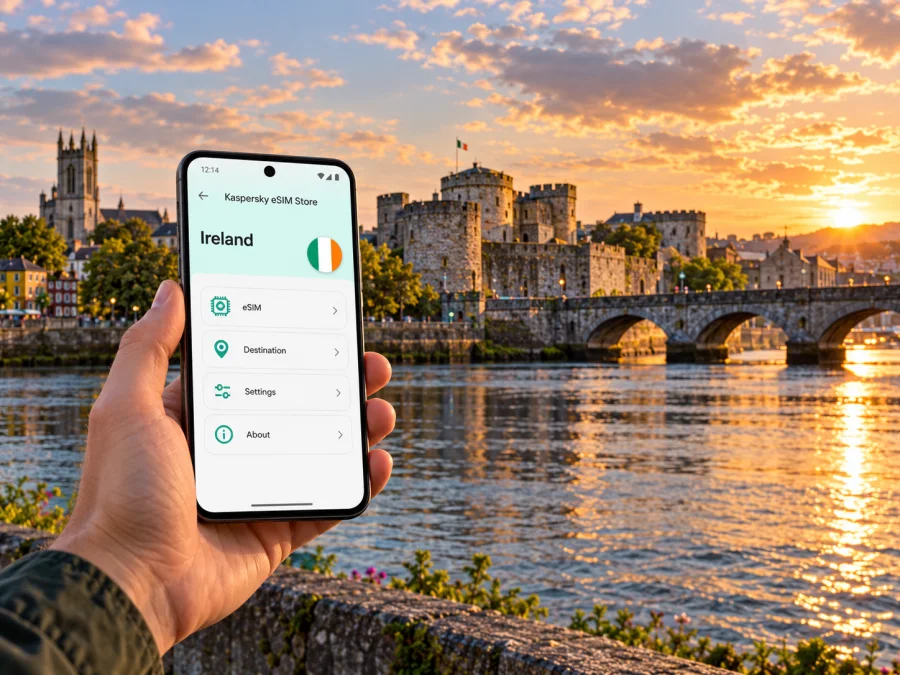
Limerick eSIM: Mobile Connection and Internet for Your Trip
A reliable mobile connection makes the first hours in Limerick easier: you can check your arrival details, follow directions from the airport, contact your accommodation and adjust plans when Irish weather changes. An eSIM can provide mobile data without swapping the physical SIM in your phone, provided your device supports eSIM and the plan you choose covers Ireland.
Limerick is a compact city on the River Shannon in the Republic of Ireland. Its medieval quarter, central shopping streets, university district and airport connections create several different travel patterns. A visitor spending most of a weekend around the centre may use data differently from someone commuting to the University of Limerick, attending a meeting in Raheen or continuing by rail to another Irish city. This guide explains how to prepare mobile internet around those real journeys, what to check before choosing an eSIM, and how to avoid relying on a single connection method.
Where mobile data helps around Limerick
The city centre is walkable, but a map is useful when you arrive with luggage, look for a hotel entrance or move between the riverside and the streets around O’Connell Street. Navigation also helps you find a bus stop, confirm a train departure or locate a restaurant after an event. Keep the accommodation address and any important tickets available offline as a backup; mobile data is useful, but no connection should be treated as guaranteed at every moment.
Limerick’s main visitor areas are close enough for a flexible day on foot. You might cross the Shannon to King’s Island and King John’s Castle, walk back over Thomond Bridge, then head towards the Milk Market or the Georgian streets. A live map can help with turn-by-turn directions and opening-time checks, while messaging data is useful if your group splits up. When exploring, download an offline map of the centre before leaving your hotel. It reduces data use and gives you a fallback if a street has poor reception or your battery is low.
For a longer stay, the destination on your booking matters more than the city name alone. Limerick city and its suburbs spread beyond the central area: a room near Castletroy or the University of Limerick is a different starting point from accommodation beside Colbert Station or the medieval quarter. Save the exact address, Eircode if supplied, and route to the property. If you are meeting a driver, share a clear pickup point rather than only saying “the centre”.
Quick guide to common travel tasks
| Situation | Why mobile internet helps | A useful backup |
|---|---|---|
| Arrival at Shannon Airport | Check coach details, contact your host and follow the onward route | Save the address and departure information before landing |
| Walking in the centre | Navigate between the station, riverfront, shops and sights | Download a map for offline use |
| City bus journey | Check the route, stop and current journey information | Note the stop name and route number before boarding |
| Business visit | Open meeting details, email or a rideshare booking | Keep the venue address and contact number in your calendar |
| Day trip from Limerick | Check connections and adapt plans en route | Download tickets and note the return option |
Arrival: from Shannon Airport to the city
Shannon Airport is the nearest major airport for many Limerick itineraries. Limerick City and County Council describes it as about 24 kilometres from the city. The road journey is separate from the city’s local transport network, so check the airport’s current bus and taxi options against your arrival time instead of assuming that a city route continues to the terminal. Timetables can change, especially around weekends and public holidays.
Before departure, decide how you will reach your accommodation and save the stop, destination and address offline. If someone is collecting you, agree on a meeting point and keep their number accessible. Travellers arriving through Dublin Airport should also treat the onward coach or rail leg as part of the same route. Check that your eSIM plan covers each country on the itinerary; an Ireland-labelled plan should not be assumed to include Northern Ireland or the wider United Kingdom.
Colbert is Limerick’s combined train and bus station on Parnell Street. Irish Rail lists routes from Colbert towards Dublin Heuston, Ennis, Galway and other connections. From the station, you can walk towards the centre, use a local bus or take a taxi. A map is particularly useful if you are carrying bags or arriving after dark, since the shortest route on screen may not be the most comfortable route with luggage.
Moving through the centre and outer districts
River crossings, one-way streets and pedestrian areas make mobile navigation useful even on a short visit. Check the walk to a bus stop, then reopen the route after you get off; this saves battery and helps you confirm that the stop pin matches the correct side of the road.
Transport for Ireland publishes a Limerick city bus map and route information. Its listed services connect places including Arthur’s Quay, the city centre, Raheen, University Hospital Limerick, the University of Limerick and Castletroy. Route numbers and operating days vary, and timetables may be revised. Check a current journey planner on the day, especially for an evening trip, a Sunday journey or travel to an event. Use the precise stop shown for your direction; buses serving the same road may stop on opposite sides.
For a visitor, these areas suggest a simple planning approach:
- Historic centre and riverfront: save King’s Island, the castle, the bridge and your hotel as separate map pins. The River Shannon is a helpful landmark, but it does not replace turn-by-turn directions through the surrounding streets.
- Market Quarter and central shopping streets: use a map to find the entrance or meeting point, not just the district. Market opening days and individual business hours can differ, so verify the place you intend to visit.
- Castletroy and the university area: allow time for the trip from the centre and check the return journey before an appointment or performance ends.
- Raheen and the hospital area: identify the correct entrance or building in advance. A campus or hospital may have several addresses and access points.
- A day trip beyond the city: check both the outbound connection and the last practical return option before you leave.
A city bus and a long-distance coach are separate legs with different stops and ticket rules. Keep route information in a note and verify the next departure when changing vehicles.
Plan an eSIM for your Limerick itinerary
Choose a plan by looking at the whole trip: how many days you will be in Ireland, whether you will use mobile data mainly for maps and messaging or also for video calls, and whether your route continues elsewhere. A city-specific search is useful for finding this guide, but the plan itself needs to state the territory where it is valid. Kaspersky eSIM Store is an app and website where you can select, purchase and activate an eSIM with a suitable plan for mobile internet on an international trip. The plan’s own terms determine its coverage, data allowance, validity period and activation conditions.
To compare options sensibly, estimate your normal usage rather than choosing by the largest data figure. Navigation, messages, email and web searches generally use less data than repeated video streaming, cloud backups or hotspot use. If you expect to work remotely, check whether tethering is permitted and whether your meetings will use video. Use hotel or workplace Wi-Fi when appropriate for large downloads, while keeping mobile data available for directions and messages outside.
You can review the current eSIM options for a trip to Ireland and compare the details shown for each available plan. This Ireland page is for checking current country options; it is not a separate Limerick tariff. Availability, prices and plan terms can change, so confirm the destination, data amount, validity and activation rules displayed at the time you choose.
A practical way to estimate data
| Your likely use | Plan selection questions |
|---|---|
| Maps, messages and occasional searches | How many days will the plan be active? Will you download maps before travel? |
| Frequent social posts and photo uploads | Do you upload full-resolution photos automatically? Can backups wait for Wi-Fi? |
| Remote work and video meetings | Does the plan allow hotspot use? How much data do your meeting apps consume? |
| Multi-city or cross-border itinerary | Does the plan explicitly include every country on your route? |
| Longer stay or uncertain dates | Can the plan be topped up or extended under its terms? When does validity begin? |
Coverage depends on the selected plan’s network arrangements and local conditions; buildings, congestion and device settings can affect service. For a critical call, keep a backup such as venue Wi-Fi or saved dial-in details.
Before buying: check the phone and plan
First confirm that the exact phone can install an eSIM and is not restricted by a carrier lock. Support can differ by model number and sales region, including within the same product family. Use the manufacturer’s specifications and your device settings to verify your exact version; do not rely only on the model name on the box. Check whether your device supports eSIM before completing the purchase.
Then read the plan details. Confirm that Ireland is included, the allowance and validity suit the length of the trip, and any separate regional coverage is clear. Check when the validity period starts: some plans begin at installation, while others activate under different conditions stated in their terms. If the plan requires data roaming to be enabled for the eSIM profile, follow its instructions; keep roaming disabled on your home line if you want to avoid unexpected charges from your regular provider.
An eSIM intended for travel data may not provide an ordinary Irish phone number, voice minutes or SMS. Read the individual plan terms instead of assuming these are included. Keep your regular SIM active if you need calls or verification texts on your usual number, and check your home provider’s roaming charges. Messaging and internet calls may work through apps when both parties have internet access, but they are not a substitute for emergency calling or a standard mobile number.
Purchase checklist
- [ ] The exact phone variant supports eSIM and is not carrier-locked.
- [ ] Ireland is explicitly listed in the plan’s coverage details.
- [ ] The data allowance and validity match the length and style of your trip.
- [ ] You understand when the plan activates and what counts as first use.
- [ ] Hotspot, voice, SMS, top-up and refund terms are clear for your use case.
- [ ] You have internet access available for installation, such as trusted Wi-Fi.
- [ ] Your booking address, tickets and key travel details are saved offline.
Install and activate before you leave
Installing an eSIM while you have a stable internet connection gives you time to read each step and resolve questions before the journey. Follow the instructions associated with the plan and your phone. For a walkthrough, see the eSIM installation guide for Android or the eSIM installation guide for iPhone and iOS.
A typical setup looks like this, though screen names vary by phone:
- Check the plan and device. Confirm the destination and compatibility before purchase.
- Open the installation details. Use the app, account or QR code provided for your selected plan. Keep the QR code accessible on another screen if your phone cannot scan its own display.
- Add the eSIM profile. Follow the on-screen instructions and give the line a recognizable label such as “Ireland travel”.
- Choose when to use it. If your plan allows installation before travel, you can add the profile in advance and follow the plan’s activation instructions. Avoid deleting a profile as a troubleshooting shortcut; some eSIMs cannot be reinstalled after removal.
- Set mobile data deliberately. When you want to use the travel plan, select it for mobile data. Check whether the plan requires data roaming for that profile, and leave your home line’s settings as intended.
- Check the connection. Once the plan should be active and you have arrived in a covered area, allow the phone time to register. If it does not connect, confirm the selected data line and review the plan’s troubleshooting steps before changing multiple settings.
Installation and activation are not always the same event. An eSIM profile can be added to the phone before the plan starts, depending on its conditions. Keep the confirmation and instructions until the trip is over, and do not remove the profile simply because you are switching mobile data back to your home SIM.
Everyday connection habits in Limerick
Download a local map, save your hotel and transport hubs, and carry a charger for a long day. For buses, data helps with route changes but does not replace a ticket; check payment options and keep enough battery to display a mobile ticket. Pause automatic photo backups to conserve data. If you are working, download key files and test meeting access before leaving.
If the eSIM does not connect
Start with the simple checks and change one setting at a time. A failed connection does not automatically mean the plan is unusable; the profile may not yet be active, the phone may be using another line for data, or the local signal may be temporarily weak.
- Check that the eSIM profile is still installed and switched on.
- Confirm that the travel eSIM is selected for mobile data.
- Review the plan’s destination, activation timing and data-roaming instructions.
- Move outdoors or to a different location, then wait briefly for the phone to register.
- Toggle airplane mode once or restart the device if the plan’s troubleshooting guidance recommends it.
- Use trusted Wi-Fi to contact support if the connection remains unavailable. Include your device model, location, plan name and the steps already tried.
Avoid deleting the eSIM profile unless support or the plan instructions specifically tell you to do so. If you need immediate access to a ticket or address, use a saved screenshot or downloaded document while resolving the connection issue.
Short itineraries and onward travel
For a weekend based in central Limerick, a modest data plan may be enough if you mainly use maps, messaging, email and booking details. A work trip with video calls or hotspot use needs a different estimate. For a family or group trip, remember that one person’s plan does not automatically provide data for everyone; each device needs its own suitable setup unless the plan explicitly allows sharing through hotspot.
A Limerick stay can be one part of a wider west or south-west itinerary. Save route details before departure and check coverage terms for every country if your journey crosses a border. A plan for Ireland should not be assumed to work in Northern Ireland, which is part of the United Kingdom, unless it expressly includes it. For a short connection, keep your next departure, station or pickup point, and ticket available offline.
Frequently asked questions
Is an eSIM useful for a weekend in Limerick?
It can be useful if you want mobile data for maps, messages, bookings and transport information without replacing your physical SIM. Compare the plan’s Ireland coverage, validity and allowance with your actual dates and expected use.
Can I keep my normal number while using an eSIM?
Often a compatible dual-SIM phone can keep a physical SIM and an eSIM profile installed, but the exact options depend on the handset and its configuration. Set the travel eSIM as the data line if that is your intention, and check charges with your home provider before leaving.
Will the eSIM include calls and text messages?
Not necessarily. Travel eSIM plans may be for data only. Check the specific plan terms for voice, SMS or a phone number. Internet calling and messaging apps require an active data or Wi-Fi connection.
What if my phone was bought in another country?
Check the exact model and regional variant with the manufacturer and verify eSIM support in the phone’s settings. Some regional versions differ. Also confirm that the handset is not locked to a carrier. Check your device’s eSIM compatibility before choosing a plan.
Prepare for the trip
Before leaving, save your accommodation address, tickets, airport transfer details and a map of central Limerick for offline access. Check the route from Shannon Airport or Colbert Station that matches your arrival time. Confirm eSIM compatibility, the plan’s Ireland coverage and its activation rules, then install the profile when you have a reliable connection if the plan permits it.
When you are ready, compare current eSIM plans for Ireland in Kaspersky eSIM Store. Choose an option based on your travel dates, expected data use and the plan terms shown at purchase, then follow the relevant installation guide for your device. A little preparation keeps your phone useful for directions, messages and itinerary changes as you explore Limerick.


