Travel connectivity guide
Little India eSIM: Mobile Internet in Singapore
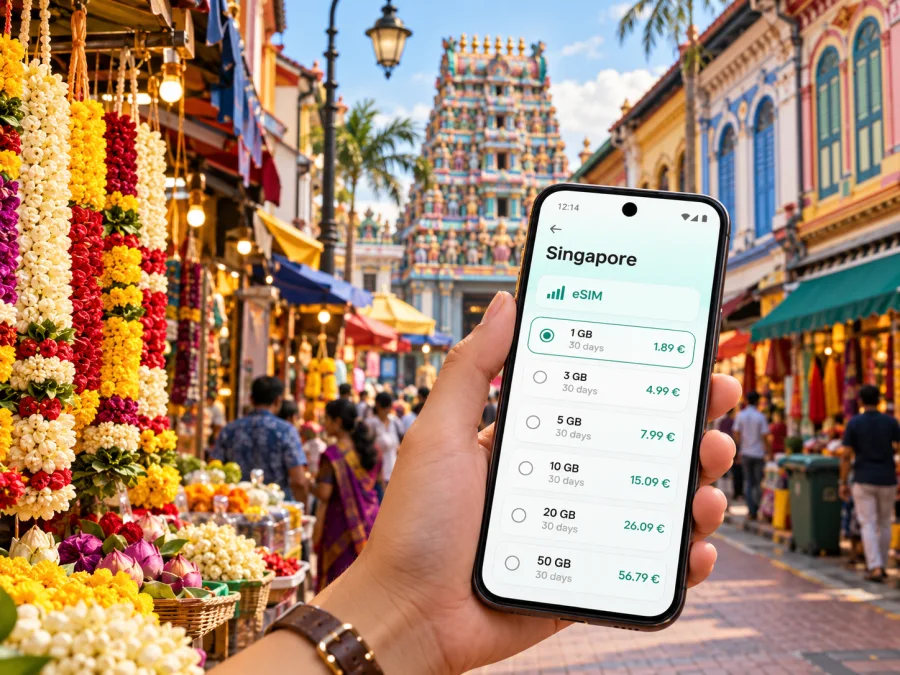
Little India eSIM: mobile connection and internet for your Singapore visit
Little India is a compact, busy part of central Singapore where a short walk can take you from a market hall and temple streets to conserved shophouses, cafés and a train station. A mobile data connection is useful here for checking directions, coordinating a meeting, translating a menu, booking a ride or finding the next stop while you explore. An eSIM can make that first day simpler: prepare a data plan for Singapore before departure, then use it on a compatible, unlocked device when your trip begins.
This guide focuses on Little India itself: how to arrive, orient yourself around its MRT stations, move between nearby streets, and plan mobile internet for a city break or work visit. Singapore is the country and the mobile market to select for this trip; Little India is a neighbourhood within the city, not a separate coverage or tariff destination.
First orientation: what makes Little India distinctive
Little India is one of Singapore’s historic districts and a centre of Indian community life. Its street pattern is made up of a main road, narrower side streets, lanes and small open spaces. Serangoon Road is the principal spine. Around it, shops selling textiles, jewellery, flowers and everyday goods sit alongside places of worship, food businesses, heritage buildings and newer cafés. The neighbourhood is lively and sensory, so using a map can help you keep a route in mind without rushing from one pin to the next.
A few useful landmarks help establish your bearings:
| Landmark | How it helps you navigate | A practical note |
|---|---|---|
| Little India MRT station | A convenient anchor between Serangoon Road and the surrounding streets | It serves the North East and Downtown lines; follow station signs for the correct exit. |
| Tekka Centre | A recognizable food and market destination near the southern end of the district | Check current opening information before planning a meal or market visit. |
| Indian Heritage Centre | A museum and cultural landmark near Campbell Lane and Clive Street | Useful as a clear map pin when exploring the lanes on foot. |
| Sri Veeramakaliamman Temple | A prominent temple on Serangoon Road | Be respectful of worshippers and follow any visitor guidance at the entrance. |
| Former House of Tan Teng Niah | A colourful conserved villa on Kerbau Road | A popular photo stop; leave room for residents and other visitors. |
| Mustafa Centre | A large retail landmark near the northern edge of the area | The surrounding streets can be busy, especially at popular shopping times. |
Little India is best explored in small loops. Pick one or two landmarks, then add streets that connect them rather than relying on a long sequence of turns. Campbell Lane, Kerbau Road, Race Course Road, Buffalo Road and the side streets off Serangoon Road each have different rhythms. A map pin is useful for finding a destination, but the street itself is often the experience: look up at the shophouse façades, pause at a mural, and allow time for a meal or a market stop.
The area is a conserved historic district, but it is also a working neighbourhood. Shops serve local residents as well as visitors; temples remain active places of worship; market and food businesses have their own daily schedules. Keep entrances clear, ask before photographing people, and check whether a site is open rather than assuming that every landmark is a visitor attraction throughout the day.
Arriving in Little India and choosing your route
If you arrive in Singapore by air at Changi Airport, the airport’s official transport guidance describes a rail route into the city via Changi Airport MRT station and a transfer at Tanah Merah. From there, the East West Line continues toward central Singapore. Your final route to Little India may involve another transfer or a short taxi or ride-hail journey, depending on the time, luggage and destination. Check the live journey planner on the day, as service patterns, operating hours and disruptions can change.
Little India station is served by the North East Line (NE7) and Downtown Line (DT12). Those line codes are useful when reading station maps and route planners. Jalan Besar station on the Downtown Line is also close to parts of the neighbourhood, while Rochor is another nearby station. Choose the station based on your hotel address and the exact street you are visiting: “Little India” covers several blocks, and the nearest platform is not always the nearest station exit.
For the first trip from the airport, keep the hotel address saved offline and in a format you can show a driver. If you are using rail, check the route before entering the station and confirm the direction shown on platform signs. A data connection helps with live changes and walking directions, but an offline map and a written address are useful backups if the phone battery is low or your connection is temporarily unavailable.
Once you reach the neighbourhood, walking is often the easiest way to cover the central streets. Use the station as a reset point if the lanes become confusing: return to a known main road, check your map, and continue from there. For a longer crossing, heavy rain, late arrival or bulky luggage, a taxi or ride-hail car may be more comfortable. Pickup points can be difficult to identify on a crowded street, so share the exact entrance or nearby landmark rather than only the neighbourhood name.
A simple arrival sequence
- Save your accommodation’s full address and entrance details before leaving the airport.
- Check the current rail route or decide whether a direct car ride fits your arrival time and luggage.
- Keep your eSIM profile and setup instructions accessible, ideally while you still have reliable Wi‑Fi.
- At Little India, confirm the station exit and walk the final section using a map pin for the building, not just the district.
- Once checked in, download or cache any maps and tickets you may need during the day.
Mobile internet for a walk, a stay or a workday
Little India tends to reward spontaneous detours. You may plan to visit the Indian Heritage Centre and end up looking for a lunch place on Race Course Road, or step into Tekka Centre and then search for a quieter route back to your hotel. Mobile data is particularly useful for those transitions: checking opening details, translating a sign, messaging your host, finding a nearby station or sharing your location with a colleague.
For a short city stop, estimate data around the tasks you actually expect to do. Map directions, messaging and web searches generally use less data than repeated video calls, high-resolution uploads or streaming. If you will rely on cloud documents, tether a laptop, or join video meetings from your hotel, plan more carefully and check whether the selected plan allows hotspot use. The conditions shown for the chosen tariff are the reliable reference for its data amount, validity, destination and any usage restrictions.
Before you decide, compare your normal roaming option with the data amount and validity you expect to use. A travel eSIM can be convenient when you want a separate data profile and prefer to keep your home SIM available, but it does not automatically replace every function of a local mobile subscription. In the Kaspersky eSIM Store app and website, you can choose, arrange and activate an eSIM with a suitable plan for an overseas trip. The service is a way to prepare a travel eSIM plan; the mobile service itself depends on the selected plan and its local operator arrangements.
For a visit to Little India, choose the Singapore destination rather than looking for a neighbourhood-specific product. You can review eSIM plan options for your trip to Singapore and compare the displayed data allowance, validity period and price against your itinerary. If you are continuing to another country, check that destination separately or look for a regional plan whose stated coverage matches the whole route.
For a stopover, navigation and messaging may be your main data uses; for a work visit, account for document access, calls through internet apps and possible laptop tethering. Check hotspot terms if you plan to share the connection. A plan sufficient for maps may not suit frequent video streaming. Consider your whole Singapore itinerary and the plan’s stated destination and validity, not only the hours in Little India.
Prepare your phone before you leave
Compatibility is the first technical check. Confirm that your exact phone model and regional variant support eSIM, and that the phone is not carrier-locked. Product names can cover devices with different hardware or software by market, so do not assume that a model sold in one country behaves exactly like a similarly named version elsewhere. Check whether your device supports eSIM and confirm any device-specific limitations before you pay.
Keep your home SIM active if you need your usual number for bank verification or incoming messages, but review your home operator’s roaming settings and charges. Set the travel eSIM as the mobile-data line when you want to use it, and make sure calls or messages do not unintentionally use a costly roaming option. The exact menus differ between iPhone and Android models, so follow the instructions for your handset.
Installation and activation checklist
- Confirm that your device supports eSIM and is unlocked.
- Read the selected plan’s country, data allowance, validity and activation conditions.
- Install the profile while connected to stable Wi‑Fi, if the plan’s instructions allow installation before travel.
- Keep the QR code or in-app setup details available until the eSIM is installed successfully.
- Label the profile clearly, for example “Singapore data”, so it is easy to recognize in settings.
- After arrival, select the travel profile for mobile data and follow the plan’s connection instructions.
- Enable data roaming for that eSIM only if the plan’s instructions require it; avoid changing unrelated lines by mistake.
- Check that mobile data is assigned to the travel eSIM and that automatic switching is configured as you intend.
For step-by-step help, follow the eSIM installation guide for iPhone and iOS or the eSIM installation guide for Android. An installation may take a few minutes, and some settings vary by operating system version. Keep the original setup details until you have confirmed that the profile appears in your phone’s mobile settings.
An eSIM intended for data does not necessarily include a standard phone number, voice calls or SMS. Check the tariff details rather than assuming those services are included. Internet calling and messaging apps can work over mobile data, subject to the app, the other person’s connection and any applicable local rules. If you need calls to your regular number, keep that line available and understand its roaming terms.
Finding your way around the district
Little India is dense enough that two pins that look close on a small screen can sit on different sides of a busy road or block. Zoom in before starting a walk and note the nearest main road as well as the destination name. Serangoon Road is the clearest north-south reference; station entrances, larger intersections and named landmarks give you useful points to reorient.
A practical walking rhythm is to navigate from one anchor to the next:
- Start near Little India MRT and choose either the market and food streets or the heritage sites first.
- Use Serangoon Road as your spine, then turn into a side lane for a specific shop, mural or temple.
- Check the return route before entering a narrow lane, especially if you have a timed appointment or restaurant booking.
- Pause at a clear landmark to update your map rather than following the phone while crossing a road.
- Keep a final destination pin saved for the hotel or meeting venue, so you can retrace the route without rebuilding it.
Shopping streets and markets can be busy, and festival periods may bring larger crowds or temporary traffic arrangements. For a temple visit or public celebration, consult current local notices and respect barriers and procession routes. Navigation apps may not immediately reflect a closure, so follow on-site signs.
Little India can be combined with nearby central areas by train or on foot. Check current operating information before a late-night journey, and leave a buffer if you are travelling back to the airport.
Staying connected without wasting data
Download maps and large files over Wi‑Fi before heading out. Turn off automatic photo and video backups on mobile data if they are not urgent, and check which apps refresh in the background. These habits help whether you are visiting for an afternoon or working in Singapore for several days.
Before a long walk, review remaining data if available and note the plan’s validity end date. Do not delete an eSIM profile to troubleshoot unless the instructions or support team advises you to; some profiles cannot be reinstalled after removal.
| If you notice… | Check this first | Then consider |
|---|---|---|
| The phone shows no mobile data | Which line is selected for mobile data and whether the eSIM profile is enabled | Follow the plan’s network setup steps and restart the connection if instructed. |
| Data works but a map feels imprecise | Location permission, map zoom and the exact street address | Compare the pin with a street sign or a nearby landmark. |
| The allowance is falling faster than expected | Video playback, cloud backups, hotspot use and background refresh | Switch heavy tasks to Wi‑Fi and adjust app data settings. |
| You cannot connect after changing settings | Whether the home SIM or travel eSIM is selected and the plan is active | Restore the documented settings and contact support if the issue continues. |
Save the address, remember the closest MRT station and keep enough battery for the return journey. If you are meeting someone, agree on a clear landmark such as a station exit or named venue rather than “somewhere on Serangoon Road.”
Practical scenarios
An afternoon, evening or work visit
After check-in, save the hotel pin and choose one nearby landmark rather than trying to cross the district at once. Confirm opening details before setting out for a museum or specific restaurant. At a busy venue, check the entrance and building number, not only the map pin. For a meeting, save the venue name, address and contact details; if you will tether a laptop, confirm hotspot terms and allow for heavier data use. A short stopover calls for a compact walking loop and a time buffer for the return trip.
Questions travellers often ask
Is Little India a separate city or a separate mobile destination?
No. Little India is a neighbourhood in Singapore. Select Singapore as the country destination and check that the selected plan’s terms match your travel dates and intended use.
Which MRT station should I use for Little India?
Little India station (NE7/DT12) is a convenient starting point and is served by the North East and Downtown lines. Jalan Besar and Rochor may be closer to particular addresses. Use your hotel or venue pin to choose the best station and exit.
Can I use an eSIM just for maps and messaging?
Yes, if the selected plan provides mobile data in Singapore and its terms suit your trip. Check how much data you need, how long the plan remains valid and when its validity begins. Maps and messages are lighter tasks than streaming or frequent video calls, but app use varies.
Does a travel eSIM replace my regular phone number?
Usually not. A data-focused travel eSIM may not include a local number, voice calls or SMS. Check the specific plan details, and keep your home SIM active if you need its number, while reviewing your home operator’s roaming charges.
Can I install the eSIM before landing?
Often the profile can be installed before travel, but activation and validity rules differ by plan. Read the instructions for the specific eSIM. If installation is available before departure, use stable Wi‑Fi and follow the stated activation timing so the validity period starts when you expect.
What if the phone supports eSIM in one market but mine is a different variant?
Check the exact model and regional version against the device compatibility information. Manufacturer model families can vary by sales market, and carrier locks can also prevent activation. Confirm both points before selecting a plan.
Will my connection work inside every building or on every street?
No mobile service can be guaranteed at every indoor location. The actual experience can vary with the local operator, building materials, congestion, device and selected plan. Keep offline directions or another backup for essential information.
A calm plan for your Little India visit
For a smooth day, keep the setup simple: choose a Singapore plan based on your full itinerary, confirm device support, install and label the eSIM carefully, and save a few important addresses before leaving Wi‑Fi. In Little India, navigate from the main roads and MRT stations, then explore the smaller lanes at your own pace. Check live transport and opening details when plans depend on a particular time, and leave enough data and battery for the return journey.
When you are ready to prepare your mobile internet for the trip, use Kaspersky eSIM Store to select and activate an eSIM plan that fits your destination, dates and expected data use. Choose an eSIM plan for Singapore and review its conditions before completing your purchase.


