
Travel connectivity guide
Liverpool eSIM for mobile internet in the UK
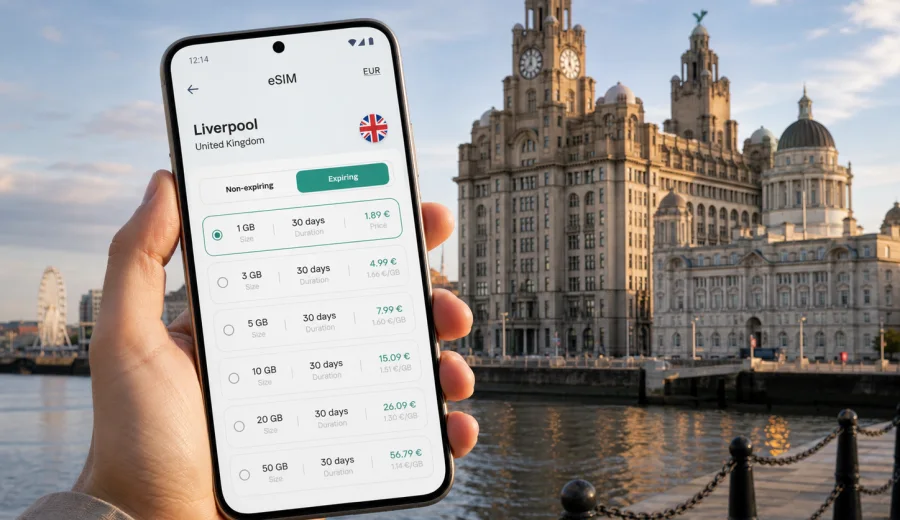
Liverpool eSIM: mobile connection and internet for your city trip
Liverpool is an easy city to enjoy when your phone is ready before you arrive. You may need maps from Liverpool John Lennon Airport, train updates at Lime Street, a rideshare after a late flight, a hotel booking near the waterfront, or messages with colleagues before a meeting in the commercial district. An eSIM can make that first hour simpler because you do not need to look for a physical SIM card just to get mobile internet.
This guide focuses on practical mobile connection in Liverpool: arrival, transport, districts, hotels, football weekends, business trips, stopovers, and UK routes. It explains how to plan data use, what to check on your device, and how Kaspersky eSIM Store can help you choose and activate an eSIM plan for a trip.
Why mobile internet matters in Liverpool
Liverpool is compact, but the details of a trip still depend on being online. The waterfront, Royal Albert Dock, Ropewalks, Georgian Quarter, Baltic Triangle, Knowledge Quarter and Anfield are not far apart, yet a visitor often switches between walking, buses, rail, taxis and ferries.
Typical moments when mobile internet is useful in Liverpool:
- checking how to get from Liverpool John Lennon Airport to your hotel;
- following train arrivals at Liverpool Lime Street or regional stations;
- finding the correct entrance for a venue, museum, office or stadium;
- using maps while walking between the waterfront and the city centre;
- messaging a hotel, host, colleague or tour organiser;
- keeping digital tickets, boarding passes and booking confirmations available;
- comparing restaurant availability around Bold Street, Castle Street or the docks;
- using translation, banking or authentication apps during the trip.
Liverpool is also a common base for wider travel to Manchester, Chester, North Wales, the Lake District or London. If your itinerary extends beyond the city, choose a United Kingdom or regional plan that matches your full route.
Where an eSIM helps on arrival
The first useful window for an eSIM is before you leave the terminal, station or port. At Liverpool John Lennon Airport, you may need the bus route into the city, a taxi pick-up point, a hotel address or a message to someone waiting for you. At Lime Street, you may need live rail updates, walking directions to the waterfront or a route to a meeting.
With an eSIM, you can prepare the mobile data setup before the trip and activate it when the selected plan allows. This avoids a common arrival problem: you need internet to find a SIM shop, but you do not yet have local mobile internet.
| Arrival moment | Why data helps |
|---|---|
| Airport or rail arrival | Maps, bus times, taxi apps, hotel messages |
| Ferry or cruise stop | Short time ashore, tickets, meeting points |
| Late check-in | Door codes, hotel instructions, host messages |
| Business arrival | Calendar updates, messenger calls, ride bookings |
An eSIM usually gives mobile data. It does not normally include a local phone number, voice calls or SMS unless this is stated in the plan conditions. For calls and messages, many travellers use internet-based apps once mobile data is active.
Liverpool districts where reliable data is useful
Liverpool is walkable, but each district creates different mobile-data needs. Around the waterfront and Royal Albert Dock, visitors often use maps, timed tickets, restaurant bookings and ferry information. In the city centre, data helps with routes, payments, opening hours and group messages.
Ropewalks, Bold Street and the Baltic Triangle show why local navigation matters: venues, restaurants and event spaces can sit on nearby streets but have less obvious entrances. In the Knowledge Quarter, data supports calendar links and work authentication. On football weekends, keep mobile data available for route changes, tickets and meeting points.
If you cross the Mersey to the Wirral or continue by train to another UK city, choose a plan that covers the whole route. The goal is not a city-only signal; it is a suitable plan for mobile internet in the country or region where you will travel.
How much data to plan for Liverpool
Data use depends more on behaviour than on the city. Maps, chat, tickets and restaurant searches use far less than streaming video, long video calls or laptop hotspot sessions. Before choosing an eSIM plan, estimate the tasks you expect to do on mobile data.
| Trip style | Data to plan for |
|---|---|
| Weekend sightseeing | Maps, messaging, tickets, restaurant searches |
| Football weekend | Tickets, route updates, group chats, rideshare apps |
| Business trip | Email, calendar, work chat, document access, possible hotspot use |
| Stopover or cruise visit | Navigation, ticket checks, short messaging |
| UK multi-city route | Coverage and validity for the wider route |
A useful rule is to separate essential data from comfort data. Essential data covers maps, messaging, tickets, banking verification and transport updates. Comfort data covers streaming, social video, large app updates and cloud backups.
What to check before you buy an eSIM
Before choosing any eSIM plan, check the device and the trip conditions. This is especially important if your phone was bought through a carrier or if you use a dual-SIM setup for work and personal numbers.
Pre-trip checklist:
- Check whether your device supports eSIM.
- Confirm that the phone is not locked to one mobile operator.
- Check whether your device can use your main SIM and the travel eSIM together.
- Read the plan country or region, data allowance, validity period and activation conditions.
- Confirm whether tethering or hotspot use is allowed if you need it.
- Keep the QR code or installation instructions available before travel.
- Make sure you have internet access during installation.
- Do not delete an installed eSIM profile unless the plan instructions say it can be reinstalled.
The safest time to install the eSIM profile is usually before travel, while you still have a stable home connection. Activation timing depends on the selected plan, so read the plan details carefully.
Choosing an eSIM plan for a Liverpool trip
For a Liverpool article, the practical destination is still the United Kingdom. A city visitor should normally choose a UK plan unless the itinerary requires a wider regional option. If you are flying into Liverpool and staying in Merseyside, a UK plan is the straightforward match. If you are combining Liverpool with Ireland, mainland Europe or several regions, compare the country and regional options before buying.
When comparing plans, focus on four questions:
1. Where will you use data: Liverpool only, the wider UK, or several countries?
2. How long will the trip last: one day, a weekend, a week, or longer?
3. How much data do you need: essential apps only or work and media as well?
4. When does the plan start counting validity: at installation, activation or first network use?
Kaspersky eSIM Store helps you review options for the destination, see data allowance and validity, and complete the setup steps from the site or app. For a Liverpool stay, you can choose an eSIM plan for travel in the United Kingdom and match it to your arrival day, hotel location and onward route.
This link points to the country plan page because city trips use country or regional coverage. Liverpool does not need a separate city-only setup; it needs the right plan for mobile internet in the United Kingdom.
Step-by-step setup before Liverpool
Use a calm setup process rather than leaving everything for the airport. Most installation problems are easier to solve at home, where you have stable Wi-Fi and time to read the instructions.
1. Check that your phone or tablet supports eSIM and is not carrier-locked.
2. Choose the destination and plan conditions that match your Liverpool and UK route.
3. Complete the purchase process and keep the installation details accessible.
4. Install the eSIM profile while connected to Wi-Fi.
5. Label the eSIM clearly, for example "UK travel", so you do not confuse it with your main SIM.
6. Before departure, keep your main line active if you need calls or SMS from your home number.
7. On arrival, select the travel eSIM for mobile data and enable data roaming for that profile if the plan instructions require it.
8. Check that maps, messaging, transport apps and digital tickets work as expected.
If you need device-specific installation steps, use the Android eSIM installation guide or the iOS eSIM installation guide. Menus may vary by device model and operating system version, so follow the prompts shown on your screen.
Practical Liverpool travel scenarios
For a weekend visit, mobile data usually supports maps, messaging, restaurant searches, digital tickets and taxi apps. If you stay near the waterfront, Ropewalks or the city centre, a plan for everyday navigation and communication may matter more than a very large allowance for streaming.
For a business trip, data supports calendar changes, email, authentication prompts, document access and route checks between hotel, meeting rooms and restaurants. If you plan to use your phone as a hotspot for a laptop, check whether the chosen plan allows it and choose a larger allowance.
For a football weekend, download tickets before leaving your hotel and keep data available for live routes, group messages and the journey back after the match. For a cruise or ferry stop, mobile data helps you make the most of a short visit without losing time on directions. For a UK rail route, choose validity that lasts until the final travel day, not just the Liverpool stay.
Ways to reduce data use without losing convenience
A few habits make a travel eSIM last longer: download offline maps for central Liverpool, save hotel and venue addresses, turn off automatic app updates on mobile data, pause cloud photo backup until trusted Wi-Fi is available, keep screenshots of tickets, close hotspot sharing when you no longer need it, and check data usage in your phone settings.
These habits are useful because Liverpool encourages short, spontaneous movements: a walk from the waterfront to Ropewalks, a last-minute restaurant change or a train to the Wirral can all require small bursts of data.
eSIM, roaming and public Wi-Fi in Liverpool
Standard roaming, public Wi-Fi and eSIM can all get you online, but they fit different moments. Roaming uses your existing mobile plan, yet costs and allowances depend on your home operator. Public Wi-Fi can help in hotels and cafes, but availability, speed and security can vary. A physical local SIM may suit longer stays, but it requires a shop visit and a SIM slot.
An eSIM travel plan can be prepared before arrival and used without a physical SIM on a compatible, unlocked device. It can reduce dependence on public Wi-Fi when you need maps, banking verification or travel updates. Use trusted Wi-Fi for large downloads and backups when available.
Common mistakes to avoid
- Buying a plan before checking device compatibility.
- Choosing a plan for the wrong country or region.
- Waiting until the airport to read installation instructions.
- Assuming an eSIM includes voice calls or SMS without checking the plan details.
- Deleting the eSIM profile after installation and expecting it to reinstall automatically.
- Forgetting to select the eSIM as the mobile data line.
- Leaving video backup or app updates running on mobile data.
The most common issue is simple: the phone is not ready when the traveller needs data. A few minutes of preparation before departure usually prevents setup problems outside a station or hotel.
FAQ
Can I use an eSIM for Liverpool only?
The plan normally covers a country or region, not a single city. For Liverpool, choose a United Kingdom plan unless your route requires wider coverage.
Will an eSIM give me a UK phone number?
Usually no. Travel eSIM plans for mobile internet usually provide data, not a local phone number, voice calls or SMS. Check the plan conditions before buying.
Should I install the eSIM before I fly?
Installing before travel is often convenient because you can use stable Wi-Fi and check settings calmly. Activation and validity depend on the selected plan.
Is eSIM useful if my hotel has Wi-Fi?
Yes. Many important moments happen away from the hotel: airport transfer, walking routes, tickets, bookings and messages while moving around the city.
Can I keep my home SIM active?
Many compatible phones allow a physical SIM and an eSIM, or two eSIM profiles, but behaviour depends on the device. Keep your main line active if you need calls or SMS from your home number.
What if I go from Liverpool to Manchester or London?
Choose a plan that covers the United Kingdom and has enough validity for the full route. If you continue outside the UK, compare regional options carefully.
Prepare your Liverpool mobile internet before you travel
Liverpool is easier when your phone is ready for the small tasks that shape a trip: finding the airport bus, checking a train, opening a ticket, messaging a hotel, navigating to dinner, or joining a work call from a taxi. An eSIM is not a replacement for every form of communication, but it can be a practical way to prepare mobile internet without a physical SIM card.
Before you leave, check device compatibility, choose a plan that matches your UK route, install the eSIM profile on a stable connection and keep the instructions nearby. If your itinerary is centred on Liverpool, you can use Kaspersky eSIM Store to prepare an eSIM plan for your United Kingdom trip and arrive with a clearer plan for staying online.