Travel connectivity guide
Lodz eSIM: Mobile Internet for City Trips
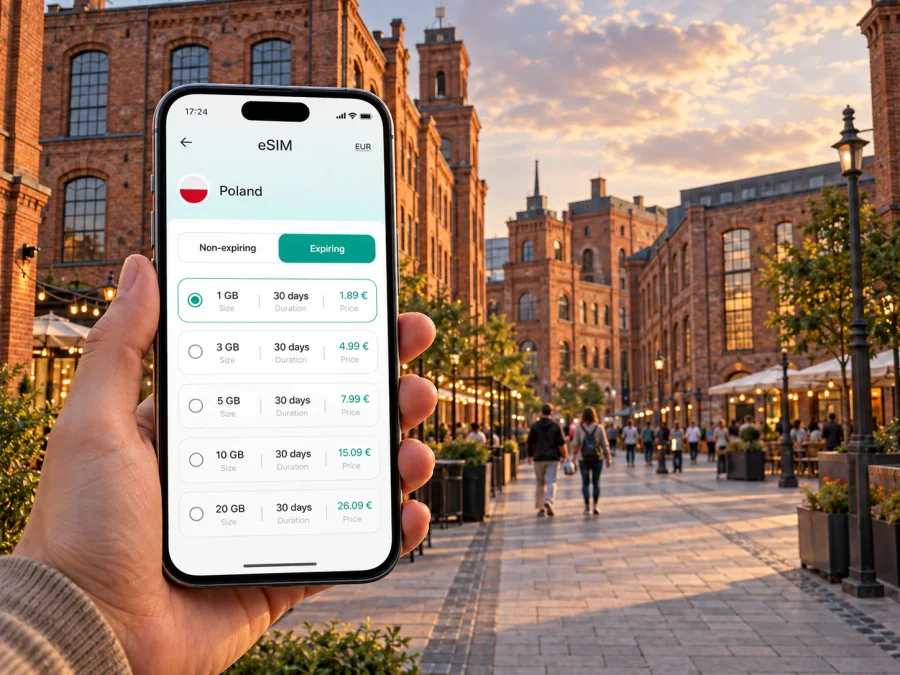
Lodz eSIM: mobile connection and internet for your trip
If you are travelling to Lodz, a digital SIM card can help you stay connected without looking for a physical SIM after arrival. An eSIM is useful for checking a route from the airport or railway station, ordering a ride, opening a hotel reservation, and sending a message while you are moving around the city. Kaspersky eSIM Store is an app and website where you can choose, arrange, and activate an eSIM with a suitable data plan for an international trip.
Lodz is a practical destination for a short city break, a university visit, a business meeting, or a longer stay in central Poland. Its streets combine former textile-factory buildings, busy transport corridors, renovated cultural spaces, and quieter residential districts. That variety makes a dependable mobile-data plan useful from the first transfer to the last evening walk.
Why an eSIM can be useful in Lodz
The first hours in a new city often involve several small tasks rather than one long journey. You may need to confirm a booking, compare a tram route, translate a message, find a meeting address, or contact a host. Having a mobile-data option prepared on your phone means you do not have to build the whole arrival plan around finding Wi‑Fi.
An eSIM may be especially convenient in these Lodz situations:
- Arrival and transfer. Use mobile data to open your reservation, check the route to your accommodation, or contact a driver. Keep the booking details available offline as a backup, too.
- Public transport. Lodz is a spread-out city, and an address on Piotrkowska Street may be several stops from a hotel near Lodz Fabryczna or from a venue in the former industrial quarter. A map and a live route view can make changes easier to follow.
- Walking between districts. A walk from the city centre towards Księży Młyn, EC1, or a renovated factory complex can involve unfamiliar turns. Mobile internet lets you check the next street without repeatedly returning to a café or hotel network.
- Business travel. A visitor may need a video call, a calendar update, a document, or a message to a local contact while travelling between a station, hotel, and meeting venue.
- Short stopovers. If Lodz is one part of a wider Poland itinerary, an eSIM avoids adding a shop visit to a tightly planned day. Choose a plan whose country or regional scope matches the complete route.
The benefit is not that every task needs a large amount of data. It is the ability to handle small, time-sensitive tasks when you are outside your accommodation: navigation, messages, reservations, translation, and transport information.
Lodz arrival: prepare the first connection before you move
Before leaving for Lodz, save the address of your hotel, apartment, or meeting place in a note. Include the street name and building number exactly as provided by the host or organiser. Also save a screenshot of the booking and the name of the nearest station or tram stop. These simple steps help if your phone battery is low or you need to switch between profiles.
If you arrive by air, plan the first leg as a separate step. The airport is outside the centre, so your route may include a transfer rather than a single walk. Check the current transport option shortly before departure and keep an alternative route in your notes. If you arrive by train, Lodz Fabryczna is a major central reference point; from there, your accommodation may still require a tram, bus, taxi, or walk.
At the point of arrival, use mobile data for the details that matter most:
- Open the accommodation confirmation and verify the check-in instructions.
- Compare the route from your arrival point with the address in the booking.
- Send a short message if your arrival time has changed.
- Check the next connection before leaving the station or airport area.
- Save the route or address for the final walk.
This keeps the first connection focused: reach a confirmed destination before solving the rest of the day.
Moving around the city
Lodz rewards a route plan that allows for changes. Piotrkowska Street is a central orientation line with restaurants, shops, and historic façades, but it does not replace the city map. A hotel north of the centre, a meeting near the New Centre of Lodz, or an evening at a cultural venue may require a different combination of walking and public transport.
Trams and buses
For public transport, check the current route, stop direction, and ticket conditions in the transport service you choose. Routes, temporary works, and ticket rules can change, so do not rely on an old screenshot for a later day. A mobile-data plan is useful when you need to check whether a tram has been diverted or whether the next connection leaves from the opposite side of a large junction.
When you board, keep the destination and stop name visible. Polish street names can look unfamiliar at first, and some stops share similar words. Matching the full stop name rather than only the first part reduces the chance of leaving too early. If you plan to walk after the last stop, load that walking leg before putting the phone away.
Districts and city areas where connection matters
Lodz is not a single postcard centre. Your data needs can change with the type of area you are visiting.
| City setting | Typical online tasks | Useful preparation |
|---|---|---|
| Piotrkowska Street and the central area | Maps, reservations, messages, restaurant or venue details | Save the exact entrance and a return route to your accommodation |
| Lodz Fabryczna and the New Centre of Lodz | Train information, onward directions, pickup coordination | Keep your next address and station exit details ready |
| Manufaktura and former factory areas | Indoor venue details, meeting messages, walking directions | Use the full venue name and confirm which entrance you need |
| Księży Młyn and quieter historic streets | Walking navigation, photo sharing, transport back to the centre | Download or save a route before beginning a longer walk |
| Hotel or coworking district outside the centre | Calls, work messages, maps, delivery or taxi coordination | Choose a plan with enough data for the length of your stay |
The table is a planning aid, not a promise of identical conditions in every area. Match the data plan to the way you will use Lodz.
Choosing an eSIM plan for a trip to Lodz
Choose the plan according to the entire route, not only the first hotel. For a trip based in Lodz, a Poland plan may be the relevant starting point. If you will continue to Krakow, Warsaw, Wroclaw, the coast, or another country, check whether the selected plan applies to those destinations as well. Do not assume that a city name determines the plan’s territory; the country or region listed in the plan conditions is what matters.
1. Estimate your data pattern
Think about what you will actually do. Light use may include maps, messaging, online tickets, and occasional searches. Higher use can include frequent photo uploads, video calls, remote work, navigation for long days, or using your phone as a hotspot. Hotel Wi‑Fi can reduce mobile-data use, but it should not be the only part of your arrival plan.
Prioritise navigation from the airport or station, communication with a host or colleague, transport updates, online reservations, translation, and work messages. Review the plan’s traffic allowance and validity before arranging it; the conditions should fit the way you will use Lodz.
2. Match the validity to the itinerary
Consider the moment when you will install the eSIM and the moment when data use begins. The details can depend on the selected plan and device. If you install before departure, make sure you understand whether activation or the first connection starts the validity period. If you prefer to install after arrival, ensure you have another way to access the required profile or QR code and a temporary internet connection for setup.
For a short stopover, cover the actual stop. For a longer stay, include weekends, day trips, and the return journey.
3. Check the destination and conditions
Before payment, confirm that the plan applies to Poland or to the wider region you will use. Check its traffic allowance, validity, activation rules, data-sharing conditions, and any recharge or support information shown at the time of selection. Conditions can differ between plans, so use the details of the specific option rather than a general assumption about eSIMs.
Kaspersky eSIM Store helps you choose and arrange an eSIM plan for the trip. To review the current options for the country, you can choose a data plan for travel in Poland. The city context remains Lodz, but the relevant plan page is the country page because eSIM plans are selected by destination scope rather than by an individual street or district.
Three practical Lodz scenarios
- One day: save the arrival point, a central destination, and the return connection; use data for routes, venue details, and messages.
- Business trip: keep hotel, office, restaurant, and station addresses in one note, then verify each leg and leave time for the final walk.
- Trips from Lodz: check the plan’s country or regional scope against every destination, especially if the route crosses a national border.
Install and activate your eSIM
Before starting, connect to the internet, check that your device supports eSIM, and confirm it is not locked to another operator. Some models vary by market, so a model name alone may not be enough. You can check your device compatibility before arranging a plan.
Keep the QR code or profile details accessible on a second screen or in your account. Then follow this sequence:
- Check the conditions. Confirm the destination, traffic allowance, validity, and activation rules for the selected plan.
- Open mobile settings. Find the option for adding a mobile plan or eSIM. The wording differs between operating systems.
- Add the eSIM profile. Scan the QR code or follow the in-app installation flow.
- Label the line clearly. Use a name such as “Poland travel” so you do not confuse it with your regular line.
- Choose the data line. Set the travel eSIM as the line for mobile data when you want to use it in Lodz.
- Keep your regular line under control. Decide whether calls, messages, and data should continue through your home line, and review the roaming setting for that line.
- Activate data roaming for the travel eSIM if required. Some plans need this setting to connect; follow the plan and device instructions.
- Test the connection. Open a simple page or map, then check that the correct line is shown for mobile data.
For operating-system-specific steps, use the Android installation instructions or the iOS installation instructions. Activation can take a few minutes and may depend on the device and local network. After testing, turn the travel line off if you plan to use it later; do not delete the profile. If the phone shows no data, review the selected data line and the plan’s roaming requirement, then contact support if needed.
What an eSIM can and cannot replace
For a Lodz trip, a travel eSIM is primarily a mobile-data tool. Unless the specific plan states otherwise, it does not provide a separate phone number, ordinary voice calls, or SMS. You can use messaging and calling apps over the data connection, while keeping your regular number available in the way that suits your device and roaming arrangement.
An eSIM does not replace a charged phone, saved accommodation details, a valid ticket, or a backup route; it is one prepared part of your travel setup.
Lodz connection checklist
Before departure, confirm that:
- [ ] your Lodz address, arrival point, and first transfer are saved;
- [ ] the device supports eSIM and is not operator-locked;
- [ ] the plan covers Poland or the required wider region;
- [ ] traffic allowance, validity, and activation rules fit the itinerary;
- [ ] the QR code or profile details and Android/iOS instructions are available;
- [ ] you understand which line will use data and how roaming is set for the home line.
On arrival, select the travel eSIM for data, confirm the connection, open the saved address, check the first route, and send your arrival message.
Frequently asked questions
Is an eSIM useful for a two-day stay in Lodz?
Yes, when you need navigation, messages, reservations, and transport information. Choose a plan whose destination and validity match the visit.
Will the eSIM give me a Polish phone number?
Not necessarily. Travel eSIM plans are generally intended for mobile data, so do not assume a separate number, voice calls, or SMS unless the selected plan explicitly includes them. Messaging apps can use the data connection.
What if my plans include another country after Lodz?
Check the full route against the plan’s country or regional scope. A Poland plan may suit Polish cities, but a border crossing can require a different scope.
Stay ready for Lodz without overcomplicating the trip
The most useful eSIM setup matches your day: arrival, routes, messages, bookings, and the places you will visit. Save the important addresses, check the plan’s destination and validity, confirm compatibility, and choose the correct data line before you leave.
When you are ready, choose an eSIM plan for your trip to Poland, install it on a compatible device, and activate it according to the plan instructions. You can then use mobile internet in Lodz with a setup that is prepared for the city rather than dependent on finding Wi‑Fi at every stop.


